
Community listing page, reviews may not be monitored by the author.
JEI KubeJS

No reviews yet
Create custom JEI recipe categories from KubeJS client scripts: layout, slots, arrows, flames, textures, tooltips, scroll areas, catalysts and click areas. No Java needed.

Community voices
Reviews
No reviews yet. Be the first to review this project!
Get it on
Available Platforms
About
Project Details
For authors
Embed Badge
If you're the author of this project, you can embed a live badge anywhere that supports HTML or Markdown. It updates automatically whenever ratings change.
Use HTML for any page that supports it, or Markdown for README files and Markdown-based descriptions.
Identifiers
Platform IDs
Resources
External Links
About
Description
JEI KubeJS
Create your own JEI recipe categories from KubeJS scripts. No Java needed.
Features
- Categories: title, icon, size, named input and output slots, catalysts, and click areas on container screens that open your category.
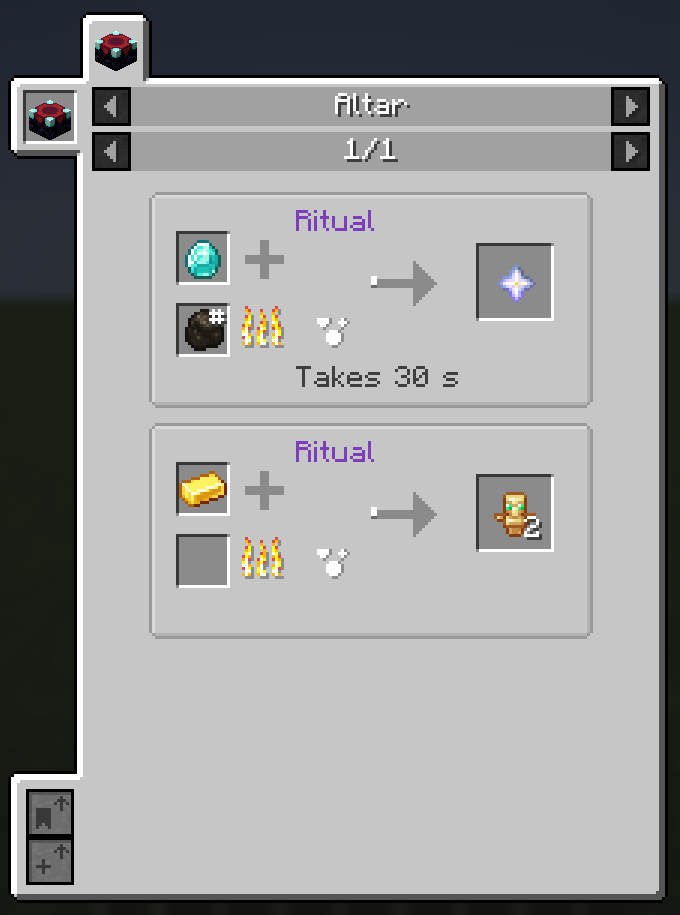
- Drawing: JEI's arrows, flames and plus signs (animated or static), any texture, progress bars that fill in four directions, labels, per-recipe text and tooltips.
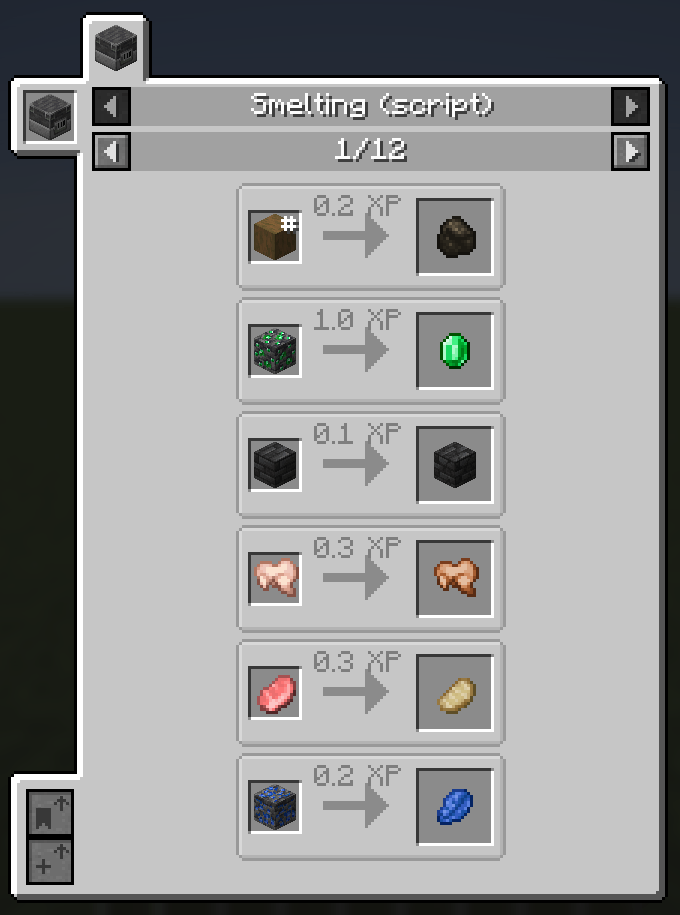
- Recipes: add recipes by hand, or turn a whole existing recipe type (for example one added by a datapack or another mod) into a JEI page with one call.
- Slot tooltips: add extra tooltip lines to the item in a slot, such as chances or conditions.
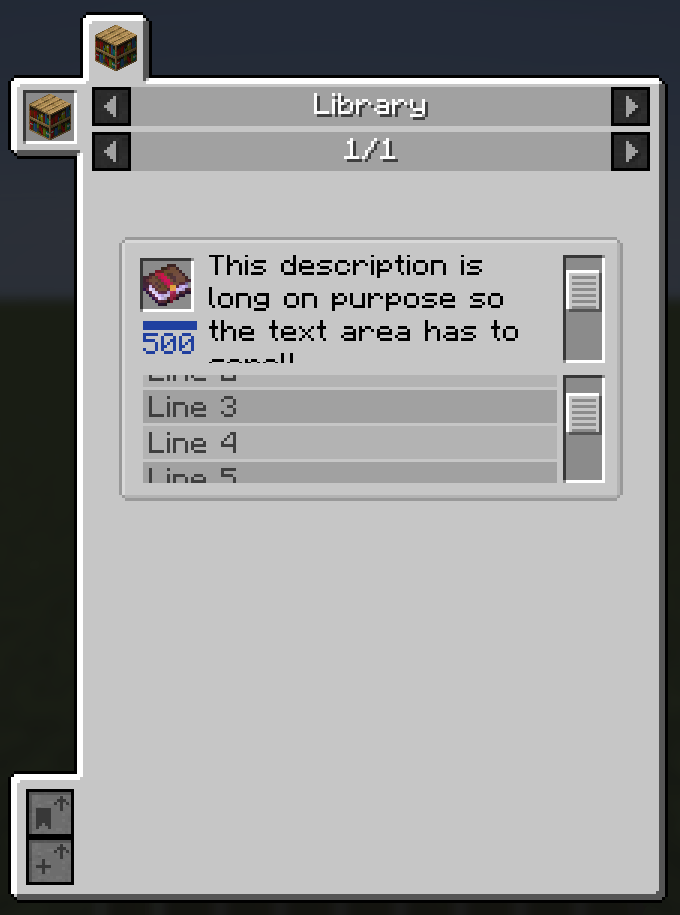
- Scroll areas: scrolling text and scrolling panels for content taller than the page.
- Callbacks:
onDrawandonTooltiplet your script draw and add tooltips with its own logic, using per-recipe data set withr.data(...). - Errors stay in the log: a wrong slot name or category id only logs an error. Other recipes still load.
Example
JEIKubeJSEvents.registerCategories(event => {
  event.create('mypack:altar', cat => cat
    .title(Text.of('Altar'))
    .icon('minecraft:enchanting_table')
    .size(140, 64)
    .inputSlot('in', 6, 10)
    .inputSlot('fuel', 6, 34)
    .outputSlot('out', 110, 18)
    .plus(28, 12)
    .flame(27, 34, 200)
    .arrow(70, 18, 100)
    .progress(52, 20, 'jei:textures/jei/atlas/gui/brewing_stand_bubbles.png', 0, 0, 11, 28, 11, 28, 60, 'bottom')
    .label(45, 2, Text.of('Ritual'), 0x7F3FBF)
    .text('time', 45, 54)
    .tooltip(70, 18, 24, 17, Text.of('Ritual in progress'), Text.gray('Stand on the altar'))
    .catalyst('minecraft:enchanting_table'))
})

JEIKubeJSEvents.registerRecipes(event => {
  event.add('mypack:altar', r => r
    .slot('in', 'minecraft:diamond')
    .slot('fuel', '#minecraft:coals')
    .slot('out', 'minecraft:nether_star')
    .slotTooltip('out', Text.gold('Rare result'), '50% chance')
    .text('time', 'Takes 30 s'))
})
The full example with every feature is examples/all_features.js.
Requirements
- 1.21.1 NeoForge: JEI 19.x, KubeJS 2101, Rhino
- 1.20.1 Forge: JEI 15.x, KubeJS 2001, Rhino, Architectury
Links
JEI KubeJS
用 KubeJS 脚本新建 JEI 配方分类,不用写 Java。
功能
- 分类: 标题、图标、尺寸、具名的输入输出槽位、催化剂,以及容器界面上可打开该分类的点击区。
- 绘制: JEI 自带的箭头、火焰、加号(可带动画),任意贴图,四个方向填充的进度条,标签,每条配方各自的文字和悬停提示。
- 配方: 手动添加配方,或一次调用就把现有的整个配方类型(例如数据包或其他模组添加的)转成 JEI 页面。
- 槽位提示: 给槽位里的物品追加提示行,例如概率或条件。
- 滚动区: 内容超出页面时可用滚动文字区和滚动面板。
- 回调:
onDraw和onTooltip让脚本用自己的逻辑绘制和添加提示,可读取r.data(...)设置的每条配方数据。 - 出错只记日志: 槽位名或分类 ID 写错只会在日志里报错,其他配方照常加载。
示例
JEIKubeJSEvents.registerCategories(event => {
  event.create('mypack:altar', cat => cat
    .title(Text.of('Altar'))
    .icon('minecraft:enchanting_table')
    .size(140, 64)
    .inputSlot('in', 6, 10)
    .inputSlot('fuel', 6, 34)
    .outputSlot('out', 110, 18)
    .plus(28, 12)
    .flame(27, 34, 200)
    .arrow(70, 18, 100)
    .progress(52, 20, 'jei:textures/jei/atlas/gui/brewing_stand_bubbles.png', 0, 0, 11, 28, 11, 28, 60, 'bottom')
    .label(45, 2, Text.of('Ritual'), 0x7F3FBF)
    .text('time', 45, 54)
    .tooltip(70, 18, 24, 17, Text.of('Ritual in progress'), Text.gray('Stand on the altar'))
    .catalyst('minecraft:enchanting_table'))
})

JEIKubeJSEvents.registerRecipes(event => {
  event.add('mypack:altar', r => r
    .slot('in', 'minecraft:diamond')
    .slot('fuel', '#minecraft:coals')
    .slot('out', 'minecraft:nether_star')
    .slotTooltip('out', Text.gold('Rare result'), '50% chance')
    .text('time', 'Takes 30 s'))
})
包含全部功能的完整示例见 examples/all_features.js。
依赖
- 1.21.1 NeoForge: JEI 19.x、KubeJS 2101、Rhino
- 1.20.1 Forge: JEI 15.x、KubeJS 2001、Rhino、Architectury
链接
Screenshots
Gallery
-
 library_scrolled.png library_scrolled.png
-
 smelting_copy.png smelting_copy.png
-
 altar.png altar.png
Versions
Files
Relations
Project Relations
More like this
Similar Mods
Suggestions use data such as tags, dependencies, dependents, descriptions, titles, and more to rank how much they overlap with this mod.
On ModDex
Community snapshot
By the numbers
Statistics

Get it on
Available Platforms
On ModDex
Community snapshot
By the numbers
Statistics
Resources