Community listing page, reviews here may not be monitored by the author.
Just Enough Calculation EX

No reviews yet
This is a Minecraft 1.12.2 Forge addon mod that enhances the GTCEu (GregTech Community Edition Unofficial) recipe import experience for Just Enough Calculation (JEC). It also adds a recipe tree.
Community voices
Reviews
No reviews yet. Be the first to review this project!
Get it on
Available Platforms
About
Project Details
For authors
Embed Badge
If you're the author of this project, you can embed a live badge anywhere that supports HTML or Markdown. It updates automatically whenever ratings change.
Use HTML for any page that supports it, or Markdown for README files and Markdown-based descriptions.
Identifiers
Platform IDs
Resources
External Links
About
Description
Just Enough Calculation EX
A full-screen crafting tree addon for Just Enough Calculation, with optional GregTech CEu recipe-import compatibility.
Minecraft 1.12.2 | Forge | Version 0.2.2 | GNU LGPL-3.0
Transparency note: this project was developed with AI assistance (design, coding, and debugging).
What this mod does
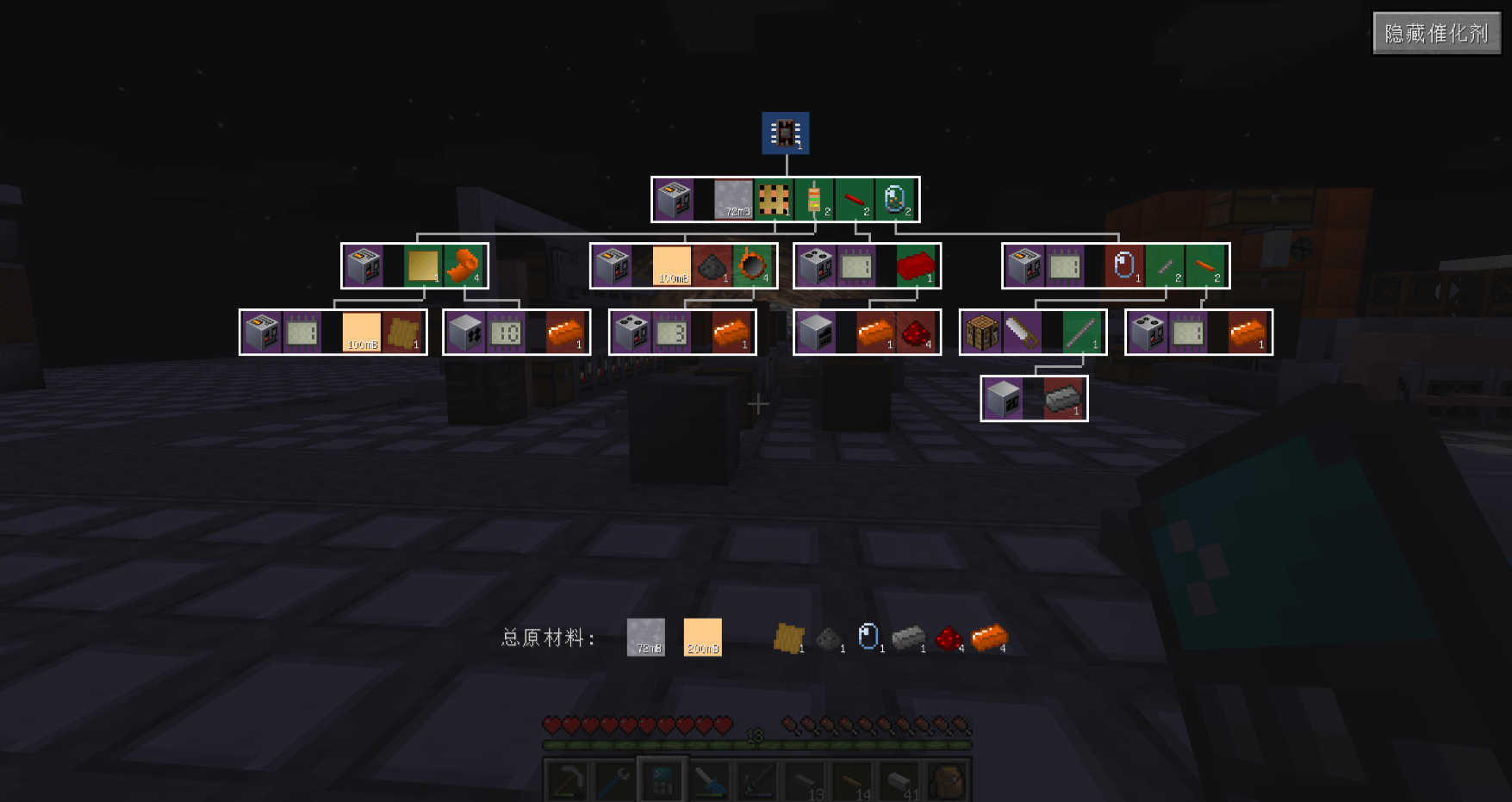
The main feature of Just Enough Calculation EX (JEC EX) is the Crafting Tree, a full-screen Bill-of-Materials style recipe tree for JEC. GregTech CEu support is optional: when GTCEu is installed, this mod also improves how GTCEu recipes are imported from JEI/HEI.
Crafting Tree view (main feature)
Open the JEC crafting calculator and click the Crafting Tree button.
- Compact, top-down layout: parent recipe inputs point directly to their child recipes, with no redundant intermediate output boxes.
- Clear quantity display: every node shows the required amount, and a fixed bottom bar summarizes the total raw material quantities for items and fluids.
- Color-coded nodes:
- Blue - target item
- Purple - catalysts
- Green - craftable inputs
- Red - raw materials
- Pan by dragging and zoom with the mouse wheel.
- Shift + left-click a recipe card to open the JEC recipe editor pre-filled with that recipe, then save it to add the recipe to your calculator.
- Toggle catalysts on and off with the button in the top-right corner; the layout reflows automatically.
- Large trees are rendered with caching and viewport culling for better performance.
- Works for regular JEC recipes even without GregTech installed.
Optional GregTech CEu recipe import compatibility
This part only activates when GregTech CEu is installed. When you click the + button in JEI/HEI to import a GTCEu machine recipe into JEC:
- Machines no longer appear as "Unnamed" blank blocks caused by fuzzy-meta folding.
- Non-consumed inputs (circuits, molds, lenses, tools, and similar items) are routed into the catalyst slot instead of the ingredient slot.
- The correct machine is selected by voltage tier - for example, an MV recipe shows the MV machine, and steam machines are skipped.
Without GregTech, this mod still loads normally and the Crafting Tree remains fully usable.
Requirements
| Mod | Status | Notes |
|---|---|---|
| Minecraft Forge 1.12.2 | Required | |
| Just Enough Calculation | Required | Version 3.2.7 is tested |
| Just Enough Items (JEI) | Required | HEI is a supported runtime drop-in replacement |
| MixinBooter | Required | Provides the late mixin loader used by this mod |
| GregTech CEu | Optional | Only needed for the GTCEu recipe import fixes; the Crafting Tree works without it |
Installation
- Install Forge for Minecraft 1.12.2.
- Install Just Enough Calculation, JEI (or HEI instead of JEI), and MixinBooter.
- Install GregTech CEu only if you want the optional GTCEu recipe import fixes.
- Download
Just Enough Calculation EX-<version>.jarfrom the Files tab. - Put the jar into your
modsfolder. - Launch the game and open the JEC crafting calculator to see the Crafting Tree button.
Usage
- Open the crafting tree: open the JEC crafting calculator and click Crafting Tree.
- Navigate: drag to pan, scroll to zoom.
- Add a recipe to the calculator: Shift + left-click a recipe card, review the pre-filled recipe editor, then save.
- Show/hide catalysts: use the button in the top-right corner of the crafting tree.
- Import a GTCEu recipe (optional): with GTCEu installed, open a GTCEu machine recipe in JEI/HEI and click +.
Compatibility
- Works without GregTech; GTCEu support is optional.
- Tested environment:
- Nomifactory CEu
- JEC 3.2.7
- HEI (Had Enough Items) 4.30.3
- GTCEu 2.8.10-beta (optional)
- MixinBooter 10.7
Technical notes
- Uses an ILateMixinLoader because the mixin targets JEC GUI classes.
- GregTech CEu is accessed through reflection, with no compile-time dependency and no hard runtime requirement.
- The crafting tree design is inspired by EMI's
BoMScreen. - JEC is LGPL-3.0 licensed and is installed separately; this mod does not bundle JEC.
Source and license
- GitHub: LeafHui/JustEnoughCalculationEX
- License: GNU LGPL-3.0
- Third-party notices: THIRD_PARTY_NOTICES.md
Screenshots
Gallery
-
 JECaEX.png JECaEX.png
Versions
Files
Relations
Project Relations
More like this
Similar Mods
Suggestions use data such as tags, dependencies, dependents, descriptions, titles, and more to rank how much they overlap with this mod.
On ModDex
Community snapshot
By the numbers
Statistics
Want to reach Minecraft players?
We're looking for a server hosting partner to feature here and other parts of the site. Interested? Send us a message!
Get in touchGet it on
Available Platforms
On ModDex
Community snapshot
By the numbers
Statistics
Resources