
Community listing page, reviews here may not be monitored by the author.
KeyFlow


No reviews yet
Find and use all your keybinds instantly from one clean menu or action wheel
Community voices
Reviews
No reviews yet. Be the first to review this project!
Get it on
Available Platforms
Compatibility
Supported Environments
Runs entirely on the client. Works on vanilla servers.
About
Project Details
For authors
Embed Badge
If you're the author of this project, you can embed a live badge anywhere that supports HTML or Markdown. It updates automatically whenever ratings change.
Use HTML for any page that supports it, or Markdown for README files and Markdown-based descriptions.
Identifiers
Platform IDs
Resources
External Links
About
Description
⌨️Stop digging through the Controls menu⌨️
KeyFlow puts all your Minecraft and mod keybinds in one simple menu.
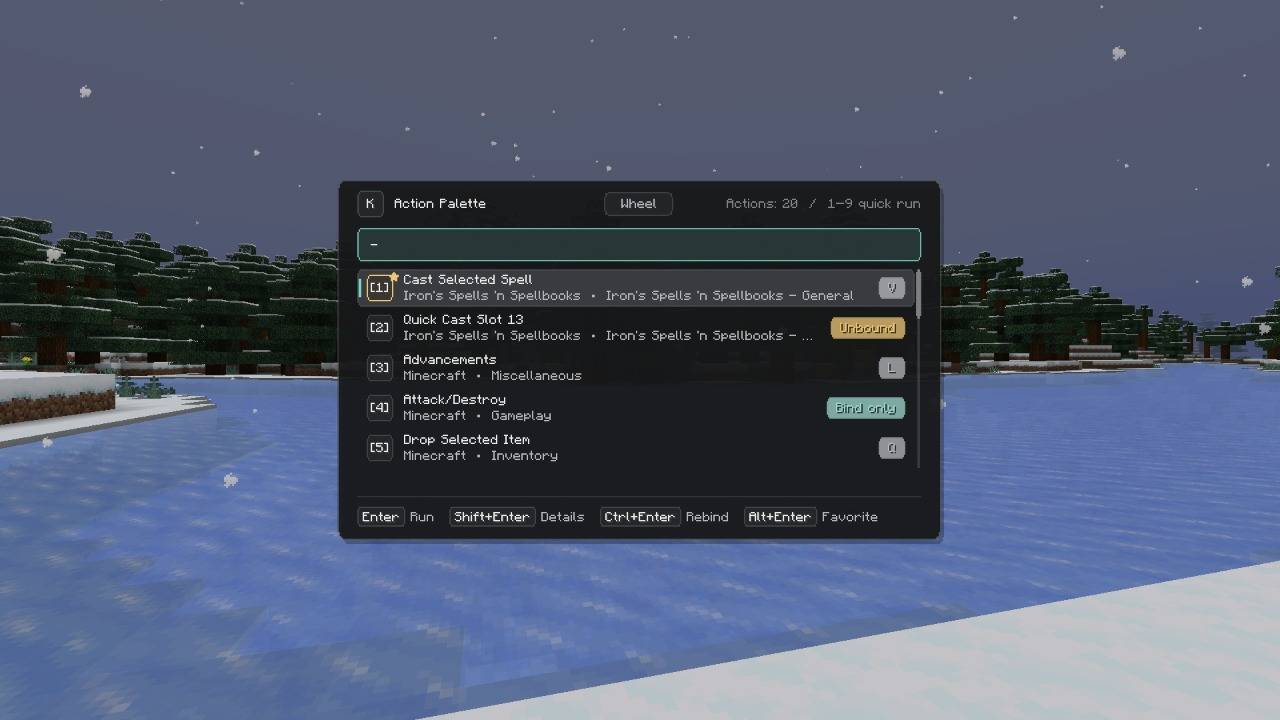
Press Left Alt, type what you need, and run the action, change its key, fix conflicts, or add it to your Action Wheel.
Perfect for large modpacks with hundreds of controls.
Features
- Search by action name, mod, category, or key
- Run supported actions directly from the menu
- Rebind keys without opening the Controls menu
- Find and fix key conflicts
- Save actions to Favorites
- Build your own Action Wheel with 4–16 slots
- Adjust the size, position, behavior, and colors
- Fully client-side
Quick Start
-
Press Left Alt
-
Type the name of an action or mod
-
Press Enter to run it
You can switch between the Palette and the Wheel at the top of the menu.
Want a different opening key? Change it in:
Mods > KeyFlow > Config
Palette Controls
| Control | Action |
|---|---|
| Up / Down | Move through the results |
| Enter | Run the selected action |
| Shift + Enter | Open action details |
| Ctrl + Enter | Change the keybind |
| Alt + Enter | Add to or remove from Favorites |
| Ctrl + Z | Undo the last keybind change |
| 1–9 | Run one of the first nine actions while the search bar is empty |
| Double-click | Run an action with the mouse |
KeyFlow also shows when an action:
- Has no key assigned
- Shares a key with another action
- Is currently unavailable
- Only works through its own keybind
Search Filters
Just type to search, or use filters to narrow down the results:
@modid— show actions from one mod!conflict— show actions with key conflicts!unbound— show actions with no key assigned!favorite— show your Favorites!bindonly— show actions that only work through their own keybind
Examples
@create rotate
!conflict inventory
@iceandfire !unbound
Action Wheel
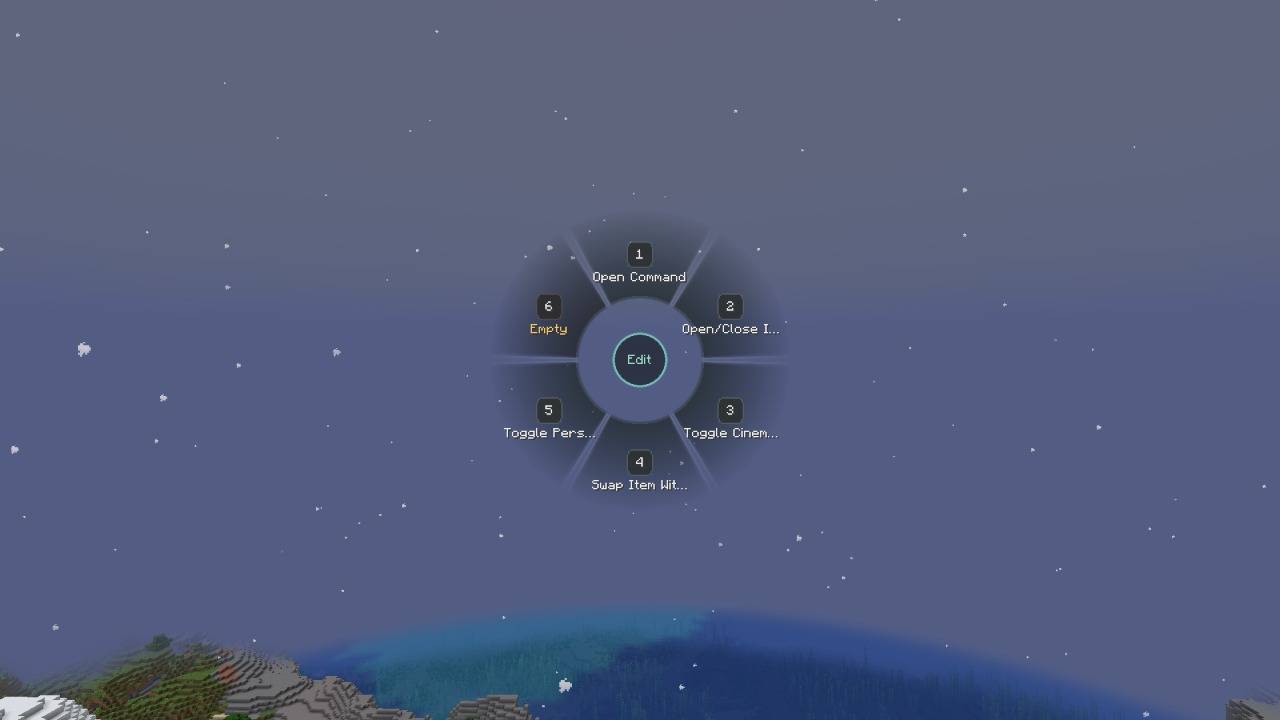
The Action Wheel is a quick menu for the actions you use most.
Hold Mode
In the default Hold mode:
-
Hold the KeyFlow key
-
Move your mouse toward an action
-
Release the key to run it
If you release the key without selecting anything, the full Palette opens instead.
Toggle Mode
Prefer pressing instead of holding?
Switch to Toggle mode:
-
Press once to open the Wheel
-
Press again to confirm the selected action
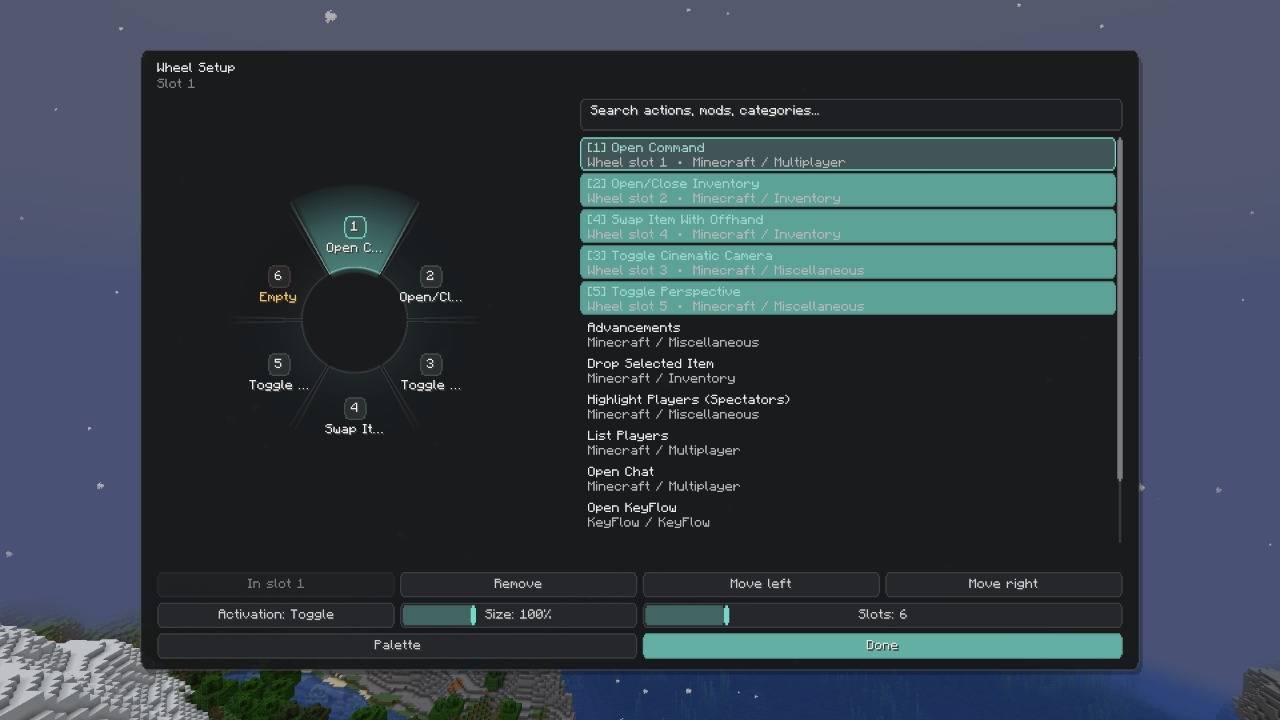
Wheel Setup
Open Wheel Setup to:
- Add, remove, and rearrange actions
- Use between 4 and 16 slots
- Resize the Wheel
- Switch between Hold and Toggle modes
Note: Favorites and the Wheel are separate. Favoriting an action does not add it to the Wheel.
Keybinds and Conflicts
Select an action and press Ctrl + Enter to assign a new key or mouse button.
KeyFlow supports:
- Plain keys
- Mouse buttons
- Combinations with Ctrl
- Combinations with Shift
- Combinations with Alt
Two actions fighting over the same key?
Open Review Conflicts in KeyFlow Settings. From there, you can:
- Rebind actions
- Choose which action keeps the key
- Unbind the remaining actions
- Review all planned changes
- Undo changes
Nothing is saved until you confirm.
Settings
Go to:
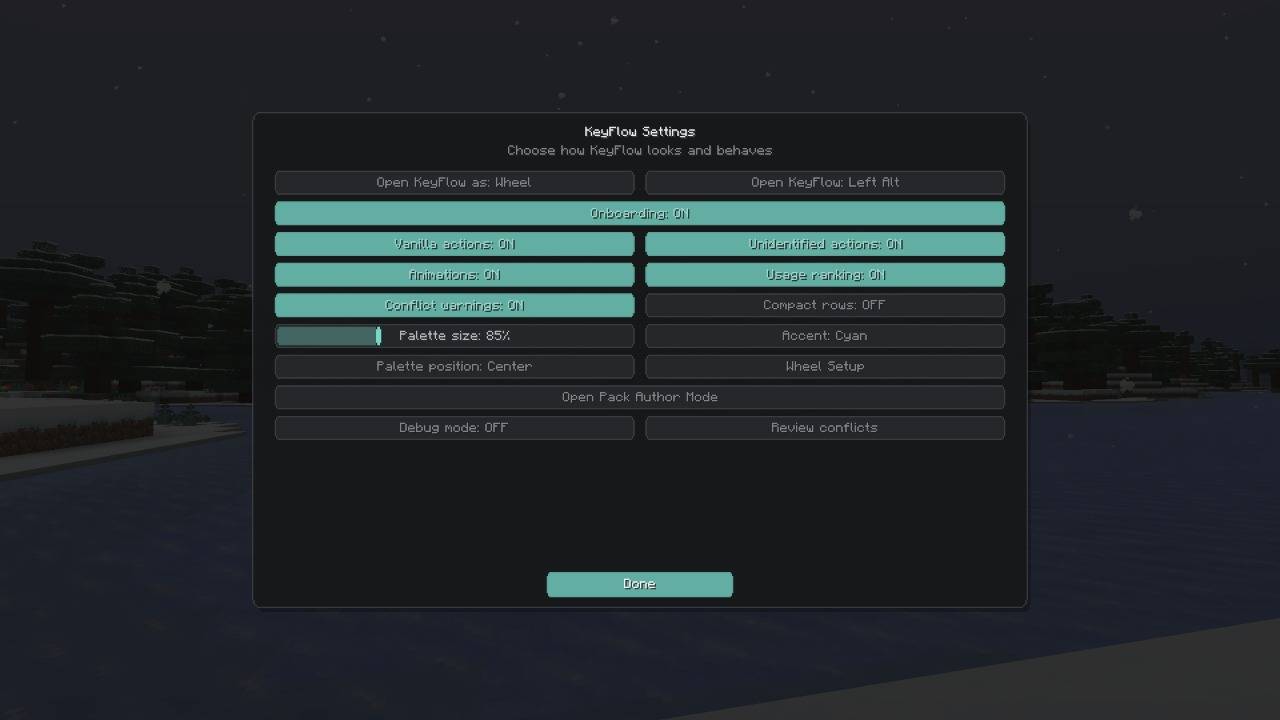
Mods > KeyFlow > Config
You can change:
- Default view: Palette or Wheel
- Opening key
- Palette and Wheel size
- Number of Wheel slots
- Palette position
- Hold or Toggle mode
- Accent color
- Compact mode
- Animations
- Sorting based on how often you use actions
- Conflict warnings
- Opening KeyFlow on top of other menus
For Modpack Authors
KeyFlow includes a built-in Pack Author Mode.
Enable it in:
Mods > KeyFlow > Config > Pack Author Mode
As a pack author, you can:
- Add simpler names and search aliases
- Rename confusing actions
- Highlight important actions
- Hide technical or unwanted actions
- Protect key actions from being unbound
- Choose how actions are run
- Suggest better keybinds
- Set default Wheel actions
- Give Wheel actions custom icons
- Preview and validate the profile before exporting
Suggested keybinds are never forced. Players can review them or keep their existing controls.
The exported profile is saved to:
config/keyflow/pack-profile.json
Ship this file with the rest of your modpack configuration files.
⌨️ No more getting lost in the Controls menu. ⌨️
KeyFlow puts Minecraft and modded keybinds into one simple menu. Press Left Alt to search for any action, run it, change its keybind, fix conflicts, or add it to your Action Wheel. It is especially useful in large modpacks with hundreds of controls.
Features Search by action name, mod, category, or key Run supported actions directly Rebind controls without opening the Controls menu Find and fix key conflicts Add actions to Favorites Create a custom Action Wheel Use between 4 and 16 Wheel slots Change the size, position, behavior, and colors English and Russian language support Client-side only Quick Start Press Left Alt Type the name of an action or mod Press Enter to run it You can switch between the Palette and Wheel at the top of the KeyFlow menu.
The opening key can be changed in:
Mods > KeyFlow > Config
Palette Controls Up / Down: Move through results Enter: Run the selected action Shift + Enter: Open action details Ctrl + Enter: Change the keybind Alt + Enter: Add or remove from Favorites Ctrl + Z: Undo the last keybind change 1–9: Run one of the first nine actions when the search is empty Double-click: Run an action with the mouse KeyFlow also shows whether an action is unbound, conflicting, unavailable, or requires its normal keybind.
Search Filters You can search normally or use filters:
@modid shows actions from one mod !conflict shows conflicting actions !unbound shows actions without a key !favorite shows favorite actions !bindonly shows actions that require their normal keybind Examples:
@create rotate
!conflict inventory
@iceandfire !unbound
Action Wheel The Action Wheel gives you quick access to actions you use often.
With the default Hold mode:
Hold the KeyFlow key Move the mouse toward an action Release the key to run it Releasing the key without selecting an action opens the full Palette.
You can also use Toggle mode, where one press opens the Wheel and another press confirms the selected action.
Open Wheel Setup to:
Add, remove, and move actions Use between 4 and 16 slots Change the Wheel size Switch between Hold and Toggle mode Favorites and Wheel slots are separate. Favoriting an action does not add it to the Wheel automatically.
Keybinds and Conflicts Press Ctrl + Enter on an action to give it a new keyboard key or mouse button.
KeyFlow supports normal keys and combinations with Ctrl, Shift, or Alt.
Open Review Conflicts in KeyFlow Settings to see actions using the same key.
You can rebind actions, choose which action keeps the key, unbind selected actions, review all changes, and undo recent changes.
Nothing changes until you confirm it.
Settings Open:
Mods > KeyFlow > Config
You can change:
Default view: Palette or Wheel Opening key Palette and Wheel size Number of Wheel slots Palette position Hold or Toggle behavior Accent color Compact mode Animations Usage ranking Conflict warnings Opening KeyFlow over other menus For Modpack Authors KeyFlow includes an in-game Pack Author Mode.
Enable it in:
Mods > KeyFlow > Config > Pack Author Mode
Pack authors can:
Add easier search names and aliases Rename unclear actions Feature important actions Hide technical or unwanted actions Protect important actions from being unbound Choose how actions are run Suggest better keybinds Set default Wheel actions Add custom Wheel icons Preview and validate the profile before exporting it Suggested keybinds are not applied automatically. Players can review them or keep their current controls.
The exported profile is saved here:
config/keyflow/pack-profile.json
Include this file with the modpack config files.
Screenshots
Gallery
-
The Action Wheel The Action Wheel
-
Action Wheel Setup Action Wheel Setup
-
The Action Palette (Main Menu) Searchable Keybind Menu
-
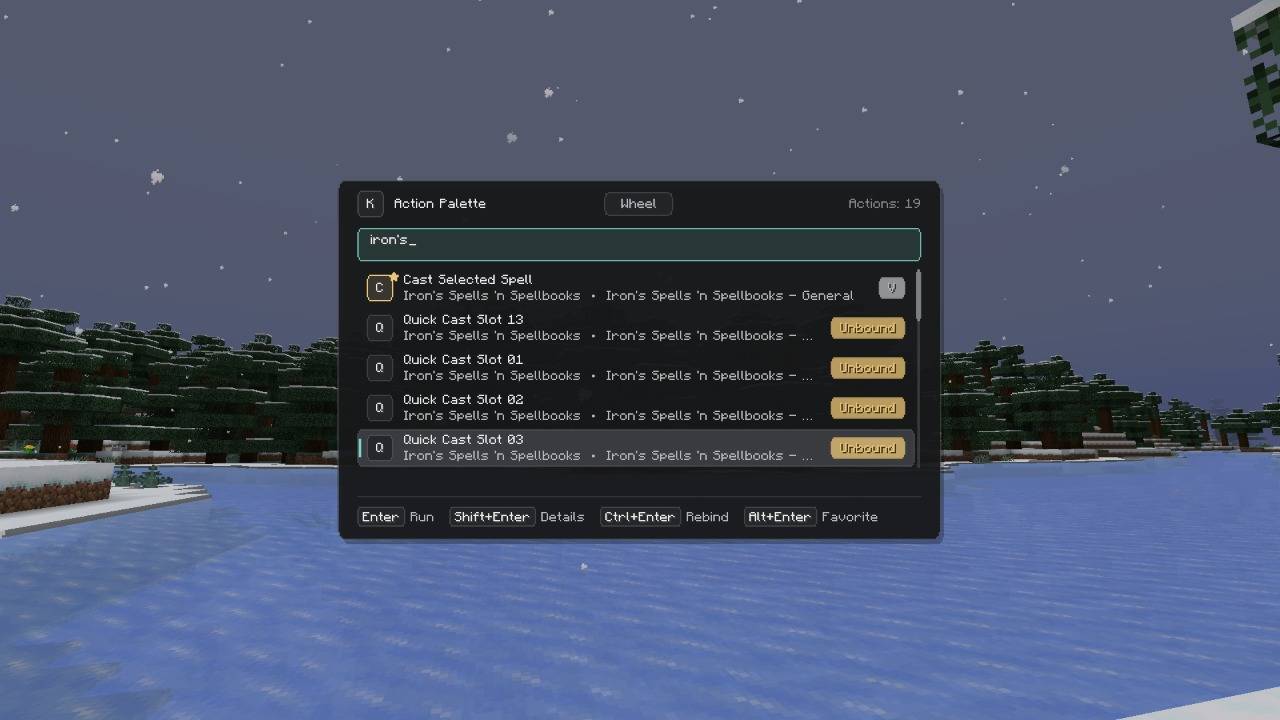
Fast Search and Mod Filtering Fast Search and Mod Filtering
-
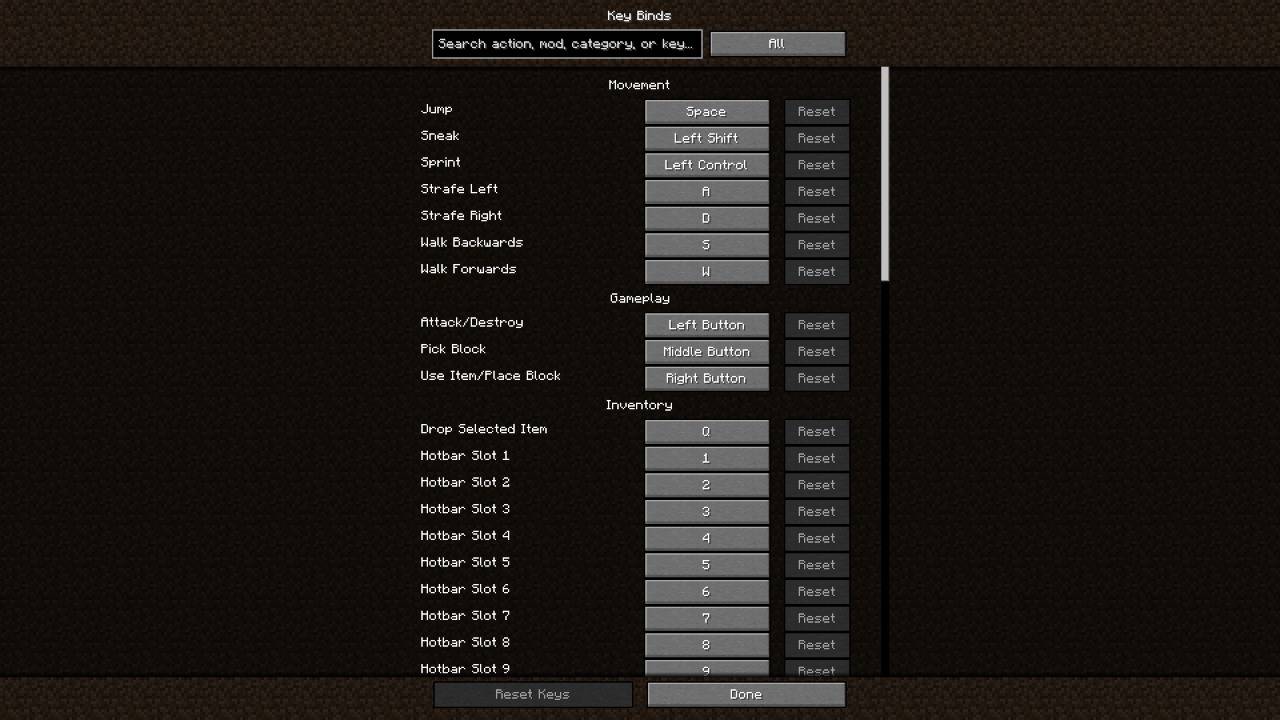
Vanilla Controls Search Integration Vanilla Controls Search Integration
-
KeyFlow Configuration Menu Mod Settings and Customization
-
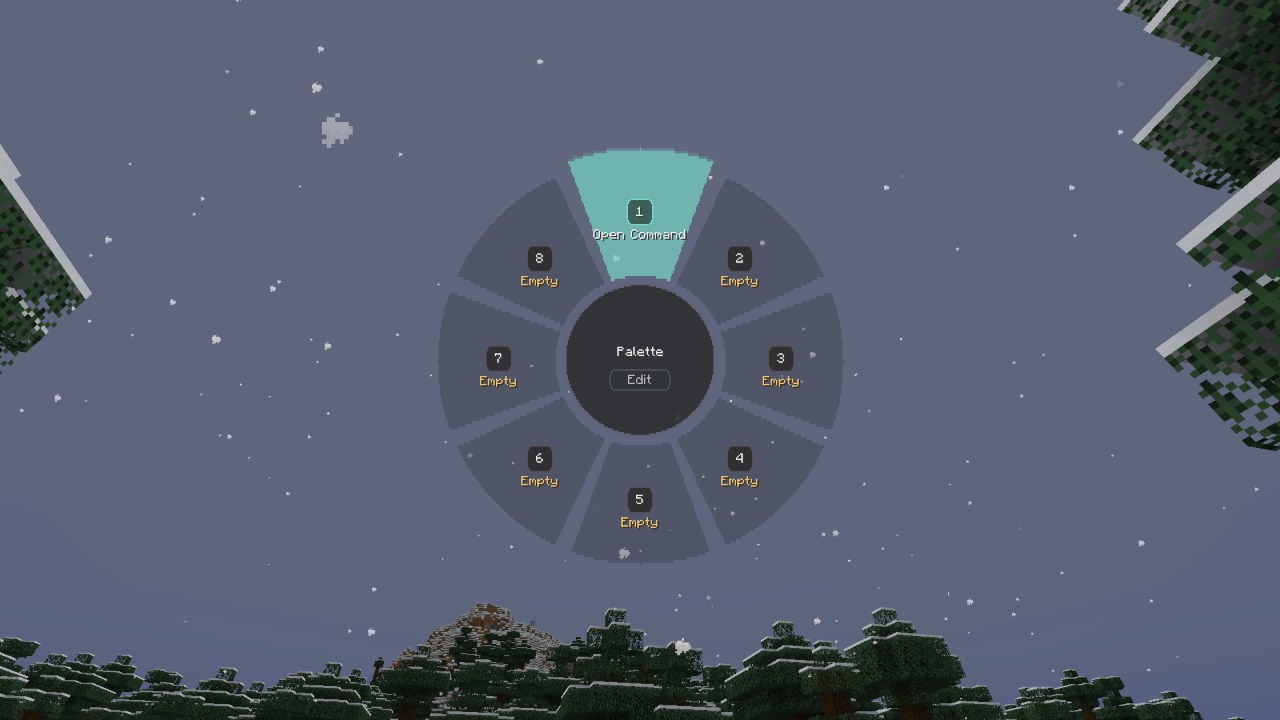 Action Wheel
 -
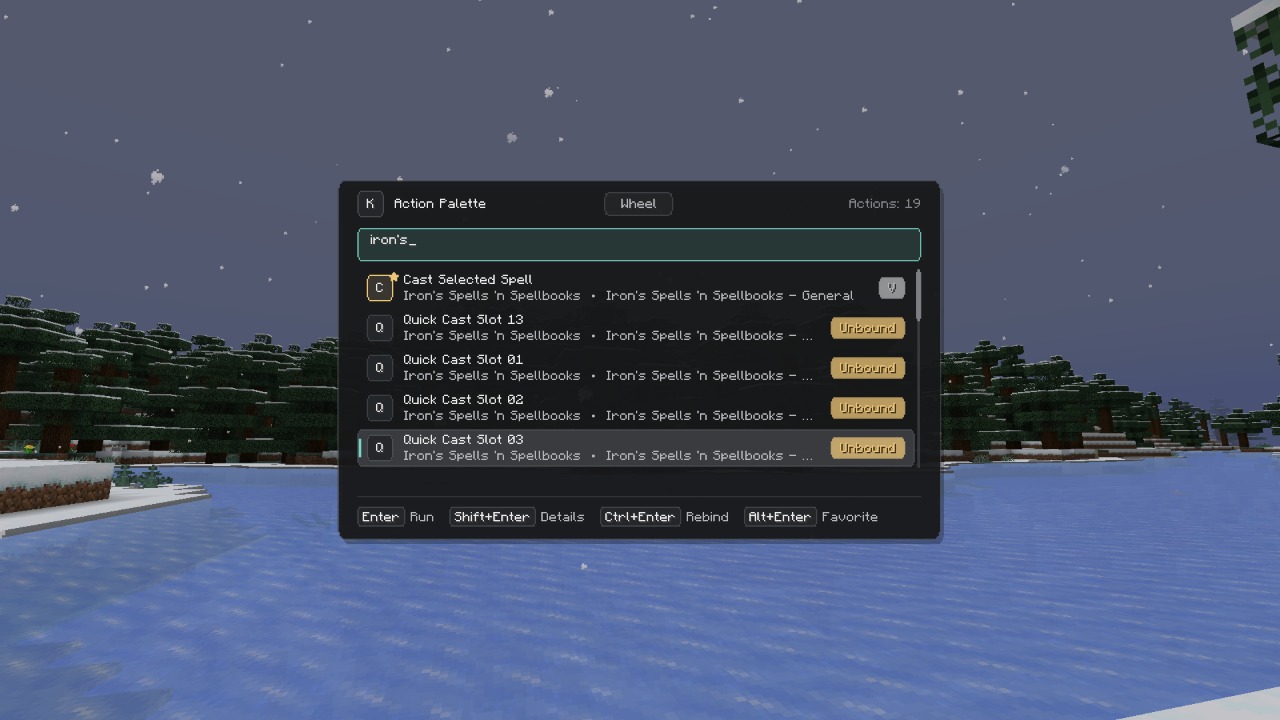 Action Palette Searchable Keybind Menu
 -
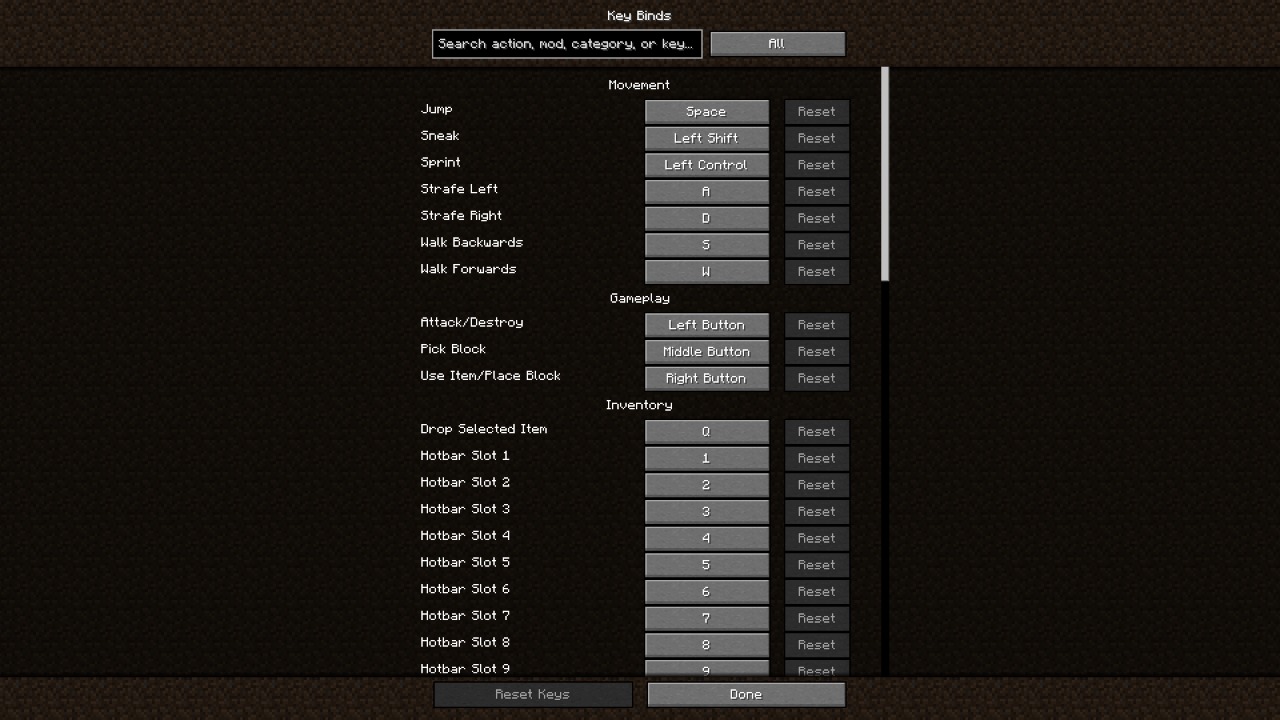 Vanilla Controls Search Integration
Versions
Files
Relations
Project Relations
More like this
Similar Mods
Suggestions use data such as tags, dependencies, dependents, descriptions, titles, and more to rank how much they overlap with this mod.
On ModDex
Community snapshot
By the numbers
Statistics
Want to reach Minecraft players?
We're looking for a server hosting partner to feature here and other parts of the site. Interested? Send us a message!
Get in touchGet it on
Available Platforms
On ModDex
Community snapshot
By the numbers
Statistics
Resources