
Community listing page, reviews here may not be monitored by the author.
Keystrokes HUD

No reviews yet
A lightweight client-side HUD overlay that shows your keyboard and mouse inputs in real time, automatically reflecting your actual keybinds if you rebind any keys.
Community voices
Reviews
No reviews yet. Be the first to review this project!
Get it on
Available Platforms
Compatibility
Supported Environments
Runs entirely on the client. Works on vanilla servers.
About
Project Details
For authors
Embed Badge
If you're the author of this project, you can embed a live badge anywhere that supports HTML or Markdown. It updates automatically whenever ratings change.
Use HTML for any page that supports it, or Markdown for README files and Markdown-based descriptions.
Identifiers
Platform IDs
Resources
External Links
About
Description
Keystrokes HUD
A lightweight, client-side HUD overlay that displays your keyboard and mouse inputs live on-screen — perfect for recording gameplay, streaming, or just seeing your inputs at a glance.
Features
- Hotbar row (top-left) — shows slots 1–9. If you've rebound any hotbar slot to a different key, the overlay automatically updates to show your actual bound key instead of the default number.
- Action keys row (top-right) — displays your currently bound keys for Swap Offhand, Drop, Inventory, Forward, Left, Back, Right, Sneak, Sprint, and Jump. Keys highlight in red when pressed, and labels update automatically if you rebind any of these actions.
- Mouse indicator (bottom-right) — shows left-click and right-click, plus side buttons (mouse 4/5) if your mouse has them. Highlights whichever action is currently bound to each physical mouse button — so if you've swapped Attack and Jump around, the overlay reflects your actual setup, not just the vanilla defaults.
Why this mod?
Unlike simple "keystrokes" overlays that just show hardcoded key labels, Keystrokes HUD reads your actual keybinds in real time. If you rebind Attack to Space and Jump to left-click (looking at you, DrDonut), the overlay updates to match — no manual configuration needed.
Requirements
- Minecraft 26.2
- Fabric Loader 0.19.3+
- Fabric API
Status
This is an early Beta release. Core functionality (hotbar, keyboard row, mouse buttons) is fully working. Planned for future updates:
- Custom pixel-art icons for actions (replacing the current text-based labels on mouse buttons)
- Scroll wheel detection for hotbar switching
Development note
This mod was built with AI assistance (Claude) for code generation and debugging support, alongside significant manual design decisions, testing, and iteration by the developer. See the AI-generated content disclosure on this project page for details.
Screenshots
Gallery
-
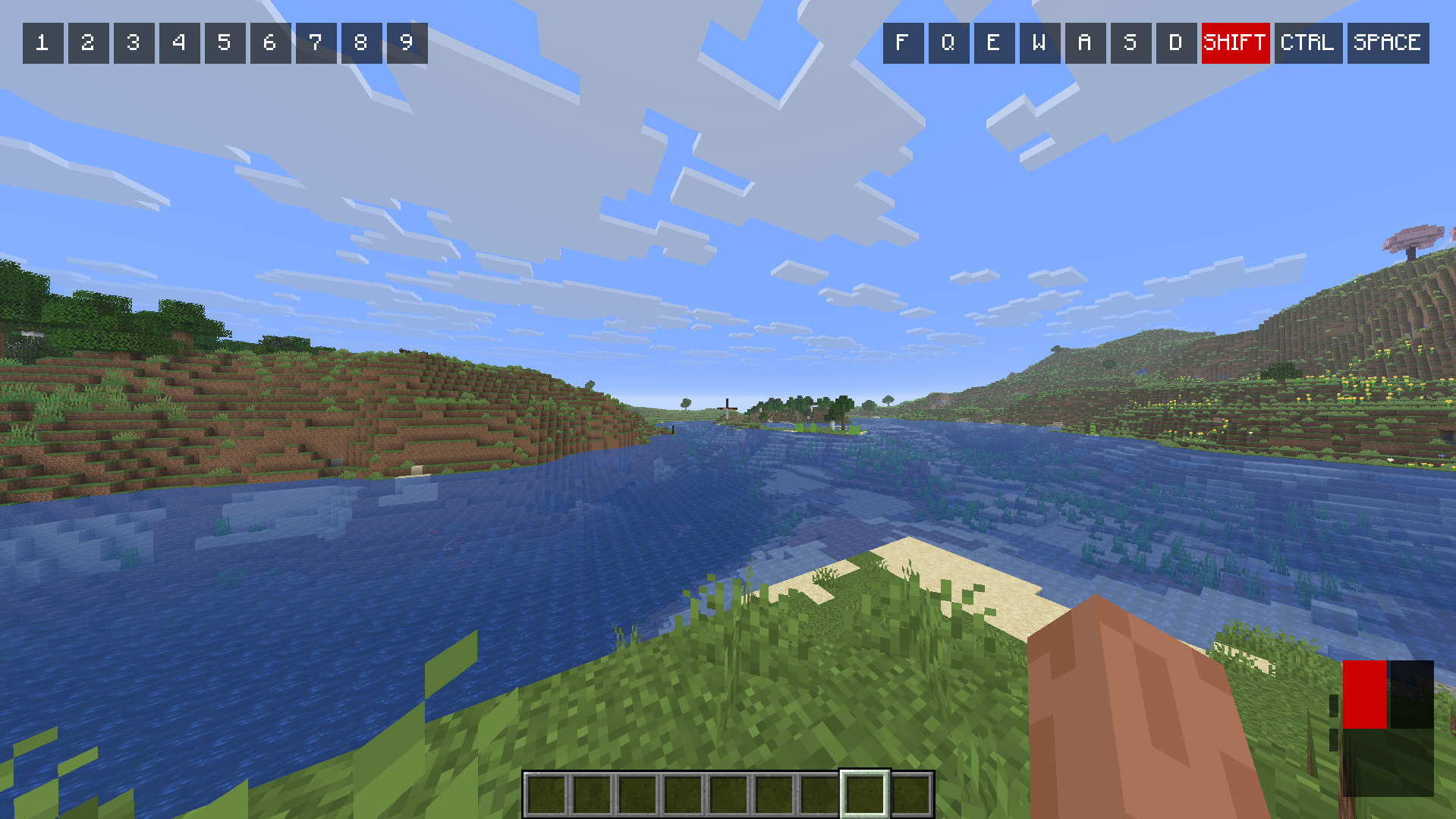 Example of Keystrokes
Versions
Files
Relations
Project Relations
More like this
Similar Mods
Suggestions use data such as tags, dependencies, dependents, descriptions, titles, and more to rank how much they overlap with this mod.
On ModDex
Community snapshot
By the numbers
Statistics

Want to reach Minecraft players?
We're looking for a server hosting partner to feature here and other parts of the site. Interested? Send us a message!
Get in touchGet it on
Available Platforms
On ModDex
Community snapshot
By the numbers
Statistics
Resources