Community listing page, reviews may not be monitored by the author.
Kid Buttons

No reviews yet
Turn complex commands into simple, colorful buttons! Change game modes, time, weather, and more with just a click. Perfect for kids who want to explore Minecraft's creative possibilities without typing commands.

Community voices
Reviews
No reviews yet. Be the first to review this project!
Get it on
Available Platforms
About
Project Details
For authors
Embed Badge
If you're the author of this project, you can embed a live badge anywhere that supports HTML or Markdown. It updates automatically whenever ratings change.
Use HTML for any page that supports it, or Markdown for README files and Markdown-based descriptions.
Identifiers
Platform IDs
Resources
External Links
About
Description
Kid-Friendly Buttons
📝 Description
Transform complex Minecraft commands into simple, colorful buttons!
Kid-Friendly Buttons is the perfect solution for young Minecraft players who want to explore the game's creative possibilities without learning complex commands. No more typing /gamemode creative or /time set 6000 - just click beautiful, intuitive buttons!
🎯 Perfect for Young Players (Ages 6-12)
- No command memorization required - Everything is visual!
- No typing needed - Just click and play
- Safe exploration of Minecraft features
- Confidence building through easy success
🎮 What You Can Do
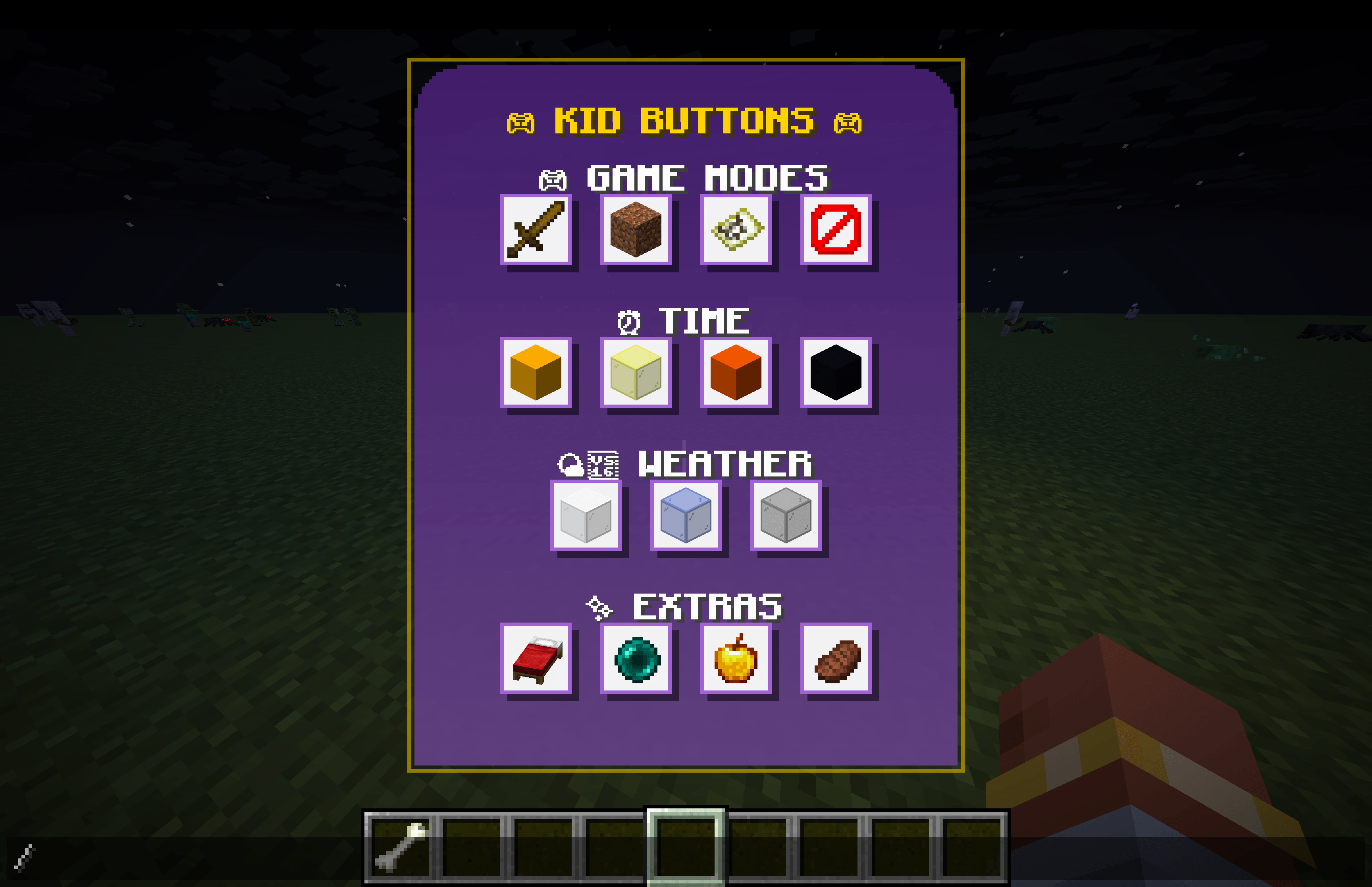
Game Modes: Switch between Survival, Creative, Adventure, and Spectator modes instantly
Time Control: Set the time to Sunrise, Noon, Sunset, or Midnight with one click
Weather Control: Change weather to Clear, Rain, or Thunder Storm
Extra Features: Set home points, teleport home, heal instantly, and satisfy hunger
🛡️ Safety First
- Smart home teleportation - Never get stuck at dangerous world spawn
- Safe fallback locations - Always teleport to secure areas
- Cooldown protection - Prevents accidental spam clicking
- Parent-approved commands - Only basic, safe game functions
🎨 Beautiful Interface
- Purple gradient design with gold accents
- Organized categories for easy navigation
- Hover tooltips explain what each button does
- Responsive sizing that adapts to any screen
- High contrast for easy visibility
🚀 How to Use
- Install the mod (see installation section below)
- Launch Minecraft with the Fabric profile
- Press T to open chat
- The Kid Buttons overlay appears automatically
- Click any button to execute the command
- Hover over buttons to see helpful tooltips
🏠 Setting Up Home
- Find a safe location where you want your home to be
- Click the red bed button (Set Home)
- Your location is now saved as your home point
- Click the green ender pearl (Go Home) to return anytime
📦 Installation
Requirements
- Minecraft 1.21.8
- Fabric Loader
- Fabric API
Step-by-Step
- Install Fabric Loader for Minecraft 1.21.8
- Download and install Fabric API
- Download Kid-Friendly Buttons from this page
- Place the JAR file in your
.minecraft/modsfolder - Launch Minecraft with the Fabric profile
- Open chat (T key) to access the interface
🎯 Who This Mod Is For
👶 Young Players
- Ages 4-12 who are learning Minecraft
- Non-readers who can't type commands
- Creative builders who want easy mode switching
- Explorers who want to control time and weather
👨👩👧👦 Parents & Families
- Family servers with mixed-age players
- Supervised play with controlled commands
- Educational tool for learning game mechanics
- Safe environment for creative expression
🎓 Educators
- Classroom Minecraft with young students
- Educational servers with controlled features
- Learning tool for game mechanics
- Easy setup and management
🖥️ Server Administrators
- Kid-friendly servers with controlled commands
- Reduced command spam in chat
- Better user experience for young players
- Easy moderation of available features
🔧 Technical Information
Mod Details
- Mod ID: kid-buttons
- Version: 1.0.0
- Minecraft Version: 1.21.8
- Fabric API Required: Yes
- Client-Side Only: Yes
- Performance: Lightweight, minimal impact
Commands Used
The mod uses these vanilla Minecraft commands:
gamemode [mode] @p- Change game modestime set [value]- Control time of dayweather [type]- Control weathereffect give @p [effect] [duration] [amplifier]- Apply effectstp @p [x] [y] [z]- Teleportationspawnpoint @p [x] [y] [z]- Set spawn points
Features
- ✅ Complete UI overlay system
- ✅ All game mode buttons
- ✅ Time control features
- ✅ Weather control options
- ✅ Home teleportation system
- ✅ Health and hunger management
- ✅ Beautiful purple gradient design
- ✅ Safe teleportation logic
- ✅ Responsive button sizing
- ✅ Hover tooltips
- ✅ Click cooldown protection
🐛 Troubleshooting
Common Issues
Q: The overlay doesn't appear when I press T A: Make sure you're using the Fabric profile, not vanilla Minecraft
Q: Buttons don't work when I click them A: Check that you have operator permissions or are in single-player mode
Q: I get stuck when using the home button A: The mod uses safe teleportation - it will never teleport you to dangerous locations
Q: The interface looks too big/small A: The interface automatically scales to your screen size
Getting Help
- Check the logs for any error messages
- Verify Fabric API is installed correctly
- Ensure Minecraft version matches (1.21.8)
- Try in single-player first to test functionality
🌟 What Players Are Saying
"My 8-year-old loves this mod! No more asking me to type commands for him." - Minecraft Parent
"Perfect for our family server. The kids can explore creative mode safely." - Server Admin
"Simple, effective, and exactly what we needed for young players." - Educator
"The interface is so intuitive, my 6-year-old figured it out immediately!" - Family Gamer
📈 Version History
v1.0.0 - Initial Release
- ✨ Complete UI overlay system
- 🎮 All game mode buttons (Survival, Creative, Adventure, Spectator)
- ⏰ Time control features (Sunrise, Noon, Sunset, Midnight)
- 🌤️ Weather control options (Clear, Rain, Thunder)
- 🏠 Home teleportation system with safety features
- 💊 Health and hunger management (Heal, Feed)
- 🎨 Beautiful purple gradient design with gold accents
- 🔒 Safe teleportation logic (never stuck at spawn)
- 📱 Responsive button sizing for all screen sizes
- 💡 Hover tooltips for all buttons
- ⏱️ Click cooldown protection
🤝 Support & Community
Need Help?
- Leave a comment on this CurseForge page
- Check the troubleshooting section above
- Verify your installation follows the step-by-step guide
Want to Contribute?
This mod is open source! Contributions are welcome:
- Bug reports and feature requests
- Code improvements and optimizations
- UI/UX enhancements
- Documentation updates
📜 License
This project is licensed under the MIT License with Commercial Restriction - see the LICENSE file for details.
This means you can:
- ✅ Use the mod freely for personal and educational purposes
- ✅ Modify it for personal use
- ✅ Share it with others
- ✅ Include it in open source projects
- ✅ Use it in community servers and modpacks
- ❌ Cannot sell or monetize the mod commercially
🙏 Credits
Development
- fletchertyler914 - Original developer and maintainer
- Fabric Team - Amazing modding framework
- Minecraft Community - Inspiration and feedback
Special Thanks
- Young Minecraft players - For inspiring this project
- Parents and educators - For valuable feedback
- Beta testers - For helping improve the mod
Made with ❤️ for young Minecraft players everywhere!
Transform the way kids experience Minecraft - one button at a time.
🎮 Screenshots
[Note: Add screenshots of the interface in action, showing the purple overlay with buttons organized by category]
🔗 Links
- GitHub Repository: https://github.com/fletchertyler914/kid-buttons
- Fabric API: Required dependency
- Fabric Loader: Required for installation
- Minecraft 1.21.8: Required game version
Download now and give your young Minecraft players the power to control their world with simple, beautiful buttons! 🎮✨
Screenshots
Gallery
-
 Screenshot 2025-08-03 at 10.41.28â¯AM.png Screenshot 2025-08-03 at 10.41.28â¯AM.png
Versions
Files
Relations
Project Relations
More like this
Similar Mods
Suggestions use data such as tags, dependencies, dependents, descriptions, titles, and more to rank how much they overlap with this mod.
On ModDex
Community snapshot
By the numbers
Statistics

Get it on
Available Platforms
On ModDex
Community snapshot
By the numbers
Statistics
Resources