
Community listing page, reviews here may not be monitored by the author.
KillStats


No reviews yet
Tracks your entity kills during gameplay sessions and displays live statistics via a configurable in-game HUD overlay.
Community voices
Reviews
No reviews yet. Be the first to review this project!
Get it on
Available Platforms
Compatibility
Supported Environments
Runs entirely on the client. Works on vanilla servers.
About
Project Details
For authors
Embed Badge
If you're the author of this project, you can embed a live badge anywhere that supports HTML or Markdown. It updates automatically whenever ratings change.
Use HTML for any page that supports it, or Markdown for README files and Markdown-based descriptions.
Identifiers
Platform IDs
About
Description
KillStats
Track every kill, estimate your loot, and dominate the battlefield!
This lightweight client-side Fabric mod tracks your entity kills during gameplay sessions and displays live statistics via a configurable in-game HUD overlay.
Features
Kill Tracking
- Per-mob breakdown - See exactly how many of each mob type you've killed
- Multiple kill methods - Tracks melee, projectile, and splash potion kills
- 40+ mob types - Covers hostile, passive, nether, end mobs, and bosses
HUD Display
- Full mode - Detailed per-mob breakdown with drop icons and kill counts
- Compact mode - Minimal single-line display for less screen clutter
- Configurable position - Place the HUD in any corner of the screen
- Adjustable opacity and scale - Fine-tune the look to your preference
- Smart visibility - Show only when holding weapons, or keep always visible
Session Management
- Session timer - Track how long you've been hunting with start/pause/resume
- Auto-pause - Timer pauses automatically when opening menus
- Session summary - Detailed breakdown in chat when leaving a world or resetting
- Persistent sessions - Optionally save session data across world exits
Milestones & Alerts
- Kill milestones - Chat notifications every X total kills (configurable)
- Per-mob milestones - Notifications every 50 kills of the same mob type
- Boss kill effects - Gold flash and sound when defeating bosses
- Sound alerts - Optional audio feedback on milestones
Customization
Configure everything in-game via ModMenu:
HUD Settings
- HUD position (top-left, top-right, bottom-left, bottom-right)
- Always visible toggle
- Background opacity (0-100%)
- HUD scale (0.5x-2.0x)
Keybinds (Controls > KillStats)
K- Start/Pause/Resume timerL- Reset sessionJ- Toggle compact mode
Session Settings
- Show session summary on exit
- Auto-pause timer in menus
- Persistent session storage
Milestones
- Milestone sound toggle
- Milestone interval (0 = disabled)
Requirements
- Minecraft: 26.1+
- Fabric Loader: 0.18.4 or higher
- Fabric API: Required
- Java: 25 or higher
- ModMenu + YACL: Optional (for in-game config screen)
Perfect For
- Grinders - Track your mob farm efficiency with kill counts and drop value estimates
- Speedrunners - Monitor kills and session time in a clean overlay
- Adventurers - See your combat stats at a glance while exploring
- Everyone - Anyone who wants to know their kill stats in Minecraft!
Links
- Issues & Bugs: GitHub Issues
- Source Code: GitHub Repository
License
This mod is open-source and licensed under the MIT License.
Made with love by DennisTheGamer
KillStats
Track every kill, estimate your loot, and dominate the battlefield!
This lightweight client-side Fabric mod tracks your entity kills during gameplay sessions and displays live statistics via a configurable in-game HUD overlay.
Features
Kill Tracking
- Per-mob breakdown - See exactly how many of each mob type you've killed
- Multiple kill methods - Tracks melee, projectile, and splash potion kills
- 40+ mob types - Covers hostile, passive, nether, end mobs, and bosses
HUD Display
- Full mode - Detailed per-mob breakdown with drop icons and kill counts
- Compact mode - Minimal single-line display for less screen clutter
- Configurable position - Place the HUD in any corner of the screen
- Adjustable opacity and scale - Fine-tune the look to your preference
- Smart visibility - Show only when holding weapons, or keep always visible
Session Management
- Session timer - Track how long you've been hunting with start/pause/resume
- Auto-pause - Timer pauses automatically when opening menus
- Session summary - Detailed breakdown in chat when leaving a world or resetting
- Persistent sessions - Optionally save session data across world exits
Milestones & Alerts
- Kill milestones - Chat notifications every X total kills (configurable)
- Per-mob milestones - Notifications every 50 kills of the same mob type
- Boss kill effects - Gold flash and sound when defeating bosses
- Sound alerts - Optional audio feedback on milestones
Customization
Configure everything in-game via ModMenu:
HUD Settings
- HUD position (top-left, top-right, bottom-left, bottom-right)
- Always visible toggle
- Background opacity (0-100%)
- HUD scale (0.5x-2.0x)
Keybinds (Controls > KillStats)
K- Start/Pause/Resume timerL- Reset sessionJ- Toggle compact mode
Session Settings
- Show session summary on exit
- Auto-pause timer in menus
- Persistent session storage
Milestones
- Milestone sound toggle
- Milestone interval (0 = disabled)
Requirements
- Minecraft: 26.1+
- Fabric Loader: 0.18.4 or higher
- Fabric API: Required
- Java: 25 or higher
- ModMenu + YACL: Optional (for in-game config screen)
Perfect For
- Grinders - Track your mob farm efficiency with kill counts and drop value estimates
- Speedrunners - Monitor kills and session time in a clean overlay
- Adventurers - See your combat stats at a glance while exploring
- Everyone - Anyone who wants to know their kill stats in Minecraft!
Links
- Issues & Bugs: GitHub Issues
- Source Code: GitHub Repository
License
This mod is open-source and licensed under the MIT License.
Made with love by DennisTheGamer
Screenshots
Gallery
-
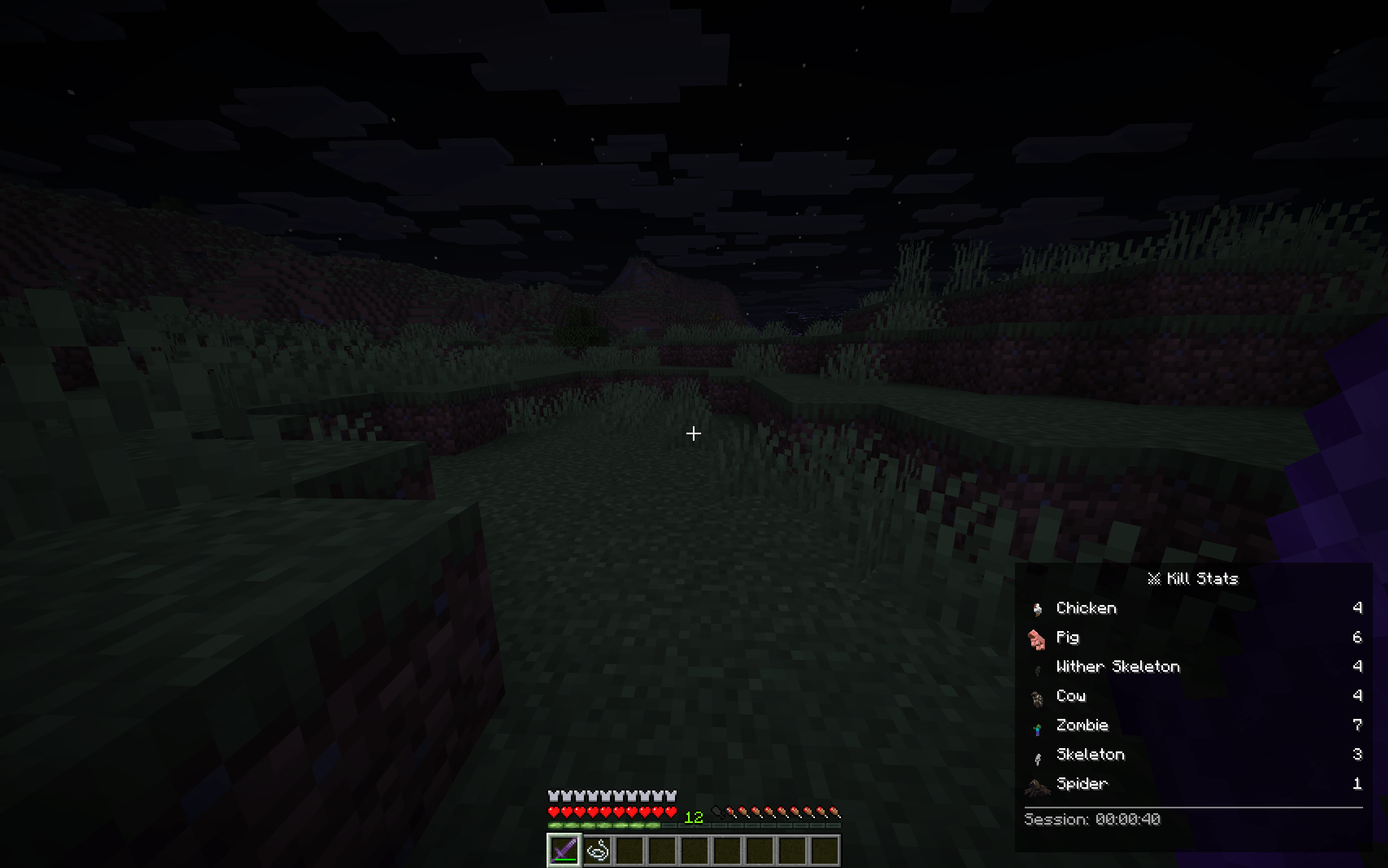 KillStats, your visual advisor while you are kill mobs A live view how many mobs you killed so far, with there icon and how long your session is going.
 -
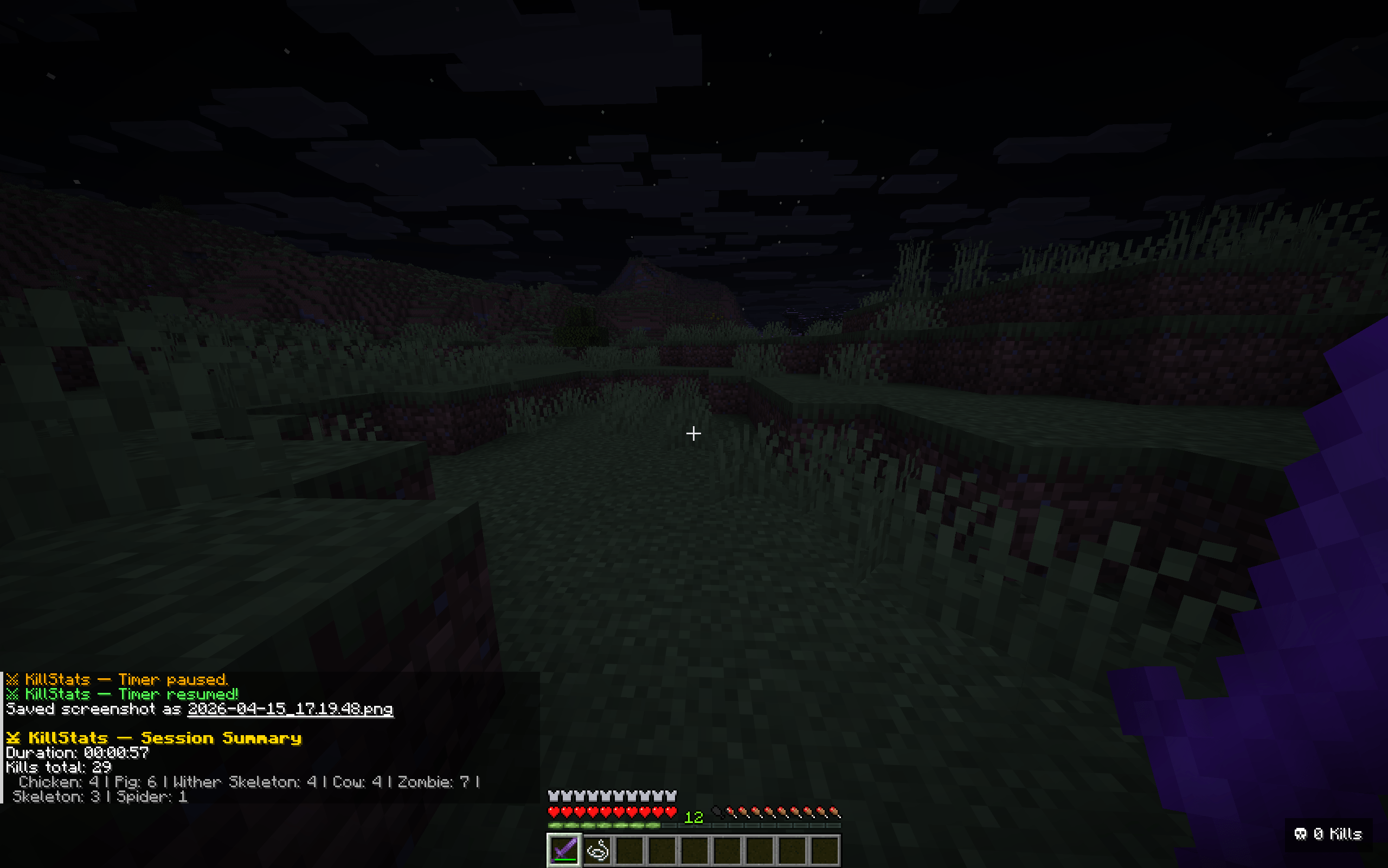 Session summary You will get a dedicated session summary after you reset your session. With all the information about what you killed, how much and so on.
-
 Session summary You will get a dedicated session summary after you reset your session. With all the information about what you killed, how much and so on.
 -
 KillStats, your visual advisor while you are kill mobs A live view how many mobs you killed so far, with there icon and how long your session is going.
Versions
Files
Relations
Project Relations
More like this
Similar Mods
Suggestions use data such as tags, dependencies, dependents, descriptions, titles, and more to rank how much they overlap with this mod.
On ModDex
Community snapshot
By the numbers
Statistics
Want to reach Minecraft players?
We're looking for a server hosting partner to feature here and other parts of the site. Interested? Send us a message!
Get in touchGet it on
Available Platforms
On ModDex
Community snapshot
By the numbers