
Community listing page, reviews here may not be monitored by the author.
LabsCases


No reviews yet
A unique mod for cases with full customization of loot, name, description, drop chance, and full customization of case color via a json file
Includes quality of life improvements and small tweaks to enhance and customize gameplay.
Forge is a popular mod loader for versions 1.1+ of Minecraft.
Community voices
Reviews
Filters
Click once to include, again to exclude, again to clear
No reviews yet. Be the first to review this project!
Get it on
Available Platforms
Compatibility
Supported Environments
Runs entirely on the server. Also works in singleplayer.
About
Project Details
For authors
Embed Badge
If you're the author of this project, you can embed a live badge anywhere that supports HTML or Markdown. It updates automatically whenever ratings change.
Use HTML for any page that supports it, or Markdown for README files and Markdown-based descriptions.
Identifiers
Platform IDs
Resources
External Links
About
Description

EN_US:
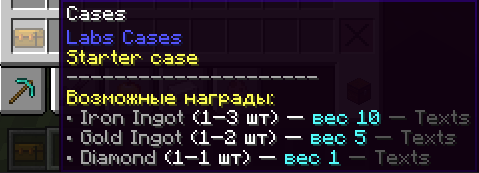
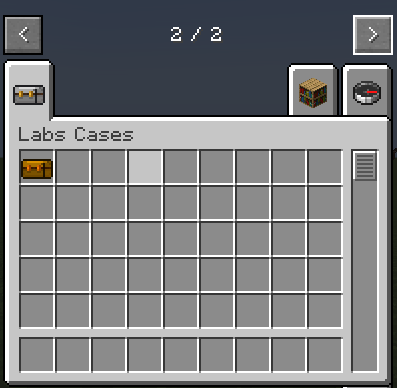
Labs Cases is a flexible and powerful case system designed for servers, modpacks, and single-player games. The mod allows you to add custom cases to Minecraft with customizable rewards, colors, rarities, and drop logic, all through simple JSON files.
Create collections of cases, rewards of any complexity, rarity, themed sets, and integrations with other mods. Labs Cases is perfect for various builds with quests, where it will be clearly interesting to try your luck instead of a predictable reward.
To add new cases, you need to restart the maincraft completely.
EXAMPLE OF CASE CREATION:
First, you should create a new json file in the config/labscases/cases/ folder with any name you like, for example lite.json
NOTE ON THE JSON file:
"caseName": "text", - this is the name of the case (can be named anything)
"color": 16724787, - this is the color of your case (you can insert any color)
"item": "minecraft:diamond", - this is the item ID (you can insert any item from any mod) If you have CraftTweaker installed, you can use /ct hand to find the item ID
"min": 1, - the minimum amount of the item that can be dropped (you can set any integer value)
"max": 2, - the maximum number of items that can be dropped (similar to the minimum number), and the drop range varies from the minimum to the maximum (depending on luck)
"weight": 5, - this is the weight of the item (or the chance of dropping it). The higher the number of an item among all other items, the higher the weight of its drop, and the lower the weight, the lower the chance of dropping it among all other items. You can set any integer value (for example, from 1 to 999)
"description": "Description of the item in the case" is a string for describing the item, where you can write whatever you want.
In the example below, three items are dropped from the case.
After creation, you open this json file and paste the code below, editing the names, weights, items, and descriptions to suit your preferences:
Example of case configuration in spoilers:
{
"caseName": "Any case name",
"color": 16724787,
"loot": [
    {
      "item": "minecraft:diamond",
      "min": 1,
      "max": 2,
      "weight": 5,
      "description": "Any text"
    },
    {
      "item": "minecraft:netherite_scrap",
      "min": 1,
      "max": 1,
      "weight": 1,
      "description": "Any text"
    },
    {
      "item": "minecraft:gold_ingot",
      "min": 3,
      "max": 6,
      "weight": 20,
      "description": "Any text"
    }
  ]
}
RU_RU:
Labs Cases — это гибкая и мощная система кейсов, созданная для серверов, модпаков и одиночной игры. Мод позволяет добавлять в Minecraft собственные кейсы с настраиваемыми наградами, цветами, редкостями и логикой выпадения — всё через простые JSON‑файлы.
Создавайте коллекции кейсов, награды любой сложности, редкости, тематические наборы и интеграции с другими модами. Labs Cases идеально подходит для различных сборок с квестами, где явно будет явно интересно попытать свою удачи вместо предсказуемой награды.
Чтобы добавились новые кейсы нужно перезапустить маинкрафт полностью.
ПРИМЕР СОЗДАНИЯ КЕЙСА:
Во первых вы должны создать в папке config/labscases/cases/ новый json файл с любым вам понравившемся названием: к примеру lite.json
ПРИМЕЧАНИЕ К JSON-файлу:
"caseName": "Название кейса", - это название кейса(может быть названо как угодно)
"color": 16724787, - это цвет вашего кейса(можно вставлять любые цвета)
"item": "minecraft:diamond", - это айди предмета(можно вставить любой предмет из любого мода) Если на сборке есть CraftTweaker, то пропишите /ct hand и узнаете айди предмета
"min": 1, - минимальное количество выпадаемого предмета(можно поставить любое целое число)
"max": 2, - максимальное количество выпадаемого предмета(аналогично минимальному любое число), Выпадение варьируется от минимального до максимального(зависит от того как повезёт)
"weight": 5, - это вес предмета(или же шанс выпадения по простому). Чем больше число предмета среди всех остальных, тем больше вес его выпадения, а чем меньше вес, тем меньше шанс выпадения среди всех остальных предметов. Можно установить любое целое число(например от 1 до 999)
"description": "Описание предмета в кейсе" - это строка для описания предмета, тут можно написать все что хотите. Например: написать: шанс выпадения очень мал.
В примере ниже зарегестрированно выпадение трёх предметов с кейса.
После создания вы открываете этот json файл и вставляете код ниже, редактируя под свои параметры названия, вес, предмет и его описание:
Пример конфигурации кейса в спойлерах:
{
"caseName": "Название кейса",
"color": 16724787,
"loot": [
    {
      "item": "minecraft:diamond",
      "min": 1,
      "max": 2,
      "weight": 5,
      "description": "Описание кейсу"
    },
    {
      "item": "minecraft:netherite_scrap",
      "min": 1,
      "max": 1,
      "weight": 1,
      "description": "Очень редкая награда"
    },
    {
      "item": "minecraft:gold_ingot",
      "min": 3,
      "max": 6,
      "weight": 20,
      "description": "Немного золота"
    }
  ]
}

EN_US:
Labs Cases is a flexible and powerful case system designed for servers, modpacks, and single-player games. The mod allows you to add custom cases to Minecraft with customizable rewards, colors, rarities, and drop logic, all through simple JSON files.
Create collections of cases, rewards of any complexity, rarity, themed sets, and integrations with other mods. Labs Cases is perfect for various builds with quests, where it will be clearly interesting to try your luck instead of a predictable reward.
To add new cases, you need to restart the maincraft completely.
EXAMPLE OF CASE CREATION:
First, you should create a new json file in the config/labscases/cases/ folder with any name you like, for example lite.json
NOTE ON THE JSON file:
"caseName": "text", - this is the name of the case (can be named anything)
"color": 16724787, - this is the color of your case (you can insert any color)
"item": "minecraft:diamond", - this is the item ID (you can insert any item from any mod) If you have CraftTweaker installed, you can use /ct hand to find the item ID
"min": 1, - the minimum amount of the item that can be dropped (you can set any integer value)
"max": 2, - the maximum number of items that can be dropped (similar to the minimum number), and the drop range varies from the minimum to the maximum (depending on luck)
"weight": 5, - this is the weight of the item (or the chance of dropping it). The higher the number of an item among all other items, the higher the weight of its drop, and the lower the weight, the lower the chance of dropping it among all other items. You can set any integer value (for example, from 1 to 999)
"description": "Description of the item in the case" is a string for describing the item, where you can write whatever you want.
In the example below, three items are dropped from the case.
After creation, you open this json file and paste the code below, editing the names, weights, items, and descriptions to suit your preferences:
Example of case configuration in spoilers:
{
"caseName": "Any case name",
"color": 16724787,
"loot": [
{
"item": "minecraft:diamond",
"min": 1,
"max": 2,
"weight": 5,
"description": "Any text"
},
{
"item": "minecraft:netherite_scrap",
"min": 1,
"max": 1,
"weight": 1,
"description": "Any text"
},
{
"item": "minecraft:gold_ingot",
"min": 3,
"max": 6,
"weight": 20,
"description": "Any text"
}
]
}
RU_RU:
Labs Cases — это гибкая и мощная система кейсов, созданная для серверов, модпаков и одиночной игры. Мод позволяет добавлять в Minecraft собственные кейсы с настраиваемыми наградами, цветами, редкостями и логикой выпадения — всё через простые JSON‑файлы.
Создавайте коллекции кейсов, награды любой сложности, редкости, тематические наборы и интеграции с другими модами. Labs Cases идеально подходит для различных сборок с квестами, где явно будет явно интересно попытать свою удачи вместо предсказуемой награды.
Чтобы добавились новые кейсы нужно перезапустить маинкрафт полностью.
ПРИМЕР СОЗДАНИЯ КЕЙСА:
Во первых вы должны создать в папке config/labscases/cases/ новый json файл с любым вам понравившемся названием: к примеру lite.json
ПРИМЕЧАНИЕ К JSON-файлу:
"caseName": "Название кейса", - это название кейса(может быть названо как угодно)
"color": 16724787, - это цвет вашего кейса(можно вставлять любые цвета)
"item": "minecraft:diamond", - это айди предмета(можно вставить любой предмет из любого мода) Если на сборке есть CraftTweaker, то пропишите /ct hand и узнаете айди предмета
"min": 1, - минимальное количество выпадаемого предмета(можно поставить любое целое число)
"max": 2, - максимальное количество выпадаемого предмета(аналогично минимальному любое число), Выпадение варьируется от минимального до максимального(зависит от того как повезёт)
"weight": 5, - это вес предмета(или же шанс выпадения по простому). Чем больше число предмета среди всех остальных, тем больше вес его выпадения, а чем меньше вес, тем меньше шанс выпадения среди всех остальных предметов. Можно установить любое целое число(например от 1 до 999)
"description": "Описание предмета в кейсе" - это строка для описания предмета, тут можно написать все что хотите. Например: написать: шанс выпадения очень мал.
В примере ниже зарегестрированно выпадение трёх предметов с кейса.
После создания вы открываете этот json файл и вставляете код ниже, редактируя под свои параметры названия, вес, предмет и его описание:
Пример конфигурации кейса в спойлерах:
{
"caseName": "Название кейса",
"color": 16724787,
"loot": [
{
"item": "minecraft:diamond",
"min": 1,
"max": 2,
"weight": 5,
"description": "Описание кейсу"
},
{
"item": "minecraft:netherite_scrap",
"min": 1,
"max": 1,
"weight": 1,
"description": "Очень редкая награда"
},
{
"item": "minecraft:gold_ingot",
"min": 3,
"max": 6,
"weight": 20,
"description": "Немного золота"
}
]
}
Screenshots
Gallery
-
 Снимок11 ÑкÑана 2026-02-07 174547.png Снимок11 ÑкÑана 2026-02-07 174547.png
 -
 2026-02-05_18.45.33.png 2026-02-05_18.45.33.png


Versions
Files
Relations
Project Relations
More like this
Similar Mods
Suggestions use data such as tags, dependencies, dependents, descriptions, titles, and more to rank how much they overlap with this mod.
On ModDex
Community snapshot
By the numbers
Statistics
Want to reach Minecraft players?
We're looking for a server hosting partner to feature here and other parts of the site. Interested? Send us a message!
Get in touchGet it on
Available Platforms
On ModDex
Community snapshot
By the numbers
Statistics
Resources