Community listing page, reviews may not be monitored by the author.
Large Iron Sign


No reviews yet
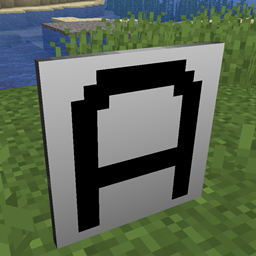
Adds a sign that displays a single large character

Community voices
Reviews
No reviews yet. Be the first to review this project!
Get it on
Available Platforms
Compatibility
Supported Environments
Must be installed on both the client and the server.
About
Project Details
For authors
Embed Badge
If you're the author of this project, you can embed a live badge anywhere that supports HTML or Markdown. It updates automatically whenever ratings change.
Use HTML for any page that supports it, or Markdown for README files and Markdown-based descriptions.
Identifiers
Platform IDs
About
Description
This is a mod for Minecraft that adds a sign that displays a single large character. The character can be any capital letter, numeric digit, or one of 40 other symbols.


The sign can be coloured, both the text and the background separately.

An optional trim can be added to the sign.

Dependencies
|
Minecraft |
Java |
Fabric Loader |
Fabric API |
|---|---|---|---|
|
1.20.1 |
17 |
0.16.5 |
0.92.2+1.20.1 |
|
1.20.2 |
17 |
0.16.5 |
0.91.6+1.20.2 |
|
1.20.3 |
17 |
0.16.5 |
0.91.1+1.20.3 |
|
1.20.4 |
17 |
0.16.5 |
0.97.2+1.20.4 |
|
1.20.6 |
21 |
0.16.5 |
0.100.8+1.20.6 |
|
1.21.1 |
21 |
0.16.5 |
0.105.0+1.21.1 |
|
1.21.3 |
21 |
0.16.9 |
0.109.0+1.21.3 |
How to Use undefined
To make signs, use an iron block in a stonecutter. This will produce 16 signs.

Place the sign, then right-click it and select the character it should display. You can also enable/disable the trim here.

To change the text colour, hold a dye in your main hand and right-click the sign.
To change the background colour, hold a dye in your off hand and right-click the sign.
If you have a dye in both hands, you can set both the text and background colour at the same time.

Credits
Textures based on font: https://www.dafont.com/vcr-osd-mono.font
Changelog
1.0.4 - 18 May 2025
Fixed particle sprites not being visible.
1.0.3 - 17 May 2025
Fixed item appearance in item frames and when on ground.
1.0.2 - 08 March 2025
Fixed opening set symbol screen on discrete server.
1.0.1 - 23 November 2024
Fixed small textures breaking mipmap levels.
1.0.0 - 06 October 2024
Initial Version.
Large Iron Sign
This is a mod for Minecraft that adds a sign that displays a single large character. The character can be any capital letter, numeric digit, or one of 40 other symbols.


The sign can be coloured, both the text and the background separately.

An optional trim can be added to the sign.

Dependencies
| Minecraft | Java | Fabric Loader | Fabric API |
|---|---|---|---|
| 1.21.1 | 21 | 0.16.5 | 0.105.0+1.21.1 |
| 1.21.3 | 21 | 0.16.10 | 0.109.0+1.21.3 |
| 1.21.4 | 21 | 0.16.10 | 0.113.0+1.21.4 |
| 1.21.5 | 21 | 0.16.14 | 0.121.0+1.21.5 |
| 1.21.7 | 21 | 0.16.14 | 0.128.2+1.21.7 |
| 1.21.8 | 21 | 0.17.3 | 0.136.0+1.21.8 |
| 1.21.10 | 21 | 0.17.3 | 0.136.0+1.21.10 |
How to Use
To make signs, use an iron block in a stonecutter. This will produce 16 signs.

Place the sign, then right-click it and select the character it should display. You can also enable/disable the trim here.

To change the text colour, hold a dye in your main hand and right-click the sign.
To change the background colour, hold a dye in your off hand and right-click the sign.
If you have a dye in both hands, you can set both the text and background colour at the same time.

Credits
Textures based on font: https://www.dafont.com/vcr-osd-mono.font
Screenshots
Gallery
Versions
Files
Relations
Project Relations
More like this
Similar Mods
Suggestions use data such as tags, dependencies, dependents, descriptions, titles, and more to rank how much they overlap with this mod.
On ModDex
Community snapshot
By the numbers
Statistics

Get it on
Available Platforms
On ModDex
Community snapshot
By the numbers