Community listing page, reviews may not be monitored by the author.
Leaderboard Hologram


No reviews yet
Minecraft server-side leaderboard holograms for Fabric and NeoForge: top-player boards, 44 stat presets, four themes, auto-refresh, no client mod.

Community voices
Reviews
No reviews yet. Be the first to review this project!
Get it on
Available Platforms
Compatibility
Supported Environments
Runs entirely on the server. Also works in singleplayer.
About
Project Details
For authors
Embed Badge
If you're the author of this project, you can embed a live badge anywhere that supports HTML or Markdown. It updates automatically whenever ratings change.
Use HTML for any page that supports it, or Markdown for README files and Markdown-based descriptions.
Identifiers
Platform IDs
About
Description
Leaderboard Hologram
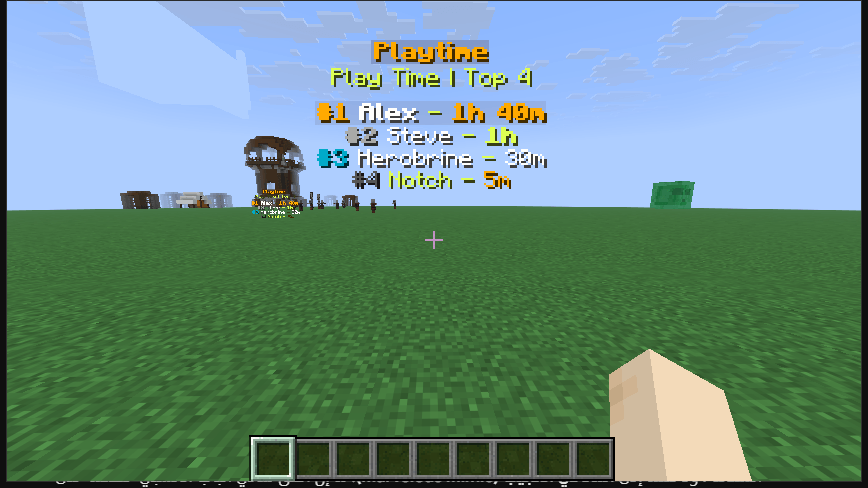
Your server already tracks play time, kills, blocks mined and trades. This mod puts those numbers in the world, on floating boards that update by themselves.
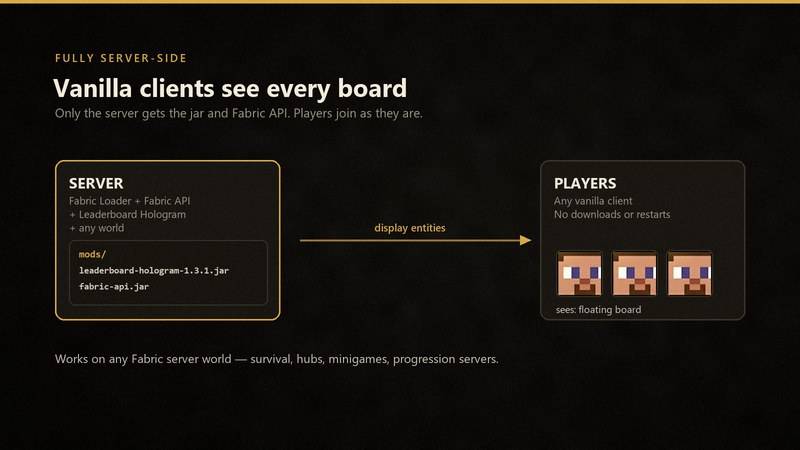
Players see the boards with a normal Minecraft client. You only install the mod on the server.
What you get
- 44 ready-made statistics, with short names like
diamonds,woodandkills - Boards for one stat or for a group, such as all ores mined or all items crafted
- Four looks: clean, gold, dark and compact
- Named boards that survive restarts
- Automatic refresh every 5 minutes, plus a manual refresh command
- Works with vanilla clients. No client mod, no resource pack.
Versions
| Loader | Minecraft |
|---|---|
| Fabric | 1.20.1 to 1.21.11, 26.1 and 26.1.1 |
| NeoForge | 1.20.1, 1.21.1, 1.21.10, 1.21.11, 26.1.2, 26.2, 26.3 |
Download the file that matches your loader and exact Minecraft version.
Most 1.20.1 to 1.21.11 builds need Java 21. The NeoForge 1.20.1 build runs on Java 17. The 26.x builds need Java 25.
Fabric servers also need Fabric API. NeoForge servers need nothing else.
Install
- Put the jar in your server's
modsfolder. - Start the server.
That is it. The first board can be made in game.
First board
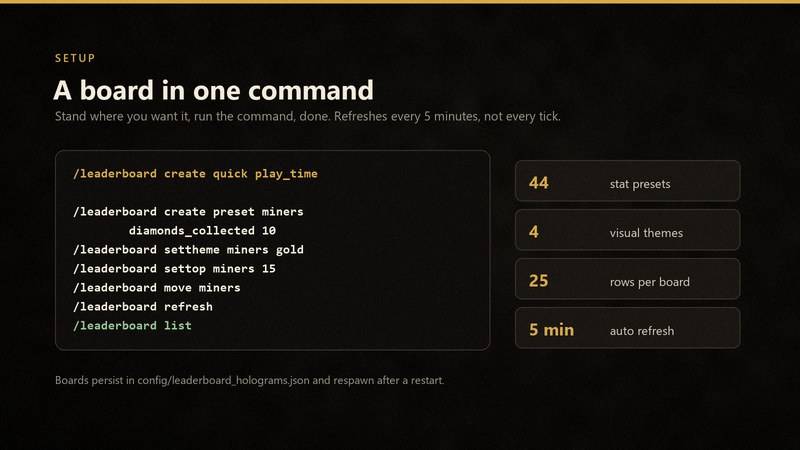
Stand where you want it and run:
/leaderboard create quick play_time
You get a board named play_time with the top 10 players by play time.
Want a different name, size or look?
/leaderboard create preset miners diamonds_collected 10
/leaderboard settheme miners gold
To use a statistic that has no preset, give it the full path:
/leaderboard create path totems "minecraft:used/minecraft:totem_of_undying" 5
Commands
Operator level 2 or the console can use these. Creating a board and moving it to yourself need a player in game.
| Command | What it does |
|---|---|
/leaderboard create quick <preset> |
Make a board where you stand |
/leaderboard create preset <name> <preset> [rows] |
Make a named board from a preset |
/leaderboard create path <name> <path> [rows] |
Make a board from a full statistic path |
/leaderboard create <name> <category> <key> [rows] |
Make a board from a category and key |
/leaderboard remove <name> |
Delete a board |
/leaderboard remove nearest |
Delete the closest board |
/leaderboard rename <name> <new_name> |
Rename a board |
/leaderboard move <name> |
Move a board to you |
/leaderboard setpos <name> <pos> |
Move a board to exact coordinates |
/leaderboard settop <name> <rows> |
Set how many players to show, 1 to 25 |
/leaderboard settheme <name> <theme> |
Change the look |
/leaderboard setstat preset <name> <preset> |
Point a board at another preset |
/leaderboard setstat path <name> <path> |
Point a board at a full statistic path |
/leaderboard setstat <name> <category> <key> |
Point a board at a category and key |
/leaderboard info <name> |
Show a board's details |
/leaderboard list |
List all boards |
/leaderboard presets [query] |
List or search presets |
/leaderboard themes |
List the four looks |
/leaderboard search <query> |
Search presets by name |
/leaderboard refresh |
Update every board now |
/leaderboard reload |
Reload the config file |
Presets
Run /leaderboard presets in game for the full list.
Time: play_time, time_since_death, time_since_rest, deaths, games_left
Combat: mob_kills, player_kills, damage_dealt, damage_taken, zombie_kills, skeleton_kills, creeper_kills, spider_kills, enderman_kills, dragon_kills, wither_kills
Movement: distance_walked, distance_sprinted, distance_swum, distance_flown, jumps, elytra_uses
Gathering: diamonds_collected, iron_ingots_collected, gold_ingots_collected, emeralds_collected, redstone_collected, coal_collected, lapis_collected, copper_ingots_collected, netherite_scrap_collected
Mining: blocks_broken_total, ores_mined_total, diamond_ore_mined, iron_ore_mined, gold_ore_mined, obsidian_mined, ancient_debris_mined, logs_chopped
Crafting: items_crafted_total, items_used_total, items_picked_up_total
Trading and fishing: villager_trades, fish_caught
Themes
| Theme | Look |
|---|---|
clean |
Soft rows, easy to read |
gold |
Warm colors with a premium feel |
dark |
Sharp and simple |
compact |
Smaller rows for tight spaces |
Storage
Boards are saved in config/leaderboard_holograms.json in your server folder. The file keeps each board's name, statistic, world, position, row count and theme.
Stop the server before editing the file. Then start it again, or run /leaderboard reload.
Boards read player statistics from the world they are placed in. A new world with no player data will show an empty board until people play.
Common questions
Do players need the mod? No. Only the server.
Does it work on Paper? No. It needs Fabric or NeoForge.
How many rows can a board show? Up to 25. The default is 10.
Will it lag? Boards update every 5 minutes, not every tick. A few boards are light.
Can two boards show the same stat? Yes. Each board has its own name, position and theme.
Can I use stats from other mods? Usually yes. Use the statistic path the other mod registers. The mod warns if the category looks unusual.
Source
The code is open under the MIT license: https://github.com/ismaildzf/leaderboard-hologram
Bug reports and preset requests can go to Discord v_eno or the GitHub issue tracker.
Leaderboard Hologram
Minecraft leaderboard holograms for Fabric and NeoForge — a readable alternative to scoreboard sidebars that puts your top players in the world.
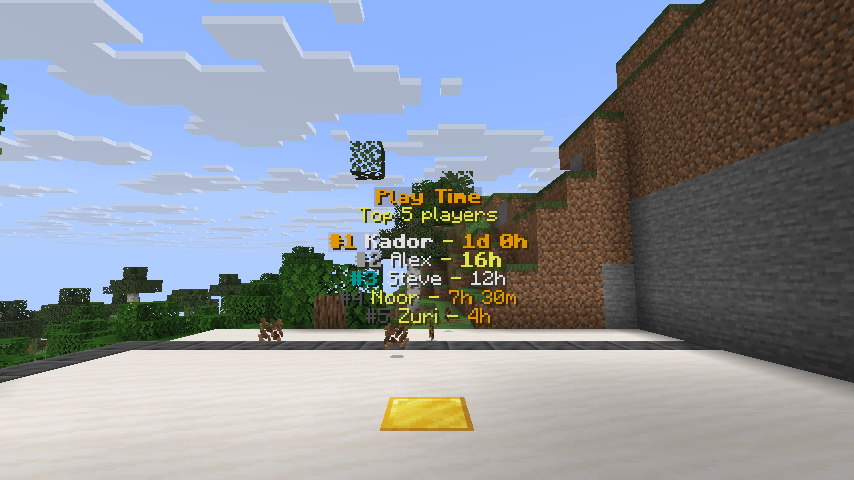
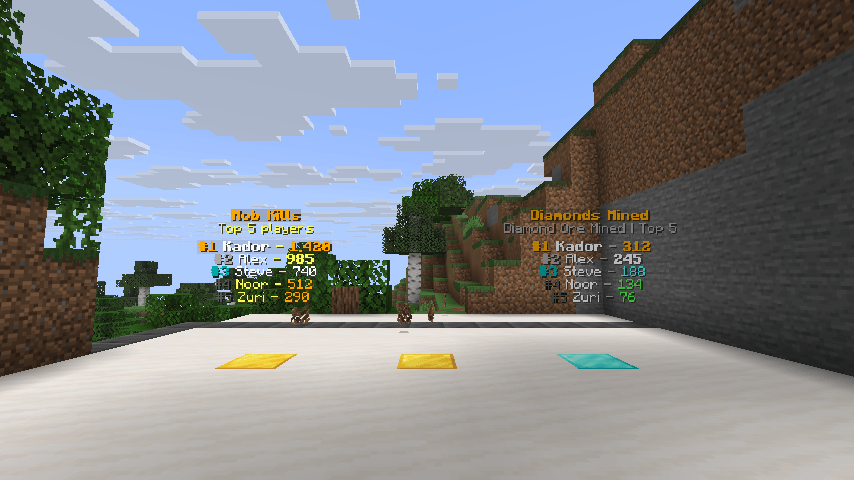
Leaderboard Hologram turns vanilla player statistics into floating, auto-updating leaderboards built from Minecraft display entities. Show top players by playtime, mob kills, blocks mined, deaths, trades or any custom statistic. Place a top-players board at spawn, over a farm, inside a lobby or beside a shop. The mod is fully server-side: players join with a vanilla client and see the boards with nothing installed.
Why servers use it
- No client mod — one jar on the server; vanilla clients see every board.
- Readable by default — centered rank rows, player names and values with per-row backgrounds.
- 44 presets with aliases — playtime, deaths, kills, mining, crafting, trades, fishing, movement and more. No need to type raw statistic keys.
- Aggregate statistics — boards such as all ores mined, all blocks broken, all logs chopped or all items crafted.
- Persistent named boards — stored in
config/leaderboard_holograms.jsonand restored after a restart. - Live refresh — updates every 5 minutes (6000 ticks), plus
/leaderboard refreshfor an immediate update. - Four themes —
clean,gold,darkandcompact, chosen per board. - Readable numbers — playtime as
3d 7h 12m, distances in metres and kilometres, large counts with separators. - Custom statistics — point a board at any statistic path, including statistics registered by other mods.
Supported loaders and versions
| Loader | Minecraft versions |
|---|---|
| Fabric | 1.20.1 through 1.21.11, plus 26.1 and 26.1.1 |
| NeoForge | 1.20.1, 1.21.1, 1.21.10, 1.21.11, 26.1.2, 26.2, 26.3 |
Choose the file that matches both your loader and your exact Minecraft version. Each jar targets its own version range; do not mix a Fabric jar with NeoForge or the reverse.
Requirements
- Fabric: Fabric Loader and Fabric API.
- NeoForge: the matching NeoForge release; no extra dependency.
- Java 21 for the Fabric 1.20.1–1.21.11 jars and the NeoForge 1.21.x jars; the NeoForge 1.20.1 jar runs on Java 17. The 26.1 jars require Java 25.
- Server-side installation only.
Quick start
Stand where you want the board and run:
/leaderboard create quick play_time
That creates a board named play_time at your position, showing the top 10 players by total play time.
A named board with a custom row count and theme:
/leaderboard create preset miners diamonds_collected 10
/leaderboard settheme miners gold
A board built from a raw statistic path:
/leaderboard create path totems "minecraft:used/minecraft:totem_of_undying" 5
Quote paths that contain : or /.
Commands
All commands require permission level 2 (operator) or the server console. Creation and player-relative movement require a player.
| Command | What it does |
|---|---|
/leaderboard create quick <preset> |
Create a board at your position, named after the preset |
/leaderboard create preset <name> <preset> [rows] |
Create a named board from a preset |
/leaderboard create path <name> <statistic_path> [rows] |
Create a named board from a raw statistic path |
/leaderboard create <name> <category> <stat_key> [rows] |
Create a board from a category and stat key |
/leaderboard remove <name> |
Delete a board by name |
/leaderboard remove nearest |
Delete the closest board |
/leaderboard rename <name> <new_name> |
Rename a board |
/leaderboard move <name> |
Move a board to your current position |
/leaderboard setpos <name> <pos> |
Move a board to absolute coordinates |
/leaderboard settop <name> <rows> |
Change how many players are shown (1–25) |
/leaderboard settheme <name> <theme> |
Change a board's theme |
/leaderboard setstat preset <name> <preset> |
Point a board at another preset |
/leaderboard setstat path <name> <statistic_path> |
Point a board at a raw statistic path |
/leaderboard setstat <name> <category> <stat_key> |
Point a board at a category and stat key |
/leaderboard info <name> |
Show statistic, position, row count and theme |
/leaderboard list |
List every active board |
/leaderboard presets [query] |
List or search presets |
/leaderboard themes |
List available themes |
/leaderboard search <query> |
Search presets by name |
/leaderboard refresh |
Refresh every board immediately |
/leaderboard reload |
Reload boards from the config file |
New boards are rejected when another board is within 1.5 blocks; the message recommends moving at least 2 blocks away.
Built-in presets
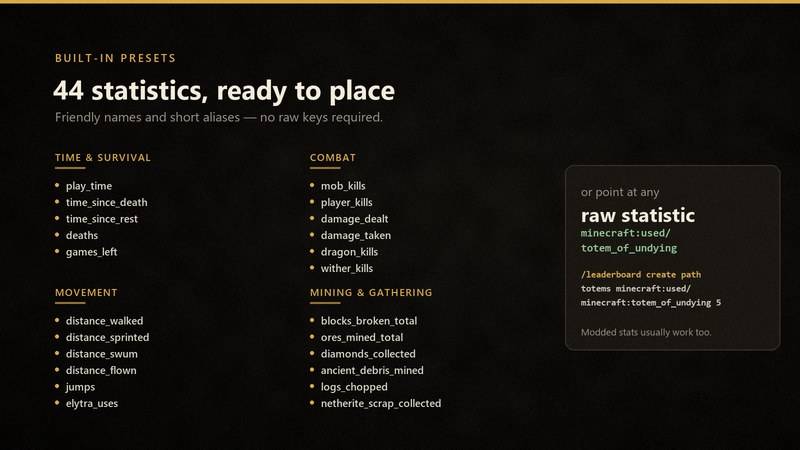
Run /leaderboard presets in game for the full list, or /leaderboard presets <query> to search it. Short aliases such as diamonds, wood and kills are accepted.
Time and survival: play_time, time_since_death, time_since_rest, deaths, games_left
Combat: mob_kills, player_kills, damage_dealt, damage_taken, zombie_kills, skeleton_kills, creeper_kills, spider_kills, enderman_kills, dragon_kills, wither_kills
Movement: distance_walked, distance_sprinted, distance_swum, distance_flown, jumps, elytra_uses
Gathering: diamonds_collected, iron_ingots_collected, gold_ingots_collected, emeralds_collected, redstone_collected, coal_collected, lapis_collected, copper_ingots_collected, netherite_scrap_collected
Mining: blocks_broken_total, ores_mined_total, diamond_ore_mined, iron_ore_mined, gold_ore_mined, obsidian_mined, ancient_debris_mined, logs_chopped
Crafting and usage: items_crafted_total, items_used_total, items_picked_up_total
Economy and fishing: villager_trades, fish_caught
Themes
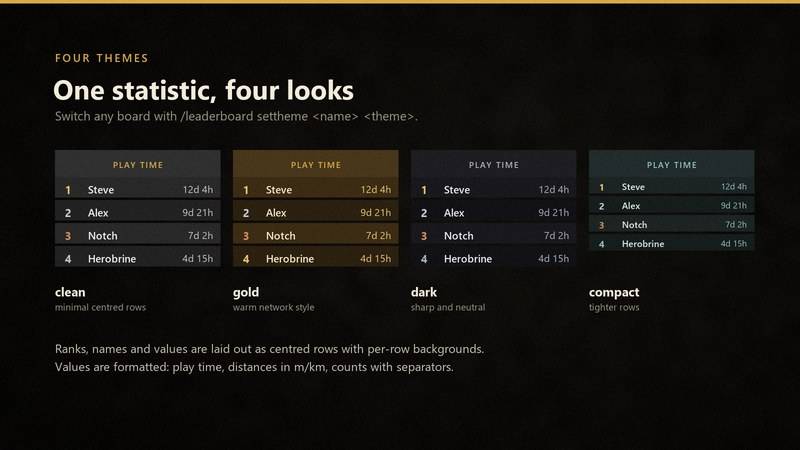
| Theme | Look |
|---|---|
clean |
Minimal centered rows with soft highlights (default) |
gold |
Warmer, premium network-style styling |
dark |
Sharper dark styling with centered rows |
compact |
Tighter rows for smaller spaces |
/leaderboard settheme spawn_board compact
Configuration and storage
Boards are saved in config/leaderboard_holograms.json in the server directory. Each board stores its name, statistic, dimension, position, row count and theme. Stop the server before editing the file, then start it again or run /leaderboard reload.
Automatic refresh runs every 5 minutes (6000 ticks). Boards read the live statistics of players who have played in that world; a fresh world with no player data shows no rows yet.
Custom statistics and modded statistics
Any statistic tracked by the vanilla statistics system can be displayed. Use /leaderboard create path or /leaderboard setstat path with a path such as:
minecraft:custom/minecraft:play_timeminecraft:mined/minecraft:deepslate_diamond_oreminecraft:killed/minecraft:wardenminecraft:used/minecraft:ender_pearl
Statistics registered by other mods usually work through the same path format. The mod warns when a path is outside the common vanilla categories.
FAQ
Do players need the mod? No. The mod is server-side; vanilla clients see the boards.
Does it work on Paper or a vanilla server? No. It requires Fabric or NeoForge on the server.
Which file should I download? Match the loader and the exact Minecraft version in the file name. Fabric and NeoForge builds are separate.
How many players can a board show? Up to 25; 10 by default.
Will it lag the server? Boards are display entities refreshed every 5 minutes, not every tick. A normal number of boards has negligible impact.
Why is a board empty? Statistics are per player and per world. A new world has no statistics yet, and a board only reads players from its own dimension.
Can I show two boards with the same statistic? Yes. Boards are addressed by name and keep independent positions, row counts and themes.
Can I move an existing world to another loader? The board config is loader-independent, but test on a copy of the world first. Keep the same mod version family.
Source and support
Source code: https://github.com/ismaildzf/leaderboard-hologram
Bug reports, preset requests and questions: Discord v_eno or the GitHub issue tracker.
Licensed under the MIT License.
Screenshots
Gallery
-
Live 26.3 server board Playtime board on a real NeoForge 26.3 server.
-
Playtime leaderboard — gold theme Live top-10 playtime board in-game, gold theme.
-
Two boards side by side Playtime and jumps boards placed together in a survival world.
-
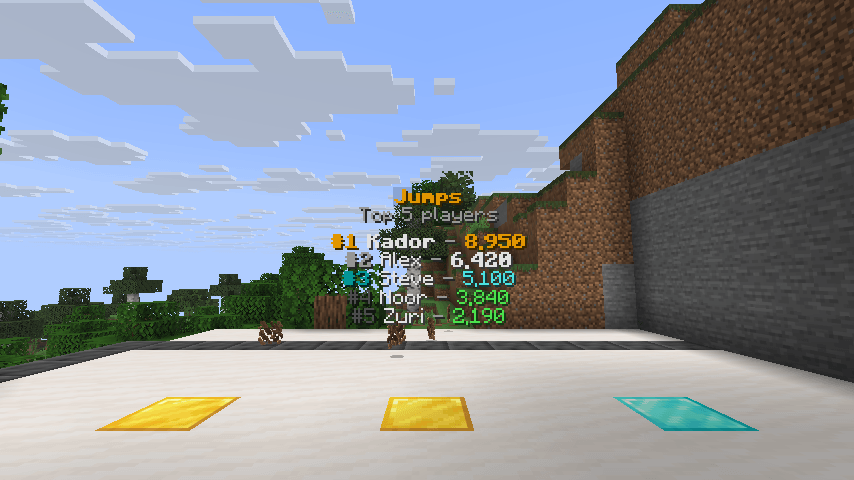
Jumps leaderboard — clean theme Compact clean-theme board showing top players by jumps.
-
 01_hero.jpg 01_hero.jpg
-
 02_presets.jpg 02_presets.jpg
-
 03_themes.jpg 03_themes.jpg
-
 04_clients.jpg 04_clients.jpg
-
 05_commands.jpg 05_commands.jpg
-
 Playtime leaderboard Live top-10 playtime board.
-
 Two boards side by side Playtime and jumps boards placed together in a survival world.
-
 Jumps leaderboard — clean theme Clean theme with per-rank rows.
-
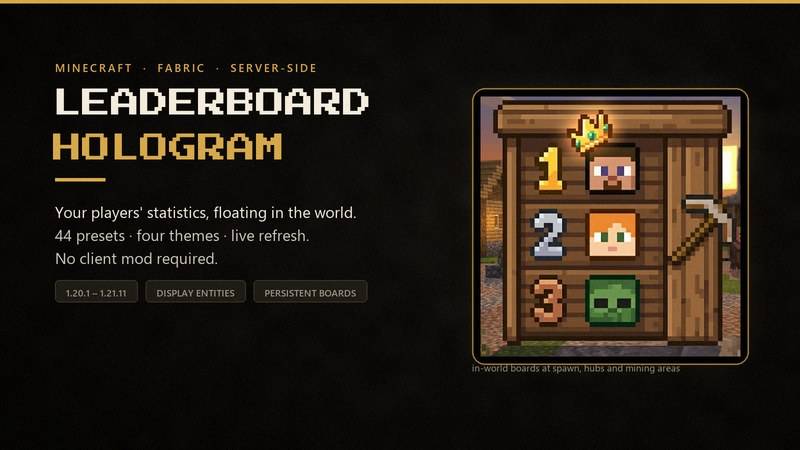
 Leaderboard Hologram overview Server-side hologram leaderboards at a glance.
-
 44 ready-made presets Play time, kills, mining, crafting, trades and more.
-
 Four themes Clean, gold, dark and compact.
-
 No client mod required Vanilla clients see the boards.
-
 Simple commands Create, move, restyle and refresh boards.
Versions
Files
Relations
Project Relations
More like this
Similar Mods
Suggestions use data such as tags, dependencies, dependents, descriptions, titles, and more to rank how much they overlap with this mod.
On ModDex
Community snapshot
By the numbers
Statistics

Get it on
Available Platforms
On ModDex
Community snapshot
By the numbers