
Community listing page, reviews here may not be monitored by the author.
Leveled Drops


No reviews yet
makes your levels a drop multiplier
Community voices
Reviews
No reviews yet. Be the first to review this project!
Get it on
Available Platforms
Compatibility
Supported Environments
Must be installed on both the client and the server.
About
Project Details
For authors
Embed Badge
If you're the author of this project, you can embed a live badge anywhere that supports HTML or Markdown. It updates automatically whenever ratings change.
Use HTML for any page that supports it, or Markdown for README files and Markdown-based descriptions.
Identifiers
Platform IDs
Resources
External Links
About
Description
Leveled Drops — 1.0.0
Background
This mod is a Forge port of the datapack "Minecraft but your XP = your multiplier" by bittu5134.
The core idea comes from the datapack: your XP level acts as a drop multiplier. This mod brings it to Forge 1.20.1, adds a configuration screen, and extends it with an enchantment rework.
Drop Multiplier
Every item drop from a broken block or killed mob is multiplied by your XP level. Level 10 means ten times the drops. Containers count too — breaking a chest or barrel multiplies the items inside along with the block's own drops. NBT data (enchantments, etc.) is preserved on every copy.
Setting the multiplier to 0 suppresses all item drops. XP orbs are unaffected.
Press M (rebindable) to open the configuration screen. The slider sets your multiplier anywhere from 1 to your current level, and the Disable Drops button sets it to 0. Your choice persists across sessions and clamps automatically if you lose levels. A ×N indicator sits in a corner of your screen at all times; the position is configurable from the same screen.
Enchantment Changes
Level cap raised to 64. All multi-level enchantments (Sharpness, Protection, Efficiency, etc.) now go up to 64. Combine books the normal way to climb: Sharpness V + V = VI, and so on. The /enchant command respects the new cap too. Single-level enchantments are untouched.
No "Too Expensive!". Anvil cost is based only on enchantment rarities, never the accumulated repair penalty, so nothing is ever blocked by cost.
Roman numeral display. Levels above X are shown as XI (11) through LXIV (64) so the number is always clear.
Notes
Install on both client and server in multiplayer. The HUD and keybind are client-only and won't appear on a dedicated server.
Leveled Drops — 1.0.1
Bug fixes
HUD and GUI now update automatically when your XP level changes. Previously the displayed multiplier stayed frozen at the value from your last login or last slider interaction. It now syncs the moment your level goes up or down.
"Stay at max" behaviour. If your multiplier was set to your current maximum and your level increases, the multiplier rises with it. If you had chosen a specific number below your max, that number is preserved (and clamped down if you lose levels).
Non-stackable item drops now multiply correctly. Items with a stack size of one (such as shulker boxes) were sometimes only dropping once because the multiplier visible in the HUD was stale. With the sync fix above, the displayed value and the actual drop count stay in agreement.
Leveled Drops — 1.0.0
Background
This mod is a Forge port of the datapack "Minecraft but your XP = your multiplier" by bittu5134. Original datapack: https://www.planetminecraft.com/data-pack/minecraft-but-your-xp-your-multiplier-bittu5134/
The core idea comes from the datapack: your XP level acts as a drop multiplier. This mod brings it to Forge 1.20.1, adds a configuration screen, and extends it with an enchantment rework.
Drop multiplier
Every item drop from a broken block or killed mob is multiplied by your XP level. Level 10 means ten times the drops. Containers count too — breaking a chest or barrel multiplies the items inside along with the block's own drops. NBT data (enchantments, etc.) is preserved on every copy.
Setting the multiplier to 0 suppresses all item drops. XP orbs are unaffected.
Press M (rebindable) to open the configuration screen. The slider sets your multiplier anywhere from 1 to your current level, and the Disable Drops button sets it to 0. Your choice persists across sessions and clamps automatically if you lose levels. A ×N indicator sits in a corner of your screen at all times; the position is configurable from the same screen.
Enchantment changes
Level cap raised to 64. All multi-level enchantments (Sharpness, Protection, Efficiency, etc.) now go up to 64. Combine books the normal way to climb: Sharpness V + V = VI, and so on. The /enchant command respects the new cap too. Single-level enchantments are untouched.
No "Too Expensive!". Anvil cost is based only on enchantment rarities, never the accumulated repair penalty, so nothing is ever blocked by cost.
Roman numeral display. Levels above X are shown as XI (11) through LXIV (64) so the number is always clear.
Notes
Install on both client and server in multiplayer. The HUD and keybind are client-only and won't appear on a dedicated server.
Screenshots
Gallery
-
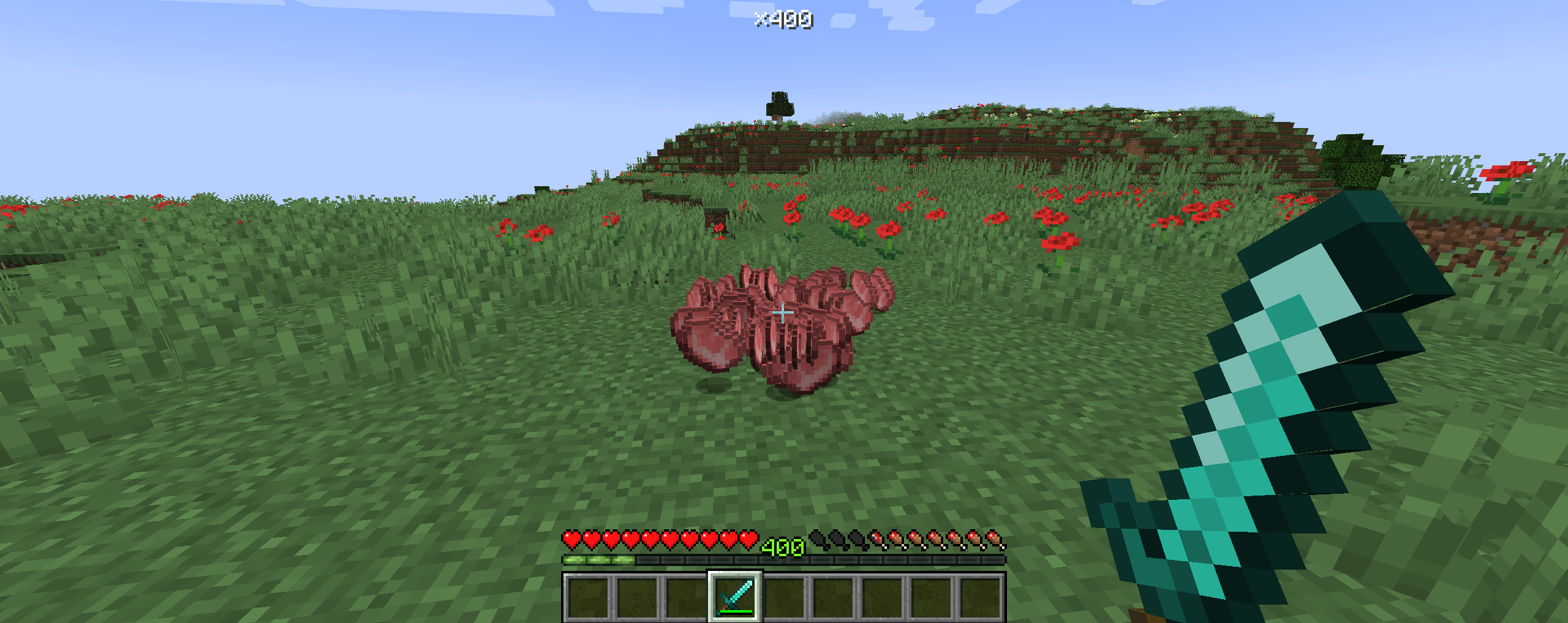 example this is what happens when you kill a pig
 -
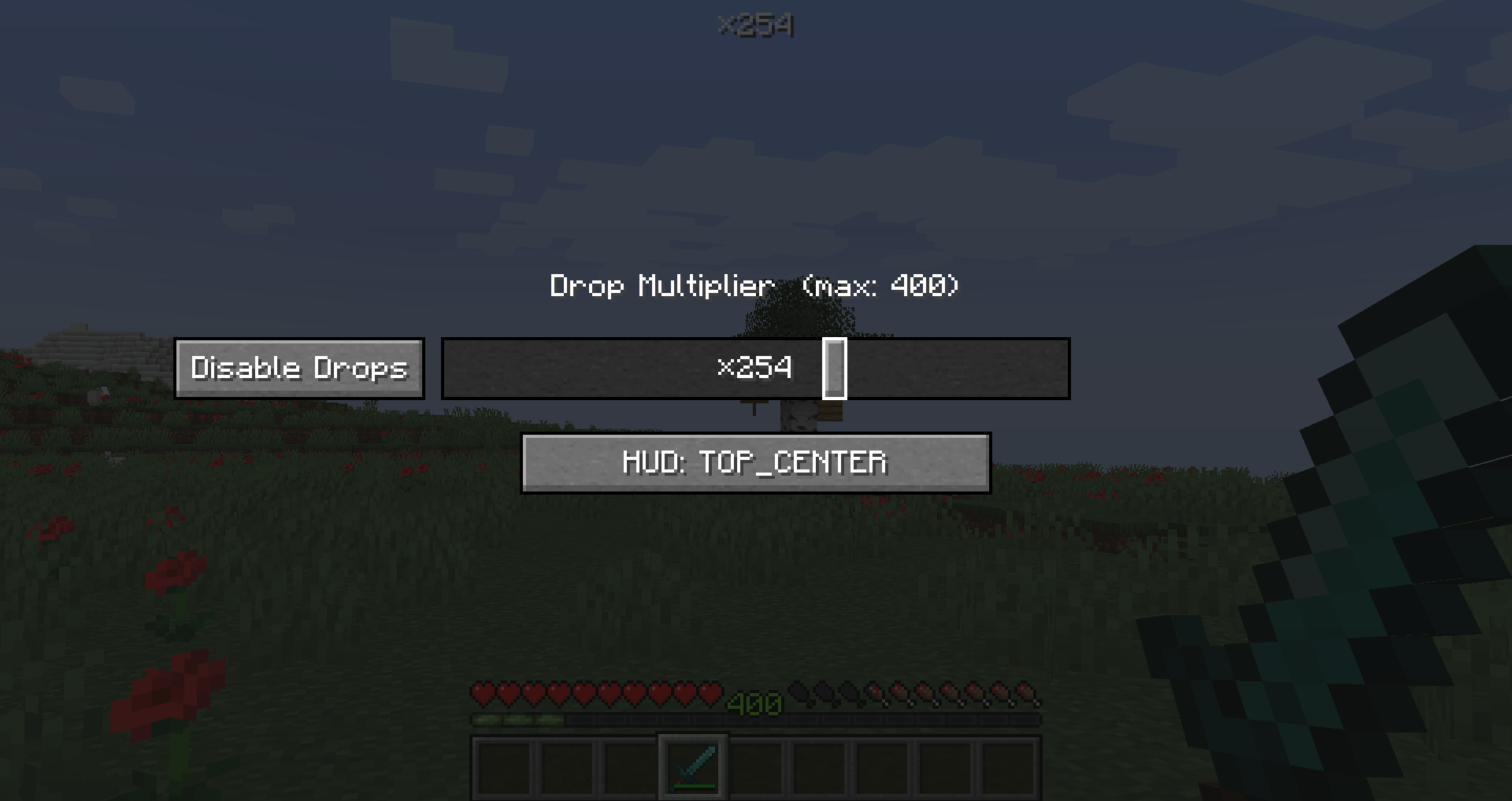 GUI this is the slider GUI
-
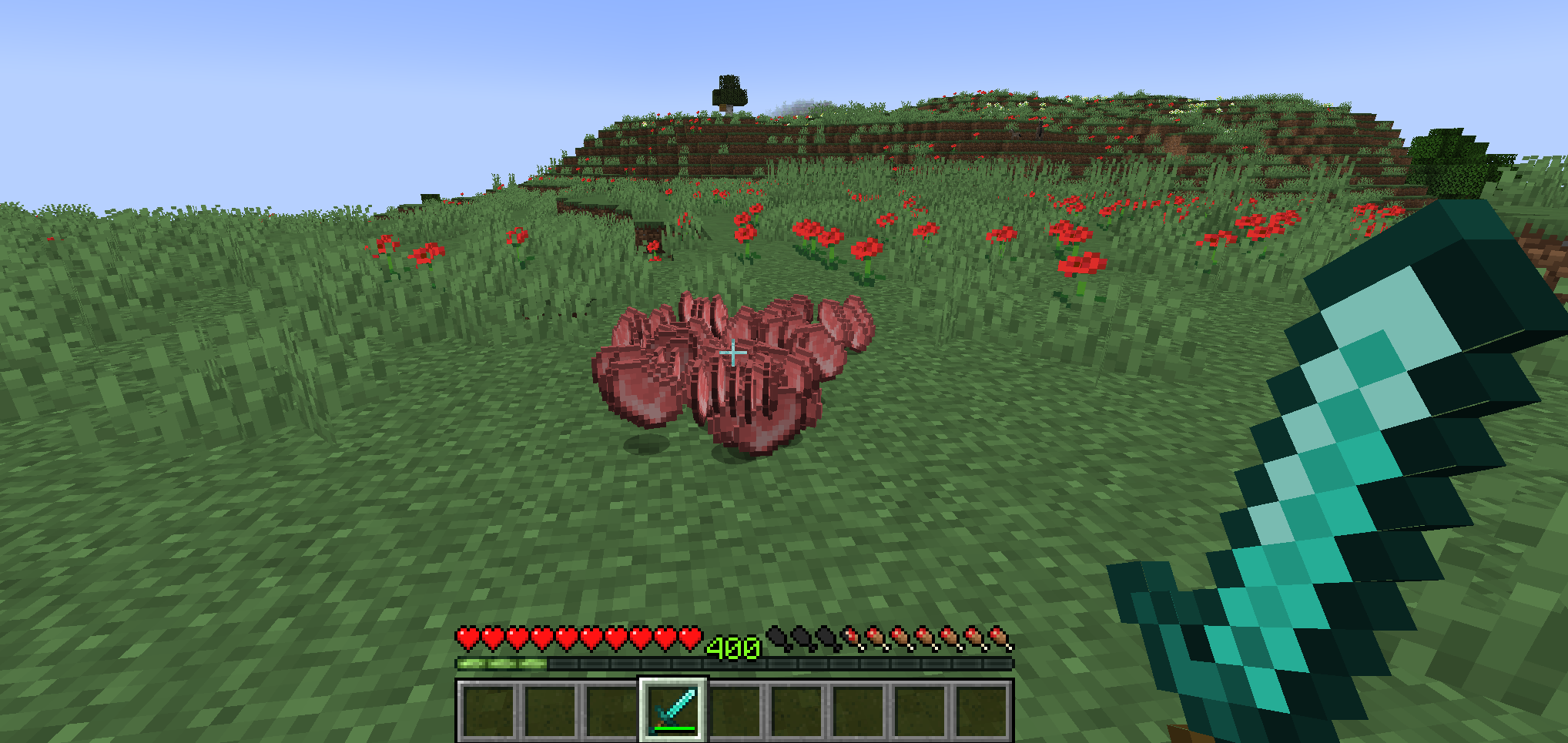 level = multiplier
 -
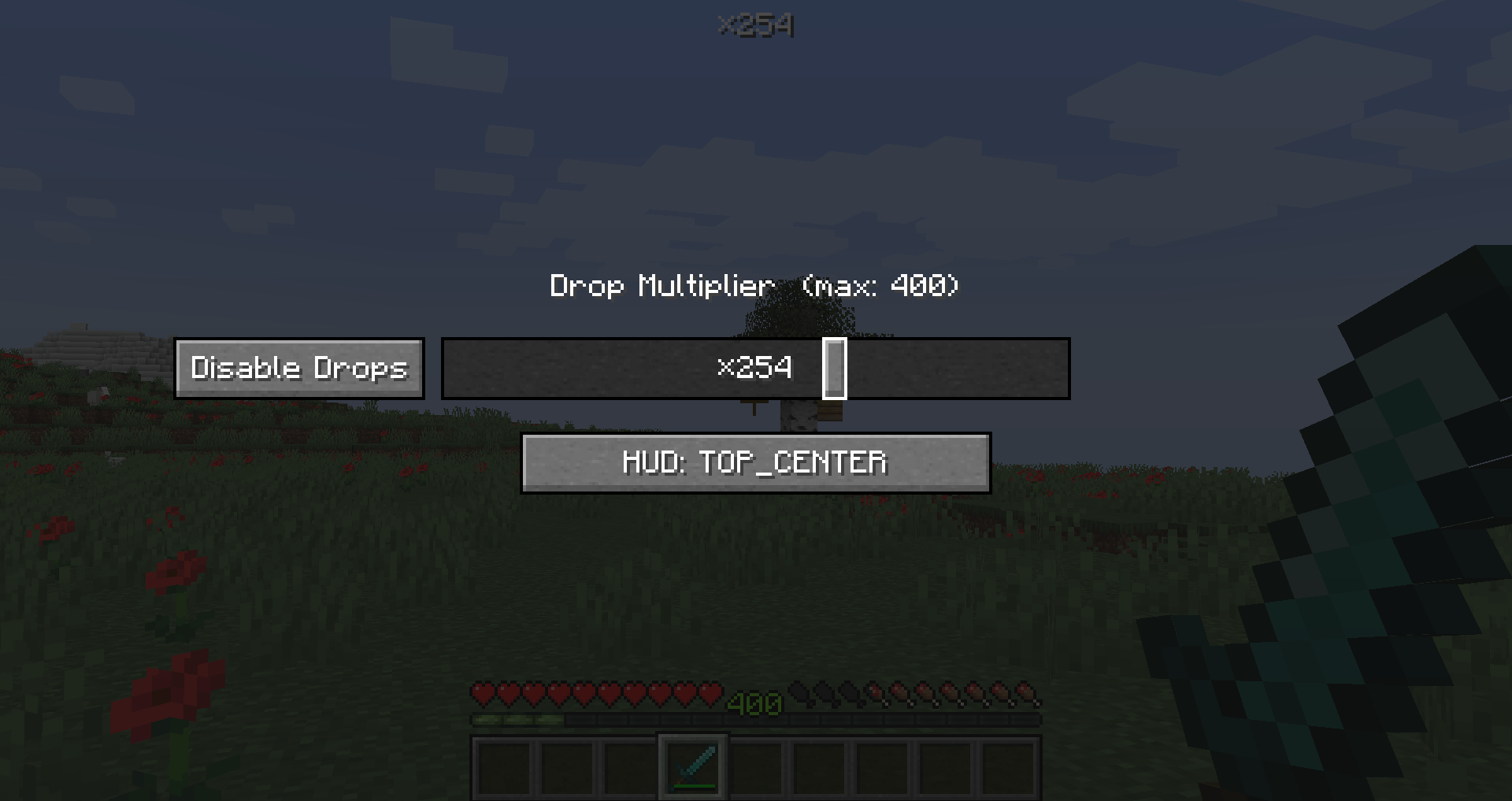 the GUI the GUI to manage the drops. features a Disable button to drop the multiplier to 0 and a button to reposition the HUD
Versions
Files
Relations
Project Relations
More like this
Similar Mods
Suggestions use data such as tags, dependencies, dependents, descriptions, titles, and more to rank how much they overlap with this mod.
On ModDex
Community snapshot
By the numbers
Statistics
Want to reach Minecraft players?
We're looking for a server hosting partner to feature here and other parts of the site. Interested? Send us a message!
Get in touchGet it on
Available Platforms
On ModDex
Community snapshot
By the numbers
Statistics
Resources