Community listing page, reviews here may not be monitored by the author.
Light Level Simple


No reviews yet
A Simple light level overlay mod!
Community voices
Reviews
No reviews yet. Be the first to review this project!
Get it on
Available Platforms
Compatibility
Supported Environments
Runs entirely on the client. Works on vanilla servers.
About
Project Details
For authors
Embed Badge
If you're the author of this project, you can embed a live badge anywhere that supports HTML or Markdown. It updates automatically whenever ratings change.
Use HTML for any page that supports it, or Markdown for README files and Markdown-based descriptions.
Identifiers
Platform IDs
Resources
External Links
About
Description
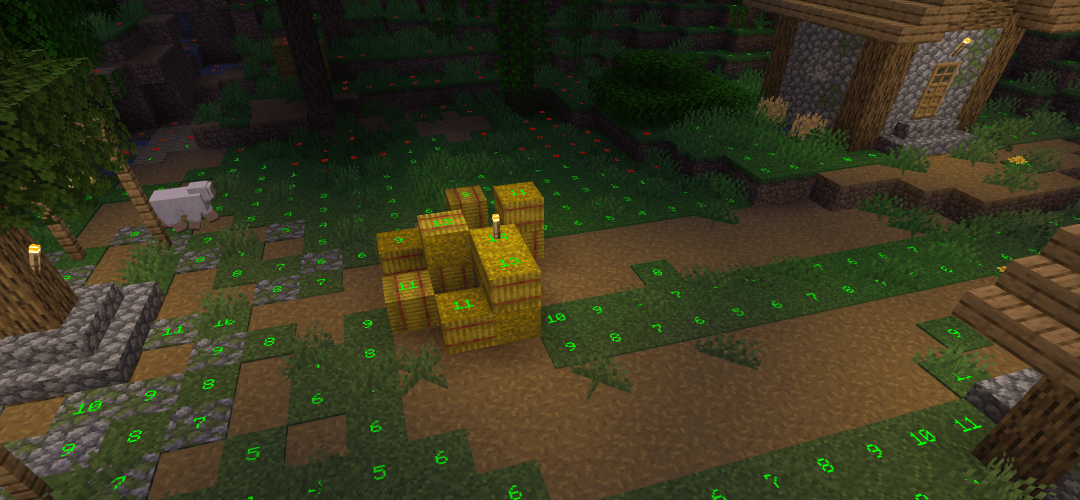
Light Level Simple is a client mod that shows light level numbers on blocks where mobs can spawn, so you can spot unsafe areas and light them up!

What It Shows
- Block light value on each spawnable block
- Optional daylight row above the blocks light level
- Colors based on whether the block is safe or unsafe
- Dimension specific light levels
Colors
- Custom colors for safe, unsafe and daylight values
- Optional separate color for the daylight value
Visual Customization
- Adjustable chunk range for how far around you numbers are shown
- Independent scale for block light and daylight numbers
- Brightness control from world lighting to fully bright markers
- Separate spawn light thresholds for the Overworld, Nether, and The End
- Toggle safe spots on or off (hide numbers on blocks that are safe)
- Toggle daylight display and whether daylight uses its own color
Keybinds
- Toggle Light Overlay:
F4 - Open Mod Settings:
F7
Note: These are the default keybinds. You can change them in Options > Controls > Key Binds, or in the mod's Key Binds settings page.
Dependencies
Credits & License
This project is All Rights Reserved.
This project was inspired by LightLevel.
Portions of the spawn eligibility logic in SpawnCheck.java were adapted from Lighty and are licensed under the Apache License, Version 2.0. Additional modifications to that file are separately licensed under All Rights Reserved.
A copy of the Apache License 2.0 is included in distributed builds as LICENSE.
Light Level Simple is a client mod that shows light level numbers on blocks where mobs can spawn, so you can spot unsafe areas and light them up!
What It Shows
- Block light value on each spawnable block
- Optional daylight row above the blocks light level
- Colors based on whether the block is safe or unsafe
- Dimension specific light levels
Colors
- Custom colors for safe, unsafe and daylight values
- Optional separate color for the daylight value
Visual Customization
- Adjustable chunk range for how far around you numbers are shown
- Independent scale for block light and daylight numbers
- Brightness control from world lighting to fully bright markers
- Separate spawn light thresholds for the Overworld, Nether, and The End
- Toggle safe spots on or off (hide numbers on blocks that are safe)
- Toggle daylight display and whether daylight uses its own color
Keybinds
- Toggle Light Overlay:
F4 - Open Mod Settings:
F7
Note: These are the default keybinds. You can change them in Options > Controls > Key Binds, or in the mod's Key Binds settings page.
Dependencies
Credits & License
This project is All Rights Reserved.
This project was inspired by LightLevel.
Portions of the spawn eligibility logic in SpawnCheck.java were adapted from Lighty and are licensed under the Apache License, Version 2.0. Additional modifications to that file are separately licensed under All Rights Reserved.
A copy of the Apache License 2.0 is included in distributed builds as LICENSE.
Screenshots
Gallery
-
 2026-08-20_22.05.40.png 2026-08-20_22.05.40.png
-
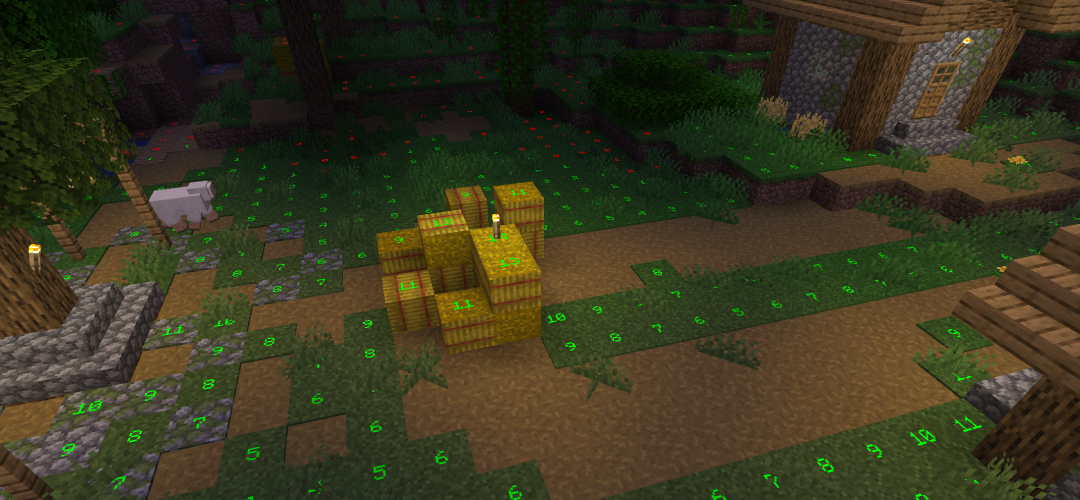 Village with mod activated Showcase of the Light Level Simple mod
Versions
Files
Relations
Project Relations
More like this
Similar Mods
Suggestions use data such as tags, dependencies, dependents, descriptions, titles, and more to rank how much they overlap with this mod.
On ModDex
Community snapshot
By the numbers
Statistics
Want to reach Minecraft players?
We're looking for a server hosting partner to feature here and other parts of the site. Interested? Send us a message!
Get in touchGet it on
Available Platforms
On ModDex
Community snapshot
By the numbers
Statistics
Resources