
Community listing page, reviews here may not be monitored by the author.
LinguaChat


No reviews yet
Fabric mod for automatic bidirectional chat translation. Supports multiple providers: Google Translate, DeepL, and Kagi.
Community voices
Reviews
No reviews yet. Be the first to review this project!
Get it on
Available Platforms
Compatibility
Supported Environments
Runs entirely on the client. Works on vanilla servers.
About
Project Details
For authors
Embed Badge
If you're the author of this project, you can embed a live badge anywhere that supports HTML or Markdown. It updates automatically whenever ratings change.
Use HTML for any page that supports it, or Markdown for README files and Markdown-based descriptions.
Identifiers
Platform IDs
Resources
External Links
About
Description
LinguaChat makes your communication in Minecraft accessible in any language, automatically translating chat messages without interrupting gameplay!
You can configure the translation directions for both sides (Client/Server) in the configuration file See description below.
📥 Installation
- Install Fabric Loader for your Minecraft version
- Install Fabric API matching your version
- Download LinguaChat for your version
For official Minecraft Launcher:
- Place the JAR file in your
modsfolder:- Windows:
%APPDATA%\.minecraft\mods - Linux:
~/.minecraft/mods - macOS:
~/Library/Application Support/minecraft/mods
- Windows:
For Prism Launcher and other instance-based launchers:
- Open instance settings → Mods tab
- Click Add / Install Mods and select the JAR file
- Make sure Fabric API is installed for this instance
Final step:
- Launch Minecraft with Fabric profile
📝 Usage Example
When properly configured, the mod automatically translates messages:
Player1: привет
[Chat for you]: hello

Player2: hello
[Chat for you]: привет
[!TIP] The original text of the message is available by hovering over the translated message!
⚙️ Configuration
Mod settings are accessible via the K key in-game.
You can also edit the file directly: config/linguachat.json
Keybinds
| Key | Action |
|---|---|
| K | Open settings screen |
| N | Toggle outgoing message translation |
Settings
| Parameter | Default | Description |
|---|---|---|
enabled |
true |
Enable/disable the mod |
translateIncoming |
true |
Translate incoming messages |
translateOutgoing |
true |
Translate outgoing messages |
defaultSourceLang |
"auto" |
Source language (auto for detection) |
defaultTargetLang |
"en" |
Target language for both incoming messages (messages from other players) and outgoing messages (your messages sent to server) |
preferredTranslator |
"google" |
Provider: google, deepl, kagi |
deeplApiKey |
"" |
DeepL API key |
kagiApiKey |
"" |
Kagi API token |
kagiSessionToken |
"" |
Kagi session token |
showOriginalOnHover |
true |
Show original on hover |
cacheSize |
512 |
Translation cache size |
debugMode |
false |
Debug logging |
Translation Providers
| Provider | Cost | API Key | Languages |
|---|---|---|---|
| Free | Not required | 100+ | |
| DeepL | Free/Paid | Get API Key | 30+ |
| Kagi | Kagi Pass | API Token (settings/api) or Session Token (settings/user_details) | Multiple |
🐛 Reporting Issues
Found a bug or have a suggestion? Create an issue:
👉 https://github.com/Lintech-1/LinguaChat/issues
Please include:
- Minecraft version
- Mod version
- Log excerpts
- Steps to reproduce
LinguaChat makes your communication in Minecraft accessible in any language, automatically translating chat messages without interrupting gameplay!
You can configure the translation directions for both sides (Client/Server) in the configuration file See description below.
📥 Installation
- Install Fabric Loader for your Minecraft version
- Install Fabric API matching your version
- Download LinguaChat for your version
For official Minecraft Launcher:
- Place the JAR file in your
modsfolder:- Windows:
%APPDATA%\.minecraft\mods - Linux:
~/.minecraft/mods - macOS:
~/Library/Application Support/minecraft/mods
- Windows:
For Prism Launcher and other instance-based launchers:
- Open instance settings → Mods tab
- Click Add / Install Mods and select the JAR file
- Make sure Fabric API is installed for this instance
Final step:
- Launch Minecraft with Fabric profile
📝 Usage Example
When properly configured, the mod automatically translates messages:
Player1: привет
[Chat for you]: hello

Player2: hello
[Chat for you]: привет
[!TIP] The original text of the message is available by hovering over the translated message!
⚙️ Configuration
Mod settings are accessible via the K key in-game.
You can also edit the file directly: config/linguachat.json
Keybinds
| Key | Action |
|---|---|
| K | Open settings screen |
| N | Toggle outgoing message translation |
Settings
| Parameter | Default | Description |
|---|---|---|
enabled |
true |
Enable/disable the mod |
translateIncoming |
true |
Translate incoming messages |
translateOutgoing |
true |
Translate outgoing messages |
defaultSourceLang |
"auto" |
Source language (auto for detection) |
defaultTargetLang |
"en" |
Target language for both incoming messages (messages from other players) and outgoing messages (your messages sent to server) |
preferredTranslator |
"google" |
Provider: google, deepl, kagi |
deeplApiKey |
"" |
DeepL API key |
kagiApiKey |
"" |
Kagi API token |
kagiSessionToken |
"" |
Kagi session token |
showOriginalOnHover |
true |
Show original on hover |
cacheSize |
512 |
Translation cache size |
debugMode |
false |
Debug logging |
Translation Providers
| Provider | Cost | API Key | Languages |
|---|---|---|---|
| Free | Not required | 100+ | |
| DeepL | Free/Paid | Get API Key | 30+ |
| Kagi | Kagi Pass | API Token (settings/api) or Session Token (settings/user_details) | Multiple |
🐛 Reporting Issues
Found a bug or have a suggestion? Create an issue:
👉 https://github.com/Lintech-1/LinguaChat/issues
Please include:
- Minecraft version
- Mod version
- Log excerpts
- Steps to reproduce
Screenshots
Gallery
-
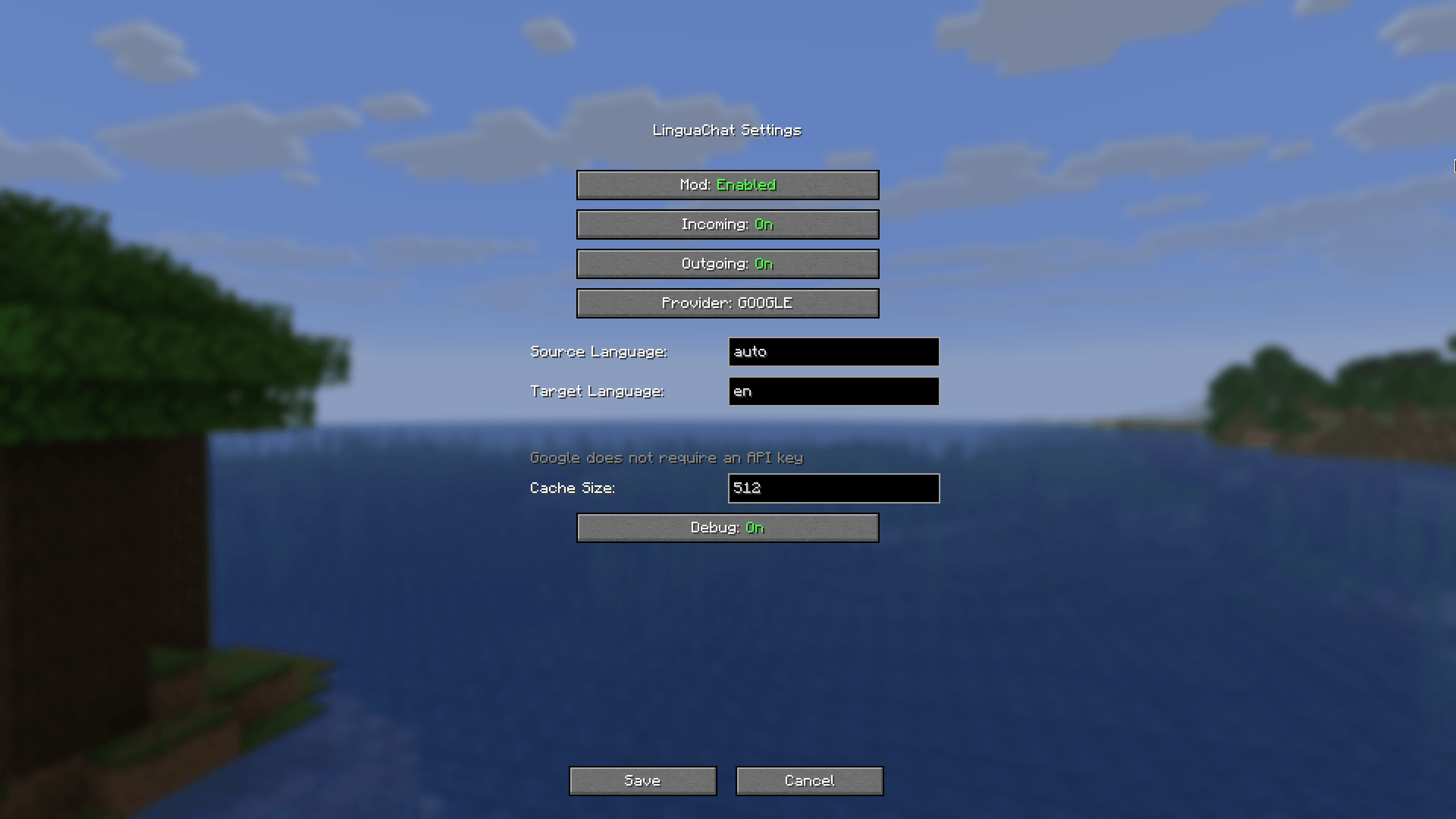 Settings The mod settings menu with parameters
-
 Settings The mod settings menu with parameters
Versions
Files
Relations
Project Relations
More like this
Similar Mods
Suggestions use data such as tags, dependencies, dependents, descriptions, titles, and more to rank how much they overlap with this mod.
On ModDex
Community snapshot
By the numbers
Statistics
Want to reach Minecraft players?
We're looking for a server hosting partner to feature here and other parts of the site. Interested? Send us a message!
Get in touchGet it on
Available Platforms
On ModDex
Community snapshot
By the numbers
Statistics
Resources