Community listing page, reviews here may not be monitored by the author.
Locate Plus


No reviews yet
Find any block, entity or item, not just structures. Scans, surveys, inspects and teleports you there safely. Server-side only, no client install needed.
Community voices
Reviews
No reviews yet. Be the first to review this project!
Get it on
Available Platforms
Compatibility
Supported Environments
Runs entirely on the server. Also works in singleplayer.
About
Project Details
For authors
Embed Badge
If you're the author of this project, you can embed a live badge anywhere that supports HTML or Markdown. It updates automatically whenever ratings change.
Use HTML for any page that supports it, or Markdown for README files and Markdown-based descriptions.
Identifiers
Platform IDs
About
Description
Locate Plus
Find any block, entity or item, not just structures. Scans, surveys, inspects and teleports you there safely. Server-side only, no client install needed.
Commands
| Command | What it does |
|---|---|
/lp |
In-game command list |
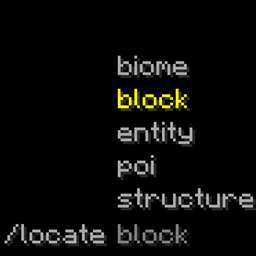
/locate block <id|#tag> [<n> chunks|blocks] |
Nearest matching block |
/locate entity <id|#tag> [<n> chunks|blocks] |
Nearest matching entity |
/locate item <id|#tag> [<n> chunks|blocks] [export] |
Find an item in chests, on the ground, on mobs and on players |
/locate biome|structure|poi <id|#tag> |
Vanilla searches, with a safe-teleport button |
/lp inspect <x> <y> <z> |
Redstone, light, mob spawning, crops, containers, entity data |
/safetp [targets] <destination> |
Teleport somewhere you can actually stand |
/glow <target> <n> chunks|blocks |
Outline entities through terrain |
/lp analyze blocks|entities|both [<n> chunks|blocks] [export] |
Survey an area |
/purgeentities <target> [<n> chunks|blocks] [export] |
Remove entities, with a log |
/lp visualize <n> chunks|blocks [seconds] |
Outline the area a scan would cover |
/lp stop |
Stop any scan that is running |
/lp clear [all|both|glow|markers] |
Clear what this mod is showing |
/lp config / /lp reload |
Show settings, or re-read the config file |
Needs permission level 2 by default. Add forceload to most commands to include unloaded chunks.
Good to know
Leave the radius off and a command covers every chunk the server has loaded, which on a normal world is a few hundred around you. Give one and it covers exactly that.
The radius unit is required when you give one. Write 64 blocks or 4 chunks, never just 64. Plural only.
Both units are echoed back so nothing is ambiguous.
A chunk radius is a reach, not a total. 4 chunks scans everything within four chunks in every
direction, which is 49 chunks. 20 chunks reaches 20 chunks out and covers 1,257. Use 0 chunks
for the chunk you are standing in and nothing else. Both units describe a distance, so a block
radius works the same way and covers whatever chunks it reaches.
Radius is horizontal. The full height of the world is always included, so flying high above something still finds it.
Targets accept ids, tags and selectors. minecraft:zombie, #minecraft:skeletons, @e,
@a, @e[type=minecraft:creeper]. Modded ids work in any namespace. Searching a tag lists each
matching type separately with its own count and teleport button.
Nothing is force-loaded unless you ask. Without forceload a scan only reads chunks already
in memory and never generates terrain. Skipped chunks are counted and reported.
Scan as far as you like. Large scans warn about the cost and then run, sliced across ticks so they never freeze the server. The only ceilings are 1,000 chunks and 16,000 blocks, which exist because a radius describes a disc: 1,000 chunks is already 3,141,549 chunks to hold in memory.
The block you were looking for glows through the ground. /locate block outlines its nearest
hit, so a buried target is visible from wherever you land and there are no directions to follow.
The outline is a copy of the block itself at its real size. The inside is plain glass, so the
block you were looking for is still the block you see. It disappears the moment you mine that
block, or when you replace it, after a minute, or on /lp clear. Set block_marker_seconds to 0
for no time limit, and block_marker_fill to change what it is made of, and
block_marker_colour to change the outline colour, as a hex code or a dye name. The fill has to
be a block with a model: barrier, light and structure void draw nothing at all, so they are
refused with a note in the log. Set mark_located_blocks to false to stop outlining entirely.
The marker is a display entity: no hitbox, no collision, nothing to walk into or hit. It is drawn
at the true size of the block, very slightly oversized so the outline sits just outside the real
faces rather than flickering against them. Anyone nearby can see it, the same as /glow, because
glowing is entity state. Any marker left behind by a server that stopped without cleaning up is
deleted the moment it loads again.
Teleports put you at the nearest safe spot and turn you to face the target. Slabs, stairs,
paths and shallow water all count as somewhere you can stand. The [Teleport] buttons in chat run
/safetp, so they get the same safety checks. Where there is genuinely nowhere to stand, such as a
position sealed inside solid rock, you are sent to the exact spot anyway and told the landing was
not checked. Set fallback_to_vanilla_tp to false to have the teleport cancelled instead.
The buttons have two switches, because the two kinds of result are different. A block, entity or
item result points at something real, so safe_teleport_from_results covers those. A biome,
structure or point of interest result points at a place rather than a block, and
safe_teleport_from_biome_results covers those. Set either to false for a plain /tp to the
exact coordinate.
Exports have four independent switches. Every block type is counted exactly whatever they are set to; they only decide which ones also get a list of coordinates.
| Switch | Lists | Default |
|---|---|---|
export_modded_blocks |
anything from another mod | on |
export_placed_blocks |
vanilla blocks a player could place | on |
export_notable_blocks |
ores, spawners, amethyst and other rare finds | off |
export_natural_blocks |
ordinary terrain: stone, dirt, water | off |
They are independent, so any combination works: modded blocks on their own, or ores without the buildings, or the other way round.
Modded blocks are sorted by the tags mods share, so a modded ore counts as an ore and a modded stone counts as ground. One with no tags at all is treated as something placed, which is right for machines, pipes and storage.
Exports are written to config/locate-plus/exports/ as a text file, on a background thread.
Chat shows the top 60 types and says how many were left out, which chat_results_shown changes.
Use export for the complete list with every coordinate.
Players are never removed by /purgeentities, however the target is written. It also produces
no drops, no XP and no death messages.
Glow and block markers last one minute. /glow is entities only.
/locate item looks everywhere an item can be: containers (including modded ones), shulker
boxes sitting inside other containers, items on the ground, mob equipment, item frames, and player
inventories and ender chests. Results are grouped by location, biggest pile first, and each line
says what is holding them. Any of those places can be switched off in the config, which is worth
doing for player inventories if your server treats those as private.
Installing it on a server you do not own
You cannot. This mod only does anything on the machine running the server, because every command it adds is registered into the server's command tree and every scan reads the server's copy of the world. Putting the jar in your own mods folder and joining someone else's server gets you nothing: your client sends the command as plain text, and a server without the mod answers "Unknown or incomplete command". Nothing is x-rayed, because the client is never the thing doing the looking.
The same reasoning is why it needs no client install in the first place. Being useless as a client-side cheat and being invisible to players are the same property.
Who sees what
Command output is private. Every message goes only to whoever ran the command, so coordinates are never announced to the server.
The one exception is glowing. It is entity state rather than a message, so any player who can see
the entity sees the outline; there is no per-player version of it. That affects /glow, and
/locate entity, which marks its nearest match. Set glow_located_entities to false to drop the
marker, or turn glow off entirely.
Configuration
config/locate-plus/config.json is written on first start. It is JSON, but comments are allowed,
and every setting is explained in the file itself. Edit it and run /lp reload, or restart.
You can change the permission level, turn individual commands off entirely, set the default radii,
choose what /locate item is allowed to search, tune how much of each tick scans may use, and
raise or lower every limit the mod applies: the largest radius it will accept, how many results
chat shows, how much one export or item search may hold, and how deep it looks into nested
containers. /lp config prints what the server currently has loaded.
A file with a syntax error is left alone and reported in the log, so a typo never costs you your settings. Out-of-range values are clamped rather than rejected.
Defaults
/locate radius |
64 blocks |
/lp analyze radius |
4 chunks |
| Permission level | 2 (OP, or cheats in singleplayer) |
| Scan budget | 8 ms per tick |
AI Disclaimer
I used AI for the README and descriptions to help clean up my writing and grammar. Hope that's okay!
Locate Plus
Find any block, entity or item, not just structures. Scans, surveys, inspects and teleports you there safely. Server-side only, no client install needed.
Commands
| Command | What it does |
|---|---|
/lp |
In-game command list |
/locate block <id|#tag> [<n> chunks|blocks] |
Nearest matching block |
/locate entity <id|#tag> [<n> chunks|blocks] |
Nearest matching entity |
/locate item <id|#tag> [<n> chunks|blocks] [export] |
Find an item in chests, on the ground, on mobs and on players |
/locate biome|structure|poi <id|#tag> |
Vanilla searches, with a safe-teleport button |
/lp inspect <x> <y> <z> |
Redstone, light, mob spawning, crops, containers, entity data |
/safetp [targets] <destination> |
Teleport somewhere you can actually stand |
/glow <target> <n> chunks|blocks |
Outline entities through terrain |
/lp analyze blocks|entities|both [<n> chunks|blocks] [export] |
Survey an area |
/purgeentities <target> [<n> chunks|blocks] [export] |
Remove entities, with a log |
/lp visualize <n> chunks|blocks [seconds] |
Outline the area a scan would cover |
/lp stop |
Stop any scan that is running |
/lp clear [all|both|glow|markers] |
Clear what this mod is showing |
/lp config / /lp reload |
Show settings, or re-read the config file |
Needs permission level 2 by default. Add forceload to most commands to include unloaded chunks.
Good to know
Leave the radius off and a command covers every chunk the server has loaded, which on a normal world is a few hundred around you. Give one and it covers exactly that.
The radius unit is required when you give one. Write 64 blocks or 4 chunks, never just 64. Plural only.
Both units are echoed back so nothing is ambiguous.
A chunk radius is a reach, not a total. 4 chunks scans everything within four chunks in every
direction, which is 49 chunks. 20 chunks reaches 20 chunks out and covers 1,257. Use 0 chunks
for the chunk you are standing in and nothing else. Both units describe a distance, so a block
radius works the same way and covers whatever chunks it reaches.
Radius is horizontal. The full height of the world is always included, so flying high above something still finds it.
Targets accept ids, tags and selectors. minecraft:zombie, #minecraft:skeletons, @e,
@a, @e[type=minecraft:creeper]. Modded ids work in any namespace. Searching a tag lists each
matching type separately with its own count and teleport button.
Nothing is force-loaded unless you ask. Without forceload a scan only reads chunks already
in memory and never generates terrain. Skipped chunks are counted and reported.
Scan as far as you like. Large scans warn about the cost and then run, sliced across ticks so they never freeze the server. The only ceilings are 1,000 chunks and 16,000 blocks, which exist because a radius describes a disc: 1,000 chunks is already 3,141,549 chunks to hold in memory.
The block you were looking for glows through the ground. /locate block outlines its nearest
hit, so a buried target is visible from wherever you land and there are no directions to follow.
The outline is a copy of the block itself at its real size. The inside is plain glass, so the
block you were looking for is still the block you see. It disappears the moment you mine that
block, or when you replace it, after a minute, or on /lp clear. Set block_marker_seconds to 0
for no time limit, and block_marker_fill to change what it is made of, and
block_marker_colour to change the outline colour, as a hex code or a dye name. The fill has to
be a block with a model: barrier, light and structure void draw nothing at all, so they are
refused with a note in the log. Set mark_located_blocks to false to stop outlining entirely.
The marker is a display entity: no hitbox, no collision, nothing to walk into or hit. It is drawn
at the true size of the block, very slightly oversized so the outline sits just outside the real
faces rather than flickering against them. Anyone nearby can see it, the same as /glow, because
glowing is entity state. Any marker left behind by a server that stopped without cleaning up is
deleted the moment it loads again.
Teleports put you at the nearest safe spot and turn you to face the target. Slabs, stairs,
paths and shallow water all count as somewhere you can stand. The [Teleport] buttons in chat run
/safetp, so they get the same safety checks. Where there is genuinely nowhere to stand, such as a
position sealed inside solid rock, you are sent to the exact spot anyway and told the landing was
not checked. Set fallback_to_vanilla_tp to false to have the teleport cancelled instead.
The buttons have two switches, because the two kinds of result are different. A block, entity or
item result points at something real, so safe_teleport_from_results covers those. A biome,
structure or point of interest result points at a place rather than a block, and
safe_teleport_from_biome_results covers those. Set either to false for a plain /tp to the
exact coordinate.
Exports have four independent switches. Every block type is counted exactly whatever they are set to; they only decide which ones also get a list of coordinates.
| Switch | Lists | Default |
|---|---|---|
export_modded_blocks |
anything from another mod | on |
export_placed_blocks |
vanilla blocks a player could place | on |
export_notable_blocks |
ores, spawners, amethyst and other rare finds | off |
export_natural_blocks |
ordinary terrain: stone, dirt, water | off |
They are independent, so any combination works: modded blocks on their own, or ores without the buildings, or the other way round.
Modded blocks are sorted by the tags mods share, so a modded ore counts as an ore and a modded stone counts as ground. One with no tags at all is treated as something placed, which is right for machines, pipes and storage.
Exports are written to config/locate-plus/exports/ as a text file, on a background thread.
Chat shows the top 60 types and says how many were left out, which chat_results_shown changes.
Use export for the complete list with every coordinate.
Players are never removed by /purgeentities, however the target is written. It also produces
no drops, no XP and no death messages.
Glow and block markers last one minute. /glow is entities only.
/locate item looks everywhere an item can be: containers (including modded ones), shulker
boxes sitting inside other containers, items on the ground, mob equipment, item frames, and player
inventories and ender chests. Results are grouped by location, biggest pile first, and each line
says what is holding them. Any of those places can be switched off in the config, which is worth
doing for player inventories if your server treats those as private.
Installing it on a server you do not own
You cannot. This mod only does anything on the machine running the server, because every command it adds is registered into the server's command tree and every scan reads the server's copy of the world. Putting the jar in your own mods folder and joining someone else's server gets you nothing: your client sends the command as plain text, and a server without the mod answers "Unknown or incomplete command". Nothing is x-rayed, because the client is never the thing doing the looking.
The same reasoning is why it needs no client install in the first place. Being useless as a client-side cheat and being invisible to players are the same property.
Who sees what
Command output is private. Every message goes only to whoever ran the command, so coordinates are never announced to the server.
The one exception is glowing. It is entity state rather than a message, so any player who can see
the entity sees the outline; there is no per-player version of it. That affects /glow, and
/locate entity, which marks its nearest match. Set glow_located_entities to false to drop the
marker, or turn glow off entirely.
Configuration
config/locate-plus/config.json is written on first start. It is JSON, but comments are allowed,
and every setting is explained in the file itself. Edit it and run /lp reload, or restart.
You can change the permission level, turn individual commands off entirely, set the default radii,
choose what /locate item is allowed to search, tune how much of each tick scans may use, and
raise or lower every limit the mod applies: the largest radius it will accept, how many results
chat shows, how much one export or item search may hold, and how deep it looks into nested
containers. /lp config prints what the server currently has loaded.
A file with a syntax error is left alone and reported in the log, so a typo never costs you your settings. Out-of-range values are clamped rather than rejected.
Defaults
/locate radius |
64 blocks |
/lp analyze radius |
4 chunks |
| Permission level | 2 (OP, or cheats in singleplayer) |
| Scan budget | 8 ms per tick |
AI Disclaimer
I used AI for the README and descriptions to help clean up my writing and grammar. Hope that's okay!
Screenshots
Gallery
Versions
Files
Relations
Project Relations
More like this
Similar Mods
Suggestions use data such as tags, dependencies, dependents, descriptions, titles, and more to rank how much they overlap with this mod.
On ModDex
Community snapshot
By the numbers
Statistics
Want to reach Minecraft players?
We're looking for a server hosting partner to feature here and other parts of the site. Interested? Send us a message!
Get in touchGet it on
Available Platforms
On ModDex
Community snapshot
By the numbers