
Community listing page, reviews here may not be monitored by the author.
Locator Display


No reviews yet
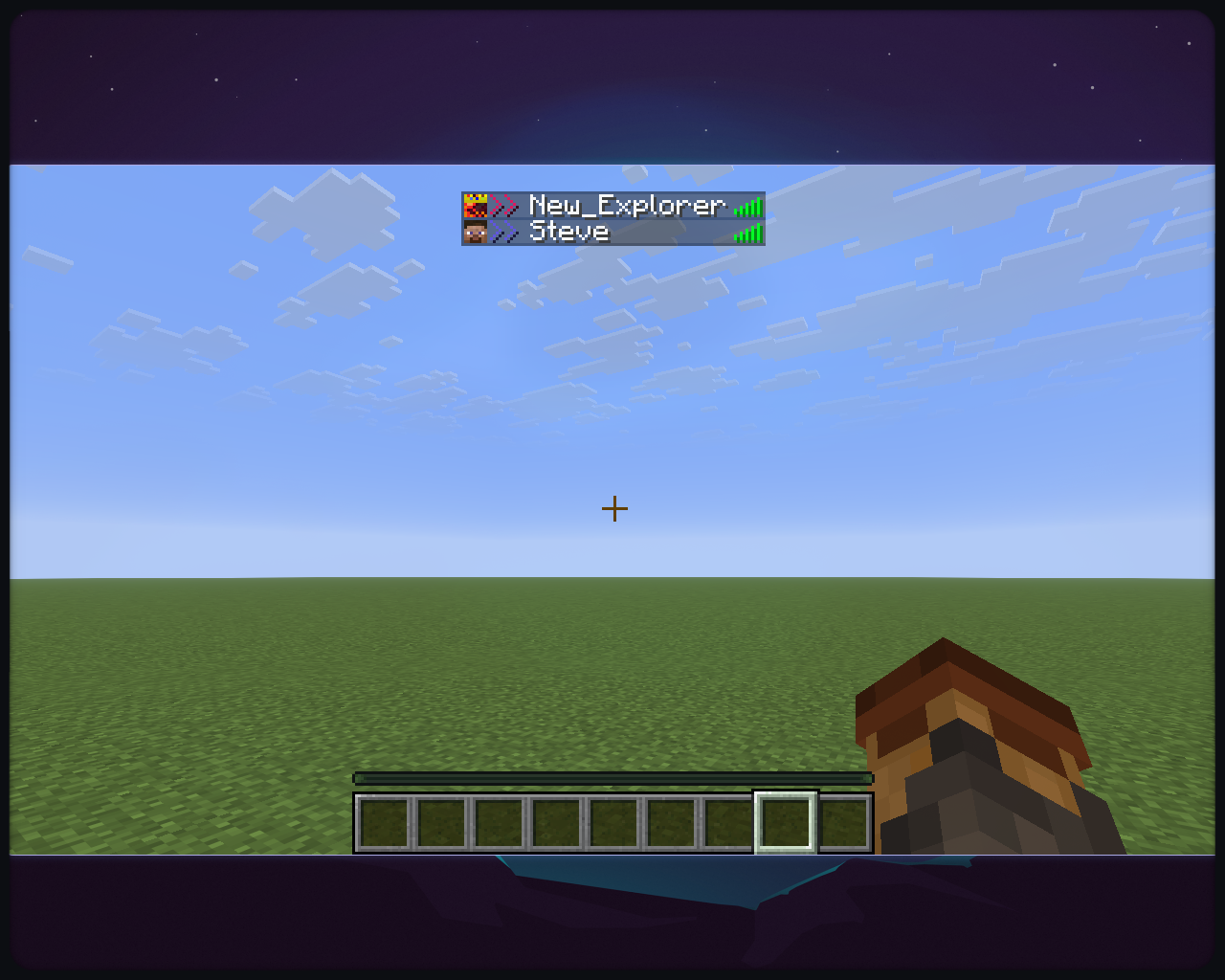
Locator Display is a client-side Minecraft mod that adds a customizable symbol next to player names in the tab list, colored exactly like their locator bar color.
Community voices
Reviews
No reviews yet. Be the first to review this project!
Get it on
Available Platforms
Compatibility
Supported Environments
Runs entirely on the client. Works on vanilla servers.
About
Project Details
For authors
Embed Badge
If you're the author of this project, you can embed a live badge anywhere that supports HTML or Markdown. It updates automatically whenever ratings change.
Use HTML for any page that supports it, or Markdown for README files and Markdown-based descriptions.
Identifiers
Platform IDs
About
Description
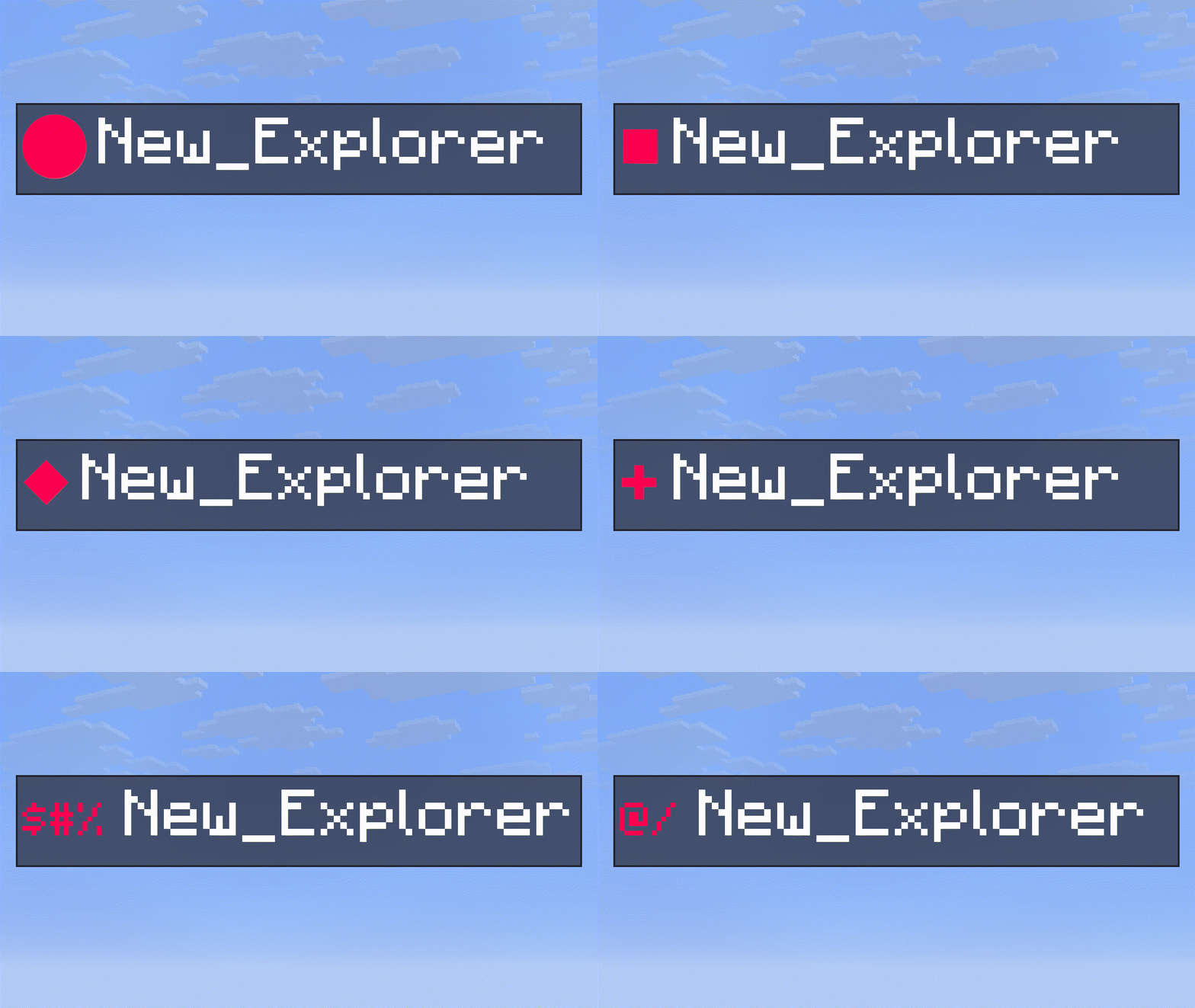
Locator Display
Just a Client-Side Locator Bar Color Display Mod
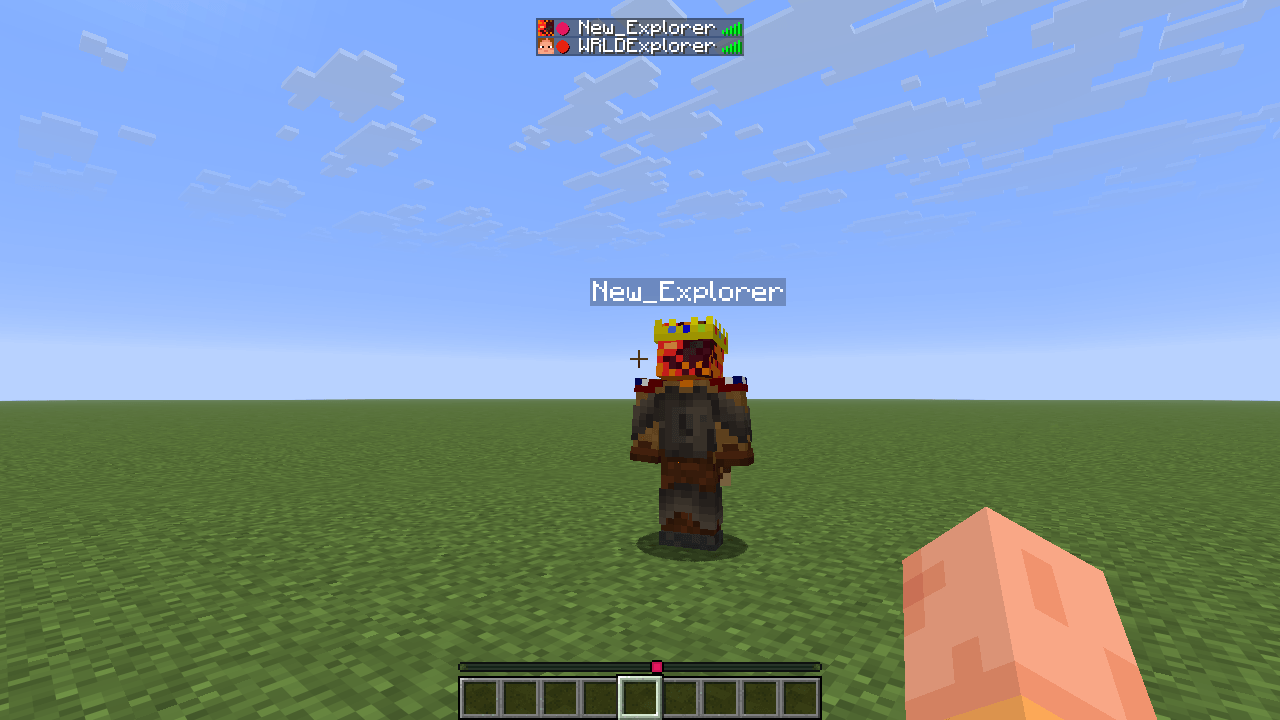
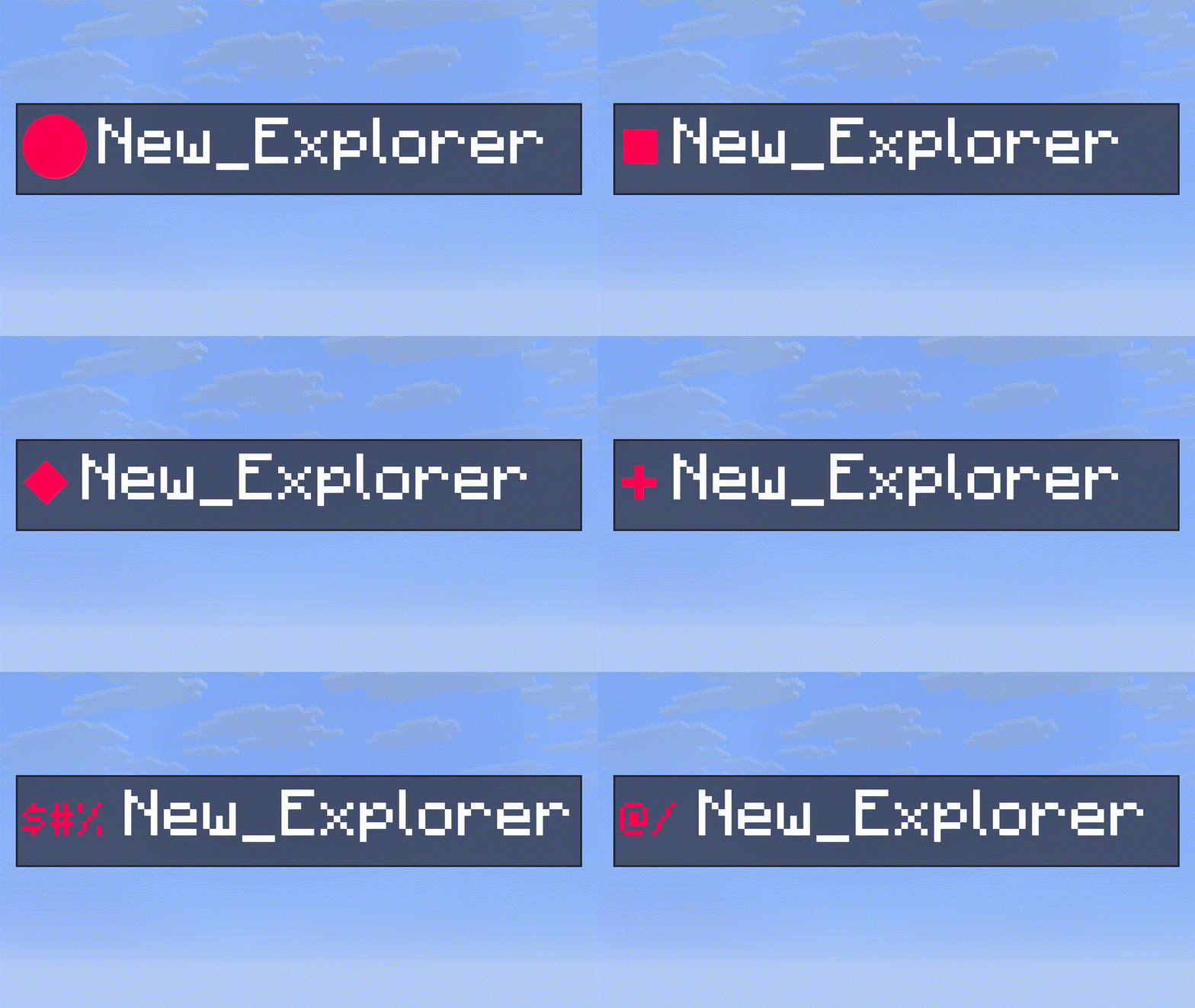
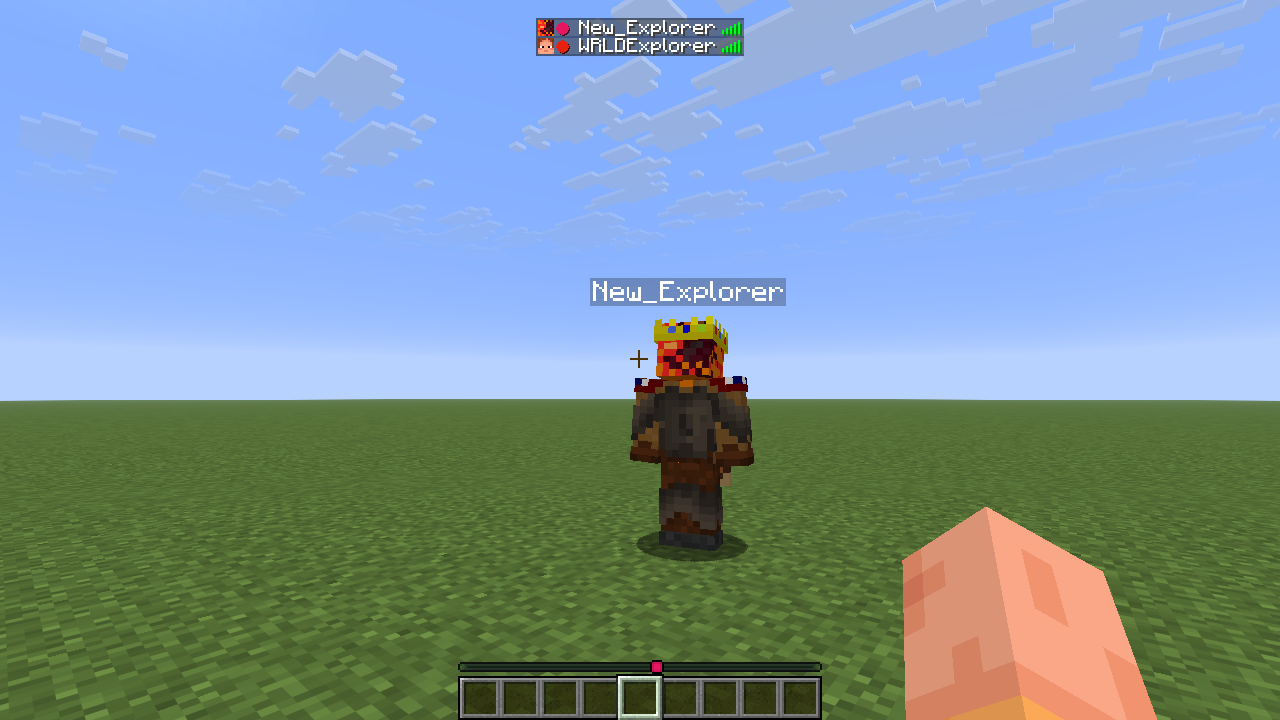
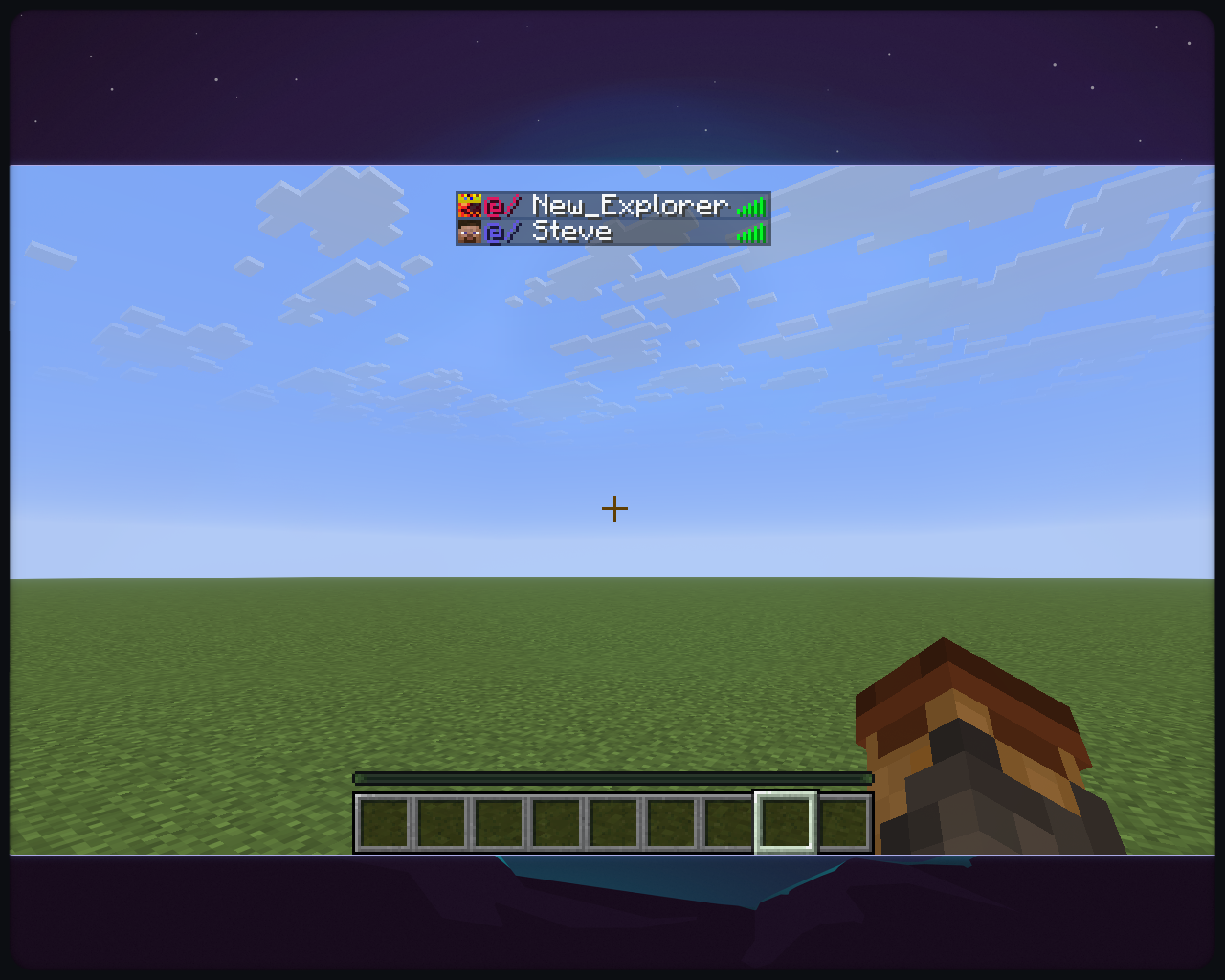
Locator Display is a client-side Minecraft mod that adds a customizable symbol next to player names in the tab list, colored exactly like their locator bar color.
Features
- Displays a customizable colored symbol before each player's name in the tab list.
- Customize the symbol by choosing one of the characters in the preset or by specifying a custom one:
⬤, ▌, ⬛, ★, ◆, ▶, ✚, ✖ - Display an icon or a texture instead of a symbol.
- Choose to color player names.
- Proximity Detection shows how far or near a player is from you.
- Allows disabling the locator bar and only displaying the experience bar.
- Choose to use the Server-Provided or the official Mojang UUID for accurate colors.
- Falls back to a deterministic offline UUID for players not registered with Mojang.
- Fully client-side; works on any SMP.
- Turns off in servers with thousands of players in the tab list(minigames, pvp servers)


Requirements
- Minecraft 1.21.6+
- Fabric Loader 0.19.3+
- Java 21+
- ModMenu (recommended)
Installation
- Download the appropriate
.jar - Place the file into your
.minecraft/modsfolder - Launch Minecraft with Fabric Loader
How It Works
- The mod fetches the player's UUID either from the client or from the public Mojang API.
- It computes a color from the UUID using the same algorithm as the locator bar.
- The specified symbol is prepended to the player's name in the tab list.
Configuration
The mod is configurable with ModMenu:
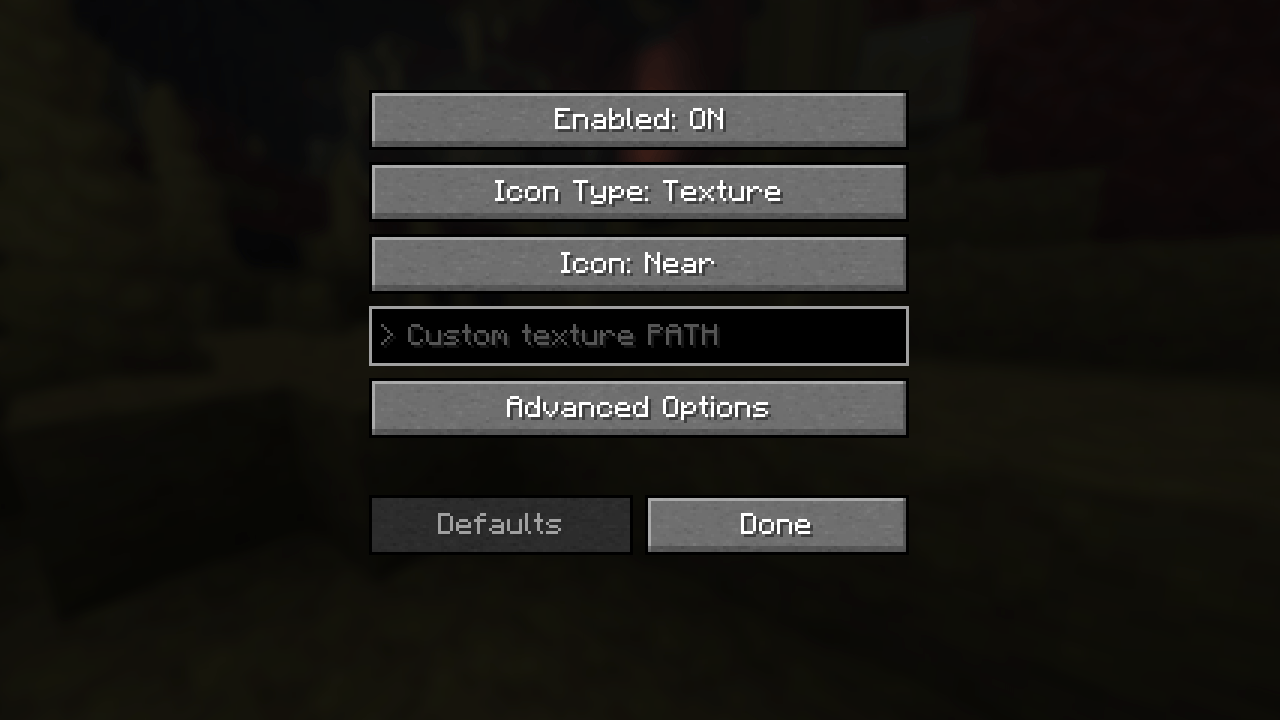
Options:
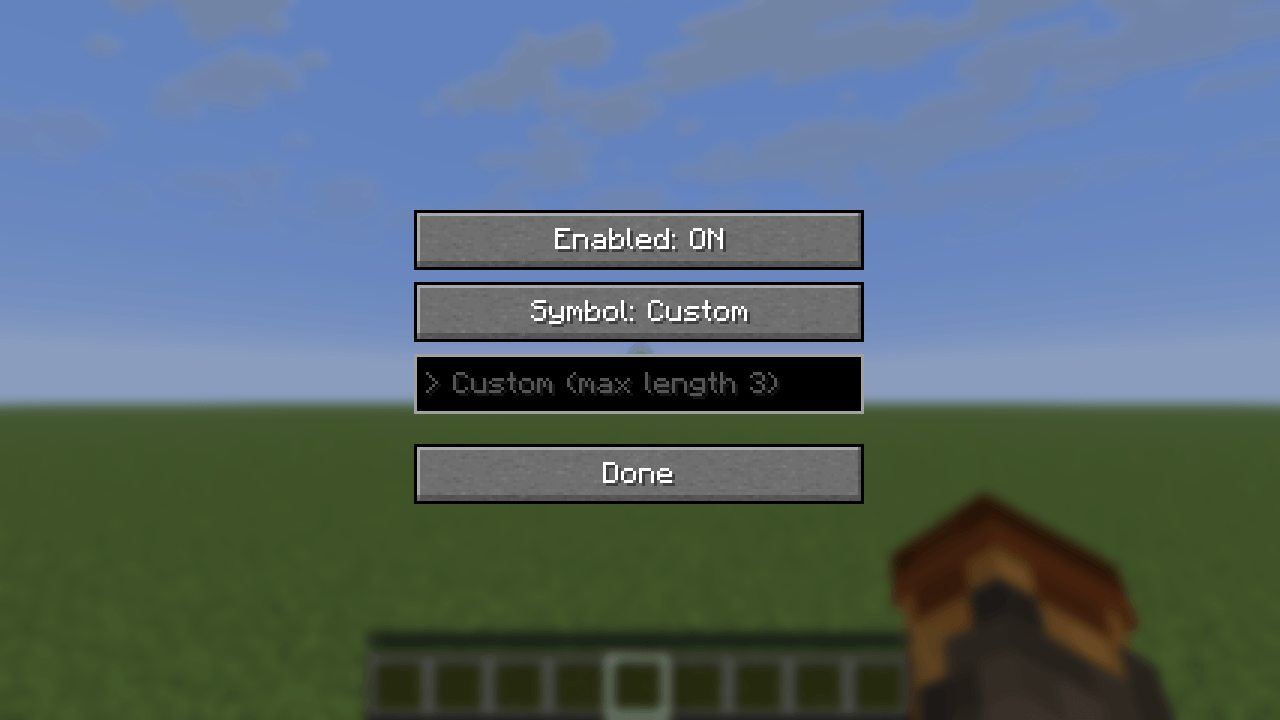
Enabled→ to turn the mod on and offIcon Type→ Select eitherTextureorSymbolIcon→Near,Nearby,Far,Distant,Bowtie> Custom (max length 3)or> Custom texture PATH→ IfCustomwas specified in the previous selection, put your custom configuration here- Custom Symbol:
- input at most 3 characters
- those characters will be prepended to the player name
- the character must be renderable by Minecraft
- Example:
>> Player_Name - Custom Icon:
- Allows instance-loaded textures to be used
modid:block/custom_block- accepts only directories inside the
textures/directory of any instance - for Minecraft, any texture inside:
block,colormap,effect,entity,environment,font,gui,item,map,misc,mob_effect,painting,particle,trims - Example input:
block/dirtminecraft:item/iron_swordhud/heart/full.pngminecraft:textures/block/glowstone.png→ the correct input, the mod formats everything into this
- Recommended: Use light textures(ones that do not contain a lot of dark pixels)
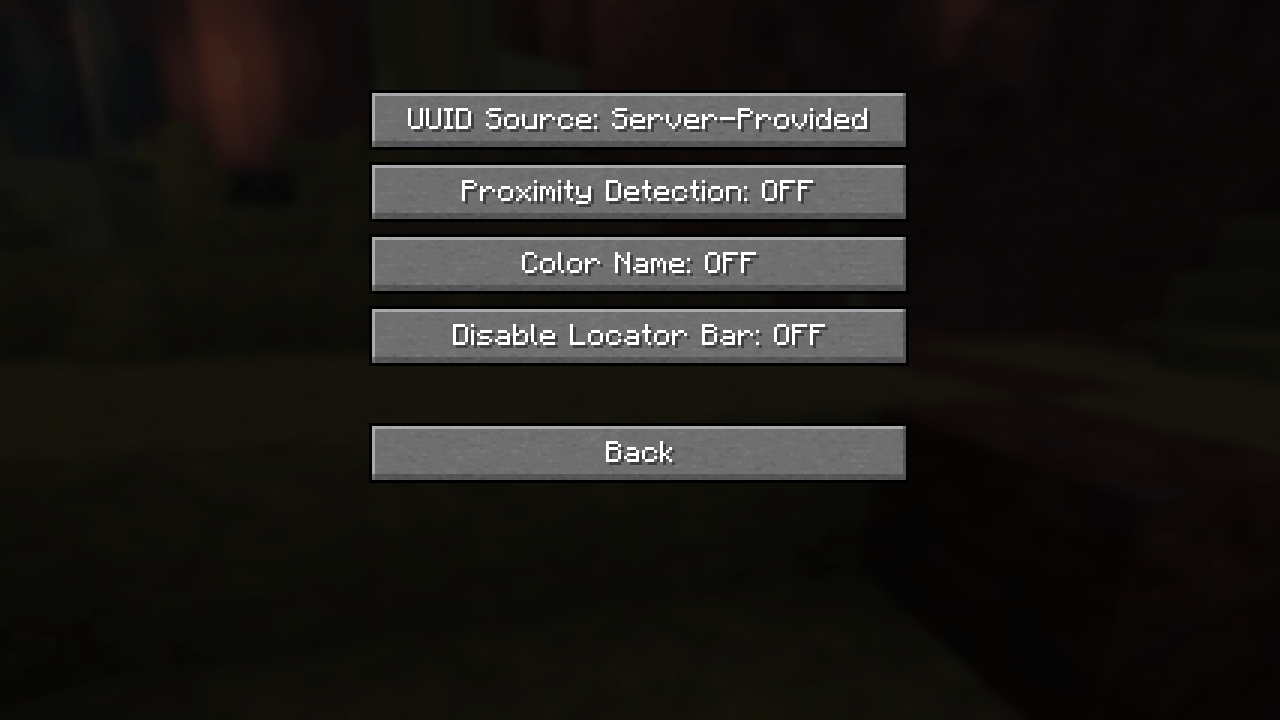
Advanced Options:UUID Source→ can either beServer-ProvidedorOfficial Mojang(from the Mojang API)Proximity Detection→ Disables icon customization, makes the icon smaller or bigger like the locator bar. For players in a different dimension, a bowtie will be displayed.Color Name→ change the color of the player names into their locator bar colorDisable Locator Bar→ as the name suggests, forces only the Experience Bar to appear
Defaults→ sets all options to the defaultsDone→ Saves the configuration and exits
Disclaimer
This is free software: you are free to change and redistribute it. There is NO WARRANTY, to the extent permitted by law.
License
Code: GPL-3.0-only
Assets (logo/icon): CC BY-NC-ND 4.0 (see LICENSE-ASSETS)
Contributing
Open an issue if you find a bug or have a feature request. If you want to contribute code-wise, make sure to check the TODO file and opened issues. By contributing to this repository you agree that all additions/modifications will be licensed under GPLv3-only and you agree to allow distribution in compiled form.
Credits
Based on the Fabric example mod template (CC0).

Locator Display
Just a Client-Side Locator Bar Color Display Mod
Locator Display is a client-side Minecraft mod that adds a customizable symbol next to player names in the tab list, colored exactly like their locator bar color.
Features
- Displays a customizable colored symbol before each player's name in the tab list.
- Customize the symbol by choosing one of the characters in the preset or by specifying a custom one:
⬤, ▌, ⬛, ★, ◆, ▶, ✚, ✖ - Display an icon or a texture instead of a symbol.
- Choose to color player names.
- Proximity Detection shows how far or near a player is from you.
- Allows disabling the locator bar and only displaying the experience bar.
- Choose to use the Server-Provided or the official Mojang UUID for accurate colors.
- Falls back to a deterministic offline UUID for players not registered with Mojang.
- Fully client-side; works on any SMP.
- Turns off in servers with thousands of players in the tab list(minigames, pvp servers)


Requirements
- Minecraft 1.21.6+
- Fabric Loader 0.19.3+
- Java 21+
- ModMenu (recommended)
Installation
- Download the appropriate
.jar - Place the file into your
.minecraft/modsfolder - Launch Minecraft with Fabric Loader
How It Works
- The mod fetches the player's UUID either from the client or from the public Mojang API.
- It computes a color from the UUID using the same algorithm as the locator bar.
- The specified symbol is prepended to the player's name in the tab list.
Configuration
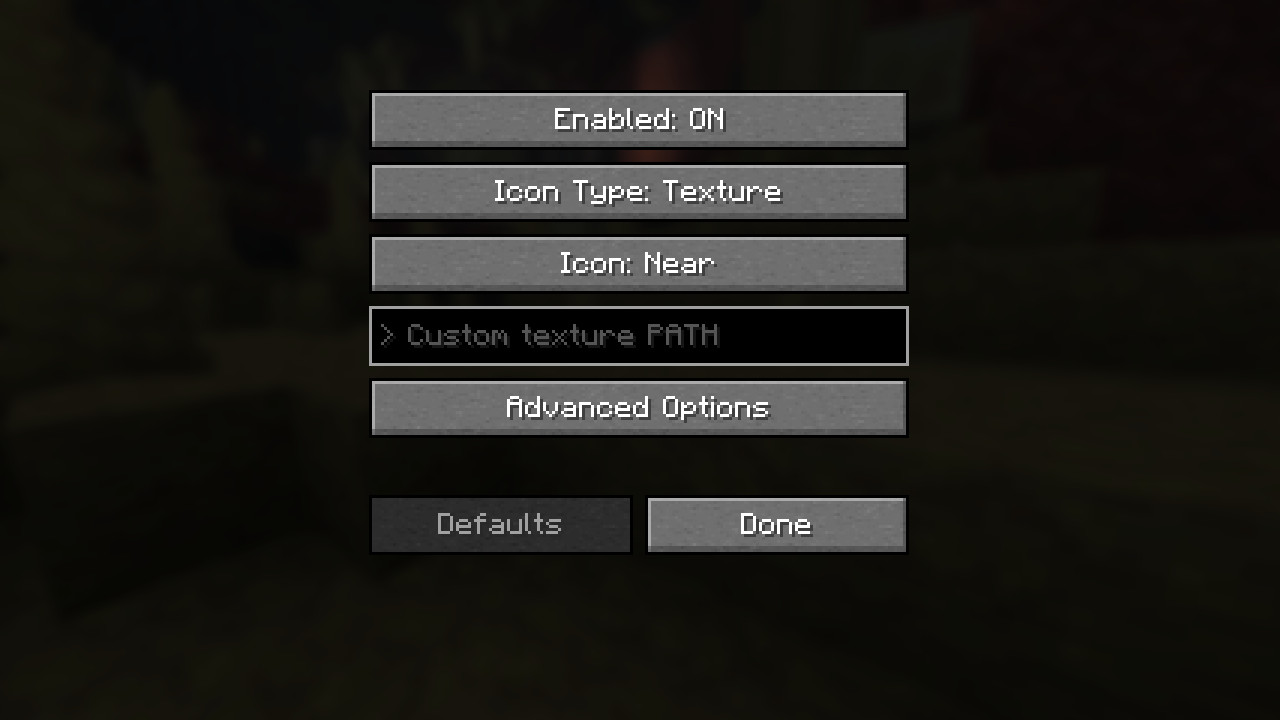
The mod is configurable with ModMenu:
Options:
Enabled→ to turn the mod on and offIcon Type→ Select eitherTextureorSymbolIcon→Near,Nearby,Far,Distant,Bowtie> Custom (max length 3)or> Custom texture PATH→ IfCustomwas specified in the previous selection, put your custom configuration here- Custom Symbol:
- input at most 3 characters
- those characters will be prepended to the player name
- the character must be renderable by Minecraft
- Example:
>> Player_Name
- Custom Icon:
- Allows instance-loaded textures to be used
modid:block/custom_block- accepts only directories inside the
textures/directory of any instance - for Minecraft, any texture inside:
block,colormap,effect,entity,environment,font,gui,item,map,misc,mob_effect,painting,particle,trims - Example input:
block/dirtminecraft:item/iron_swordhud/heart/full.pngminecraft:textures/block/glowstone.png→ the correct input, the mod formats everything into this
- Recommended: Use light textures(ones that do not contain a lot of dark pixels)
- Custom Symbol:
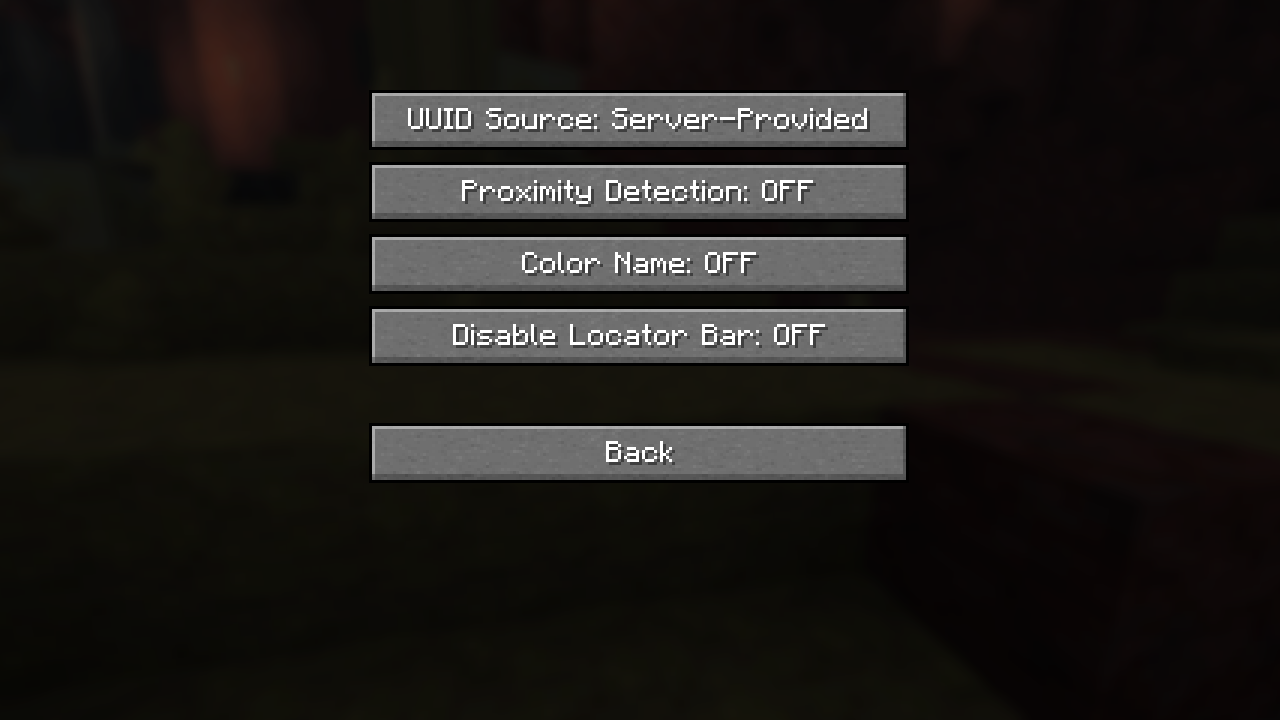
Advanced Options:UUID Source→ can either beServer-ProvidedorOfficial Mojang(from the Mojang API)Proximity Detection→ Disables icon customization, makes the icon smaller or bigger like the locator bar. For players in a different dimension, a bowtie will be displayed.Color Name→ change the color of the player names into their locator bar colorDisable Locator Bar→ as the name suggests, forces only the Experience Bar to appear
Defaults→ sets all options to the defaultsDone→ Saves the configuration and exits
Disclaimer
This is free software: you are free to change and redistribute it. There is NO WARRANTY, to the extent permitted by law.
License
Code: GPL-3.0-only
Assets (logo/icon): CC BY-NC-ND 4.0 (see LICENSE-ASSETS)
Contributing
Open an issue if you find a bug or have a feature request. If you want to contribute code-wise, make sure to check the TODO file and opened issues. By contributing to this repository you agree that all additions/modifications will be licensed under GPLv3-only and you agree to allow distribution in compiled form.
Credits
Based on the Fabric example mod template (CC0).
Screenshots
Gallery
-
mod-game.png mod-game.png
-
tab-menu.png tab-menu.png
-
inventory.png inventory.png
-
 old_config.png old_config.png
 -
config.png config.png
-
advanced_config.png advanced_config.png
-
Animated Banner
-
 TAB MENU
 -
 Comparison to the inventory color
 -
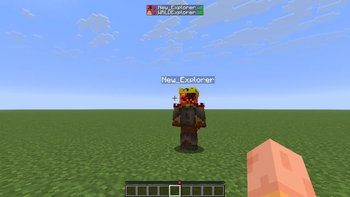
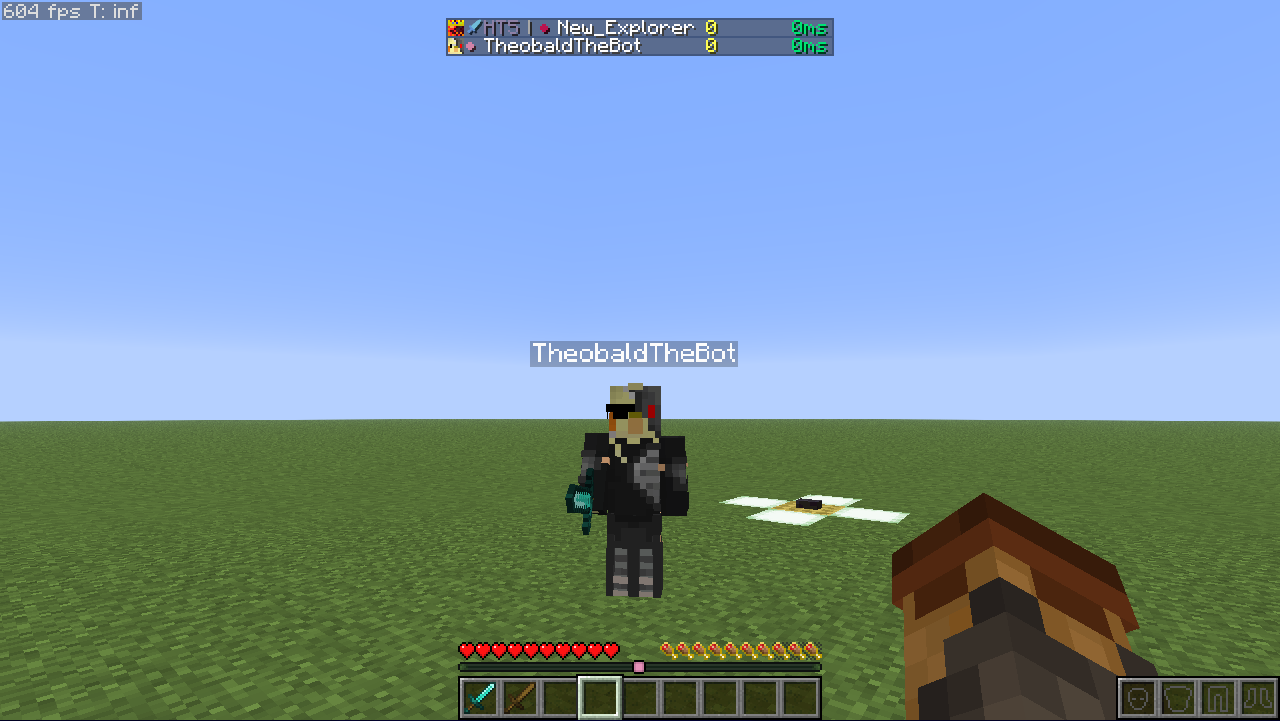 Locator Display How Locator Display looks in game(see the tab menu)
 -
ModMenu Config
-
Advanced Config Options
-
-
-
-
-
-
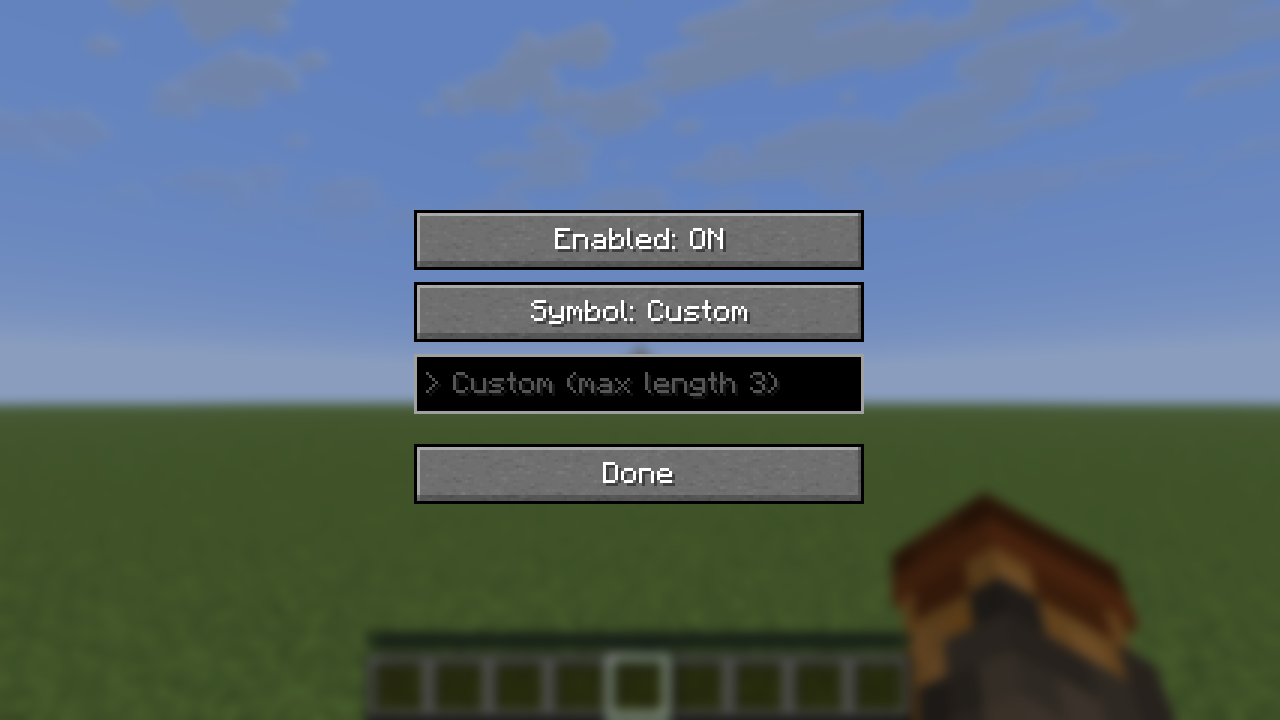 ModMenu Config (old - pre v0.0.3)
Versions
Files
Relations
Project Relations
More like this
Similar Mods
Suggestions use data such as tags, dependencies, dependents, descriptions, titles, and more to rank how much they overlap with this mod.
On ModDex
Community snapshot
By the numbers
Statistics
Want to reach Minecraft players?
We're looking for a server hosting partner to feature here and other parts of the site. Interested? Send us a message!
Get in touchGet it on
Available Platforms
On ModDex
Community snapshot
By the numbers