
Community listing page, reviews here may not be monitored by the author.
Logout Timer

No reviews yet
This mod allows you to set a timer in game and when the timer reaches your desired time it boots you from the world/server you were in. This is great for afking on large servers where you dont want to be found or just to not die in game.
Community voices
Reviews
No reviews yet. Be the first to review this project!
Get it on
Available Platforms
Compatibility
Supported Environments
Runs entirely on the client. Works on vanilla servers.
About
Project Details
For authors
Embed Badge
If you're the author of this project, you can embed a live badge anywhere that supports HTML or Markdown. It updates automatically whenever ratings change.
Use HTML for any page that supports it, or Markdown for README files and Markdown-based descriptions.
Identifiers
Platform IDs
Resources
External Links
About
Description
⏳ Session Timer
Take control of your playtime.
Ever find yourself saying "just five more minutes" and suddenly it's 3 AM? Session Timer is a simple, lightweight utility mod designed to help you manage your gaming sessions effectively. Set a time limit, track it with a clean HUD, and when time runs out, the mod automatically disconnects you from the world or server.
Whether you are trying to stay productive, managing screen time, or just doing a speedrun challenge, Session Timer keeps you on track. ✨ Key Features
⏱️ flexible Time Input: No math required. Type naturally like /timer set 1h 30m or /timer add 10m to adjust your session on the fly.

🖥️ Visual HUD: A clean, unobtrusive timer in the top-left corner keeps you aware of your remaining time.

🎛️ Easy Configuration Menu: Press K (default) to open a user-friendly menu. Start, stop, add time, or reset the timer with a single click.

🧠 Smart Pausing:

    Singleplayer: The timer respects your pause menu. If you press ESC to take a break, the timer stops.

    Multiplayer: The timer keeps running even if you are in a menu, ensuring you don't lose track of real-world time.

🔌 Auto-Disconnect: When the clock hits 00:00:00, you are instantly disconnected from the server or world. No overrides, no cheating!
🎮 How to Use The Menu (Recommended)
Press K to open the Session Timer GUI.
Input Box: Type a duration (e.g., 45m or 1h 15m) and click Add to set the timer.

Quick Buttons: Use +1 Min or +10 Min for quick adjustments.

Controls: Click Start to begin the countdown or Stop to pause it.

Toggle HUD: Hide the on-screen timer if you want full immersion (the disconnect will still happen!).
Commands
Prefer using the chat? We have you covered:
/timer set <time> - Set the timer (e.g., /timer set 20m).

/timer add <time> - Add more time to the current clock.

/timer start - Resume the countdown.

/timer stop - Pause the countdown.

/timer reset - Reset the clock to 0.

/timer togglehud - Show or hide the overlay.
📥 Installation
Download and install the Fabric Loader.

Download the Fabric API mod.

Drop SessionTimer.jar into your mods folder.

Launch the game and press K to get started!
Screenshots
Gallery
-
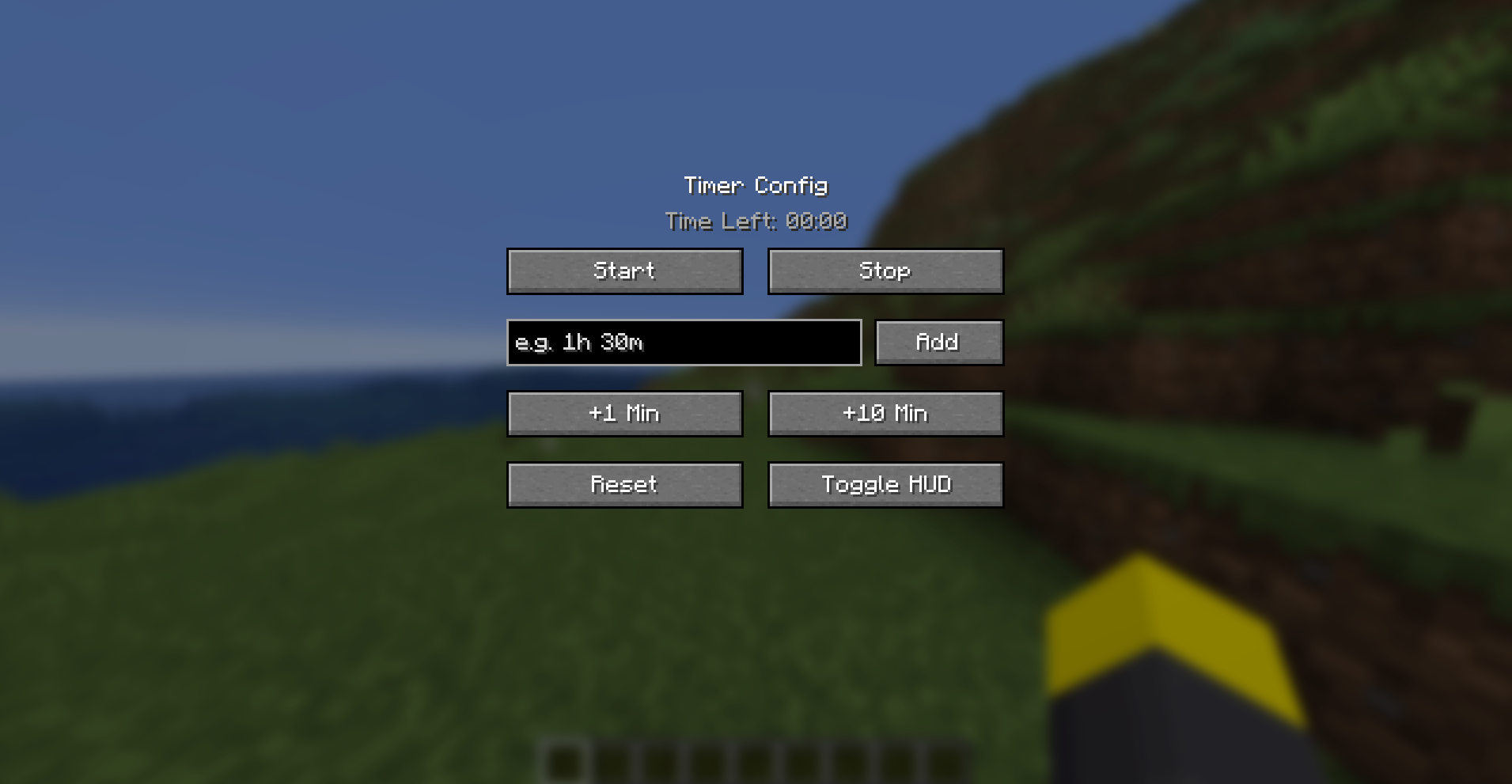 Timer Menu
Versions
Files
Relations
Project Relations
More like this
Similar Mods
Suggestions use data such as tags, dependencies, dependents, descriptions, titles, and more to rank how much they overlap with this mod.
On ModDex
Community snapshot
By the numbers
Statistics

Want to reach Minecraft players?
We're looking for a server hosting partner to feature here and other parts of the site. Interested? Send us a message!
Get in touchGet it on
Available Platforms
On ModDex
Community snapshot
By the numbers
Statistics
Resources