
Community listing page, reviews here may not be monitored by the author.
Loot All


No reviews yet
Looting made easy. Loot all nearby containers.

Community voices
Reviews
No reviews yet. Be the first to review this project!
Get it on
Available Platforms
Compatibility
Supported Environments
Must be installed on both the client and the server.
About
Project Details
For authors
Embed Badge
If you're the author of this project, you can embed a live badge anywhere that supports HTML or Markdown. It updates automatically whenever ratings change.
Use HTML for any page that supports it, or Markdown for README files and Markdown-based descriptions.
Identifiers
Platform IDs
About
Description
Press - and every loot container around you will be emptied into your inventory, or into your storage system if you've set a transfer target.
Fabric needs Fabric API. Install Mod Menu and Cloth Config to edit the config in game.
Features
Loots chests, barrels and any other container with a loot table, within a radius you set.
Works with Lootr (Forge and NeoForge).
Auto-loot mode empties nearby containers on a timer.
On-screen text shows how many items you got and from how many containers.
Loot Transfer
Look at a storage block, or hover an item in your inventory, and press = to make it your transfer target. Everything you loot after that goes straight into it, from any distance and even from another dimension (both configurable).
Bind a chest, drawer, ME terminal, backpack, wireless grid, or anything else with an inventory.
Items are not voided. Whatever doesn't fit goes to your inventory, then the ground.
HUD text will tell you where your loot went: "Transferred to ...".
On Fabric, only blocks can be targets, not items.
Mod Support
Loot Transfer works with any block or item that has a standard inventory. These mods also have dedicated support on Forge and NeoForge:
| Mod | Supported Stuff |
|---|---|
| Applied Energistics 2 | ME Network |
| Refined Storage | Network + Wireless Grid |
| Mekanism | QIO Dashboard / Drive Array + Portable QIO Dashboard |
| Tom's Simple Storage | Storage Terminal + Inventory Connector |
| Simple Storage Network | Master / Request Table |
| Pretty Pipes | Item Terminal |
| ProjectE | EMC: Klein Stars, Transmutation Table and Tablet |
| Curios | Backpacks and other inventories in Curios slots |
On Forge, you can also lock Loot All's features behind stages with Game Stages.
Configuration
range: how far to search for containers (default 20).
includeMinecarts: also loot minecarts that have loot tables.
autoLooting and autoLootingTimer: loot nearby containers on a timer.
excludeBlockedContainers: skip chests that can't be opened.
feedbackMessage and playSound: turn the on-screen message and the pickup sound on or off.
enableLootingTransfer: turn the transfer system on or off.
maxLootTransferDistance, transferRequireSameDimension, transferRequireLoadedChunk: limit how far transfers can reach.
Item Filters
Filters apply to both looting and transfers.
skipList: items to not loot. Each entry can be:
modid:item, a single item (e.g. minecraft:stick)
#modid:tag, an item tag (e.g. #minecraft:stairs)
@modid, every item from a mod (e.g. @alexsmobs)
skipListMode:
BLACKLIST (default): loot everything except what's in skipList.
WHITELIST: loot only what's in skipList.
skipArmorAndTools: skip all armor, tools and weapons.
skipNonStackable: skip items that only stack to 1.
skipUnenchantedGear: skip armor, tools and weapons unless they're enchanted.
rarityFilterMode and rarityList: filter by rarity. Set the mode to ONLY to loot only the listed rarities, or SKIP to loot everything except them.
Default Keybinds
-: loot nearby containers.
=: set or clear the transfer target.

Press - and every loot container around you will be emptied into your inventory, or into your storage system if you've set a transfer target.
Fabric needs Fabric API. Install Mod Menu and Cloth Config to edit the config in game.
Features
Loots chests, barrels and any other container with a loot table, within a radius you set.
Works with Lootr (Forge and NeoForge).
Auto-loot mode empties nearby containers on a timer.
On-screen text shows how many items you got and from how many containers.
Loot Transfer
Look at a storage block, or hover an item in your inventory, and press = to make it your transfer target. Everything you loot after that goes straight into it, from any distance and even from another dimension (both configurable).
Bind a chest, drawer, ME terminal, backpack, wireless grid, or anything else with an inventory.
Items are not voided. Whatever doesn't fit goes to your inventory, then the ground.
HUD text will tell you where your loot went: "Transferred to ...".
On Fabric, only blocks can be targets, not items.
Mod Support
Loot Transfer works with any block or item that has a standard inventory. These mods also have dedicated support on Forge and NeoForge:
Mod Supported Stuff Applied Energistics 2 ME Network Refined Storage Network + Wireless Grid Mekanism QIO Dashboard / Drive Array + Portable QIO Dashboard Tom's Simple Storage Storage Terminal + Inventory Connector Simple Storage Network Master / Request Table Pretty Pipes Item Terminal ProjectE EMC: Klein Stars, Transmutation Table and Tablet Curios Backpacks and other inventories in Curios slots
On Forge, you can also lock Loot All's features behind stages with Game Stages.
Configuration
range: how far to search for containers (default 20).
includeMinecarts: also loot minecarts that have loot tables.
autoLooting and autoLootingTimer: loot nearby containers on a timer.
excludeBlockedContainers: skip chests that can't be opened.
feedbackMessage and playSound: turn the on-screen message and the pickup sound on or off.
enableLootingTransfer: turn the transfer system on or off.
maxLootTransferDistance, transferRequireSameDimension, transferRequireLoadedChunk: limit how far transfers can reach.
Item Filters
Filters apply to both looting and transfers.
skipList: items to not loot. Each entry can be:
modid:item, a single item (e.g. minecraft:stick)
#modid:tag, an item tag (e.g. #minecraft:stairs)
@modid, every item from a mod (e.g. @alexsmobs)
skipListMode:
BLACKLIST (default): loot everything except what's in skipList.
WHITELIST: loot only what's in skipList.
skipArmorAndTools: skip all armor, tools and weapons.
skipNonStackable: skip items that only stack to 1.
skipUnenchantedGear: skip armor, tools and weapons unless they're enchanted.
rarityFilterMode and rarityList: filter by rarity. Set the mode to ONLY to loot only the listed rarities, or SKIP to loot everything except them.
Default Keybinds
-: loot nearby containers.
=: set or clear the transfer target.
Screenshots
Gallery
-
 Looted Text
 -
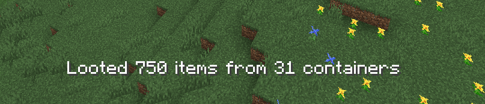 Looted Text looted text 2.png
 -
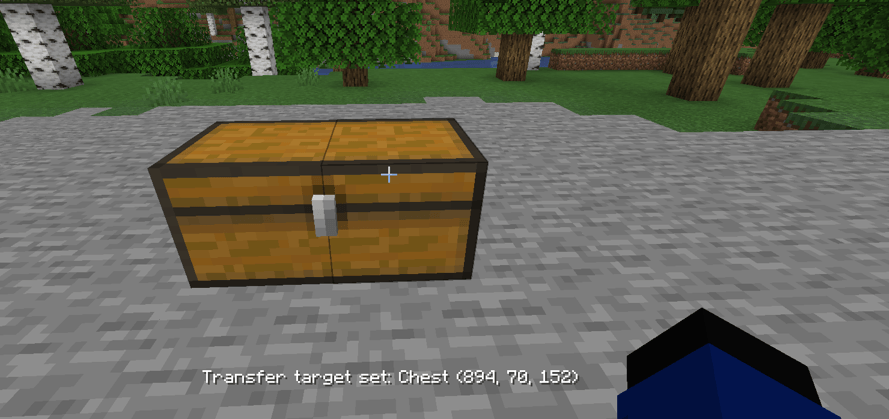 Storage Transfer
-
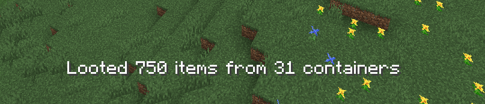 Loot Text 2
 -
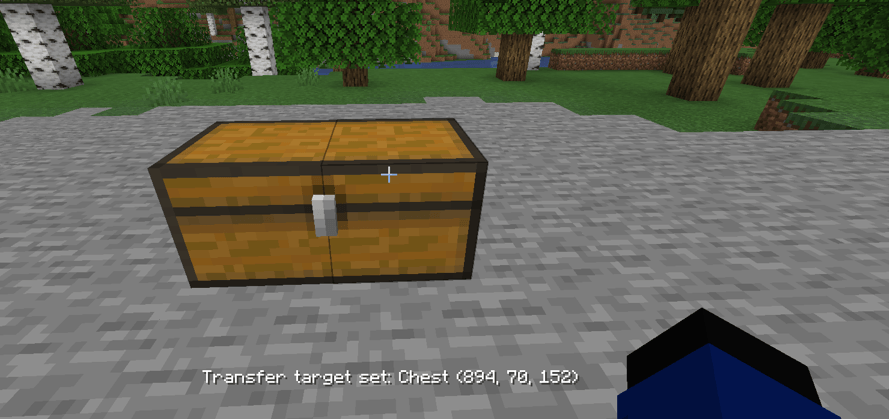 Storage Transfer
 -
 Loot Text 1
Versions
Files
Relations
Project Relations
More like this
Similar Mods
Suggestions use data such as tags, dependencies, dependents, descriptions, titles, and more to rank how much they overlap with this mod.
On ModDex
Community snapshot
By the numbers
Statistics
 (opens in a new tab)
Get it on
Available Platforms
On ModDex
Community snapshot
By the numbers