
Community listing page, reviews here may not be monitored by the author.
LPC Minimessage - Chat Formatter

No reviews yet
A chat formatting with Minimessage Support plugin for LuckPerms.
Community voices
Reviews
No reviews yet. Be the first to review this project!
Get it on
Available Platforms
About
Project Details
For authors
Embed Badge
If you're the author of this project, you can embed a live badge anywhere that supports HTML or Markdown. It updates automatically whenever ratings change.
Use HTML for any page that supports it, or Markdown for README files and Markdown-based descriptions.
Identifiers
Platform IDs
About
Description




LPC – LuckPerms Chat Formatter ✨
A flexible chat formatting plugin with MiniMessage support for LuckPerms
Modern chat formatting powered by MiniMessage, full LuckPerms metadata support, group/track formats, and PlaceholderAPI.
🧩 Compatibility
| Minecraft | 26.1.2 |
| Server | Paper (recommended) or Spigot |
| Java | 25+ |
🔧 Requirements
- LuckPerms (Required) – Permissions plugin
- PlaceholderAPI (Optional) – Additional placeholders
✅ Features
Formatting
- Full MiniMessage support, with group- and track-specific formats
- Optional PlaceholderAPI integration and
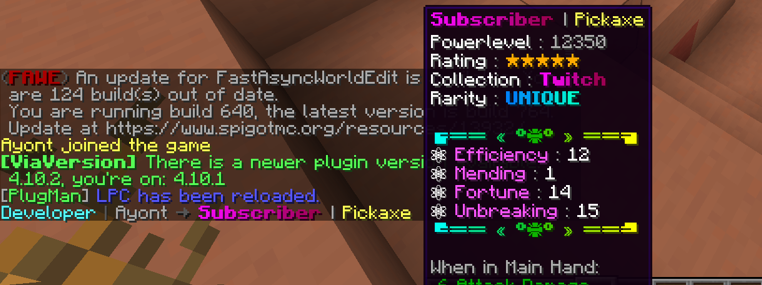
[item]placeholder (hover tooltip on Paper) - Per-rank message styling and per-rank gradient names (
{gradient-name}) - Per-world toggle via
disabled-worlds
Social (on by default)
- @Mention pings – highlight online names + sound/action-bar ping (Paper)
- Emoji shortcuts – e.g.
:heart:→ ❤ (fully configurable) - Clickable links – URLs become
openUrllinks on Paper, coloured on Spigot
Moderation (off by default)
- Anti-spam cooldown, repeated-message blocker, caps filter, profanity mask, anti-advertising
- Per-player mute (
/lpc mute) + LuckPerms mute node for punishment plugins
Server messages (off by default)
- MiniMessage join / quit / first-join / death messages
Quality of life
/lpc reload · version · help · mute · unmutewith tab completion- Built-in Modrinth update checker
- Safe by design – player messages can never inject
click/hover/command components - Works on both Paper (Adventure rendering) and Spigot (legacy fallback)
⌨️ Commands
| Command | Permission | Description |
|---|---|---|
/lpc reload |
lpc.reload |
Reload the configuration |
/lpc version |
– | Show the installed version |
/lpc help |
– | List available commands |
/lpc mute <player> [duration] |
lpc.mute |
Mute a player (e.g. 10m, 2h; omit for permanent) |
/lpc unmute <player> |
lpc.mute |
Unmute a player |
🧑💼 Permissions
| Permission | Default | Description |
|---|---|---|
lpc.reload |
op | Reload the configuration |
lpc.chatcolor |
false | Use colour codes & cosmetic MiniMessage tags in chat |
lpc.itemplaceholder |
false | Use the [item] placeholder in chat |
lpc.update |
op | Receive an update notification on join |
lpc.emoji |
true | Use emoji shortcuts (only enforced if emoji.require-permission) |
lpc.chatlinks |
true | Have URLs turned into clickable links |
lpc.mention.exempt |
false | Opt out of receiving mention pings |
lpc.mute |
op | Use /lpc mute and /lpc unmute |
lpc.muted |
false | Marks a player as muted (usually set by a punishment plugin) |
lpc.bypass.spam / .repeat / .caps / .profanity / .advert |
op | Bypass the matching moderation filter |
ℹ️ Even with
lpc.chatcolor, only cosmetic tags (colours, decorations, and optionally gradients/rainbow) are honoured in player messages. Interactive tags (click,hover,insertion, …) are always stripped.
⚙️ Configuration (config.yml)
# Main chat format (MiniMessage!)
chat-format: "{prefix}{name}<dark_gray> »<reset> {message}"

# Per-group formats (optional)
group-formats:
#  default: "<gray>[User]</gray> {name}<dark_gray> »<reset> {message}"
#  admin: "<red>[Admin]</red> {name}<dark_gray> »<reset> {message}"

# Per-track formats (optional) – groups take priority over tracks
track-formats:
#  staff_track: "<gold>[Staff]</gold> {name}<dark_gray> »<reset> {message}"

# Enable the [item] placeholder
use-item-placeholder: true

# Allow <gradient> / <rainbow> for players with lpc.chatcolor
allow-gradient-tags: true

# Worlds where LPC does NOT format chat
disabled-worlds: []

# Check Modrinth for updates on startup
update-checker: true

# Reload message
reload-message: "<green>Reloaded LPC configuration!"
🪄 Available Placeholders
| Placeholder | Description |
|---|---|
{message} |
The chat message (inserted safely, never re-parsed) |
{name} |
Player's name |
{displayname} |
Display name / nickname |
{world} |
Player's current world |
{prefix} / {suffix} |
Highest priority prefix / suffix |
{prefixes} / {suffixes} |
All prefixes / suffixes, highest priority first |
{username-color} / {message-color} |
Colour values from LuckPerms meta |
ℹ️ All colour values (prefix, suffix, etc.) must be in MiniMessage format – no legacy codes (
&a,§b).
🚀 Installation
- Stop your server
- Drop
LPC-<version>.jarinto your/pluginsfolder - Start the server to generate
config.yml - Edit the config to your liking
- Run
/lpc reloadto apply changes ✅
🛠️ Building
./gradlew shadowJar
# output: build/libs/LPC-<version>.jar
Requires JDK 25.
📌 Notes
- Not affiliated with LuckPerms – please do not contact the LuckPerms author for support.
- Legacy version available at: GitHub Legacy LPC
📸 Previews
Chat Format Example

[ITEM] Placeholder Example
🚀 Installation
- Stop your server
- Place the
LPC.jarinto your/pluginsfolder - Start the server to generate configuration files
- Edit the
config.ymlto your liking - Use
/lpc reloadto apply your changes ✅
Screenshots
Gallery
-
 LPC
LPC -
 Chat Format Preview
 -
![[ITEM] Placeholder](https://cdn.modrinth.com/data/LOlAU5yB/images/5e95c782f9e06878f56633e45ac4b465e540ac97.png) [ITEM] Placeholder It gives you Placeholder to show your item in the Chat.
[ITEM] Placeholder It gives you Placeholder to show your item in the Chat.
Versions
Files
Relations
Project Relations
More like this
Similar Mods
Suggestions use data such as tags, dependencies, dependents, descriptions, titles, and more to rank how much they overlap with this mod.
On ModDex
Community snapshot
By the numbers
Statistics

Want to reach Minecraft players?
We're looking for a server hosting partner to feature here and other parts of the site. Interested? Send us a message!
Get in touchGet it on
Available Platforms
On ModDex
Community snapshot
By the numbers