Community listing page, reviews may not be monitored by the author.
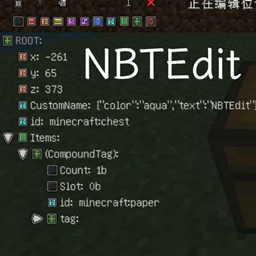
In-game NBTEdit Reborn


No reviews yet
A mod adds a GUI to edit NBT of Entities or BlockEntities.

Community voices
Reviews
No reviews yet. Be the first to review this project!
Get it on
Available Platforms
Compatibility
Supported Environments
Must be installed on both the client and the server.
About
Project Details
For authors
Embed Badge
If you're the author of this project, you can embed a live badge anywhere that supports HTML or Markdown. It updates automatically whenever ratings change.
Use HTML for any page that supports it, or Markdown for README files and Markdown-based descriptions.
Identifiers
Platform IDs
About
Description
In-Game NBTEdit / 游戏内NBT编辑器
A Minecraft mod allows you to edit any NBT tags of the game content with a GUI while in-game. Such as TileEntities, Entities. It may help map creators to make custom items or help mod creators to debug.
本模组可以用于在游戏内编辑物品、实体或方块的 NBT ,可能会对地图制作者制作自定义物品或模组开发者 Debug 有所帮助。
Usage? Please visit GitHub page. CurseForge has a very poor editor.
关于使用方法,请到 GitHub页面 查看。CurseForge的编辑器很难用。
Forge, NeoForge, Fabric are supported!
Forge、NeoForge、Fabric 均已支持!
In-Game NBTEdit / 游戏内NBT编辑器
A Minecraft mod allows you to edit any NBT tags of the game content with a GUI while in-game. Such as TileEntities, Entities. It may help map creators to make custom items or help mod creators to debug.
本模组可以用于在游戏内编辑物品、实体或方块的 NBT ,可能会对地图制作者制作自定义物品或模组开发者 Debug 有所帮助。
Forge, NeoForge, Fabric are supported!
Forge、NeoForge、Fabric 均已支持!
Documents before version 5.2.0 (5.2.0 版本之前的文档)
Usage(食用方法)
Shortcuts(快捷键)
Press N (by default) to edit your target BlockEntity, Entity or ItemStack in main hand (if target is missing).
使用 N 键(默认情况下)打开编辑界面。编辑的目标为十字准星指向的方块实体或者实体,如果没有指向则编辑主手上的物品。
Ctrl+Cto Copy a node. (复制)Ctrl+Vto Paste a node. (粘贴)Ctrl+Xto Cut a node. (剪切)Ctrl+Dto Delete a node. (删除)
Commands(命令)
-
/nbtedit me
Edit player themselves.
编辑玩家自身。 -
/nbtedit hand
Edit ItemStack in player's main hand.
编辑玩家主手上的物品。 -
/nbtedit <x> <y> <z>
Edit BlockEntity at x y z.
编辑位于 x y z 的方块实体。 -
/nbtedit <entity selector>
Edit Entity with entity selector.
编辑由 entity selector 选择的实体。
Permissions(权限)
| Name(权限名) | Default Level(默认等级) | Description(说明) |
|---|---|---|
| use | 2 | Open the editor to edit the NBT. 使用编辑器编辑 NBT 的权限。 |
| read_only | 1 | Open the editor to view NBT, but can't save. 使用编辑器查看 NBT 的权限,保存按钮会被禁用。 |
| edit_on_player | 4 | Use the editor on player, some issue may be caused. USE AT YOUR OWN RISK! 使用编辑器编辑玩家的权限,可能会造成一些问题。谨慎使用。 |
If you're using Forge or NeoForge, you may need a permission plugin like LuckPerms to grant permission node nbtedit.<Permission Node> to any player, or use as the same as Fabric.
在 Forge 或者 NeoForge 平台使用,可以搭配权限管理模组(例如 LuckPerms)授予玩家 nbtedit.<权限名> 的权限节点,或者像 Fabric 一样调整配置文件。
Configurations(配置文件)
Forge/NeoForge
Location(位置): .minecraft/config/nbtedit.toml
# General settings.
[general]
    # Enable debug logs. Necessary if you are reporting bugs. (显示调试日志,反馈问题时需要。)
    debug = false

    # Permission node levels. Like vanilla, should in 0 ~ 5 range. (权限节点默认等级,取值和原版相同。)
    [general.permission]
       use = 2
       read_only = 1
       edit_on_player = 4
Fabric
Location(位置): .minecraft/config/nbtedit.json
{
  "debug": false,           // Enable debug logs. Necessary if you are reporting bugs. (显示调试日志,反馈问题时需要。)
  "permissionsLevels": {    // Permission node levels. Like vanilla, should in 0 ~ 5 range. (权限节点默认等级,取值和原版相同。)
    "read_only": 1,
    "edit_on_player": 4,
    "use": 2
  }
}
Origin(原帖地址)
Screenshots(使用截图)


Common issues(常见问题)
- I was kicked when I tried to save my edit(在尝试保存时被服务器踢出):
If it showsPayload may not be larger than 32767 bytes, please use Packet Fixer by TonimatasDEV to fix it.
如果客户端显示Payload may not be larger than 32767 bytes,请使用 TonimatasDEV 的 Packet Fixer 修复。
Bug report / Feature request(反馈/催更)
Please go to the issues page of GitHub repo.
请到 Issues 页面 提出。
Screenshots
Gallery
Versions
Files
Relations
Project Relations
More like this
Similar Mods
Suggestions use data such as tags, dependencies, dependents, descriptions, titles, and more to rank how much they overlap with this mod.
On ModDex
Community snapshot
By the numbers
Statistics

Get it on
Available Platforms
On ModDex
Community snapshot
By the numbers