Community listing page, reviews may not be monitored by the author.
LunaLace's Movement Overhaul

No reviews yet
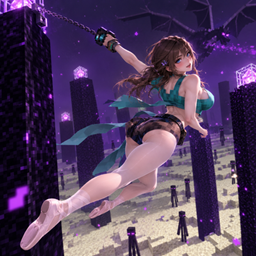
LunaLace's Movement Overhaul reinvents Minecraft movement with double jumps, crawling, sliding, diving, omnidirectional (up/down/left/right) running/sliding/diving, wall running, wall jumping, and a grappling hook for fluid 3D parkour.

Community voices
Reviews
No reviews yet. Be the first to review this project!
Get it on
Available Platforms
About
Project Details
For authors
Embed Badge
If you're the author of this project, you can embed a live badge anywhere that supports HTML or Markdown. It updates automatically whenever ratings change.
Use HTML for any page that supports it, or Markdown for README files and Markdown-based descriptions.
Identifiers
Platform IDs
Resources
External Links
About
Description
LunaLace's Movement Overhaul
Overview
LunaLace's Movement Overhaul is a Minecraft movement mod that adds double jump, crawling, sliding, diving, omnidirectional movement, wall running, wall jumping, climbing, long jumps, and a grappling hook for fluid parkour and traversal.
Features
Double Jump — double-tap Space.
Crawl — default X.
Slide — default C.
Dive — dive in the current/desired direction.
Omnidirectional Movement — run, slide, and dive in up/down/left/right directions.
Wall Run — run along walls.
Wall Jump — jump off walls.
Grappling Hook — default Mouse5; fire in the desired direction and move along the hook. The grappling hook can pull entities toward the player, stopping them three blocks away, and can also launch entities within three blocks of the player three blocks away.
Climbing — face a block and press W + Space while on the ground or in the air to climb up three blocks. The climbing height can be configured.
Vaulting — automatically vaults over one-block-high obstacles (including fences) while running.
Long Jump — while using omnidirectional movement, perform a long-distance jump in the corresponding direction by briefly pressing Shift while running.
Stepping — Stepping preserves momentum when jumping upon landing. When the player falls from a height, they build up downward vertical velocity. Pressing Space at the moment of landing cancels the normal velocity reset upon landing, allowing the player to jump and convert the falling speed into forward movement speed.
Leaning — Players can lean left or right, tilting both the character's body and camera. The default key bindings are Numpad 1 (left) and Numpad 2 (right). If your keyboard doesn't have a numeric keypad, you can rebind these controls to other keys or mouse side buttons in the settings.
Config Menu — press O to freely configure all related features and actions.
Controls
Crawl: X
Slide: C
Grappling Hook: Mouse5
Double Jump: double-tap Space
Run in a direction: double-tap a direction key, or Ctrl + the corresponding direction key
Slide while running: press the slide key to slide in that direction
Dive while running: press the dive key to dive in that direction
Grapple: press the grappling hook key to fire in that direction and move along the hook
Climb: face a block and press W + Space to climb
Long Jump: briefly press Shift while running with omnidirectional movement
Stepping: Press Space at the exact moment you land to trigger it
Leaning: Numpad 1 to lean left, Numpad 2 to lean right.
Config Menu: O
Configuration
Press O to freely configure related features and keybinds, including climbing height and other movement settings.
All actions can be adjusted in the O config menu.
Note: The Fabric version is no longer supported.
LunaLace 的移动大修
简介
LunaLace 的移动大修是一个 Minecraft 移动模组,加入二段跳、趴下、滑铲、飞扑、全向移动、墙跑、蹬墙跳、攀爬、飞跃和钩爪,带来流畅的跑酷与立体穿梭体验。
功能
二段跳 — 双击空格。
趴下 — 默认 X 键。
滑铲 — 默认 C 键。
飞扑 — 向当前/对应方向飞扑。
全向移动 — 支持上/下/左/右方向的奔跑、滑铲和飞扑。
墙跑 — 可在墙面上奔跑。
蹬墙跳 — 可从墙面蹬出跳跃。
钩爪 — 默认 Mouse5 键;向对应方向发射并顺着钩爪移动过去。钩爪可以将实体拉取至玩家三格远的位置,也可以将三格范围内的实体弹射至三格远的位置。
攀爬 — 可在地面或空中面对方块时使用 W + 空格攀爬至三格高度,上墙高度可配置。
翻越 — 奔跑时会自动翻越一格高的障碍物(包括栅栏)。
飞跃 — 在全向移动状态下,奔跑时短按 Shift,可向对应方向进行远距离跳跃。
偷步:偷步为落地动量保留跳跃,玩家从高处落下,积累向下的垂直速度,在触地的时机按下空格,取消正常落地后的速度重置,让玩家跳起来,并把下落时的速度转换为向前的移动速度。
探头:可以左右进行,角色视角和身体向左或右倾斜,默认按键为小键盘1(左)和小键盘2(右),如果键盘上没有小键盘可以在设置中换成别的键或者鼠标侧键
配置菜单 — 按 O 键自由配置所有相关功能与操作。
操作
趴下:X
滑铲:C
钩爪:Mouse5
二段跳:双击空格
朝某方向奔跑:双击方向键,或 Ctrl + 对应方向键
奔跑中滑铲:按滑铲键,向对应方向滑铲
奔跑中飞扑:按飞扑键,向对应方向飞扑
发射钩爪:按钩爪键,向对应方向发射钩爪并顺着钩爪移动过去
钩爪拉取实体:将实体拉至玩家三格远的位置
钩爪弹射实体:将三格范围内的实体弹射至三格远的位置
攀爬:面对方块时按 W + 空格,可向上攀爬三格
飞跃:全向移动奔跑时短按 Shift,向对应方向进行远距离跳跃
偷步:从空中跳到地面触地的一瞬间按空格触发
探头:小键盘1左,小键盘2右
配置菜单:O
配置
按 O 键可自由配置相关功能与按键,包括攀爬高度和其他移动设置。
所有操作均可在 O 键配置菜单中调整。
注意: Fabric 版本不再支持。
Screenshots
Gallery
Versions
Files
Relations
Project Relations
More like this
Similar Mods
Suggestions use data such as tags, dependencies, dependents, descriptions, titles, and more to rank how much they overlap with this mod.
On ModDex
Community snapshot
By the numbers
Statistics

Get it on
Available Platforms
On ModDex
Community snapshot
By the numbers
Statistics
Resources