Community listing page, reviews here may not be monitored by the author.
M0-Dev-Tools


No reviews yet
M0-Dev Tools is a client-side Fabric toolbox for Minecraft modders, builders, and technical players.
Community voices
Reviews
No reviews yet. Be the first to review this project!
Get it on
Available Platforms
Compatibility
Supported Environments
Required on the client. Installing it on the server adds functionality.
About
Project Details
For authors
Embed Badge
If you're the author of this project, you can embed a live badge anywhere that supports HTML or Markdown. It updates automatically whenever ratings change.
Use HTML for any page that supports it, or Markdown for README files and Markdown-based descriptions.
Identifiers
Platform IDs
About
Description
M0-Dev Tools
M0-Dev Tools is a client-side Fabric toolbox for Minecraft modders, builders, and technical players. It bundles overlays, HUDs, movement helpers, macros, scripting, and debugging tools into one mod.
Certain modules such as X-Ray, Freecam will require the mod to be installed on the server as well.
It was meant to be a personal project, but I decided to release it for public.
Feature overview
Visual overlays & inspectors
- Light level overlay - Shows light levels on blocks to help with mob spawning prevention
- Redstone power overlay - Visualizes redstone power levels and updates
- Redstone dust update order / BUD overlay - Shows the order of redstone dust updates and BUD mechanics
- Slime chunk overlay - Highlights slime chunks for easy location identification
- Biome border overlay - Displays biome boundaries
- Chunk border overlay - Shows chunk borders for navigation and building
- Structure bounding box overlay - Visualizes structure bounding boxes
- Command block overlay - Shows command block information and commands
- Block inspector / WAILA-style block text - Displays detailed block information on hover
- NBT info HUD - Shows NBT data as an on-screen overlay/HUD
- NBT tooltips - Displays NBT information in item tooltips
- Shulker preview tooltips - Preview shulker contents on hover
- Entity radar / entity list - Shows nearby entities with distance and information
- Entity health bars - Displays health bars above entities
- Item pickup notifier - Announces when items are picked up
- Mob drops tracker - Tracks and displays mob drops with statistics (kills, items per minute, unique items)
- Mob AI visualizer - Shows mob AI goals and behaviors currently active
- ClickHUD - Interactive HUD for quick access to modules
Building, movement & utility tools
- Xray - Shows specified blocks through walls and terrain
- Instant break - Breaks blocks instantly without mining animation
- Fast block placement - Places blocks at maximum speed
- Reach - Extends player reach distance for blocks and entities
- Inventory move - Allows moving items in inventory while holding items
- Mouse Tweaks support - Integration with Mouse Tweaks mod for enhanced mouse controls
- Bridging tweaks - Assists with bridge building (snapping, torch placement, slab assist, replaceable targets)
- Fullbright - Illuminates dark areas for better visibility
- Held light - Provides light from held items
- Zoom - Zooms in for better precision and long-distance viewing
- Freecam - Move camera independently of player body
- Quick teleport - Quick teleportation to waypoints and locations
- Waypoints - Place and manage waypoints for navigation
- Hunger tweaks - Modifies hunger-related behavior (saturation preservation, no-sprint on low hunger, etc.)
- Dynamic FPS - Adjusts frame rate based on window focus for performance
- HUD tweaks - Customize HUD elements visibility and appearance
- WorldEdit - Basic WorldEdit integration with
/drawcompanion command
Chat & workflow helpers
- Secondary chat - Advanced chat system with:
- Addon/replacement render modes for vanilla chat
- Draggable multi-window custom chat
- Tab organization with per-tab regex routing
- Unread message indicators
- Timestamps
- Compact repeated message display
- Message selection and interaction features
- Customizable window management
- Command history - Browse and execute previously used commands
- Message history - Access and search message history
- Longer chat history - Extended chat message retention
- Better command block UI - Enhanced command block editor interface
- UI utilities - Advanced screen utilities:
- Packet send/delay functionality
- Save/restore GUI state
- De-sync screens
- Close windows without sending packets
- Copy GUI title JSON
- In-GUI command/message input field
Macros, scripting & automation
- Macro manager - Create and manage macros with keybind workflows
- Macro workbench canvas - Visual editor for macro creation
- Macro workbench keyboard layout - Configure keyboard layouts for macro execution
- Macro placeholders - Use dynamic placeholders in macros with provider extension points
- Script execution - Support for multiple scripting languages:
- Groovy (
.groovy) - Kotlin (
.kts) - JavaScript (
.js)
- Groovy (
- In-game script editor - Edit and test scripts directly in-game
- Rule-based automation engine - Advanced automation with
/automationcommand for:- Event-based triggers
- Conditional actions
- Module toggling
- Action runner - Execute queued client actions:
- Item use, offhand use, left click
- Sneak, jump, drop
- Command execution
- Offhand swapping
- Hotbar slot selection
- Customizable delays between actions
Debugging & admin tools
/drawshape/debug rendering - Draw custom shapes for debugging:- Lines, boxes, circles, cylinders, spheres
- Selection outlines
- Saved shapes with persistence
- Shape management (list, remove, clear)
- Save/load shape collections
- Interactive shape UI
/getdatablock/entity inspector - Inspect and edit:- Block NBT data and properties
- Entity NBT data and attributes
- Item components and data
- Real-time data editing
- Data browser interface
/itemdataitem component inspector - Advanced item component inspection and editing with:- Component metadata and descriptions
- Type hints and validators
- Component examples and templates
- Visual component editor
- Watson/CoreProtect tracker - Visualize CoreProtect data with:
- Watson-style visualization
- Tracer rendering
- Vector visualization
- TTL controls for data fade
- Synthetic test data for testing
- Teleport helpers for investigating edits
- Entry search and filtering
Tweaks module
Customizable behavior modifications:
- Particle tweaks - Hide own effect particles
- Rendering tweaks - Hide offhand item, disable block breaking particles, hide entity rendering
- Environmental tweaks - Disable Nether fog, disable rain effects
- Audio tweaks - Disable sounds
- Movement tweaks - Disable wall-unsprint behavior, angel block placement
- Permanent toggles - Permanent sneak and sprint
- Camera tweaks - Disable hurt camera shake, disable view bobbing
- Performance tweaks - Disable render distance fog
Block & Building utilities
- Block scanner - Scan for specific blocks with customizable search patterns
- Convenience commands - Utility commands for common tasks
- Math evaluator - Execute mathematical expressions with
/mathcommand
Scripting
Open the scripting module with , (default) keybind.
Groovy: give yourself a diamond sword
import net.minecraft.item.Items
import net.minecraft.item.ItemStack

player.giveItemStack(new ItemStack(Items.DIAMOND_SWORD))

"Gave you a diamond sword!"
Kotlin: spawn particles around the player
import net.minecraft.particle.ParticleTypes
import kotlin.math.cos
import kotlin.math.sin

val particleManager = client.particleManager

for (i in 0 until 20) {
    val angle = Math.toRadians(i * (360.0 / 20))
    val x = player.x + cos(angle) * 1.5
    val y = player.y + 1.0
    val z = player.z + sin(angle) * 1.5

    particleManager.addParticle(
        ParticleTypes.HAPPY_VILLAGER,
        x, y, z,
        0.0, 0.1, 0.0
    )
}

"Spawned"
M0-Dev Tools
M0-Dev Tools is a client-side Fabric toolbox for Minecraft modders, builders, and technical players. It bundles overlays, HUDs, movement helpers, macros, scripting, and debugging tools into one mod.
Certain modules such as X-Ray, Freecam will require the mod to be installed on the server as well.
It was meant to be a personal project, but I decided to release it for public.
Feature overview
Visual overlays & inspectors
- Light level overlay - Shows light levels on blocks to help with mob spawning prevention
- Redstone power overlay - Visualizes redstone power levels and updates
- Redstone dust update order / BUD overlay - Shows the order of redstone dust updates and BUD mechanics
- Slime chunk overlay - Highlights slime chunks for easy location identification
- Biome border overlay - Displays biome boundaries
- Chunk border overlay - Shows chunk borders for navigation and building
- Structure bounding box overlay - Visualizes structure bounding boxes
- Command block overlay - Shows command block information and commands
- Block inspector / WAILA-style block text - Displays detailed block information on hover
- NBT info HUD - Shows NBT data as an on-screen overlay/HUD
- NBT tooltips - Displays NBT information in item tooltips
- Shulker preview tooltips - Preview shulker contents on hover
- Entity radar / entity list - Shows nearby entities with distance and information
- Entity health bars - Displays health bars above entities
- Item pickup notifier - Announces when items are picked up
- Mob drops tracker - Tracks and displays mob drops with statistics (kills, items per minute, unique items)
- Mob AI visualizer - Shows mob AI goals and behaviors currently active
- ClickHUD - Interactive HUD for quick access to modules
Building, movement & utility tools
- Xray - Shows specified blocks through walls and terrain
- Instant break - Breaks blocks instantly without mining animation
- Fast block placement - Places blocks at maximum speed
- Reach - Extends player reach distance for blocks and entities
- Inventory move - Allows moving items in inventory while holding items
- Mouse Tweaks support - Integration with Mouse Tweaks mod for enhanced mouse controls
- Bridging tweaks - Assists with bridge building (snapping, torch placement, slab assist, replaceable targets)
- Fullbright - Illuminates dark areas for better visibility
- Held light - Provides light from held items
- Zoom - Zooms in for better precision and long-distance viewing
- Freecam - Move camera independently of player body
- Quick teleport - Quick teleportation to waypoints and locations
- Waypoints - Place and manage waypoints for navigation
- Hunger tweaks - Modifies hunger-related behavior (saturation preservation, no-sprint on low hunger, etc.)
- Dynamic FPS - Adjusts frame rate based on window focus for performance
- HUD tweaks - Customize HUD elements visibility and appearance
- WorldEdit - Basic WorldEdit integration with
/drawcompanion command
Chat & workflow helpers
- Secondary chat - Advanced chat system with:
- Addon/replacement render modes for vanilla chat
- Draggable multi-window custom chat
- Tab organization with per-tab regex routing
- Unread message indicators
- Timestamps
- Compact repeated message display
- Message selection and interaction features
- Customizable window management
- Command history - Browse and execute previously used commands
- Message history - Access and search message history
- Longer chat history - Extended chat message retention
- Better command block UI - Enhanced command block editor interface
- UI utilities - Advanced screen utilities:
- Packet send/delay functionality
- Save/restore GUI state
- De-sync screens
- Close windows without sending packets
- Copy GUI title JSON
- In-GUI command/message input field
Macros, scripting & automation
- Macro manager - Create and manage macros with keybind workflows
- Macro workbench canvas - Visual editor for macro creation
- Macro workbench keyboard layout - Configure keyboard layouts for macro execution
- Macro placeholders - Use dynamic placeholders in macros with provider extension points
- Script execution - Support for multiple scripting languages:
- Groovy (
.groovy) - Kotlin (
.kts) - JavaScript (
.js)
- In-game script editor - Edit and test scripts directly in-game
- Rule-based automation engine - Advanced automation with
/automationcommand for:- Event-based triggers
- Conditional actions
- Module toggling
- Action runner - Execute queued client actions:
- Item use, offhand use, left click
- Sneak, jump, drop
- Command execution
- Offhand swapping
- Hotbar slot selection
- Customizable delays between actions
- Groovy (
Debugging & admin tools
/drawshape/debug rendering - Draw custom shapes for debugging:- Lines, boxes, circles, cylinders, spheres
- Selection outlines
- Saved shapes with persistence
- Shape management (list, remove, clear)
- Save/load shape collections
- Interactive shape UI
/getdatablock/entity inspector - Inspect and edit:- Block NBT data and properties
- Entity NBT data and attributes
- Item components and data
- Real-time data editing
- Data browser interface
/itemdataitem component inspector - Advanced item component inspection and editing with:- Component metadata and descriptions
- Type hints and validators
- Component examples and templates
- Visual component editor
- Watson/CoreProtect tracker - Visualize CoreProtect data with:
- Watson-style visualization
- Tracer rendering
- Vector visualization
- TTL controls for data fade
- Synthetic test data for testing
- Teleport helpers for investigating edits
- Entry search and filtering
Tweaks module
Customizable behavior modifications:
- Particle tweaks - Hide own effect particles
- Rendering tweaks - Hide offhand item, disable block breaking particles, hide entity rendering
- Environmental tweaks - Disable Nether fog, disable rain effects
- Audio tweaks - Disable sounds
- Movement tweaks - Disable wall-unsprint behavior, angel block placement
- Permanent toggles - Permanent sneak and sprint
- Camera tweaks - Disable hurt camera shake, disable view bobbing
- Performance tweaks - Disable render distance fog
Block & Building utilities
- Block scanner - Scan for specific blocks with customizable search patterns
- Convenience commands - Utility commands for common tasks
- Math evaluator - Execute mathematical expressions with
/mathcommand
Scripting
Open the scripting module with , (default) keybind.
Groovy: give yourself a diamond sword
import net.minecraft.item.Items
import net.minecraft.item.ItemStack

player.giveItemStack(new ItemStack(Items.DIAMOND_SWORD))

"Gave you a diamond sword!"
Kotlin: spawn particles around the player
import net.minecraft.particle.ParticleTypes
import kotlin.math.cos
import kotlin.math.sin

val particleManager = client.particleManager

for (i in 0 until 20) {
    val angle = Math.toRadians(i * (360.0 / 20))
    val x = player.x + cos(angle) * 1.5
    val y = player.y + 1.0
    val z = player.z + sin(angle) * 1.5

    particleManager.addParticle(
        ParticleTypes.HAPPY_VILLAGER,
        x, y, z,
        0.0, 0.1, 0.0
    )
}

"Spawned"
Screenshots
Gallery
-
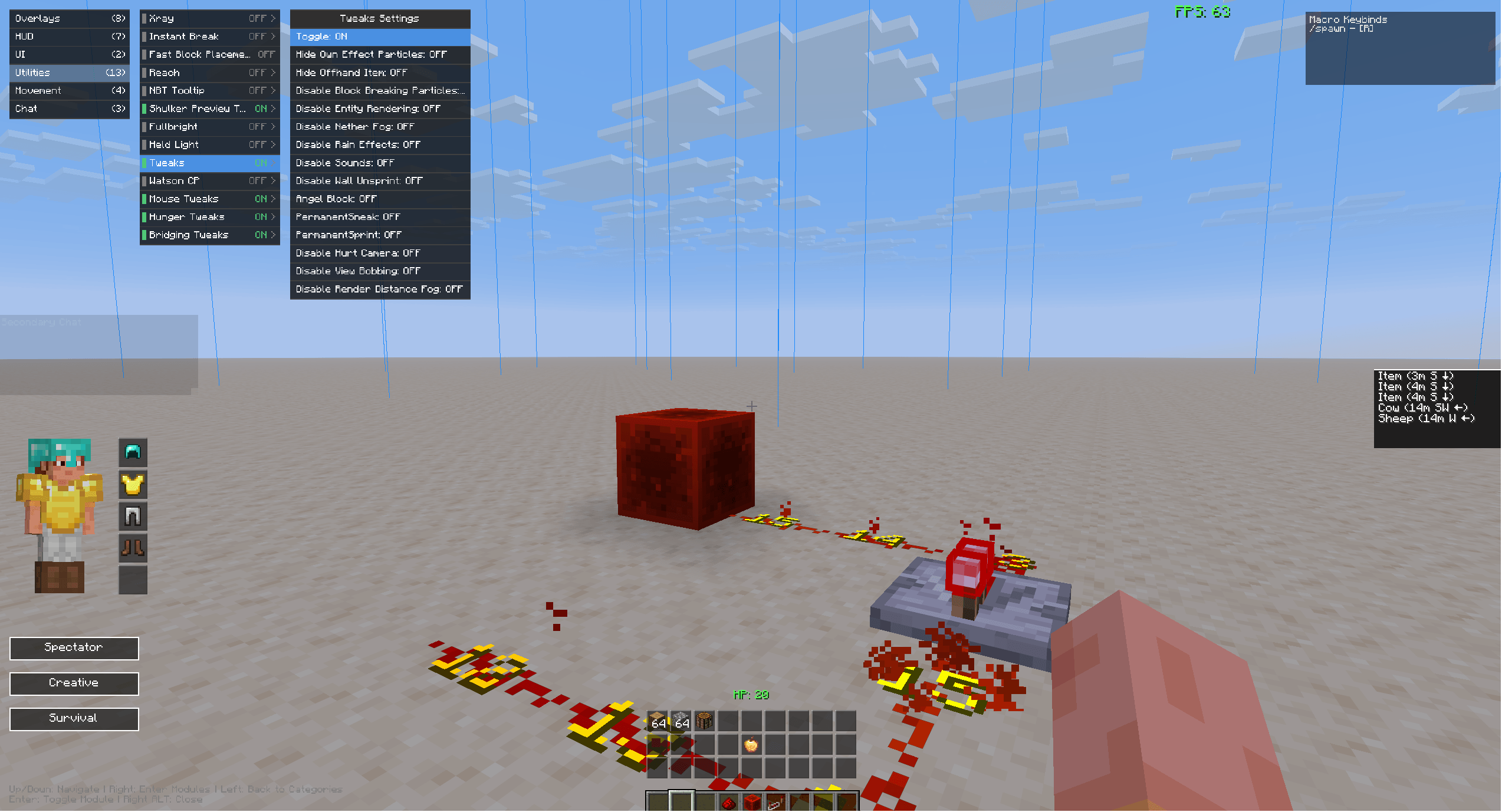 Base Overview Base Overview
 -
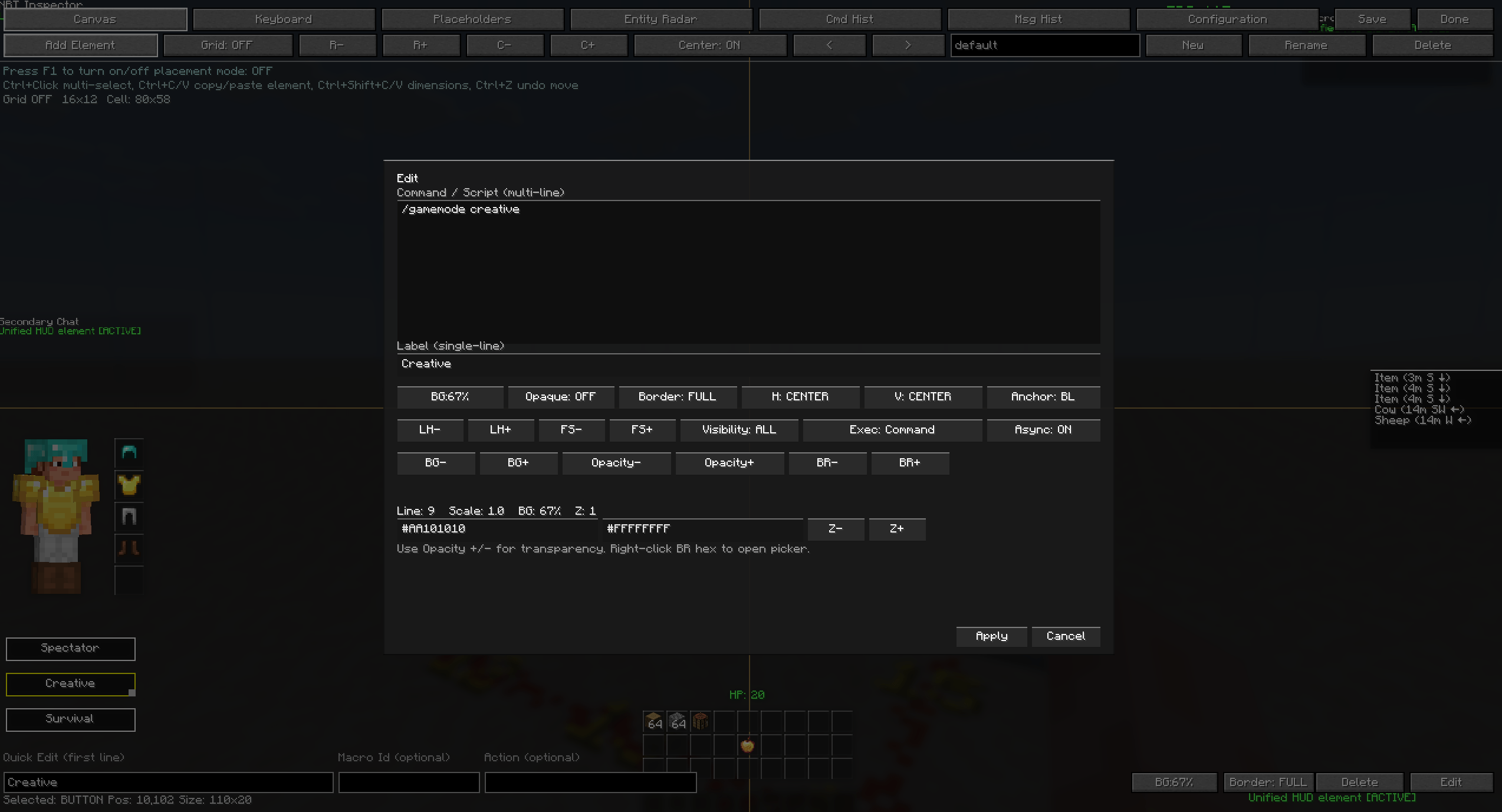 Canvas Canvas
 -
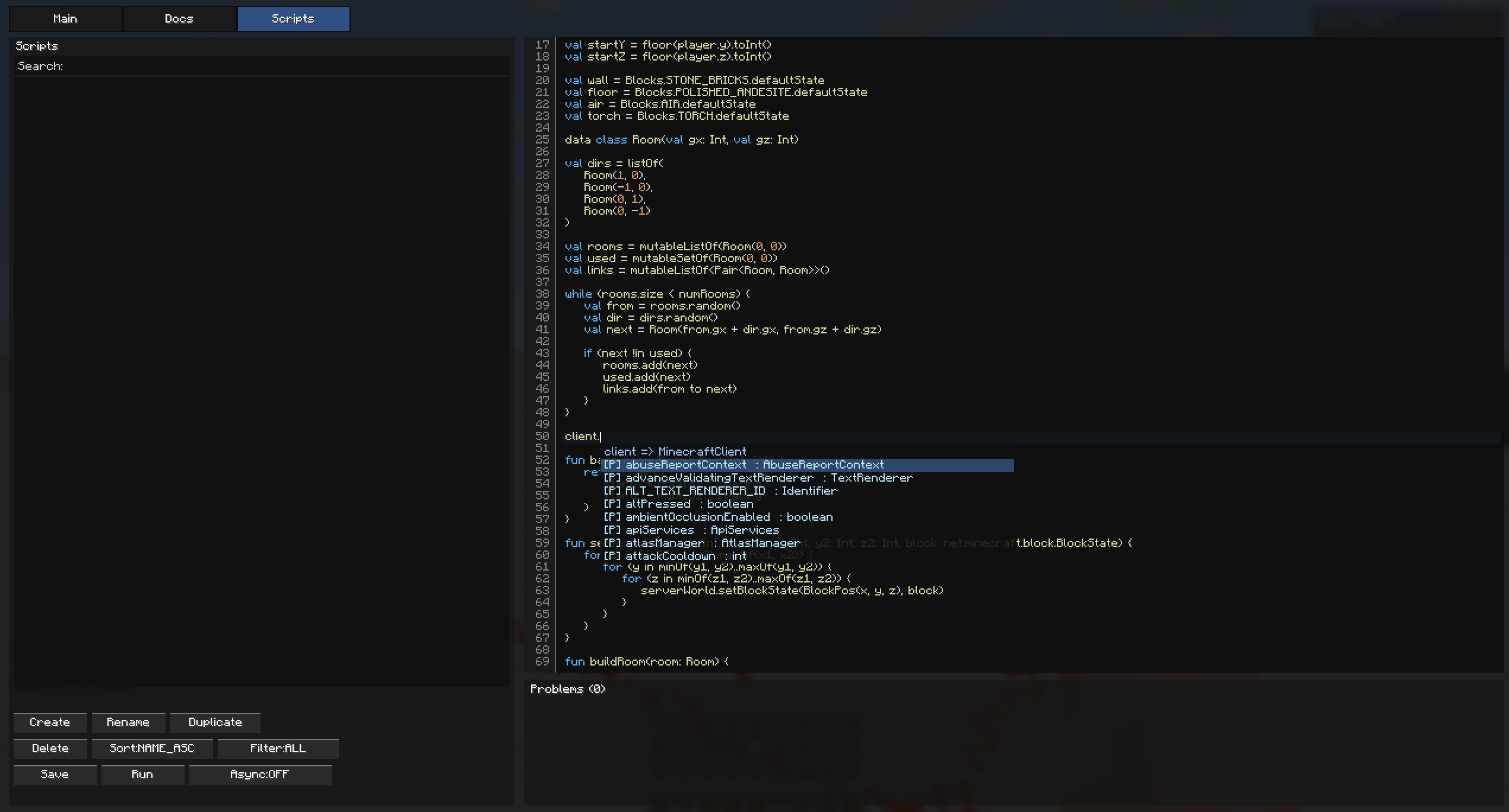 Scripting Scripting
 -
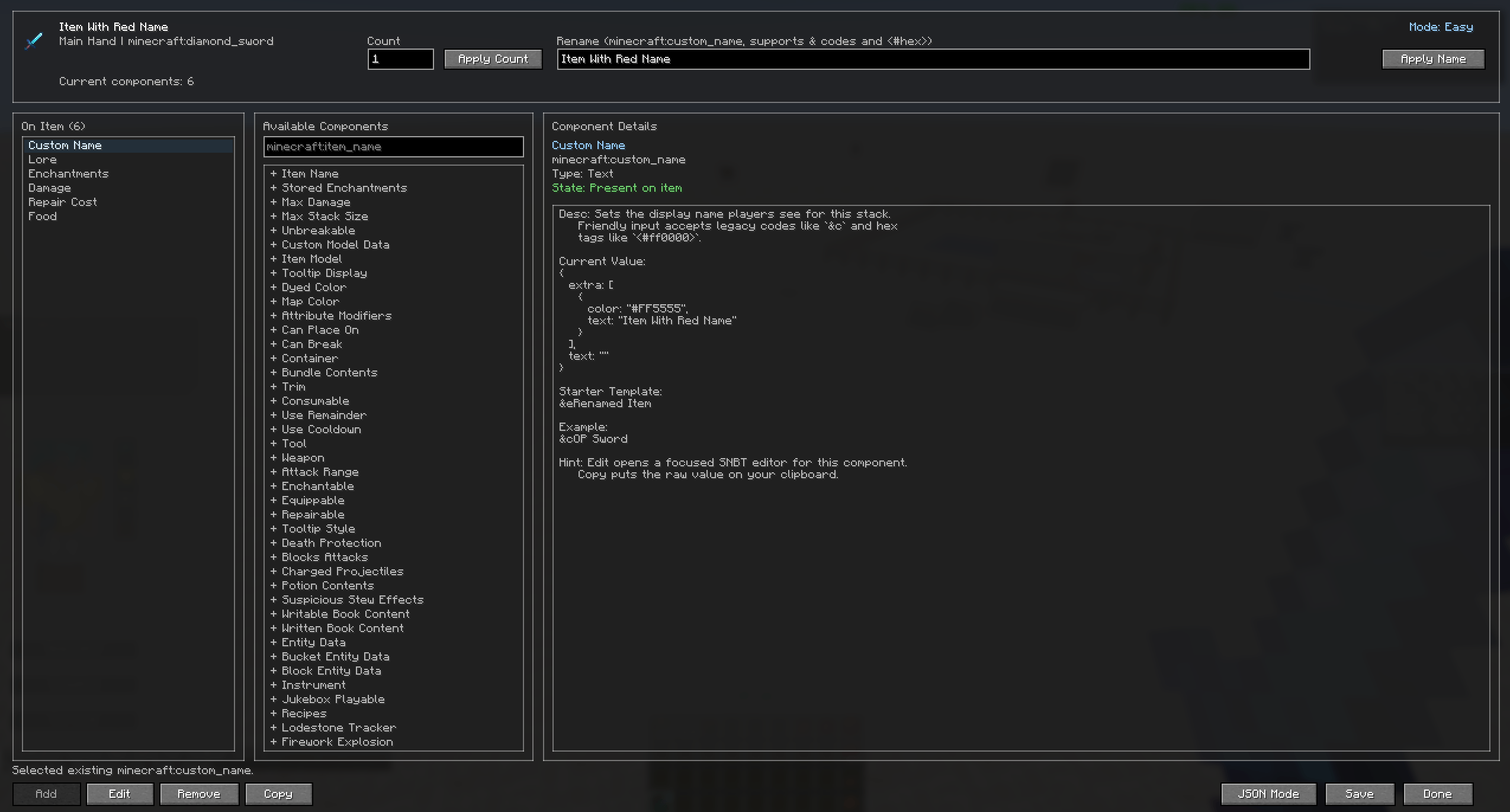 SNBT Editor SNBT Editor
-
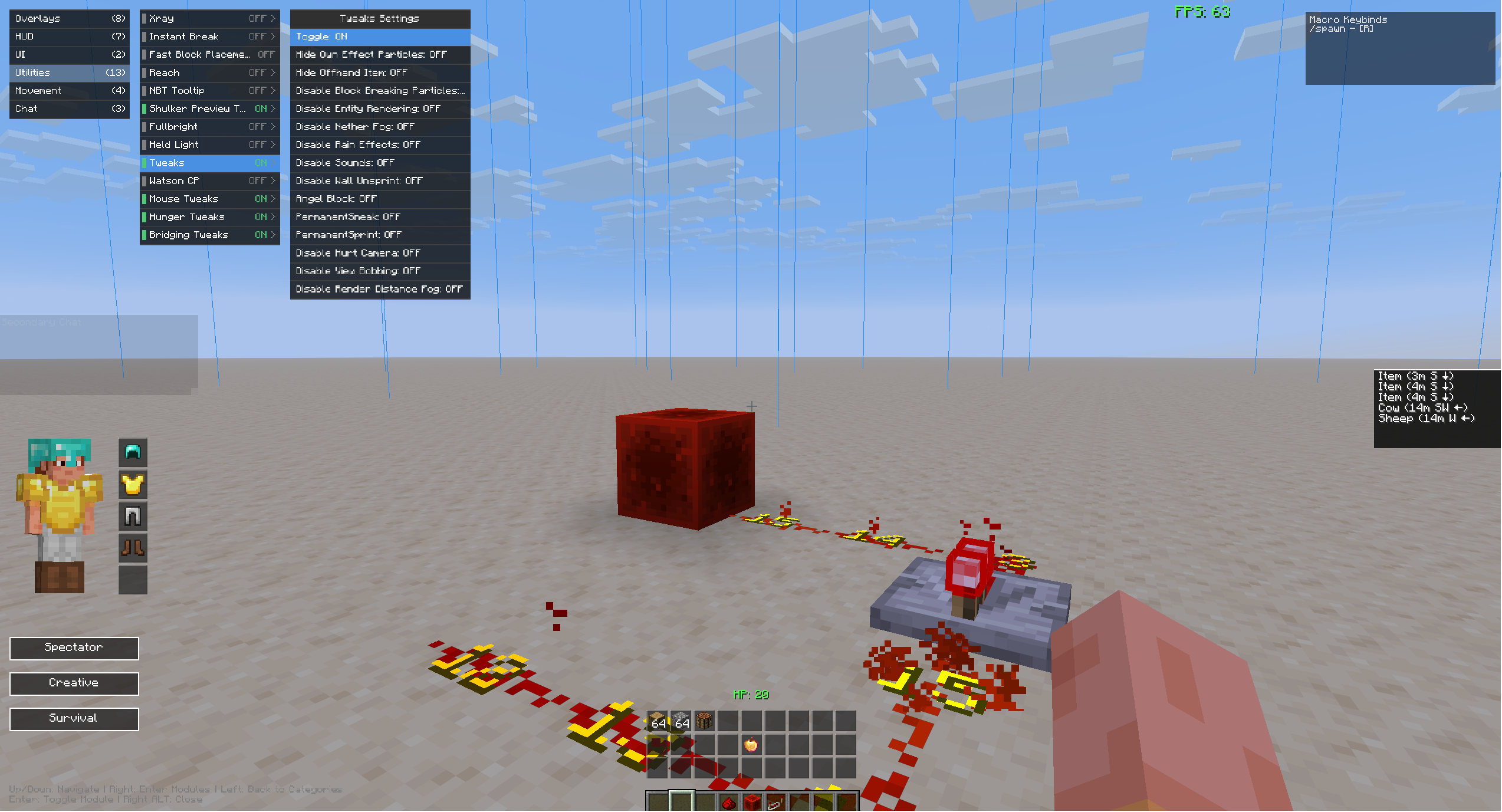 Base Overview
 -
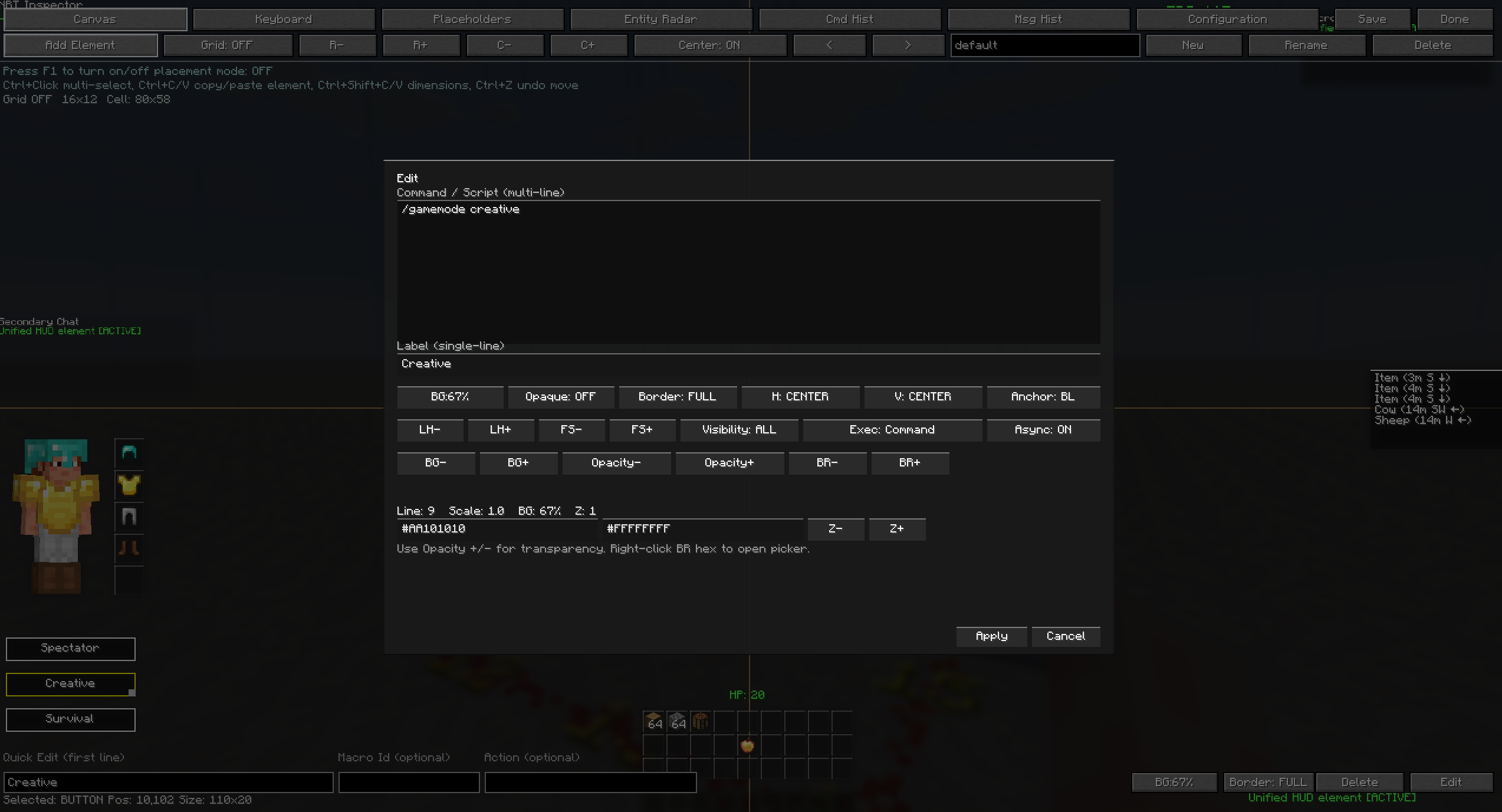 Canvas
 -
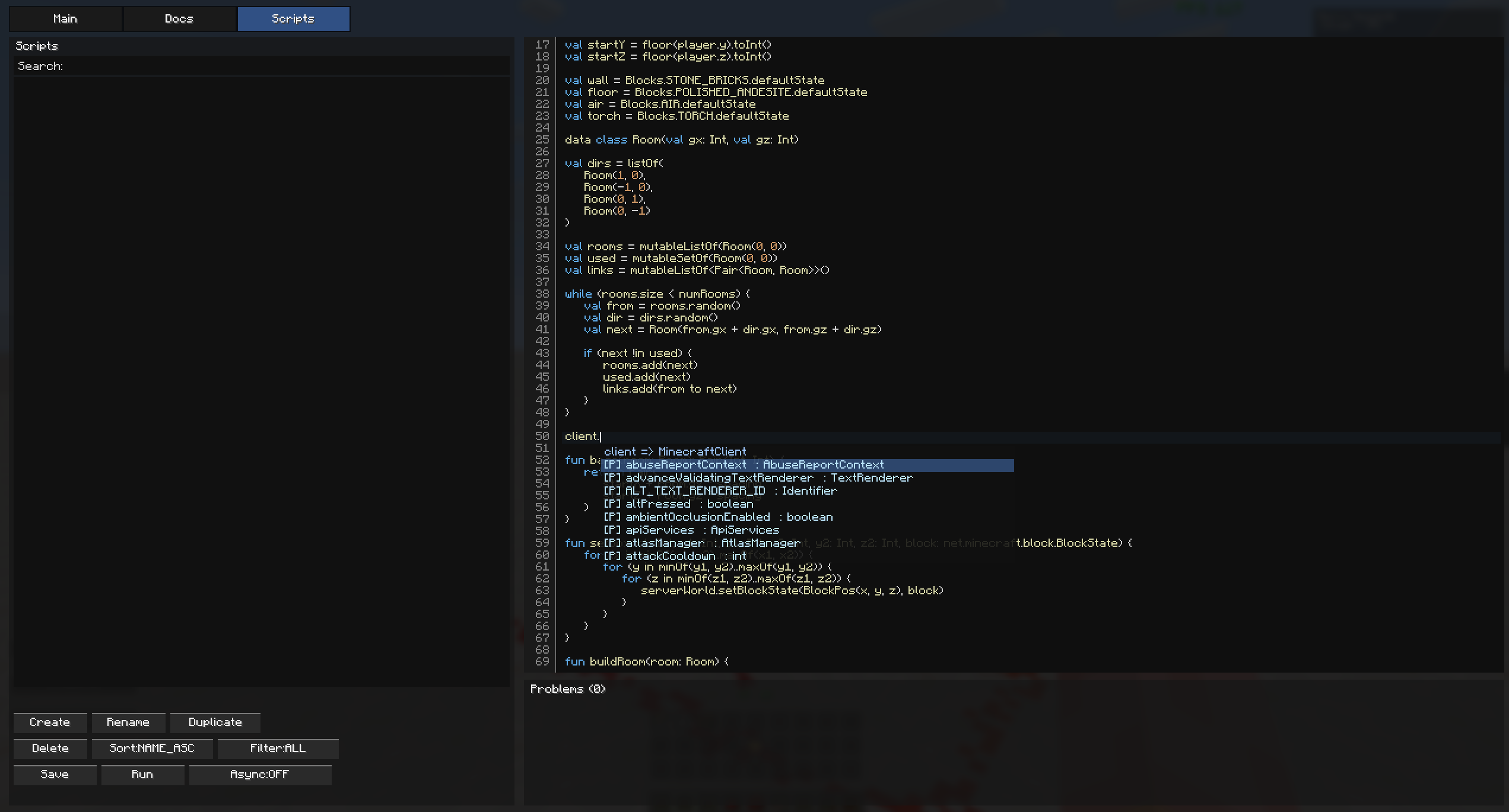 Scripting
 -
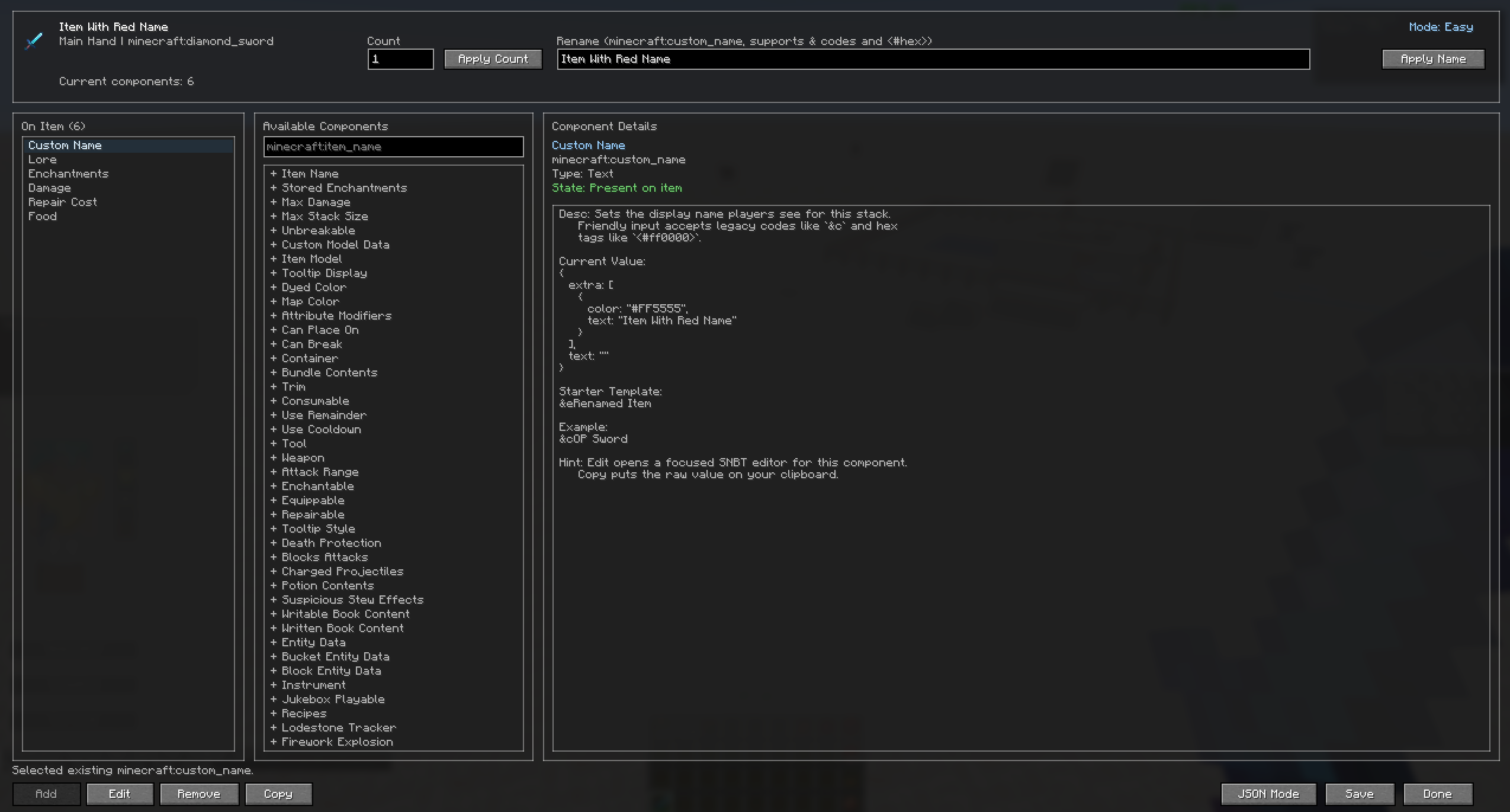 SNBT Editor
Versions
Files
Relations
Project Relations
More like this
Similar Mods
Suggestions use data such as tags, dependencies, dependents, descriptions, titles, and more to rank how much they overlap with this mod.
On ModDex
Community snapshot
By the numbers
Statistics
Want to reach Minecraft players?
We're looking for a server hosting partner to feature here and other parts of the site. Interested? Send us a message!
Get in touchGet it on
Available Platforms
On ModDex
Community snapshot
By the numbers