Community listing page, reviews here may not be monitored by the author.
Maixr‘s photo chat

No reviews yet
press [f5] and you can send your screenshot to the Chat box. sending photos in your computer disk is also allowed.
Community voices
Reviews
No reviews yet. Be the first to review this project!
Get it on
Available Platforms
About
Project Details
For authors
Embed Badge
If you're the author of this project, you can embed a live badge anywhere that supports HTML or Markdown. It updates automatically whenever ratings change.
Use HTML for any page that supports it, or Markdown for README files and Markdown-based descriptions.
Identifiers
Platform IDs
Resources
External Links
About
Description
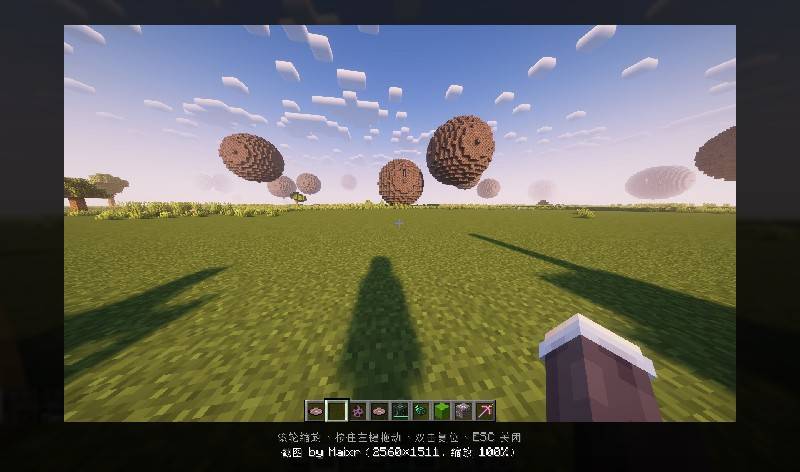
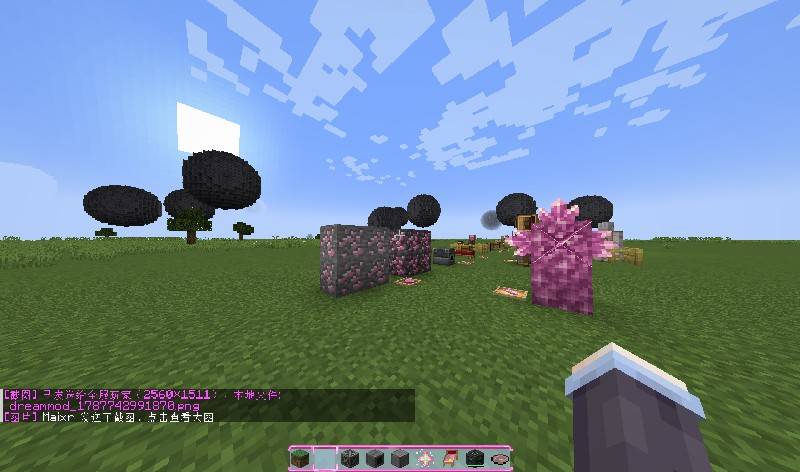
# ChatShot

Take a screenshot and send it straight to your chat with a single keypress — sharing your gaming moments has never been easier.

## ✨ Features

- **One-click screenshot sharing**: Press a hotkey to capture the screen and automatically attach the image to your chat input
- **Customizable hotkey**: Bind any key in the Controls settings
- **Lightweight & dependency-free**: No required mods — just install and play
- **(Optional) Preview before sending**: Confirm your screenshot before it hits the chat
- **(Optional) Format options**: Switch between PNG and JPG

## 🎮 How to Use

1. Install the mod and launch the game
2. Go to **Options → Controls → Key Binds** and find the ChatShot screenshot key (default [f5])
3. Press the hotkey in-game — the screenshot automatically appears in your chat input
4. Hit Enter to send

## 📦 Requirements

- **Side**: Client and sever
- **Dependencies**: None

## ⚙️ Configuration

Config file: `config/chatshot-client.toml`
- Screenshot save directory
- Image quality / format
- Preview before send toggle


## 🐛 Feedback & Support

Found a bug or have a feature request? Open an Issue on the issue tracker.


# ChatShot

一键截屏并自动发送到聊天框,和朋友分享你的游戏瞬间从未如此简单。

## ✨ 功能特性

- **一键截屏分享**:按下快捷键,自动截屏并将图片插入当前聊天框
- **自定义快捷键**:在控制设置中自由绑定按键
- **轻量无依赖**:不依赖任何其他模组,安装即用
- **(可选)截图预览**:发送前可预览并确认截图
- **(可选)格式可选**:支持 PNG / JPG 格式切换

## 🎮 使用方法

1. 安装模组后进入游戏
2. 在「选项 → 控制 → 快捷键」中找到 ChatShot 的截屏键(默认建议 `V` 或 `C`)
3. 游戏中按下快捷键,截图自动出现在聊天输入框
4. 回车发送即可

## 📦 依赖信息

- **加载器**:NeoForge(版本号:如 1.20.1 / 1.21)
- **安装端**:客户和服务
- **前置模组**:无

## ⚙️ 配置说明

模组配置文件位于 `config/chatshot-client.toml`,可调整:
- 截图保存路径
- 图片质量 / 格式
- 是否发送前预览
- 文件名命名规则

## 🐛 反馈与支持

遇到问题或有功能建议,欢迎在 Issue 区反馈。
Screenshots
Gallery
Versions
Files
Relations
Project Relations
More like this
Similar Mods
Suggestions use data such as tags, dependencies, dependents, descriptions, titles, and more to rank how much they overlap with this mod.
On ModDex
Community snapshot
By the numbers
Statistics
Want to reach Minecraft players?
We're looking for a server hosting partner to feature here and other parts of the site. Interested? Send us a message!
Get in touchGet it on
Available Platforms
On ModDex
Community snapshot
By the numbers
Statistics
Resources