
Community listing page, reviews here may not be monitored by the author.
Maze


No reviews yet
An advanced Minecraft maze generator with themes, life rooms, timed resets, exits control, and deep gameplay customization.

Community voices
Reviews
No reviews yet. Be the first to review this project!
Get it on
Available Platforms
Compatibility
Supported Environments
Must be installed on both the client and the server.
About
Project Details
For authors
Embed Badge
If you're the author of this project, you can embed a live badge anywhere that supports HTML or Markdown. It updates automatically whenever ratings change.
Use HTML for any page that supports it, or Markdown for README files and Markdown-based descriptions.
Identifiers
Platform IDs
Resources
External Links
About
Description
Maze - is an advanced Minecraft mod for creating dynamic, configurable labyrinths with timers, automatic updates, themes, Life Rooms, roof control, mob management, loot systems, and full material overrides.
The mod allows you to turn any selected area into a fully functional maze that can be used as an arena, event map, minigame, or challenge. Each maze is independent, customizable, and replayable.
undefined
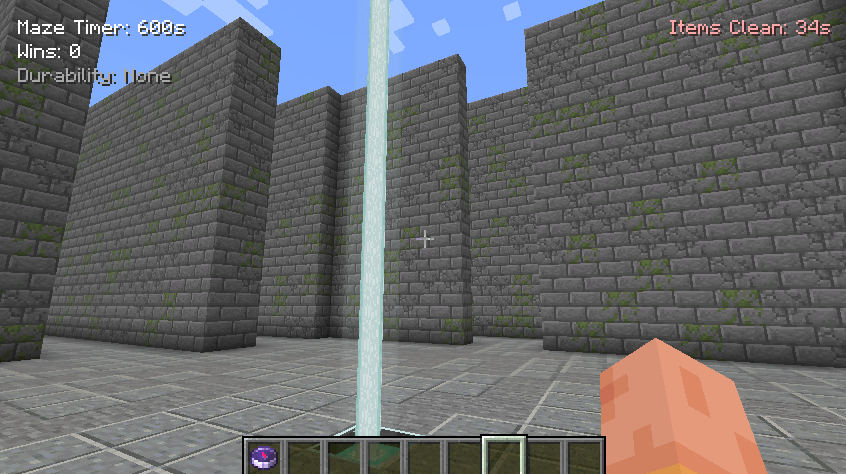
🏗️ Main Features
Generate mazes between pos1 and pos2
Automatic maze refresh when the timer reaches zero
Manual refresh and full rebuild commands
YAML-based theme system (maze_themes.yml)
Optional roof (closed maze)
Life Room (safe living area)
Flexible exit management (1–4 exits)
Chest and loot control
Mob spawn control
Drop cleanup system
Full material override mode (P)
HUD visible only inside the maze
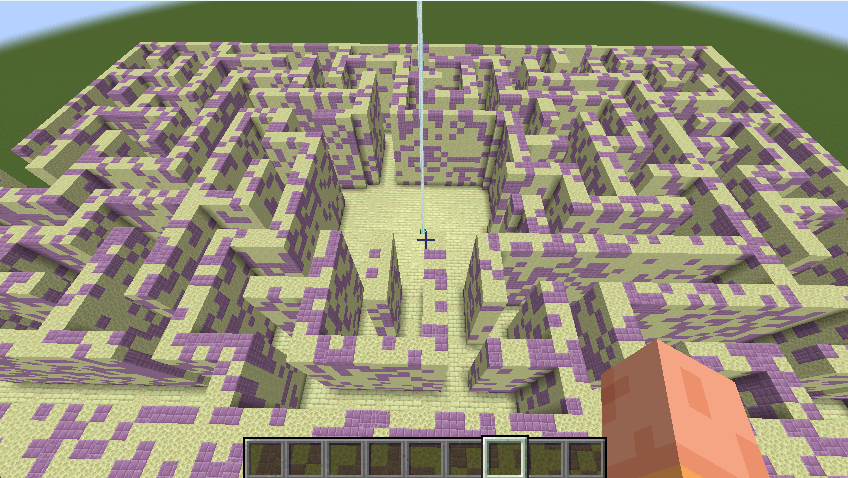
🧱 Labyrinth Themes (maze_themes.yml)
Themes define which blocks are used in different parts of the maze using weighted randomness.
Example Themecastle: wall: STONE_BRICKS: 40 CRACKED_STONE_BRICKS: 20 MOSSY_STONE_BRICKS: 15 floor: POLISHED_ANDESITE: 20 STONE: 10 top: CHISELED_STONE_BRICKS: 3 box: STONE_BRICKS: 40 CRACKED_STONE_BRICKS: 20 MOSSY_STONE_BRICKS: 15
Theme Sections
wall — maze walls
floor — maze floor
top — roof / top layer
box — maze outer boundaries (replaces `black_concrete`)
You should create a folder in Minecraft\config\ called maze_mod and place this file in it.
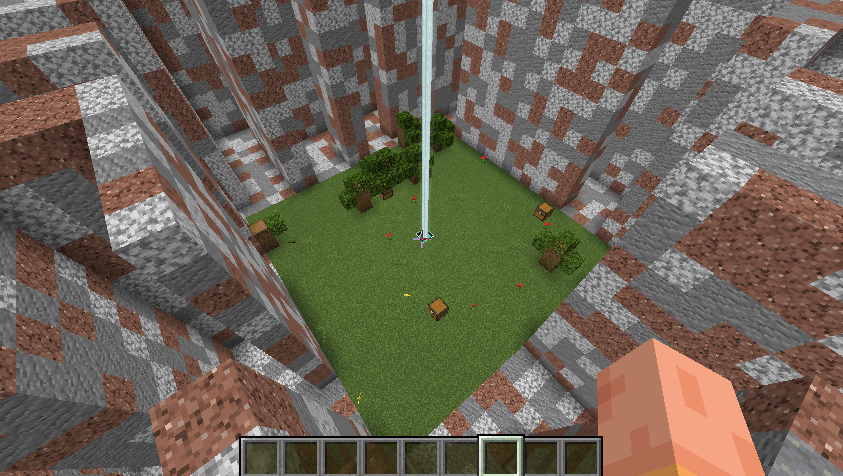
🧠 Life Room (L:true)
The Life Room is a safe living room located inside the maze.
Features
Floor is always GRASS_BLOCK
Natural environment:
grass
flowers
trees with leaves
Central structure:
beacon (lighthouse)
iron blocks under the beacon
Mobs cannot spawn or enter**
Players are immune to maze refresh**
The Life Room never resets on timer or refresh
Chests
Spawn only inside the room
Do not regenerate on refresh or timer
Player Behavior
When entering the maze from outside, players are teleported near the beacon
Players inside the Life Room do not die when the maze updates
📍 Area Selection Commands
/maze pos1 Set first position
/maze pos2 Set second position
/maze poslist Show all saved positions
/maze poscancel Remove a saved position
🏗️ Create a Maze
/maze create [arguments]
Arguments
| Argument | Description |
|---|---|
| `L:true/false` | Enable Life Room |
| `CL:true/false` | Enable roof |
| `P:` | Full material override (entire maze) |
| `LE:<1-4>` | Number of exits |
| `LC:true/false` | Chest generation |
| `ms:true/false` | Natural mob spawning |
| Examples | |
| /maze create test L:true CL:true LE:4 | create a life room with a roof and four exits |
| /maze create hell P:35 CL:true | labyrinth with a roof |
| /maze create arena L:true LC:false | create a life room without chests |
🔁 Refresh Maze
/maze refresh [arguments]
Rebuilds the maze logic and structure
Life Room remains unchanged
CL:false fully removes the roof
Examples
/maze refresh test
/maze refresh test CL:false
🔨 Full Rebuild
/maze rebuild [arguments]
Deletes the maze and immediately recreates it.
/maze rebuild test L:true CL:true
⏱️ Timer System
Each maze has its own timer
When the timer reaches 0, the maze refreshes automatically
The Life Room is never affected
Players inside the Life Room take no damage
🚪 Exits
Controlled by `LE:<1-4>`
Exits are placed at the center of each side of the maze
You can choose between 1 and 4 exits
📦 Chests & Loot
LC:true
Chests spawn:
in the maze
in the Life Room (if enabled)
LC:false
No chests at all
🧟 Mob Control
/maze ms true/false
Controls natural mob spawning
Does not affect maze-controlled mobs
Works instantly (no refresh required)
🧹 Drop Clearing System
/maze LD on/off
/maze LD Time
Examples
/maze LD on
/maze LD Time 2 min
Automatically removes dropped items
Timer works independently of maze timer
HUD shows remaining cleanup time
🎯 Use Cases
Minigames
PvE challenges
Event arenas
Adventure maps
Custom survival challenges
Maze Mod
A Minecraft mod that generates random mazes with configurable settings, including life rooms, chests, and difficulty parameters. This version features a comprehensive GUI for maze management and customization.
Features
- Maze Generation: Creates random mazes with adjustable dimensions and complexity.
- GUI Control Panel: A tabbed interface to manage maze settings without using commands.
- Multi-Version Support: Compatible with Minecraft 1.16.5, 1.18.2, 1.19.4, and 1.20.1.
- Network Sync: Real-time synchronization of maze states between client and server.
- HUD Integration: In-game hints for maze controls and status.
Installation
- Download the mod JAR file.
- Place it in your Minecraft
modsfolder. - Launch Minecraft with Forge for the corresponding version.
Usage
Controls
- Press M to open the Maze Control Panel.
- Use the < and > arrows to navigate between the 4 tabs.
Tabs
-
Maze Setup:
- Set Position 1 & 2 using in-game buttons.
- Adjust Height, Wall Width, and Path Width.
- Configure Life Room, Roof, Center Room, Torches, and Exits.
- Choose Wall Color and Floor Color.
- Select a Theme.
-
Advanced Settings:
- Set Timer, Zombie Count, and Chest Count.
- Adjust Stone Chance and Erosion.
- Configure Life Room Chest Count (LRCC).
- Toggle Loot Drops, Mob Spawning, and Life Chests.
-
Actions:
- Create, Rebuild, Refresh, or Delete Mazes.
- Start, Stop, or Reset the Timer.
- Reset Wins and Clear Positions.
- List Mazes and Positions.
- Apply Settings (Timer, Zombie Count, Chest Count).
-
GUI Customization:
- Adjust GUI Scale (50%–150%).
- Modify Background Opacity.
- Change Text Color.
Commands
While the GUI is the primary control method, the following commands are available:
/maze - Press M: Opens the Maze Control Panel./maze - List Mazes: Lists all created mazes./maze - List Positions: Lists all saved positions./maze - Clear Positions: Clears all saved positions./maze - Reset Wins: Resets the win counter./maze - Delete <name>: Deletes a maze by name./maze - Rebuild <name>: Rebuilds a maze by name./maze - Refresh <name>: Refreshes a maze by name./maze - Start <name>: Starts a maze by name./maze - Stop <name>: Stops a maze by name./maze - Reset <name>: Resets a maze by name./maze - Apply <name> <timer> <zombie_count> <chest_count>: Applies settings to a maze.
API Compatibility
| Version | Button API | Render API | Component API | Send Command |
|---|---|---|---|---|
| 1.20.1 | Button.builder().build() |
GuiGraphics |
Component.literal() |
connection.sendCommand() |
| 1.19.4 | Button.builder().bounds().build() |
PoseStack |
Component.literal() |
connection.sendCommand() |
| 1.18.2 | new Button(x,y,w,h,text,onPress) |
PoseStack |
new TextComponent() |
player.chat("/cmd") |
| 1.16.5 | new Button(x,y,w,h,text,IPressable) |
MatrixStack |
new StringTextComponent() |
player.chat("/cmd") |
License
MIT License
Screenshots
Gallery
-
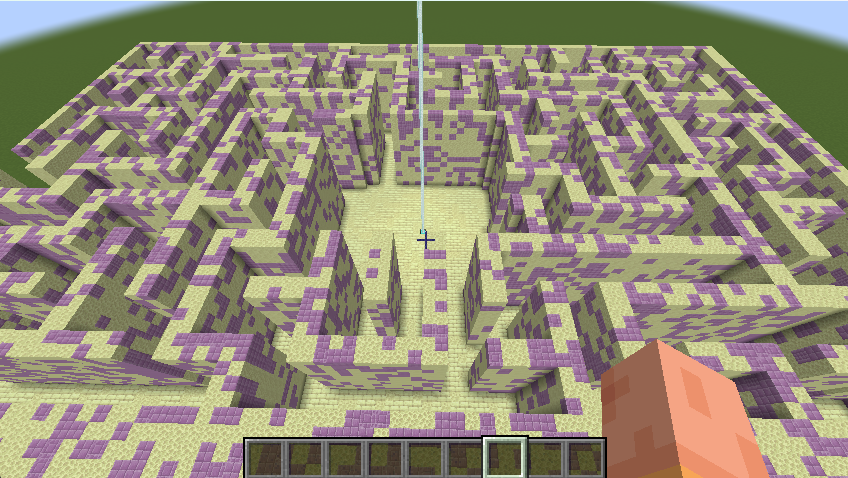 theme theme end . maze_theme.yml
 -
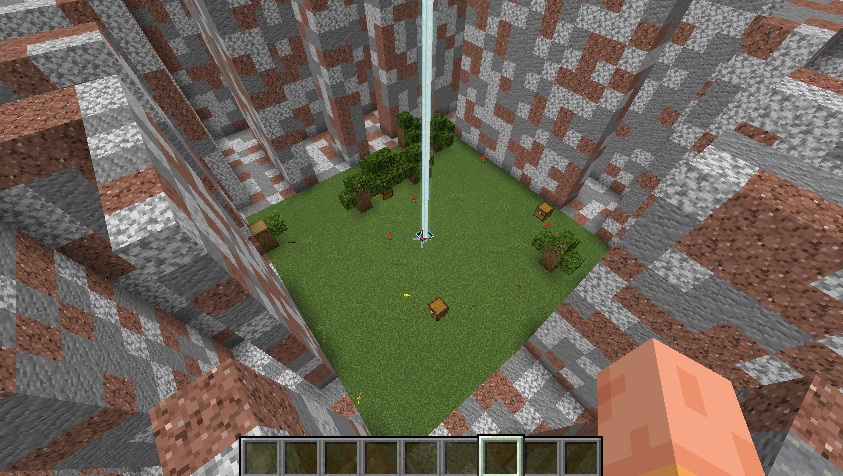 life room L:true
 -
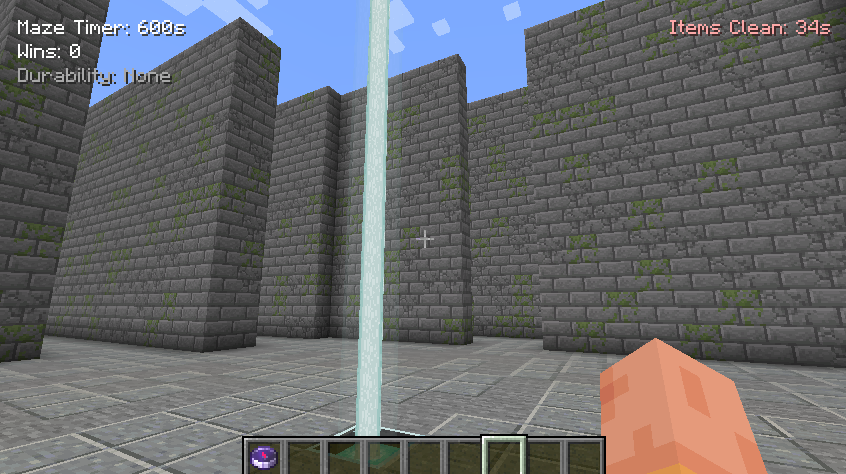 maze cool maze with maze timer,wins,durability and items cleaner
 -
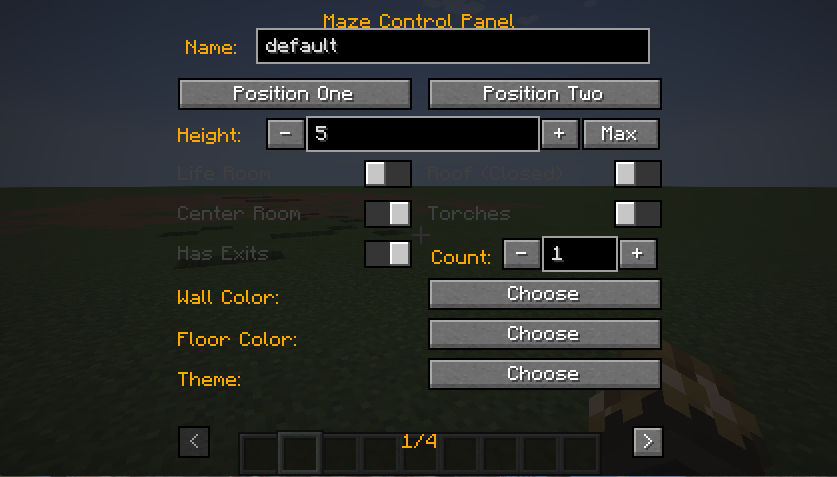 Maze Control Panel 1 page
 -
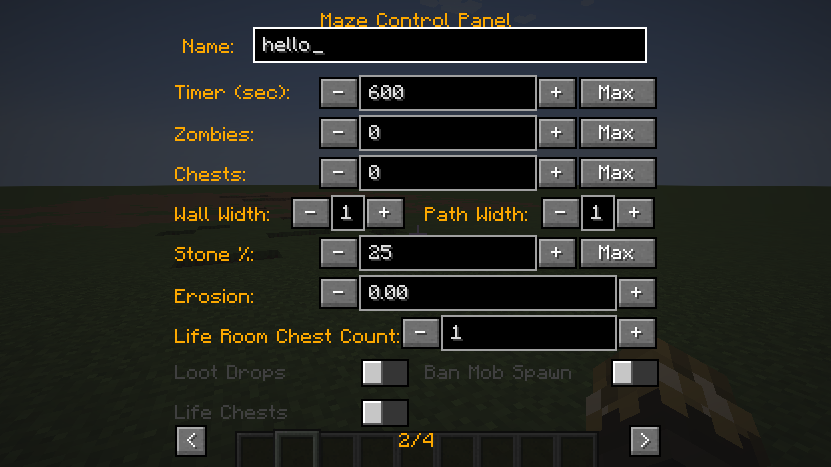 2 page
 -
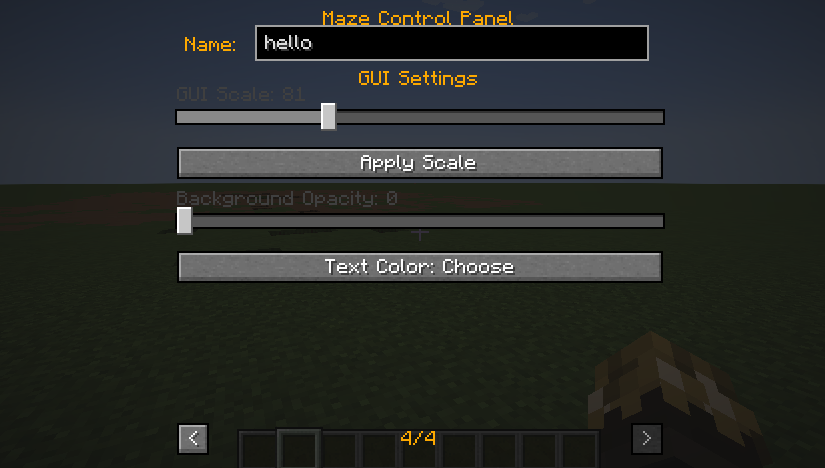 4
4 -
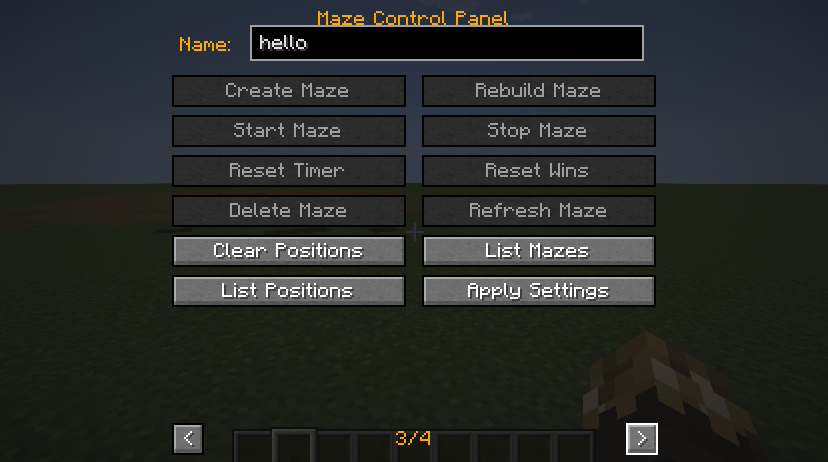 3 page
Versions
Files
Relations
Project Relations
More like this
Similar Mods
Suggestions use data such as tags, dependencies, dependents, descriptions, titles, and more to rank how much they overlap with this mod.
On ModDex
Community snapshot
By the numbers
Statistics
 (opens in a new tab)
Get it on
Available Platforms
On ModDex
Community snapshot
By the numbers
Statistics
Resources