Community listing page, reviews here may not be monitored by the author.
Locks Reforged


No reviews yet
The "Locks" mod updated to work with 1.20.1 and 1.21.1; includes all features of the original with full configurability, new content and some bug fixes.
Community voices
Reviews
No reviews yet. Be the first to review this project!
Get it on
Available Platforms
Compatibility
Supported Environments
Must be installed on both the client and the server.
About
Project Details
For authors
Embed Badge
If you're the author of this project, you can embed a live badge anywhere that supports HTML or Markdown. It updates automatically whenever ratings change.
Use HTML for any page that supports it, or Markdown for README files and Markdown-based descriptions.
Identifiers
Platform IDs
About
Description
Locks Reforged
An unofficial port of the Locks mod by Melonslise to Minecraft Forge 1.20.1.
Locks is a small but unique mod that lets you attach flexible, universal locks to any block in the game — including blocks from other mods. Protect your doors, chests, furnaces, and more with a dynamic locking system and an interactive lock picking minigame.
Features
Lock Any Block
Attach locks to any block — not just chests. Doors, trapdoors, furnaces, dispensers, hoppers, and modded blocks all work. Locks are spatial, so a single lock can cover multiple blocks at once (up to a configurable volume, 6 blocks by default).
Seven Tiers of Locks (+ Custom!)
| Lock | Pins | Enchantability | Resistance | Pick Wear |
|---|---|---|---|---|
| Wood | 5 | 15 | 4 | 1 |
| Copper | 6 | 16 | 8 | 2 |
| Gold Plated | 6 | 22 | 6 | 2 |
| Iron | 7 | 14 | 12 | 3 |
| Steel | 9 | 12 | 20 | 6 |
| Diamond Plated | 11 | 10 | 100 | 12 |
| Netherite | 14 | 8 | 200 | 24 |
- Pins — Number of pins in the lock picking minigame. More pins = harder to pick.
- Enchantability — How likely the lock is to receive powerful enchantments.
- Resistance — Explosion resistance. Diamond and Netherite locks are virtually indestructible.
- Pick Wear — Durability this lock takes off a lock pick on every wrong pin. Higher = eats picks faster.
Seven Tiers of Lock Picks (+ Custom!)
| Lock Pick | Strength | Enchantability | Durability | Wrong pins vs. its own tier |
|---|---|---|---|---|
| Wood | 0.20 | 5 | 32 | 32 |
| Bobby Pin (copper) | 0.28 | 7 | 48 | 24 |
| Gold | 0.25 | 22 | 40 | 20 |
| Iron | 0.35 | 10 | 96 | 32 |
| Steel | 0.70 | 12 | 192 | 32 |
| Diamond | 0.85 | 10 | 384 | 32 |
| Netherite | 0.95 | 15 | 768 | 32 |
- Strength — Which locks the pick may attempt at all (the Complexity gate). It does not affect how fast the pick wears out.
- Enchantability — How well the pick takes enchantments at the enchanting table. The gold pick is the mod's "enchant me" tier, exactly like vanilla gold gear.
- Durability — Durability points before the pick breaks.
Netherite locks and picks are fire-resistant and survive in lava, just like vanilla netherite gear. Both are crafted at a smithing table from their diamond equivalent using a Netherite Upgrade Template.
All locks and lock picks are fully data-driven — add your own custom tiers via simple JSON files, or tweak existing stats through config files, TOML overrides, or datapacks. No code changes needed!
Lock Picking Minigame
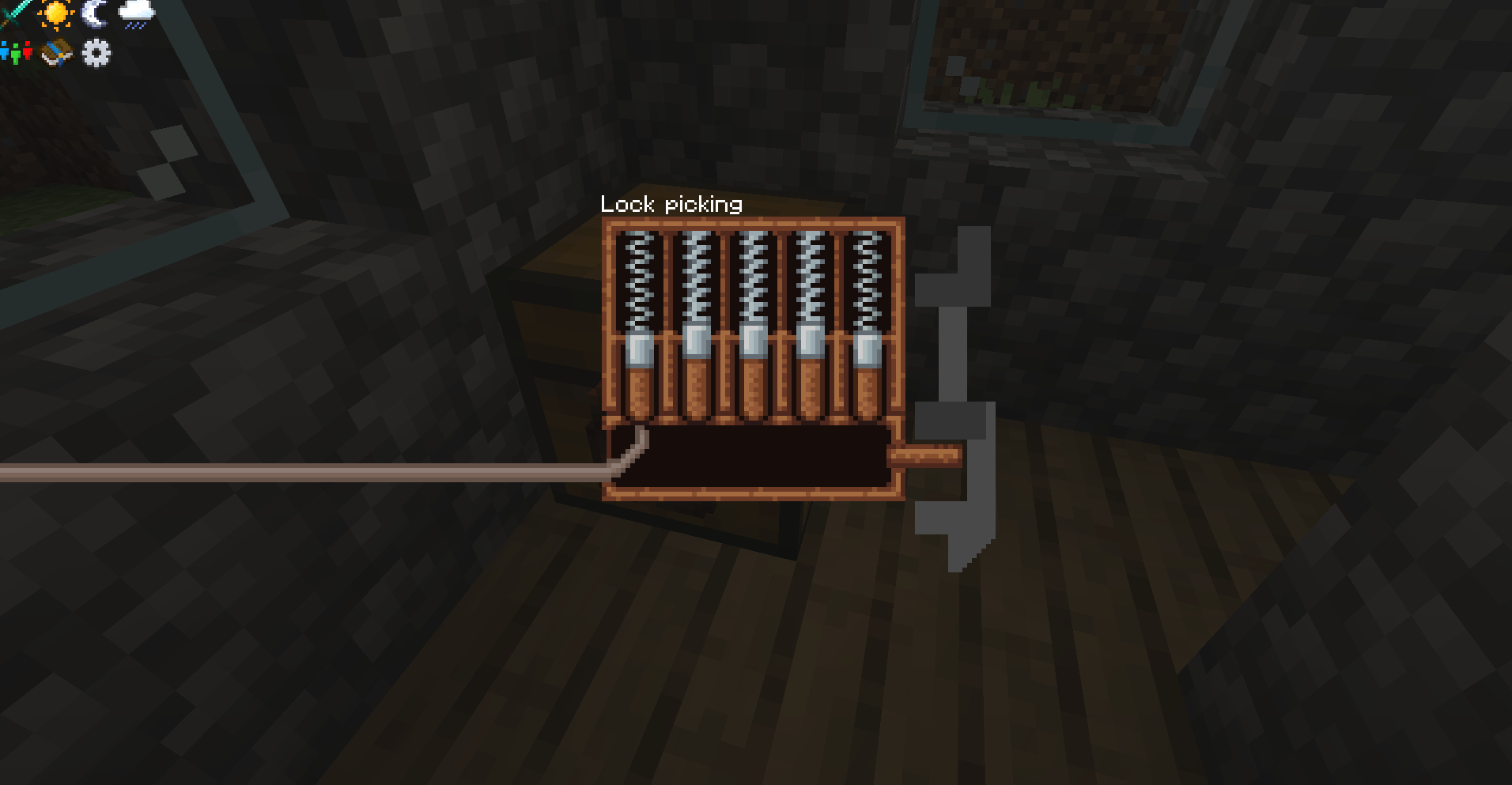
Pick locks with an interactive pin-matching minigame. Match each pin to crack the combination.
Lock picks use durability. A wrong pin does not roll the dice on destroying your pick — it costs a fixed amount of durability, set by the lock you are picking, and the pick breaks only when that durability hits zero. You can watch the bar and know exactly how many mistakes you have left. The shipped values give a pick roughly 32 mistakes against a lock of its own tier; bring a wood pick to a netherite lock and one wrong pin ends it. A guess that is off by exactly one pin costs about a third as much (never less than 1). Picks are proper tools, so Mending and Unbreaking work on them, and every tier can be repaired at an anvil.
Picks still stack to 64. Minecraft normally makes a durable item unstackable, but Locks restores the full stack size — and only ever wears down one pick at a time. The first wrong pin that actually costs durability splits the stack for you: the single pick in your hand takes the damage while the untouched remainder returns to your inventory. Break it, and only that one item is consumed; the next pristine pick is already in hand and the attempt continues. A worn pick will not merge back into a fresh stack until it is repaired, which is what keeps the damage on the one pick that earned it. An anvil also refuses to apply an enchanted book to a stack of more than one pick, so a single book cannot enchant 64 picks at once.
Optional: turn on Allow Itemless Lock Picking and players can play the same minigame with an empty hand, no lock pick required. Itemless attempts never consume or damage anything and are never blocked by Complexity, but a wrong pin drops every solved pin. Off by default; physical picks work exactly as before either way.
Keys & Key Rings
A Key Blank is uncut — it opens nothing until you pair it with a lock, and you pair it before placing the lock:
- Craft a Key Blank.
- Before placing the lock, put one Key Blank and the lock together in any crafting grid — your 2×2 inventory grid works, and so does a crafting table.
- The recipe gives back the lock and produces a Key matching it.
- Place the lock. That Key now unlocks and re-locks it.
- Craft the paired Key with another Key Blank to make a spare.
The recipe is shapeless, and one blank makes one key.
A blank key cannot copy a lock that is already placed — otherwise any visitor could cut themselves a matching key and your lock would protect nothing. Right-clicking a placed lock with a blank just reminds you of the workflow. If you placed a lock before pairing it, sneak with an empty hand to take the unlocked lock back, pair it, and place it again.
Carry a Key Ring to hold many keys at once — it opens any lock whose key is inside, and with Curios installed it works straight from a curio slot. A Master Key opens everything.
Enchantments
Lock enchantments — go on the lock:
| Enchantment | Max Level | Effect |
|---|---|---|
| Shocking | V | Electrocutes players who fail a pick attempt (bypasses armor) |
| Sturdy | III | Makes every wrong pin cost the pick more durability (+50% per level by default) |
| Complexity | III | Blocks lower-tier picks from attempting the lock at all |
| Silent | I | Suppresses the rattle sound when access is denied. Incompatible with Shocking |
| Auto-Pick | III | 10%/20%/30% chance to instantly open the lock, bypassing the minigame. Incompatible with Complexity |
| Reinforced | III | Increases explosion resistance by 50%/100%/150% |
| Awareness | I | The lock does not apply to whoever placed it — the block opens for them normally while staying locked to everyone else. Sneak + right-click with an empty hand to act on the lock itself |
Lock pick enchantments — go on the pick, and provide counterplay:
| Enchantment | Max Level | Effect |
|---|---|---|
| Finesse | III | Reduces the durability a wrong pin costs, 15% per level (counters Sturdy). Incompatible with Last Catch |
| Attunement | II | Boosts effective pick strength against complex locks (counters Complexity) |
| Grounded | III | Reduces damage from Shocking locks while holding the pick, in either hand (counters Shocking) |
| Quiet Hand | I | Reduces the sound of failed pin attempts |
| Last Catch | I | ~20% chance that a wrong pin costs no durability at all. Incompatible with Finesse |
A wrong pin always costs at least 1 durability, so no combination of enchantments and config values makes picking free. Lock picks are enchantable at the enchanting table. Each of the 12 enchantments can be individually disabled — and the lock pick enchantments' effects tuned — in the server config.
Full Protection
Locked doors cannot be opened by villagers or any other door-opening AI — including modded NPCs that drive a vanilla or subclassed door. Closing a locked door is still allowed; only opening is refused. Re-locking an open door closes it, so a door can never stand open while its lock reports locked.
Locked blocks are also protected from:
- Redstone activation
- Hopper extraction
- Piston movement
- Explosions
- Breaking (configurable)
Loot-Scaled Lock Generation
Lock tier is determined by the value of a chest's loot table contents. Village chests get wood or copper locks, while end city chests get gold or diamond locks.
- Deterministic estimate, cached per loot table — the value is computed by reading the loot table's own JSON (pools, rolls, weights, nested table references and tag entries) rather than by rolling loot, so the same table always scores the same across restarts and the cost is paid once.
- Sub-linear stack count — item value scales with the square root of stack size, so 64 cobblestone doesn't outrank a diamond sword.
- Rarity and enchantment weighting — an item's rarity tier multiplies its value, and loot-table enchantment functions push an item up a rarity band.
- Item value overrides — configurable per-item base values for materials like diamonds, emeralds, and netherite that are valuable but have common rarity. 15 vanilla items have sensible defaults.
- A chest whose loot value falls below the lowest configured threshold gets no lock at all. Raise the thresholds to reserve the best locks for the best chests and leave ordinary chests unlocked.
- Can be switched off in favour of random weighted selection, and a separate Lock Generation Chance (default 1.0 — every eligible chest) skips chests outright.
World Integration
- Locked chests spawn naturally in structures with loot-value-scaled tiers
- Lock picks, keys and mechanisms are injected into chest loot tables (configurable by pattern,
minecraft:chests/by default) - Villagers of a configurable profession (toolsmith by default) sell lock picks and lock mechanisms — and, as an opt-in, early-game wood/copper/iron locks
- Wandering traders offer gold and steel picks, enchanted steel locks, and rare enchanted diamond and netherite locks
- Every trade category can be toggled independently, so you can stop selling picks while still selling locks
Native Steel — self-sufficient, but defers to your modpack
Locks Reforged ships its own steel so the steel tier is fully craftable with no other mod: Steel Ingot, Steel Nugget, and Steel Ore / Deepslate Steel Ore (uncommon Overworld generation; smelt or blast into ingots). Everything lives in the standard forge:ingots/steel, forge:nuggets/steel, and forge:ores/steel tags, so steel from Create, Immersive Engineering, Mekanism, Thermal, etc. works in every Locks recipe.
When your pack already has a steel economy, Locks detects it and steps aside — it stops generating its ore and offering redundant steel-production recipes (its own tag entries are ignored during detection, so its ingot never masks a real provider). Each form is independent: a mod with steel ingots but no nuggets still gets Locks' nugget as a fallback. The native blocks/items always stay registered (existing worlds and stacks stay valid; disabled steel is still /give-able) — only acquisition is toggled. A server-config Steel Material Mode (AUTO / FORCE_NATIVE / EXTERNAL_ONLY) overrides the automatic behavior.
Mod Compatibility
- Curios (optional) — the Key Ring works from a curio slot without occupying your hand.
- Carry On (optional) — locks travel with a block you pick up and carry. Configurable: whether locked blocks may be carried at all, whether carrying one requires authorization, and whether picking up part of a multi-block lock is refused.
- Respawning Structures (optional) — respawned chests get re-locked.
- Lootr (optional) — each half of a double chest is treated as an independent lockable, matching how Lootr splits them.
- C2ME and other async-chunk mods — chunk lockable data is parsed off-thread safely and handed to the world on the main thread, so async chunk loading does not deadlock or drop locks.
Adding Custom Locks & Lock Picks
Locks Reforged has a fully data-driven item system. You can add entirely new lock and lock pick tiers — or tweak existing ones — using three different methods depending on your needs.
Method 1: Config Folder (New Custom Items)
Drop a JSON file into the config folder to register a brand new lock or lock pick item. The mod auto-discovers these at startup.
To add a custom lock, create config/locks/lock_types/<name>.json:
{
  "length": 7,
  "enchantment_value": 14,
  "resistance": 12,
  "pick_wear": 3,
  "fire_resistant": false
}length— Number of pins (1–20)enchantment_value— Enchantability (1–50)resistance— Explosion resistance (0–1000)pick_wear— Lock pick durability a wrong pin costs on this lock (1–1000, optional, default 1)fire_resistant— Whether the item survives fire and lava (optional, default false)
To add a custom lock pick, create config/locks/lockpick_types/<name>.json:
{
  "strength": 0.5,
  "enchantment_value": 10,
  "durability": 96,
  "fire_resistant": false
}strength— Which locks the pick may attempt, the Complexity gate (0.01–10.0). Does not affect wearenchantment_value— Enchantability at the enchanting table (0–50, optional, default 0 = not table-enchantable)durability— Durability points before the pick breaks (0–10000, optional, default 64). 0 makes it unbreakable — the escape hatch for packs that want the old "picks never break" feelfire_resistant— Whether the item survives fire and lava (optional, default false)
The filename becomes the item's registry name under the locks: namespace (e.g., netherite_lock.json registers as locks:netherite_lock). Config-folder items override JAR-bundled items of the same name, so you can also use this to replace built-in stats.
Important: Custom items registered this way will appear in-game automatically, but they will be invisible and uncraftable without:
- A resource pack providing a model and texture (
assets/locks/models/item/<name>.json,assets/locks/textures/item/<name>.png), and optionally a lock picking screen texture (assets/locks/textures/gui/<name>.png, which falls back to the iron lock's) - A datapack providing a crafting recipe (
data/locks/recipes/<name>.json) and adding the item to the appropriate tag (data/locks/tags/items/locks.jsonorlock_picks.json)
The mod creates example files at config/locks/lock_types/_example.json.disabled and config/locks/lockpick_types/_example.json.disabled on first launch for reference.
Method 2: Datapack Stat Overrides (Tweak Existing Items Per-World)
Datapacks can override the stats of any existing lock or lock pick on a per-world basis. Overrides are applied on world load and whenever /reload is run, making them ideal for modpack authors or adventure maps.
To override lock stats, place a JSON file at data/<namespace>/locks/lock_stat_overrides/<name>.json:
{
  "item": "locks:iron_lock",
  "length": 3,
  "resistance": 50
}
To override lock pick stats, place a JSON file at data/<namespace>/locks/lockpick_stat_overrides/<name>.json:
{
  "item": "locks:iron_lock_pick",
  "strength": 1.5
}
Only the fields you list are changed — omitted fields keep their current values. Multiple datapacks can provide overrides; they stack in datapack load order.
A lock's pick_wear can be overridden here, because it is read fresh on every wrong pin. A lock pick's durability cannot — it is baked into the item when it is registered at startup, long before any datapack loads, and a durability key here is ignored with a warning in the log.
Method 3: TOML Config (Override Stats Without Datapacks)
Every built-in lock and lock pick has TOML config entries in locks-common.toml that let you override individual stats without needing a datapack. Set any value to -1 (or -1.0 for pick strength) to use the JSON default. Each lock also has a Pick Wear entry. Pick durability is the one stat that cannot be set here or by datapack — set it in config/locks/lockpick_types/<name>.json.
# Example: make the copper lock have 8 pins instead of 6
["Lock Stats"."Copper Lock"]
    Length = 8
    "Enchantment Value" = -1
    Resistance = -1
    "Pick Wear" = -1

# Example: double the copper pick strength
["Lockpick Stats"]
    "Copper Lockpick Strength" = 0.56
TOML overrides are applied before datapack overrides, so datapacks take final precedence.
Override Priority
When multiple systems provide values for the same stat, the order of precedence is:
- Datapack stat overrides (highest priority, applied on
/reload) - TOML config overrides (applied on config load)
- Config folder JSON (overrides JAR defaults at startup)
- JAR-bundled JSON (lowest priority, built into the mod)
A Note on Mechanisms
Lock mechanisms (Wood, Copper, Iron, Steel) are basic crafting components — they are not data-driven and cannot be added via config or datapack. Each lock recipe requires its corresponding mechanism as the center ingredient.
Configuration
All settings are customizable via config files. Note that locks-server.toml is per-world and lives in a different location than the other two:
config/locks-common.toml — World generation and item stats
- Lock Generation Chance — Chance (0.0–1.0) that an eligible generated chest receives a lock (default: 1.0, every chest)
- Generation Enchant Chance — How often generated locks are enchanted (default: 40%)
- Generated Locks / Generated Lock Chances — Which lock tiers appear in worldgen and their relative weights (used when loot-scaling is off; also the tier order for
Loot Value Tiers) - Randomize Loaded Locks — Whether to randomize lock combinations loaded from structure files (default: false)
- Loot-Scaled Locks — Lock tier based on chest loot value (enabled by default), with
Default Item Value, rarity multipliers,Enchantment Value Bonus,Item Value Overrides, and the per-tierLoot Value Tiersthresholds (default[3.0, 6.0, 10.0, 16.0, 24.0, 40.0, 60.0]) - Lock Stats / Lockpick Stats — Per-tier stat overrides (see above)
saves/<world>/serverconfig/locks-server.toml — Server-side gameplay rules (generated per-world on first load)
- Lockable Blocks — Regex patterns for which blocks can be locked (default: chests, barrels, hoppers, doors, trapdoors, fence gates, shulker boxes)
- Lockable Tags — Block tags whose members can be locked (default:
locks:lockable) - Max Lockable Volume — Maximum blocks a single lock can cover (default: 6)
- Allow Removing Locks — Whether unlocked locks can be removed by sneaking (default: true)
- Protect Lockables — Whether locked blocks are break-proof in survival (default: true)
- Easy Lock — One-click lock placement (default: true)
- Steel Material Mode —
AUTO/FORCE_NATIVE/EXTERNAL_ONLY(default:AUTO) - Display — Hide Lock ID, Hide HUD Enchantments, Hide HUD Tooltip (all default: false)
- Enchantments — Individually enable or disable each of the 12 enchantments (7 lock-side + 5 lock-pick-side). The Lock Pick subsection tunes
Finesse Wear Reduction Per Level(0.15),Attunement Strength Per Level(0.10),Sturdy Wear Per Level(0.5),Near Miss Wear Multiplier(0.33),Grounded Reduction Per Level(0.20),Last Catch Save Chance(0.20), andQuiet Hand Volume(0.25) - Enchantments.Shocking — Damage formula (
Base0.0 + level ×Per Level1.5, clamped toMax Damage1024.0), a cooldown, whether the enchantment is required at all, and four independent triggers: on pick break (default: true), on wrong pin, on unauthorized interaction, and on block break attempt (default: false). Creative players are exempt - Netherite Lockpick Unbreakable — When enabled, netherite lock picks never break (default: false)
- Allow Itemless Lock Picking — Let an empty main hand play the lock picking minigame with no lock pick (default: false)
- Loot Table Injection Patterns — Which loot tables receive lock pick / key injection (default:
minecraft:chests/) - Trades — Master and per-category switches for villager and wandering trader sales, plus
Villager Profession(default:minecraft:toolsmith). Villager lock sales are opt-in (default: false); every other category defaults to on - Compatibility.CarryOn — Whether Carry On integration is active, whether locked blocks may be carried, whether carrying one requires authorization, whether partial multi-block pickups are denied, and transfer logging
config/locks-client.toml — Client-side settings
- Deaf Mode — Visual feedback for lock picking accessibility (default: true)
Stale config files: When the mod is updated with new tiers (e.g. Copper was added after the initial release), existing TOML files keep their old defaults. For example, the "Generated Locks" list won't include locks:copper_lock unless you manually add it or delete locks-common.toml to let it regenerate with the new defaults.
Requirements
- Minecraft 1.20.1
- Forge 47.2.0 or later
- Java 17
Optional: Curios (5.14.0+), Carry On (2.1.0+). Neither is required.
Multiplayer note: client and server must run the same version — the lock picking network protocol is version-checked at the handshake, and a mismatched connection is refused cleanly rather than misbehaving later.
Credits
- Original Author: Melonslise
- Original Mod: Locks on CurseForge
- Textures: Hoonts, Artsy (ydgy)
- Sounds: freesound.org
This is an unofficial port that preserves all original gameplay. Licensed under CC BY-NC 3.0, consistent with the original mod.
Locks Reforged
An unofficial port of the Locks mod by Melonslise to Minecraft Forge 1.20.1.
Locks is a small but unique mod that lets you attach flexible, universal locks to any block in the game — including blocks from other mods. Protect your doors, chests, furnaces, and more with a dynamic locking system and an interactive lock picking minigame.
Features
Lock Any Block
Attach locks to any block — not just chests. Doors, trapdoors, furnaces, dispensers, hoppers, and modded blocks all work. Locks are spatial, so a single lock can cover multiple blocks at once.
Seven Tiers of Locks (+ Custom!)
| Tier | Pins | Enchantability | Resistance | Pick Strength |
|---|---|---|---|---|
| Wood | 5 | 15 | 4 | 0.20 |
| Copper | 6 | 16 | 8 | 0.28 |
| Iron | 7 | 14 | 12 | 0.35 |
| Gold | 6 | 22 | 6 | 0.25 |
| Steel | 9 | 12 | 20 | 0.70 |
| Diamond | 11 | 10 | 100 | 0.85 |
| Netherite | 14 | 8 | 200 | 0.95 |
- Pins — Number of pins in the lock picking minigame. More pins = harder to pick.
- Enchantability — How likely the lock is to receive powerful enchantments.
- Resistance — Explosion resistance. Diamond and Netherite locks are virtually indestructible.
- Pick Strength — How effective the matching lock pick is. Higher = better.
Netherite items are fire-resistant and survive in lava, just like vanilla netherite gear. They're crafted at a smithing table using a Netherite Upgrade Template.
All locks and lock picks are fully data-driven — add your own custom tiers via simple JSON files, or tweak existing stats through config files, TOML overrides, or datapacks. No code changes needed!
Lock Picking Minigame
Pick locks with an interactive pin-matching minigame. Match each pin to crack the combination. Higher-tier picks are more effective against tougher locks.
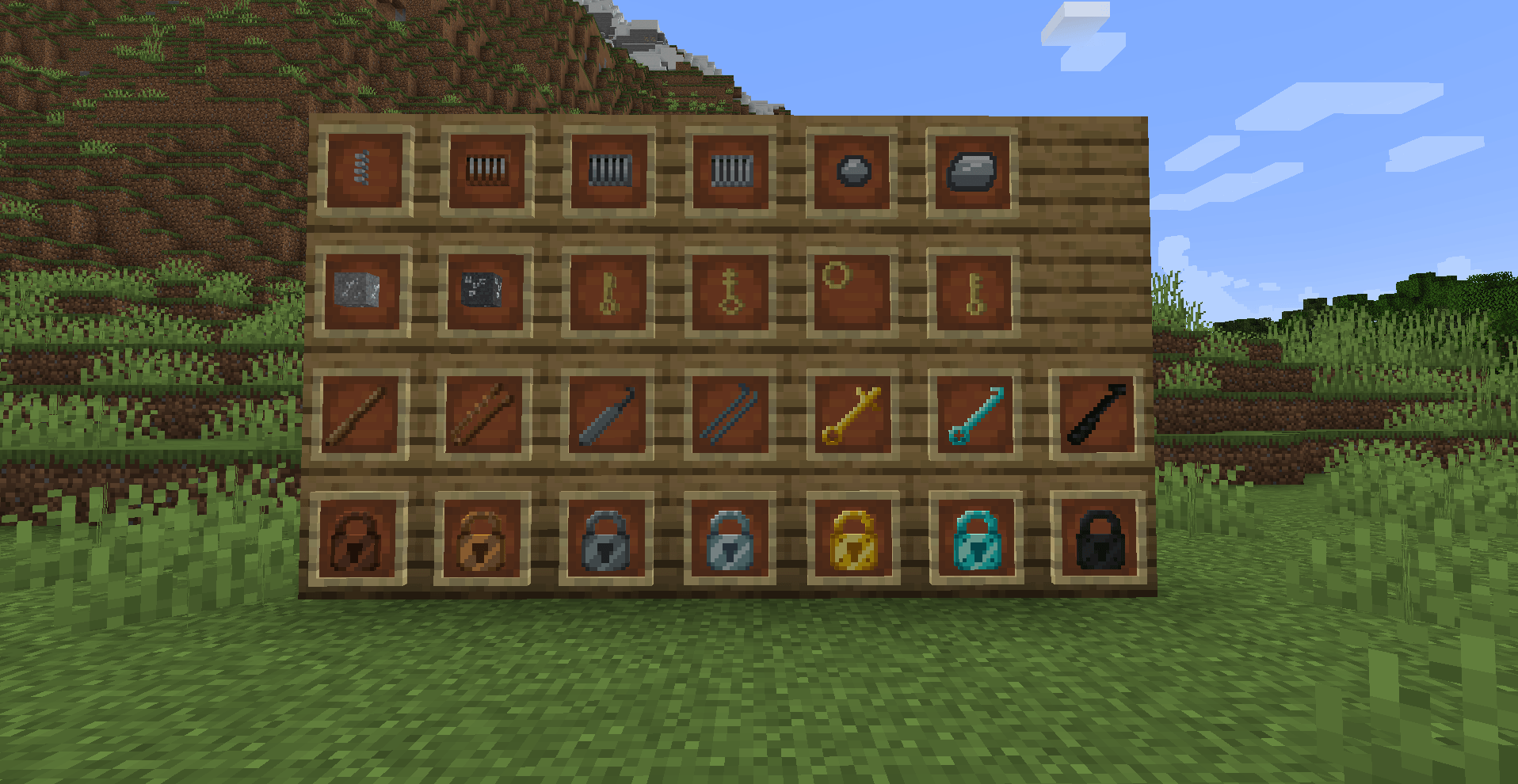
Lock Picks: Wood, Bobby Pin (copper), Iron, Steel, Gold, Diamond, Netherite (+ custom)
Keys & Key Rings
Craft keys that match your locks, or use a Key Ring to carry multiple keys. A Master Key opens any lock.
Seven Enchantments
- Shocking — Zaps players who fail a pick attempt (bypasses armor)
- Sturdy — Reduces pick effectiveness
- Complexity — Blocks lower-tier picks entirely
- Silent — Suppresses the rattle sound when access is denied
- Auto-Pick — Chance to instantly open the lock, bypassing the minigame
- Reinforced — Increases explosion resistance per level
- Awareness — Remembers who placed the lock; that player can open it without a key
Each enchantment can be individually enabled or disabled in the server config.
Full Protection
Locked blocks are protected from:
- Redstone activation
- Hopper extraction
- Piston movement
- Explosions
- Breaking (configurable)
Loot-Scaled Lock Generation
Lock tier is determined by the value of a chest's loot table contents. Village chests get wood or copper locks, while end city chests get gold or diamond locks. Chests with low-value loot get no lock at all.
- Multi-sample averaging — each loot table is sampled 32 times and averaged for consistent tier assignments across server restarts.
- Sub-linear stack count — item value scales with the square root of stack size, so 64 cobblestone doesn't outrank a diamond sword.
- Item value overrides — configurable per-item base values for materials like diamonds, emeralds, and netherite that are valuable but have common rarity. 15 vanilla items have sensible defaults.
- Fully configurable with per-tier value thresholds, rarity multipliers, and enchantment bonuses. Can be switched to random weighted selection if preferred.
World Integration
- Locked chests spawn naturally in structures with loot-value-scaled tiers
- Lock picks and mechanisms found in dungeon and temple loot
- Toolsmith villagers sell lock picks and mechanisms
- Wandering traders offer rare picks and enchanted locks
Adding Custom Items
Locks Reforged has a fully data-driven item system. You can add entirely new lock and lock pick tiers — or tweak existing ones — using three different methods depending on your needs.
Mechanisms
Lock mechanisms (Wood, Copper, Iron, Steel) are basic crafting components — they are not data-driven and cannot be added via config or datapack. Each lock recipe requires its corresponding mechanism as the center ingredient.
Configuration
All settings are customizable via config files. Note that locks-server.toml is per-world and lives in a different location than the other two:
config/locks-common.toml — World generation and item stats
- Generation Chance — How often locks appear on generated chests (default: 85%, only used when loot-scaled locks is disabled)
- Enchant Chance — How often generated locks are enchanted (default: 40%)
- Generated Locks / Weights — Which lock tiers appear in worldgen and their relative rarity
- Loot-Scaled Locks — Lock tier based on chest loot value (enabled by default). Configurable item values, rarity multipliers, enchantment bonuses, per-tier value thresholds, sample count, and per-item value overrides
- Lock Stats / Lockpick Stats — Per-tier stat overrides (see above)
saves/<world>/serverconfig/locks-server.toml — Server-side gameplay rules (generated per-world on first load)
- Lockable Blocks — Regex patterns for which blocks can be locked (default: chests, doors, hoppers, etc.)
- Lockable Tags — Block tags whose members can be locked
- Max Lockable Volume — Maximum blocks a single lock can cover (default: 6)
- Allow Removing Locks — Whether unlocked locks can be removed by sneaking (default: true)
- Protect Lockables — Whether locked blocks are break-proof in survival (default: true)
- Easy Lock — One-click lock placement (default: true)
- Hide Lock ID / Hide HUD Enchantments — Tooltip display options
- Enchantment Toggles — Individually enable or disable each of the 7 enchantments
- Netherite Lockpick Unbreakable — When enabled, netherite lock picks never break (default: false)
config/locks-client.toml — Client-side settings
- Deaf Mode — Visual feedback for lock picking accessibility (default: true)
Stale config files: When the mod is updated with new tiers (e.g. Copper was added after the initial release), existing TOML files keep their old defaults. For example, the "Generated Locks" list won't include locks:copper_lock unless you manually add it or delete locks-common.toml to let it regenerate with the new defaults.
Requirements
- Minecraft 1.20.1
- Forge 47.2.0 or later
- Java 17
Credits
- Original Author: Melonslise
- Original Mod: Locks on CurseForge
- Textures: Hoonts, Artsy (ydgy)
- Sounds: freesound.org
This is an unofficial port that preserves all original gameplay. Licensed under CC BY-NC 3.0, consistent with the original mod.
Screenshots
Gallery
-
 Items from Locks Reforged
 -
 Wooden Lock Sample
 -
 Wooden Lock GUI
 -
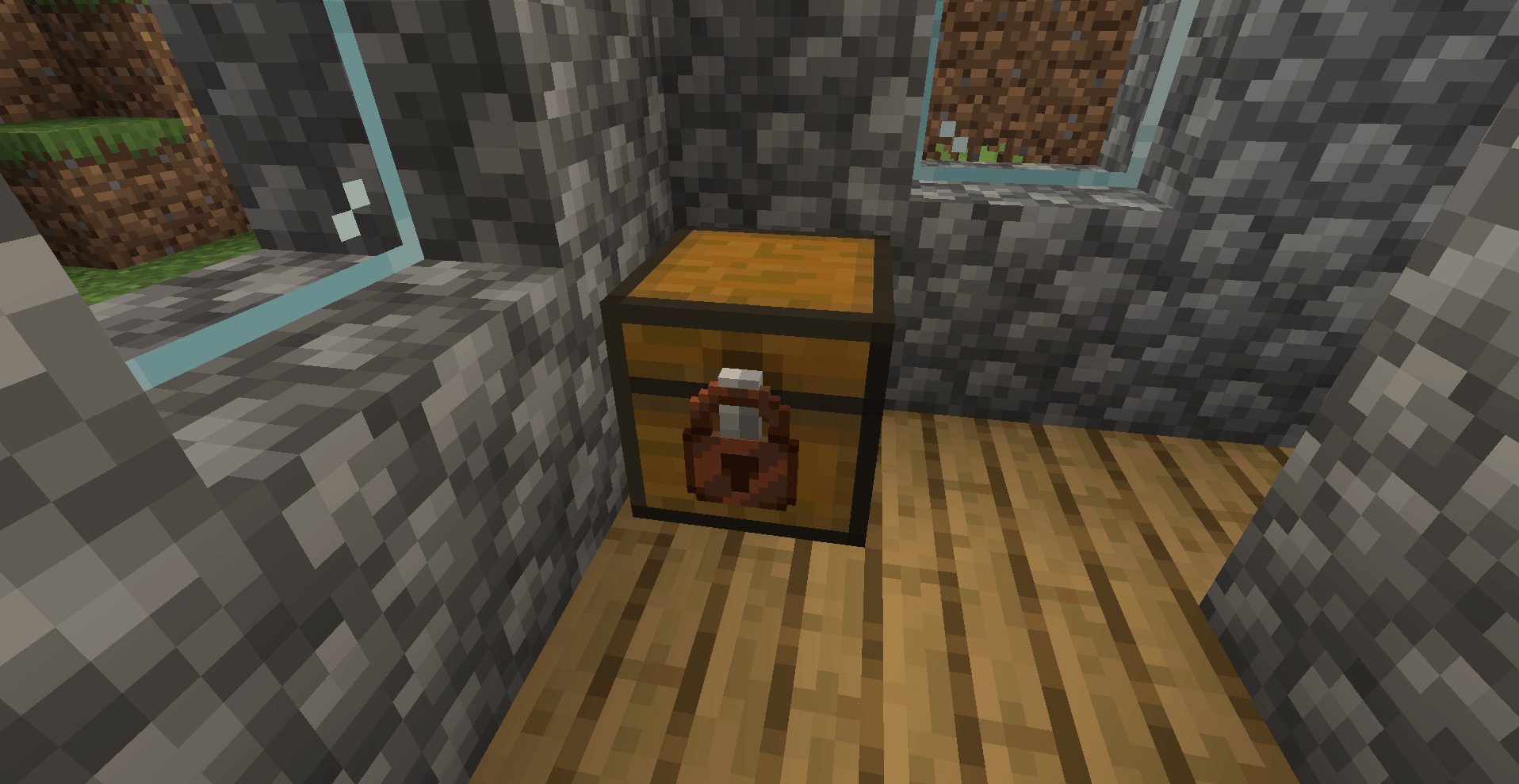
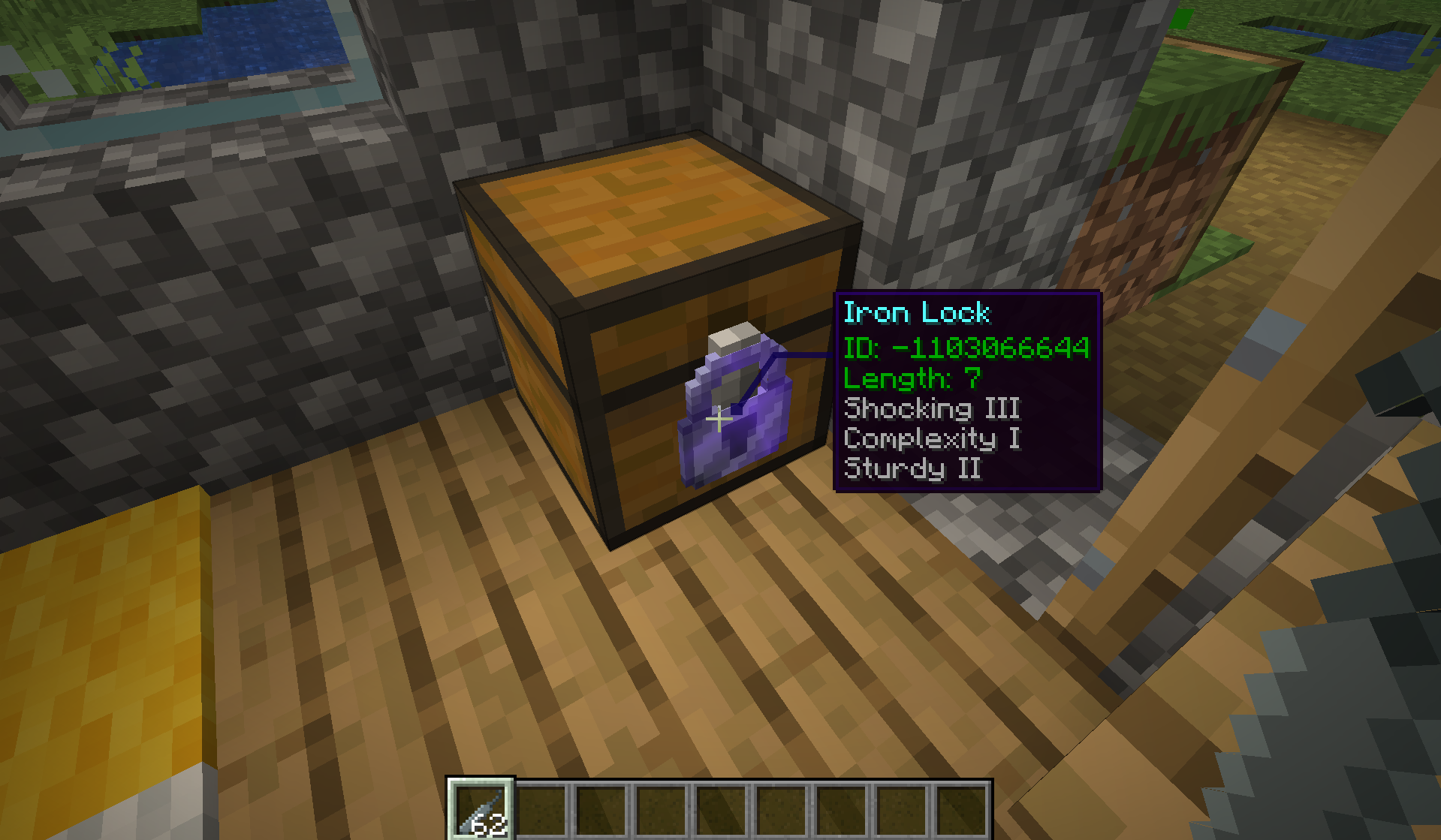 Lock on a Chest
 -
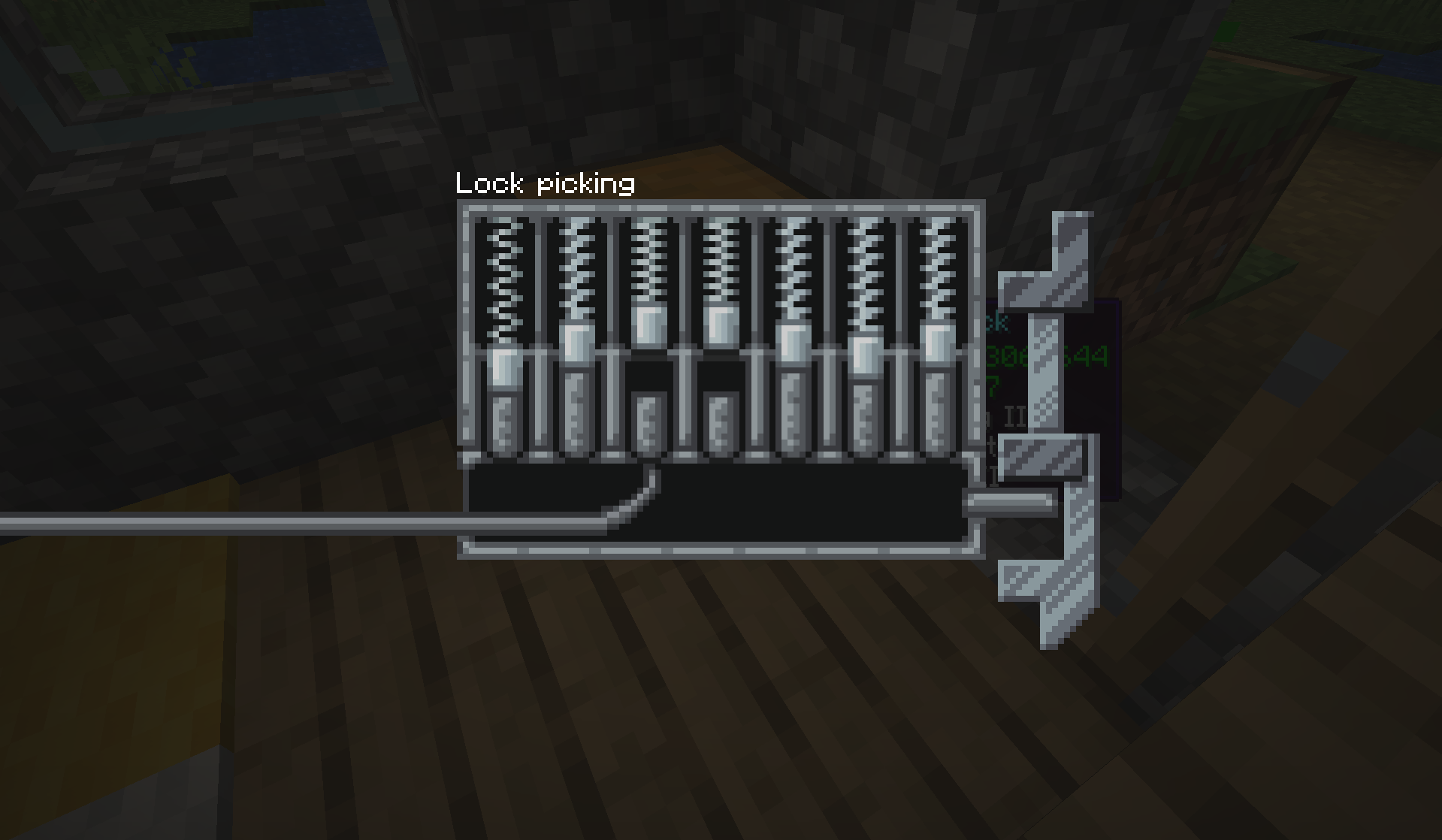 Picked Pins Sample
 -
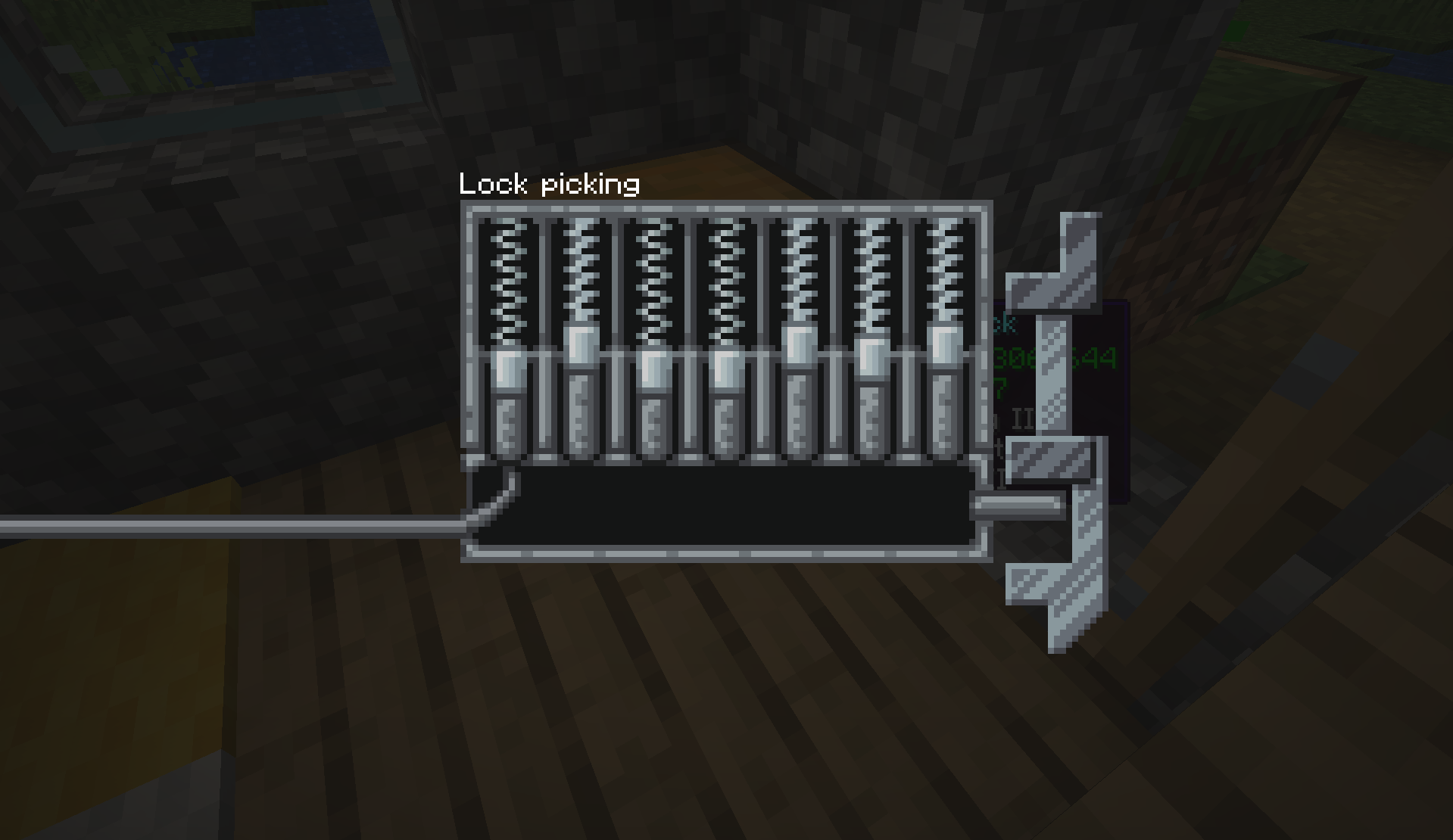 Lock Picking Interface
-
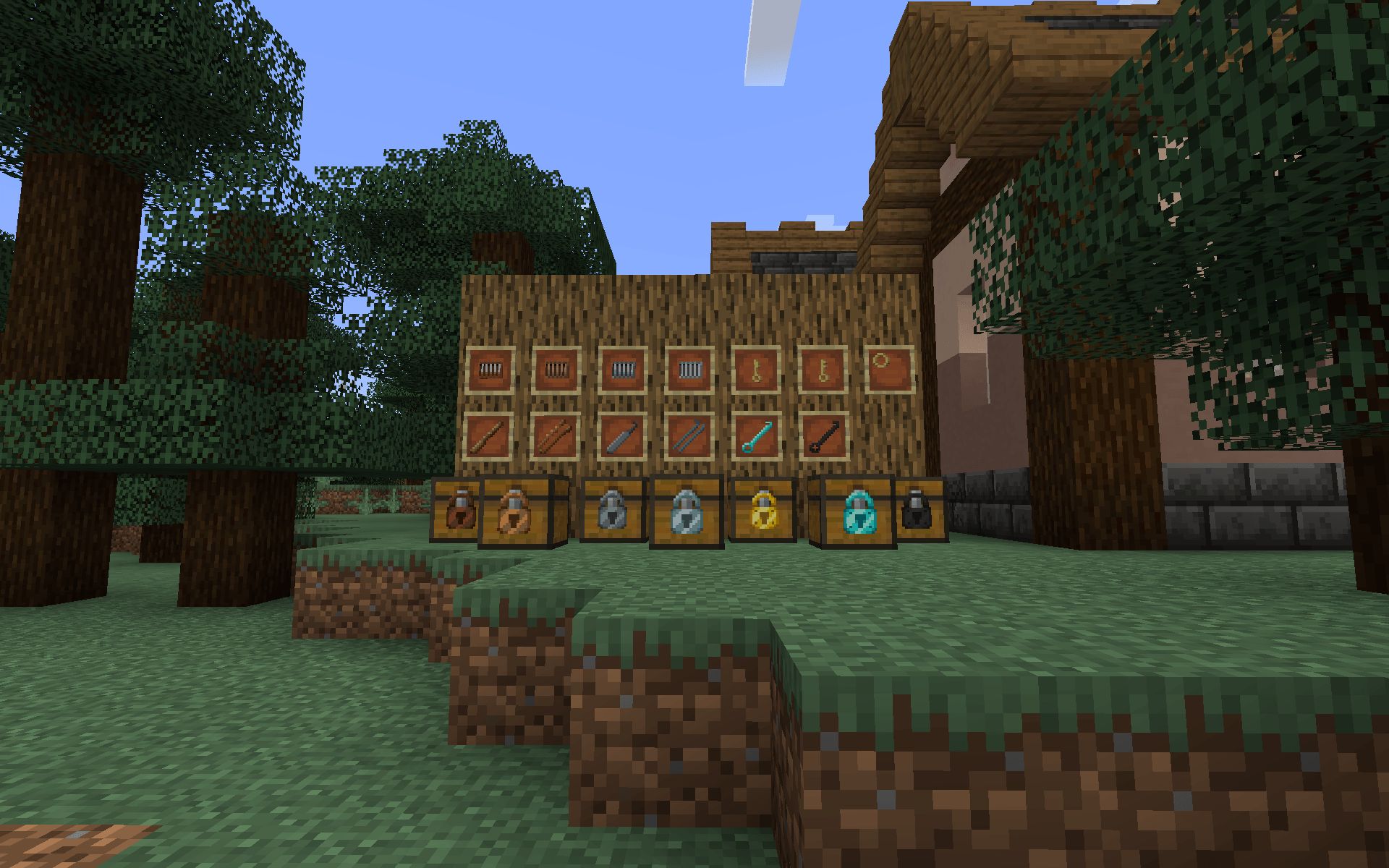 All Items from Locks Reforged A display of all items found in the Locks Reforged mod.
 -
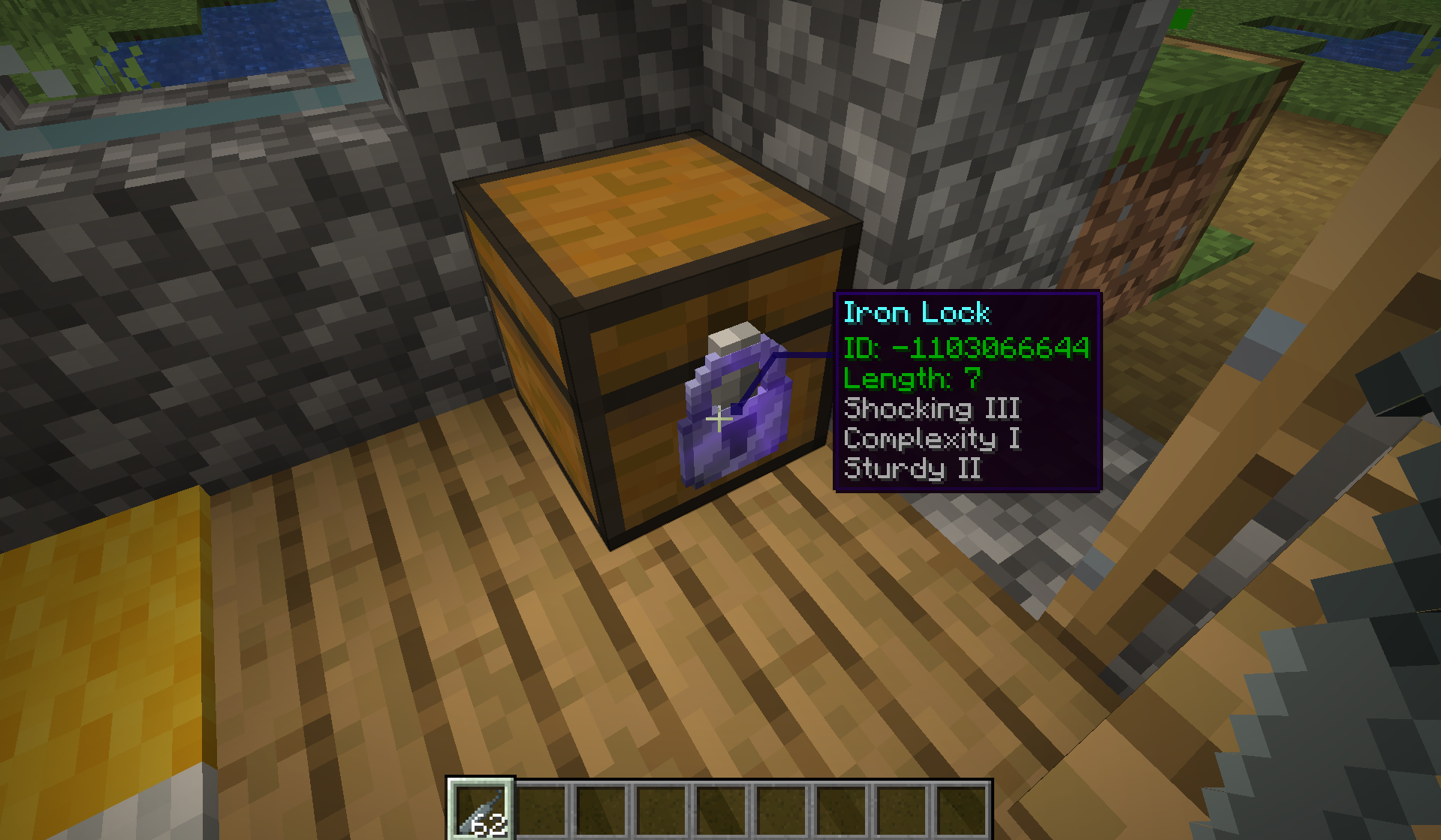 Display of In-World Tooltips for Locks (Configurable) This is what the tooltip looks like in-world. It can be disabled entirely client or server side, as well as configured more intricately if desired.
 -
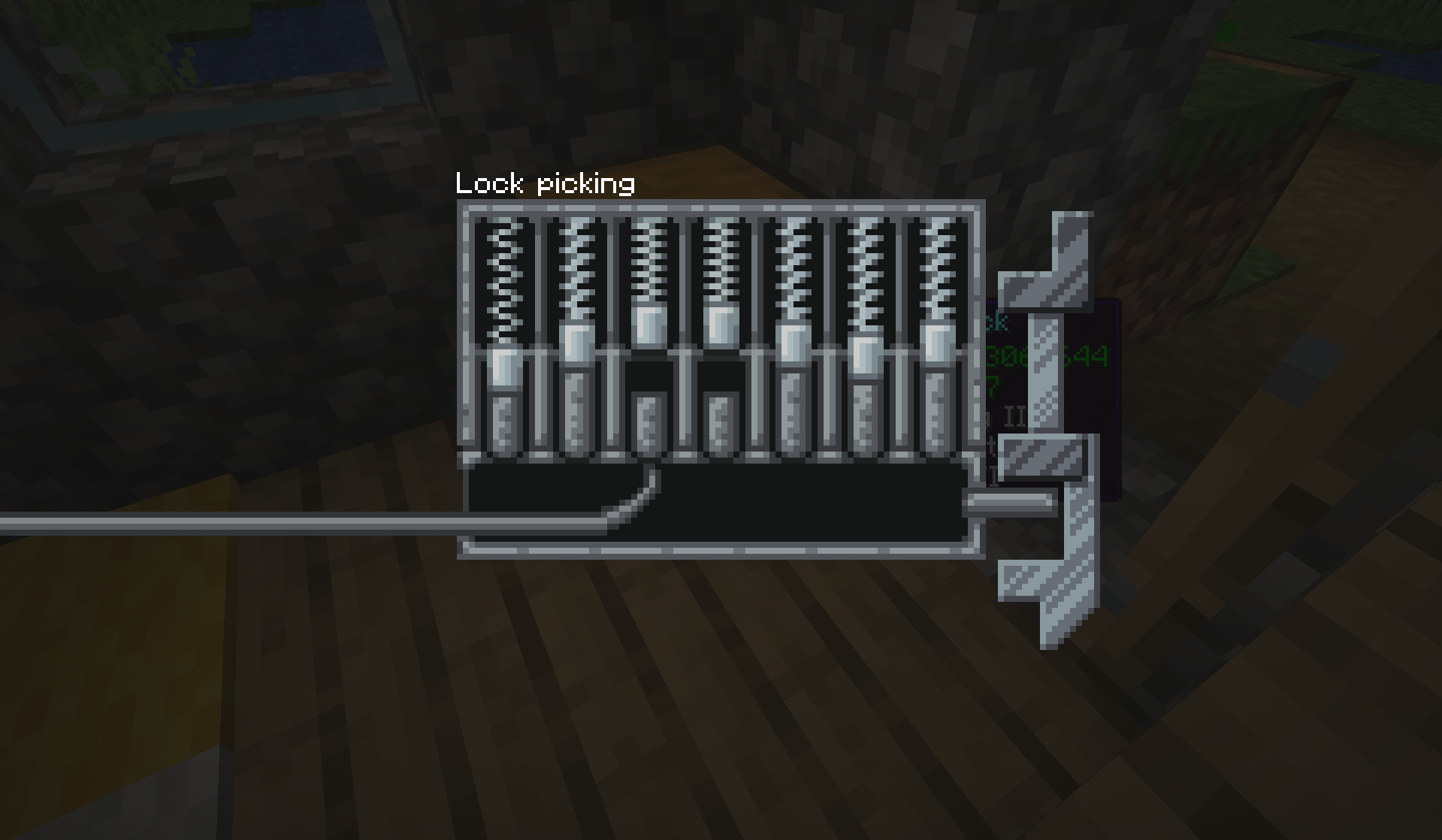 Lockpicking Mechanism GUI What the lockpicking mini-game looks like when the GUI is displayed.
Versions
Files
Relations
Project Relations
More like this
Similar Mods
Suggestions use data such as tags, dependencies, dependents, descriptions, titles, and more to rank how much they overlap with this mod.
On ModDex
Community snapshot
By the numbers
Statistics
Want to reach Minecraft players?
We're looking for a server hosting partner to feature here and other parts of the site. Interested? Send us a message!
Get in touchGet it on
Available Platforms
On ModDex
Community snapshot
By the numbers