Community listing page, reviews here may not be monitored by the author.
Mc2Discord


No reviews yet
Link your Minecraft server chat with your Discord

Community voices
Reviews
No reviews yet. Be the first to review this project!
Get it on
Available Platforms
Compatibility
Supported Environments
Runs entirely on the server. Also works in singleplayer.
About
Project Details
For authors
Embed Badge
If you're the author of this project, you can embed a live badge anywhere that supports HTML or Markdown. It updates automatically whenever ratings change.
Use HTML for any page that supports it, or Markdown for README files and Markdown-based descriptions.
Identifiers
Platform IDs
About
Description

Link your Minecraft server chat with your Discord
⚠️This mod needs configuration to work properly. Please take a look to the wiki: https://github.com/DenisD3D/Mc2Discord/wiki
Features
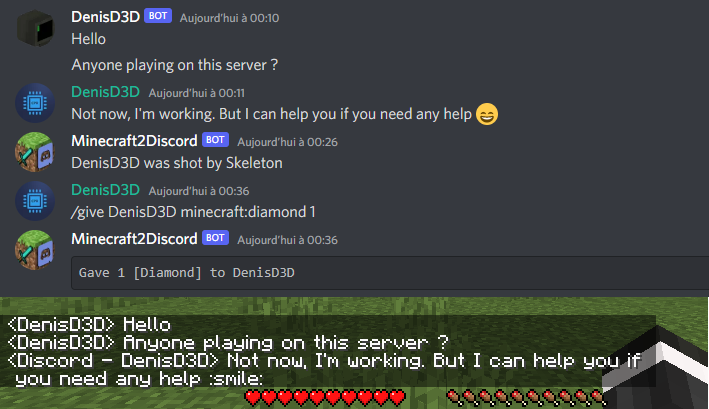
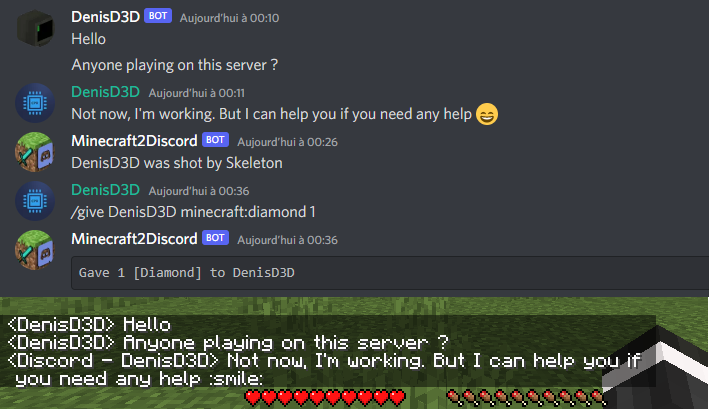
- Send Minecraft chat message to your Discord server
- Send message in your Discord server to the Minecraft chat
- Send game events message to Discord (player join, player leave, death, etc.)
- Display player's head as profile picture in Discord thanks to webhook mode
- Execute Minecraft commands on Discord
- Customize bot presence (eg: playing at xxx) and channel name / topic
- Provide an invitation link to your Discord server with the /discord command
- Forward the server console to discord (useful for admins)
- Hide player on Discord (useful for admins, integrate with VanishMod)
- Account linking (forced or optional)
- Fully customizable, easy configuration (messages, behavior, etc.)
- Relay others mods announcements
- Works with Emojiful to display emojis ingame
Try without installing
Join the official demo server hosted by MtxServ
- Join the demo discord channel #access-demo
- Start the sever with /start command (server is usually stopped)
- Connect to m2d-demo.denisd3d.fr with minecraft 1.20.2 Vanilla
Installation
A quick configuration is mandatory for the mod to work. Steps are described on the wiki: https://github.com/DenisD3D/Mc2Discord/wiki
If you need any help or want new features, you can join the Discord support server
You can also watch the video tutorial:
Misc
Links
- Discord (Support): https://discord.gg/rzzd76c
- CurseForge (Download): https://www.curseforge.com/minecraft/mc-mods/mc2discord/
- Modrinth (Download): https://modrinth.com/mod/mc2discord
- Github (Source): https://github.com/DenisD3D/Mc2Discord
- Wiki: https://github.com/DenisD3D/Mc2Discord/wiki


Link your Minecraft server chat with your Discord
/!\ This mod needs configuration to work properly. Please take a look to the wiki: https://github.com/DenisD3D/Mc2Discord/wiki
Features
- Send Minecraft chat message to your Discord server
- Send message in your Discord server to the Minecraft chat
- Send game events message to Discord (player join, player leave, death, etc.)
- Display player's head as profile picture in Discord thanks to webhook mode
- Execute Minecraft commands on Discord
- Customize bot presence (eg: playing at xxx) and channel name / topic
- Provide an invitation link to your Discord server with the /discord command
- Forward the server console to discord (useful for admins)
- Hide player on Discord (useful for admins, integrate with VanishMod)
- Account linking (forced or optional)
- Fully customizable, easy configuration (messages, behavior, etc.)
- Relay others mods announcements
- Works with Emojiful to display emojis ingame
Try without installing
Join the official demo server hosted by MtxServ
- Join the demo discord channel #access-demo
- Start the sever with /start command (server is usually stopped)
- Connect to m2d-demo.denisd3d.fr with minecraft 1.20.2 Vanilla
Installation
A quick configuration is mandatory for the mod to work. Steps are described on the wiki: https://github.com/DenisD3D/Mc2Discord/wiki
If you need any help or want new features, you can join the Discord support server
You can also watch the video tutorial:
Misc
Links
- Discord (Support): https://discord.gg/rzzd76c
- CurseForge (Download): https://www.curseforge.com/minecraft/mc-mods/mc2discord/
- Modrinth (Download): https://modrinth.com/mod/mc2discord
- Github (Source): https://github.com/DenisD3D/Mc2Discord
- Wiki: https://github.com/DenisD3D/Mc2Discord/wiki
Screenshots
Gallery
-
 Description
 -
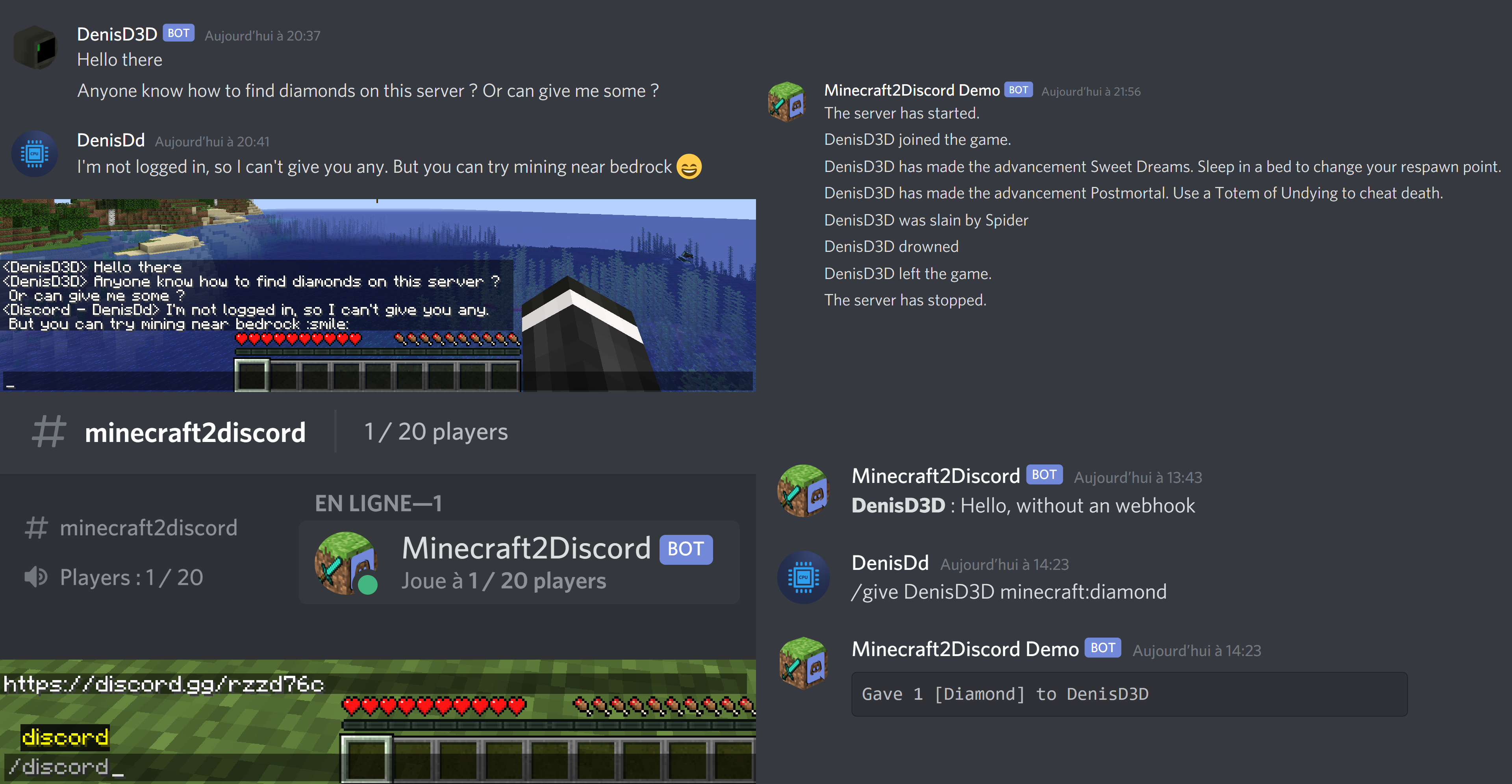
 To minercaft chat Message sent to the Minecraft Chat
 -
 From Minecraft Chat Message sent from the Minecraft Chat
 -
 Join / Left / Advancement Join / Left / Advancement messages demo
Versions
Files
Relations
Project Relations
More like this
Similar Mods
Suggestions use data such as tags, dependencies, dependents, descriptions, titles, and more to rank how much they overlap with this mod.
On ModDex
Community snapshot
By the numbers
Statistics
 (opens in a new tab)
Get it on
Available Platforms
On ModDex
Community snapshot
By the numbers