Community listing page, reviews may not be monitored by the author.
MCLabs Addons


No reviews yet
A client-side mod for MCLabs that takes the information the server already tells you in chat and puts it where you can actually see it. (Lol)

Community voices
Reviews
No reviews yet. Be the first to review this project!
Get it on
Available Platforms
Compatibility
Supported Environments
Runs entirely on the client. Works on vanilla servers.
About
Project Details
For authors
Embed Badge
If you're the author of this project, you can embed a live badge anywhere that supports HTML or Markdown. It updates automatically whenever ratings change.
Use HTML for any page that supports it, or Markdown for README files and Markdown-based descriptions.
Identifiers
Platform IDs
Resources
External Links
About
Description
MCLabs Addons
A client-side mod for MCLabs that takes the information the server already tells you in chat and puts it where you can actually see it: a clean set of on-screen timers and a fishing bite indicator. It reads chat only. It never sends commands, clicks menus, or does anything on your behalf, so it stays out of the way of how you're meant to play.
Everything is optional and movable. If you only want the fishing indicator, turn the rest off. If you want a full column of timers down the side of your screen, you can have that too.
Default HUD Editor Key

Fishing bite indicator
A marker appears above your bobber while you fish. It's one color while you're waiting and changes the moment a fish is actually on the line, so you know exactly when to reel instead of guessing or staring at the splash. You can set both colors and the marker size.
There are also a couple of sound options: replace the catch splash with a sound of your choice, and mute the cast, splash, and reel sounds coming from other players' bobbers so a crowded dock isn't a wall of noise.
On-screen timers
Each of these shows up only when it's actually relevant, and disappears when it's done. You pick which ones you want.
- Chum Timer — time left on your Chum Bucket double-fish boost
- Booster Timer — your active boosters and how long they last
- Lab Wars Boosters — the revenue boosts running during Lab Wars, with their multipliers and remaining time
- The Pit — countdown for the Pit
- Mini-Event — the current event and when the next one is coming
- Personal Boosters — your chem price and prestige boosts with time remaining
- Rental Mount — how long is left on your rented mount
- Bounties — keeps track of your bounty
- Dailies — a nudge so you don't forget your daily tasks
- Chemtainer - What's in your Chemtainer
- Vote Reminder — tells you when your votes are back up
- Arranging your HUD
- Press your assigned key to open the HUD editor. The keybind is unset out of the box, so set it once under Controls first.
In the editor you can click a widget to select it, drag it anywhere, drag its edges to resize, and use the arrow keys for fine adjustments. There's a grid and snapping to help you line things up, a list of every widget so you can find and toggle ones that aren't currently on screen, and per-widget controls for text color and an optional background. If you make a mess of it, Reset All puts everything back.
By default the timers sit in a tidy column on the right side of the screen, but you can move them wherever you like.
Settings
Open the settings through Mod Menu to change the bite indicator colors and size, the sound options, and per-widget appearance.
Compatibility
This is a client-side mod. Nothing needs to be installed on the server, and it works fine alongside the usual setup most players run. Made for MCLabs, so the timers are built around that server's features. Made sure to work with the latest feather client hud overhall. (6/16/2026)
MCLabs Addons
A client-side mod for MCLabs that takes the information the server already tells you in chat and puts it where you can actually see it: a clean set of on-screen timers and a fishing bite indicator. It reads chat only. It never sends commands, clicks menus, or does anything on your behalf, so it stays out of the way of how you're meant to play.
Everything is optional and movable. If you only want the fishing indicator, turn the rest off. If you want a full column of timers down the side of your screen, you can have that too.
Default HUD Editor Key
Fishing bite indicator
A marker appears above your bobber while you fish. It's one color while you're waiting and changes the moment a fish is actually on the line, so you know exactly when to reel instead of guessing or staring at the splash. You can set both colors and the marker size.
There are also a couple of sound options: replace the catch splash with a sound of your choice, and mute the cast, splash, and reel sounds coming from other players' bobbers so a crowded dock isn't a wall of noise.
On-screen timers
Each of these shows up only when it's actually relevant, and disappears when it's done. You pick which ones you want.
- Chum Timer — time left on your Chum Bucket double-fish boost
- Booster Timer — your active boosters and how long they last
- Lab Wars Boosters — the revenue boosts running during Lab Wars, with their multipliers and remaining time
- The Pit — countdown for the Pit
- Mini-Event — the current event and when the next one is coming
- Personal Boosters — your chem price and prestige boosts with time remaining
- Rental Mount — how long is left on your rented mount
- Bounties — keeps track of your bounty
- Dailies — a nudge so you don't forget your daily tasks
- Chemtainer - What's in your Chemtainer
- Vote Reminder — tells you when your votes are back up
- Arranging your HUD
- Press your assigned key to open the HUD editor. The keybind is unset out of the box, so set it once under Controls first.
In the editor you can click a widget to select it, drag it anywhere, drag its edges to resize, and use the arrow keys for fine adjustments. There's a grid and snapping to help you line things up, a list of every widget so you can find and toggle ones that aren't currently on screen, and per-widget controls for text color and an optional background. If you make a mess of it, Reset All puts everything back.
By default the timers sit in a tidy column on the right side of the screen, but you can move them wherever you like.
Settings
Open the settings through Mod Menu to change the bite indicator colors and size, the sound options, and per-widget appearance.
Compatibility
This is a client-side mod. Nothing needs to be installed on the server, and it works fine alongside the usual setup most players run. Made for MCLabs, so the timers are built around that server's features. Made sure to work with the latest feather client hud overhall. (6/16/2026)
Screenshots
Gallery
-
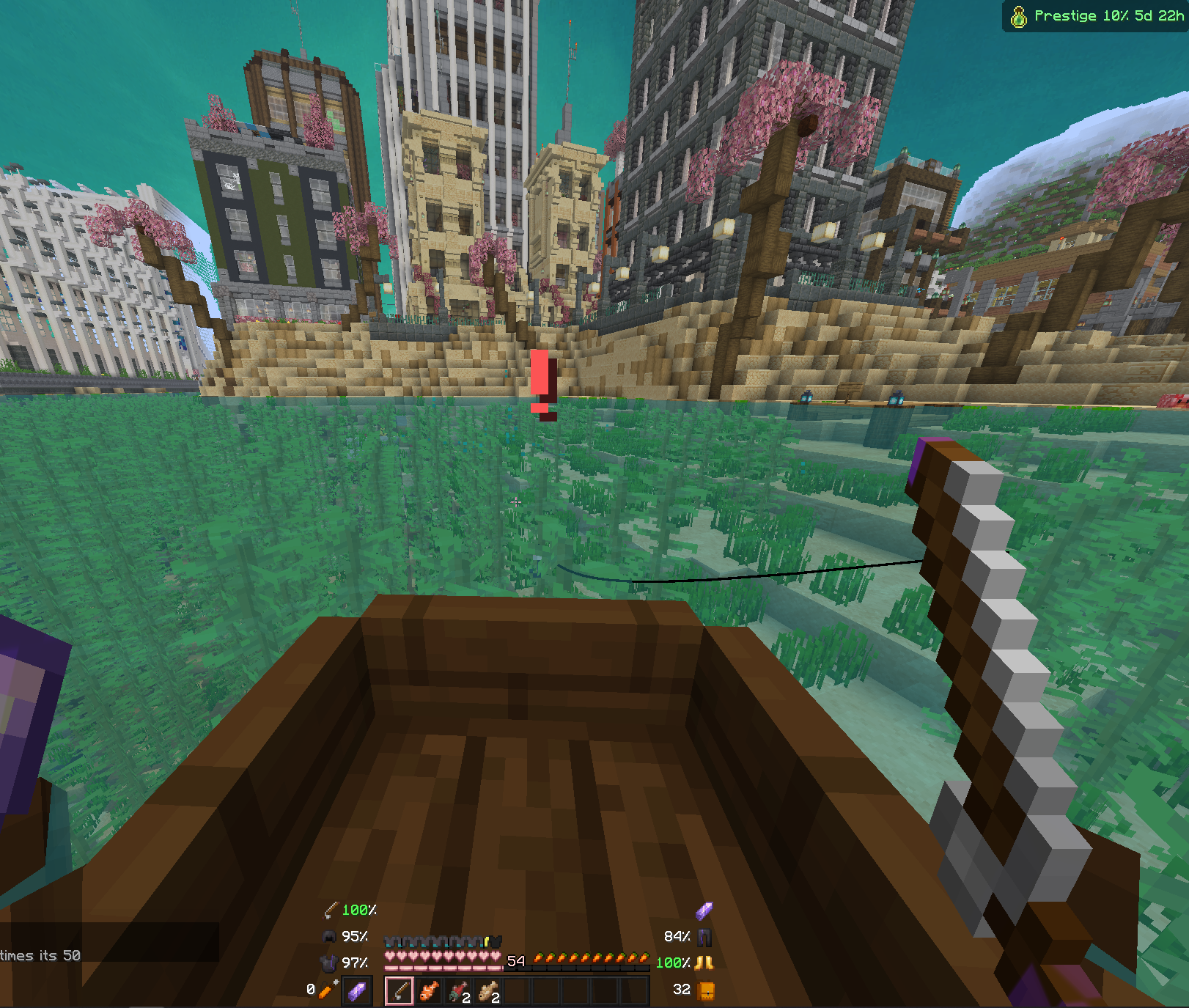 Fish on!
 -
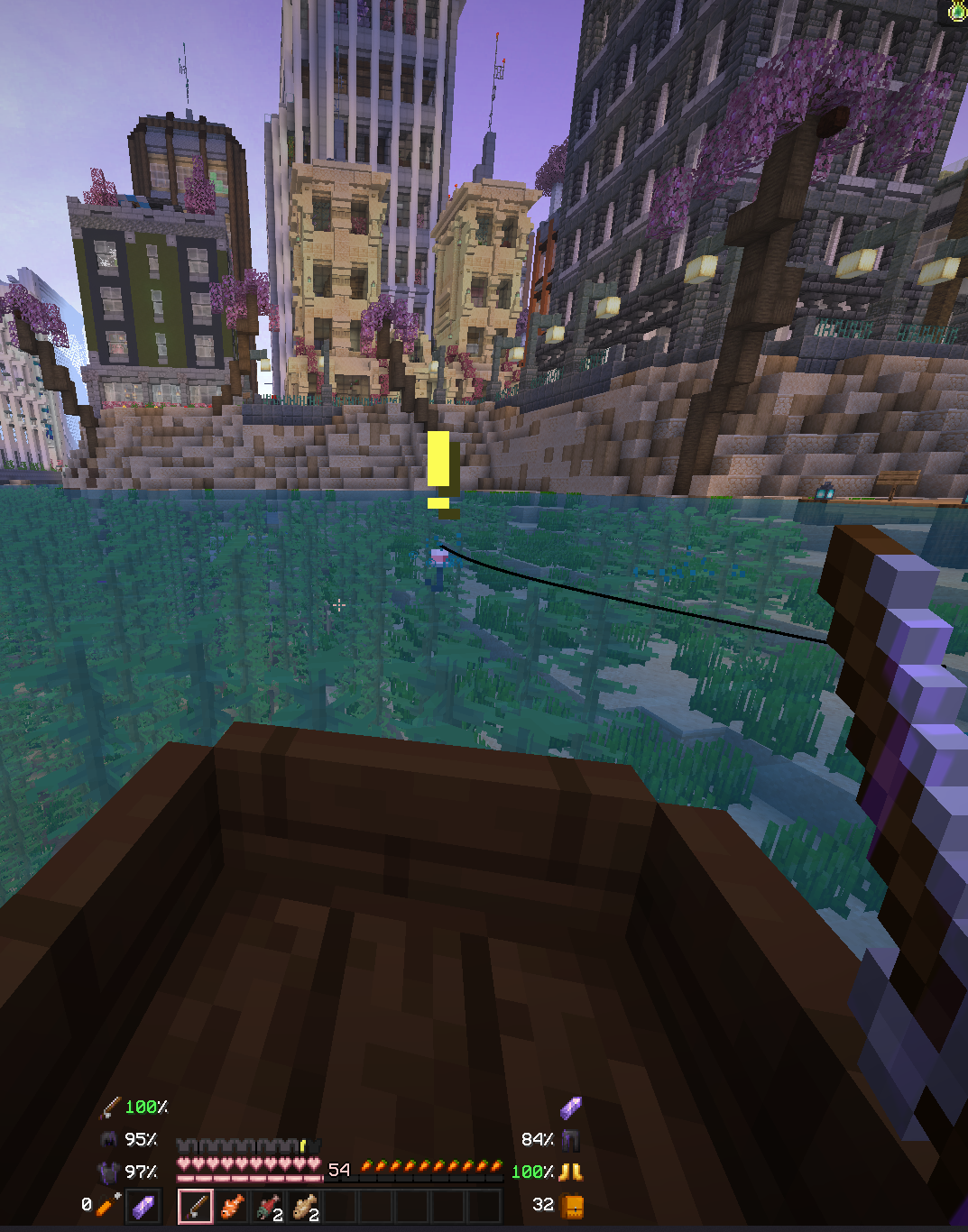 Waiting for fitchy
 -
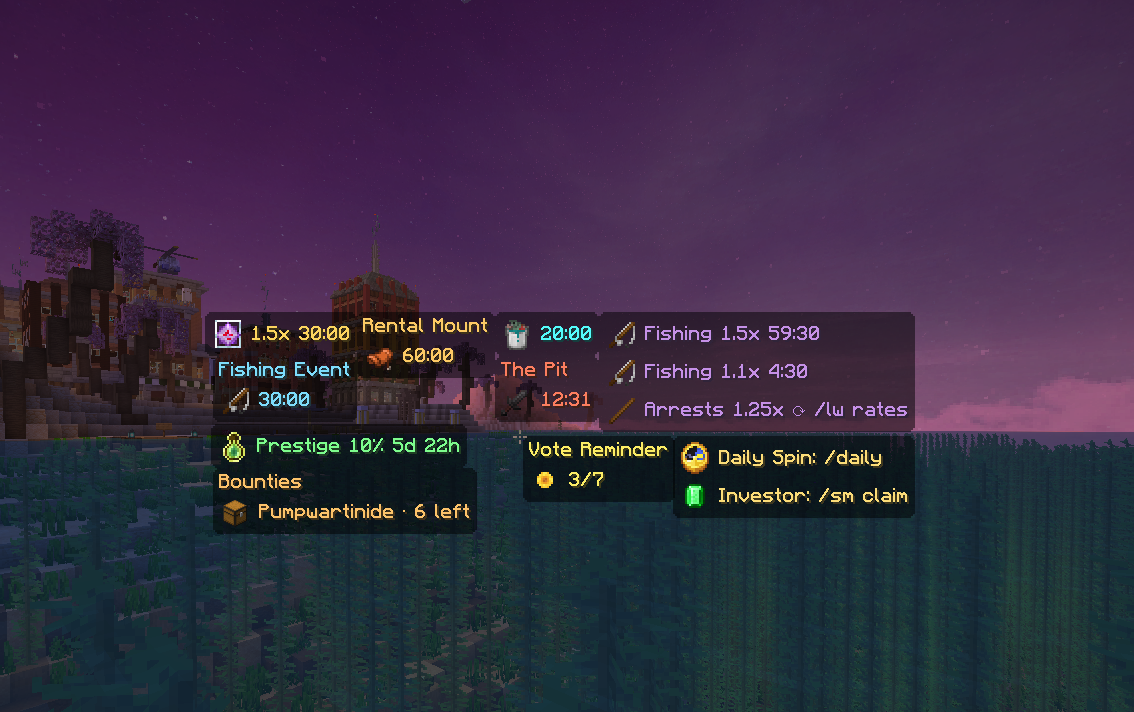 Gui Widgets
Versions
Files
Relations
Project Relations
More like this
Similar Mods
Suggestions use data such as tags, dependencies, dependents, descriptions, titles, and more to rank how much they overlap with this mod.
On ModDex
Community snapshot
By the numbers
Statistics
 (opens in a new tab)
Get it on
Available Platforms
On ModDex
Community snapshot
By the numbers
Statistics
Resources