
Community listing page, reviews here may not be monitored by the author.
MCPvP Tier Tagger

No reviews yet
A lightweight Minecraft mod that displays your MCPvP tier in player's nametags.
Community voices
Reviews
No reviews yet. Be the first to review this project!
Get it on
Available Platforms
About
Project Details
For authors
Embed Badge
If you're the author of this project, you can embed a live badge anywhere that supports HTML or Markdown. It updates automatically whenever ratings change.
Use HTML for any page that supports it, or Markdown for README files and Markdown-based descriptions.
Identifiers
Platform IDs
Resources
External Links
About
Description
MCPVP Tier Tagger
See a player's real mcpvp.com PvP tier wherever their name shows up! Above their head, in the tab list, in chat, even on custom nametag plugins. No more tabbing out to the website to check if someone's actually good.
 This mod is not officaly supported by mcpvp.com
What it does
- Above-head nametags ‣ tier shows right next to the player's name, colored to match their exact rank.
- Tab list ‣ same tag format, works for everyone connected, not just people near you.
- Chat ‣ does a best-effort job of tagging names it recognizes in chat messages too.
- Custom nametags / holograms ‣ if a server uses the common text-display hologram trick for fancy nametags, the tag gets spliced in there too, matching the hologram's existing styling instead of just slapping plain text on top of it.
/playertier <name>‣ quick chat-based lookup for anyone, ranked or not.- In-game search ‣ the config screen has a dedicated Search tab: type a name, see their points, region, title, every kit they're ranked in, and a live preview of their actual skin.
Accurate tier colors, and you can change them
Every tier code (High/Mid/Low × Tier 1 through 5) has its own color, sampled directly from mcpvp.com's real tier badges rather than a generic gradient. High and Mid and Low genuinely use different colors even within the same tier number on mcpvp.com, and this mod reflects that instead of guessing.
Don't like a color, or did mcpvp.com change one? The Colors tab in the config screen lets you edit any of the 15 colors by hex code, with a live swatch preview. A "Reset to Defaults" button puts everything back the way it started.
Config
Everything lives in a Mod Menu screen with three tabs:
- Display ‣ toggle the tag on/off, control where it shows (tab list, above head), toggle the kit icon, pick which kit's tier to show (or just show whichever is highest), and set how often the background cache refreshes.
- Colors ‣ edit any of the 15 tier colors.
- Search ‣ look up any player without leaving the menu.
Requirements
- Fabric Loader
- Fabric API
- Mod Menu (The mod itself works fine without it, you just won't have a settings UI)
A couple of honest limitations
- Chat tagging is a genuine best-effort feature, not a guarantee as it's still in development.
- Hologram tagging only works with the common "invisible text-display entity riding the player" implementation. A server doing something fully custom at the packet level isn't something a client mod can hook into generically.
If something looks wrong or a tier's not showing up, report it in our discord server. This is still in beta and actively getting fixes!
Screenshots
Gallery
-
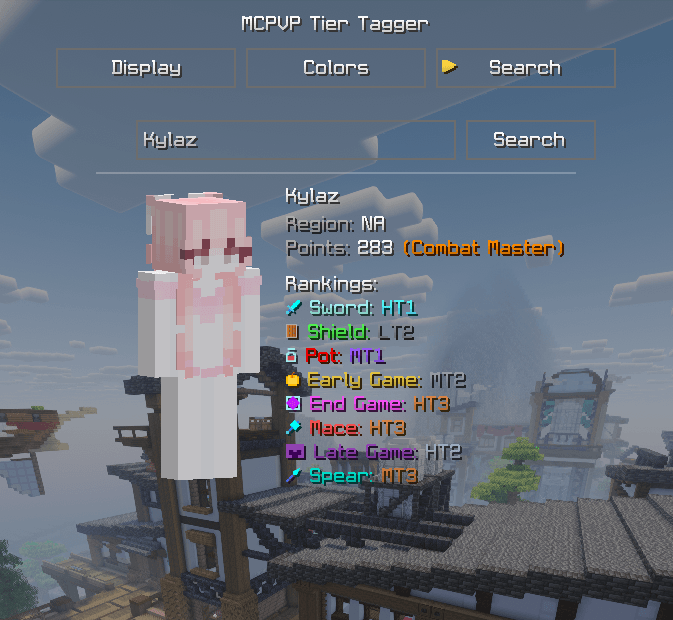 Example of the Config Search
 -
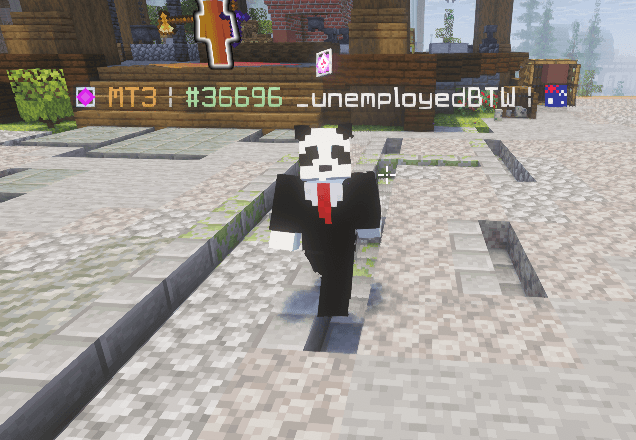 Example of mod working on Nametags
 -
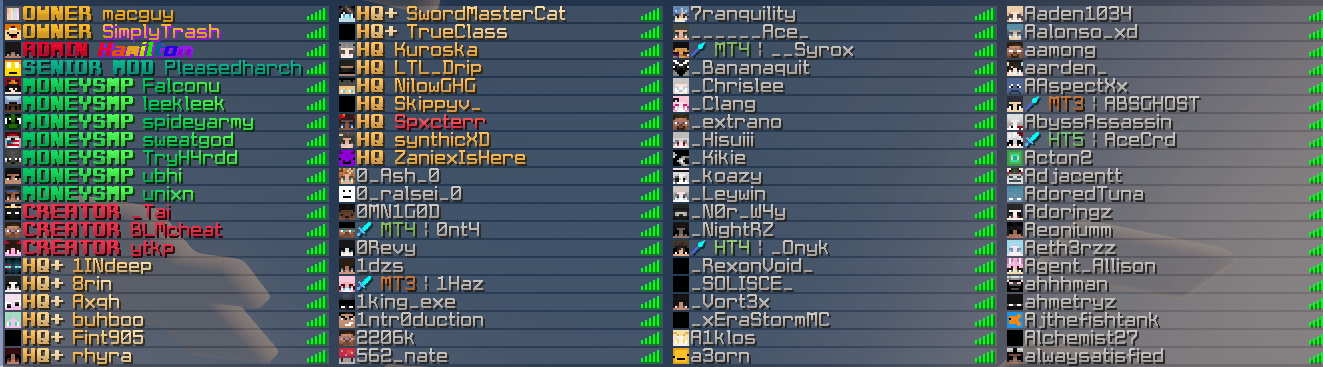 Example of the mod working on tab list
Versions
Files
Relations
Project Relations
More like this
Similar Mods
Suggestions use data such as tags, dependencies, dependents, descriptions, titles, and more to rank how much they overlap with this mod.
On ModDex
Community snapshot
By the numbers
Statistics
Want to reach Minecraft players?
We're looking for a server hosting partner to feature here and other parts of the site. Interested? Send us a message!
Get in touchGet it on
Available Platforms
On ModDex
Community snapshot
By the numbers
Statistics
Resources