
Community listing page, reviews may not be monitored by the author.
McPvP.com Tier Tagger

No reviews yet
This is a Tier tagger updated with the public API of McPvP.com, not to be confused with McTiers or Og McPvP.

Community voices
Reviews
No reviews yet. Be the first to review this project!
Get it on
Available Platforms
Compatibility
Supported Environments
Runs entirely on the client. Works on vanilla servers.
About
Project Details
For authors
Embed Badge
If you're the author of this project, you can embed a live badge anywhere that supports HTML or Markdown. It updates automatically whenever ratings change.
Use HTML for any page that supports it, or Markdown for README files and Markdown-based descriptions.
Identifiers
Platform IDs
Resources
External Links
About
Description
Light Tier Tagger
A lightweight, 100% client-side Fabric mod that displays each player's McPvP.com tier next to their name — in the tab list, above their head, and via a chat command. Built from scratch with minimal dependencies and on-demand fetching so it stays fast even on huge servers.
Features
- Tier tags in two places
- Tab list (
Tabmenu) — appears beside each player's name - Above-head nameplates — appears beside the floating name in-world
- Each can be toggled independently
- Real item icons for every gamemode, drawn inline with the text via a custom bitmap font (not letter codes — actual diamond swords, splash potions, end crystals, etc.)
- Color-coded tiers with a clean ramp from copper to amethyst:
- T5 copper
- T4 iron silver
- T3 gold
- T2 diamond cyan
- T1 amethyst purple
- Bold throughout; retired tiers also italicised
- "Highest" mode — pick a single gamemode kit, or let the mod show whichever tier is the player's personal best (the icon automatically swaps to that kit's item)
- On-demand fetching — tiers are only pulled for players you can actually see; no bulk leaderboard download, no background scanning. Two parallel HTTP workers throttled to ~25 req/sec keep a 200-player lobby populated in seconds without hammering the API
- Per-entry caching — once a player's tier is fetched, the rendered chat component is built once and reused every frame; minimal allocation overhead even with hundreds of players in tab
- Client-side
/playertier <name>command — type the command in chat and a local-only message replies with the player's overall rank, points, region, and every kit tier laid out with icons - Live name search in the config — auto-detects your own username and previews your tier; type any other player's name and results stream in after a brief debounce. No save/quit cycle needed
- Customisable kit icons — 24 item textures bundled (every chestplate, sword variant, axe variant, end crystal, mace, trident, totem, ender pearl, golden apple, splash potion, and more). Pick any item for any kit through the Icons tab in the config
- Configurable API endpoint — if
mcpvp.comever changes its hostname or path, paste the new base URL in the Advanced section — no rebuild required - Tolerant parser — accepts both the current mctiers schema (
rankings.{kit}.{tier, pos}) and the legacy McPvP schema (kitRanks.{kit}: "HT1"), automatically
- Tab list (
Privacy
Light Tier Tagger declares "environment": "client" in its mod metadata, so Fabric will refuse to load it on a dedicated server. The jar contains:
- No packet code — zero
ClientPlayNetworking, nosendCommand, no packet senders of any kind - No server-side command registration — the
/playertiercommand registers with Fabric's client command dispatcher only, so the local client intercepts it before it ever leaves your machine - No telemetry, no analytics
The only outbound traffic from the mod is direct HTTPS from your computer to:
| Host | Purpose |
|---|---|
www.mcpvp.com/tiers/data |
Primary tier lookups (configurable) |
mctiers.com/api/profile/{uuid} |
Backup tier lookups (configurable, can be disabled) |
api.mojang.com/users/profiles/minecraft/{name} |
Username → UUID resolution |
The Minecraft server you're connected to receives zero additional packets.
Configuration
Open via Mod Menu → Light Tier Tagger. The config screen has three tabs.
Display tab
- Enabled — master toggle
- Show in Tab — toggle the tier tag in the player list
- Show Above Head — toggle the tier tag in the in-world nameplate
- Show Kit Icon — toggle the item glyph (turn off for tier text only)
- Kit — which gamemode tier to display (
Highest,Vanilla,Sword,Axe,Pot,Nethpot,SMP,UHC,Mace) - Cache duration — 1 to 24 hours; how long a player's tier stays cached before being re-checked
- API URL — defaults to
https://mctiers.com/api; override if the upstream service changes
Icons tab
Eight cycle buttons (one per gamemode) — click to cycle through 24 available item textures. The button preview shows the actual icon next to the item name so you can see what you'll get. Changes take effect immediately; the per-player tag cache is invalidated automatically.
Default icons:
| Gamemode | Default Icon |
|---|---|
| Vanilla | End Crystal |
| Sword | Diamond Sword |
| Axe | Diamond Axe |
| Pot | Splash Potion |
| Nethpot | Netherite Chestplate |
| SMP | Diamond Chestplate |
| UHC | Golden Apple |
| Mace | Mace |
Your Tier Tab
- Your own tier is auto-loaded from your local Minecraft account — no typing your name
- Header line shows your overall rank, points, and region
- Per-kit breakdown shows every gamemode you're ranked in with icon + colored bold tier
- Search Another Player — type any name; results populate live within ~1 second
Commands
/playertier <username>
Client-side only. Looks up the named player on mctiers and prints a local chat message with their full tier card:
Looking up tier for coldified…
coldified  •  Rank #2  •  326 pts  •  EU
<sword> LT1  <axe> LT1  <pot> LT1  <nethop> LT2  …
The output is rendered in your chat box only — nothing is sent to the server or to other players.
Performance notes
- Tab list and nameplate tags are pre-rendered once per player per settings change, then reused — even 200 tab entries at 60 FPS adds negligible per-frame work
- HTTP fetches run on two daemon worker threads with a deduplicated request queue, so opening Tab repeatedly doesn't pile up duplicate lookups
- 404s (unranked players) are cached as negative results to avoid re-querying
Compatibility
- Minecraft: 26.1+
- Loader: Fabric (Loader 0.18+)
- Required dependencies: Fabric API, MixinExtras
- Optional dependencies: Mod Menu (for opening the config screen via the mods list)
- Works alongside other tier-tagger mods — uses MixinExtras
@ModifyReturnValuewhich composes safely with any other mod that also touches the same name-rendering methods
Data source
Tier data is provided by mcpvp.com, the official API for the McPvP testing community. This mod is not affiliated with mcpvp.com or McPvP — it's an independent client that consumes their public API.
License
MIT
Screenshots
Gallery
-
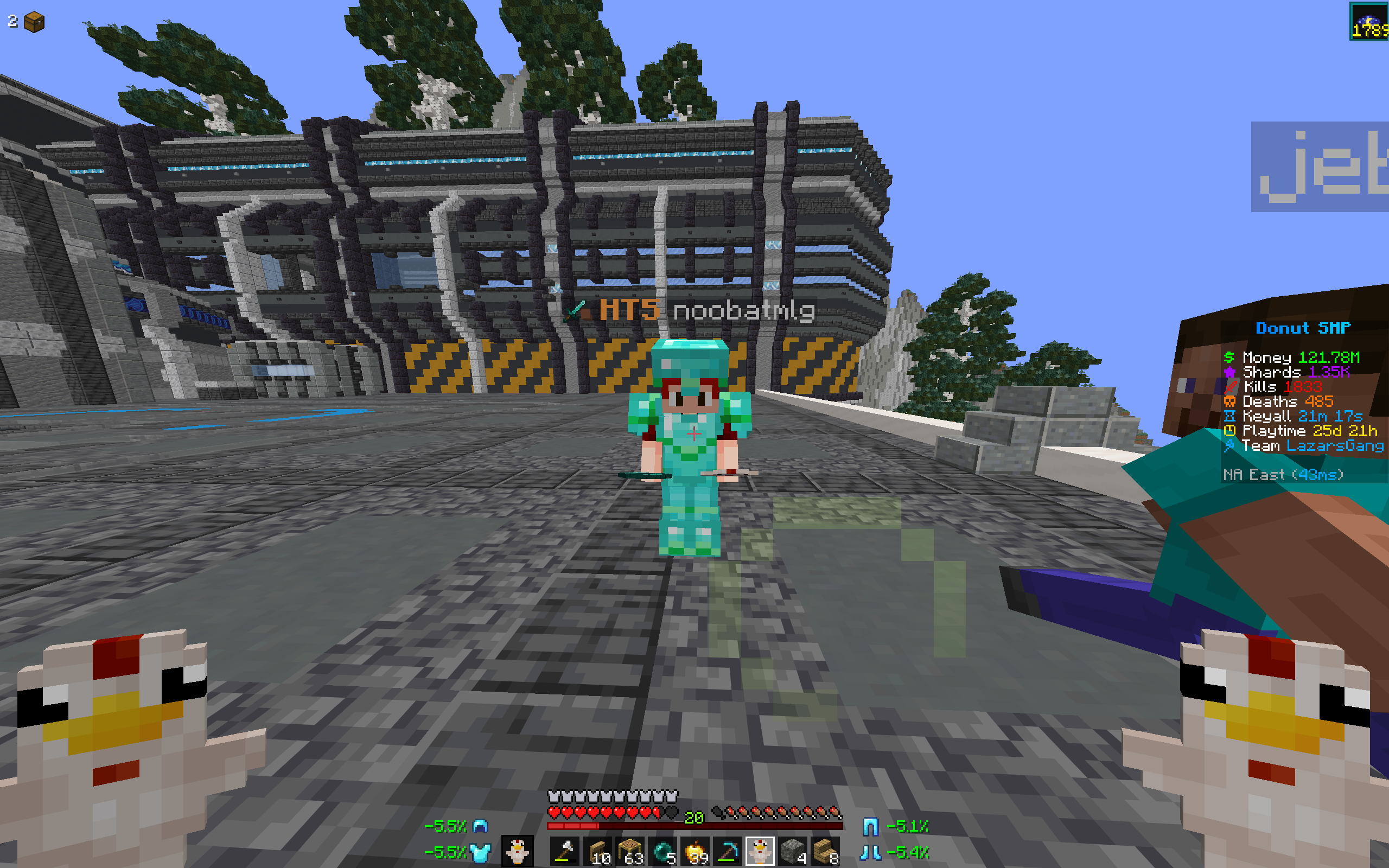 Player Name Test on Donut SMP
 -
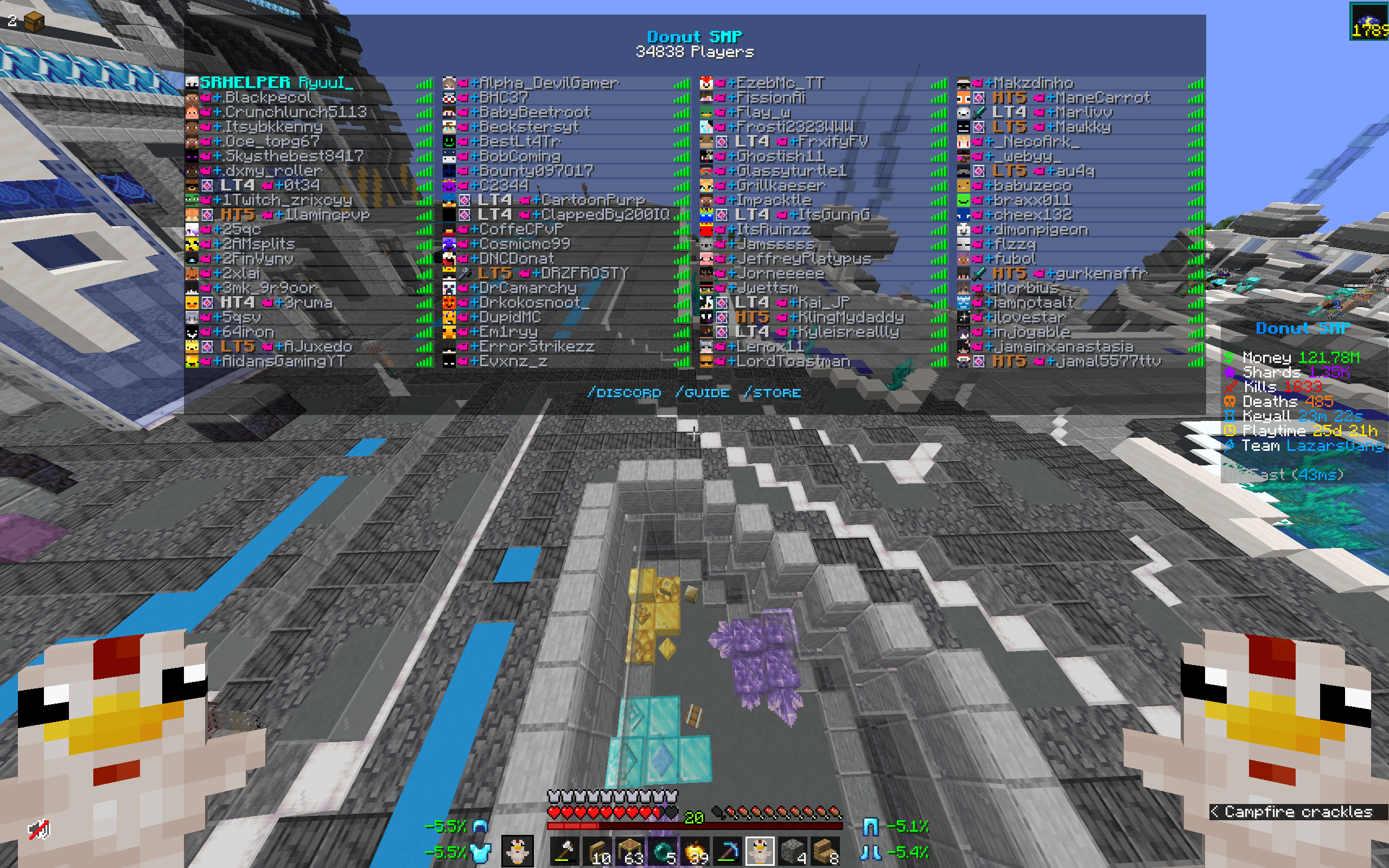 TAB test on Donut SMP
 -
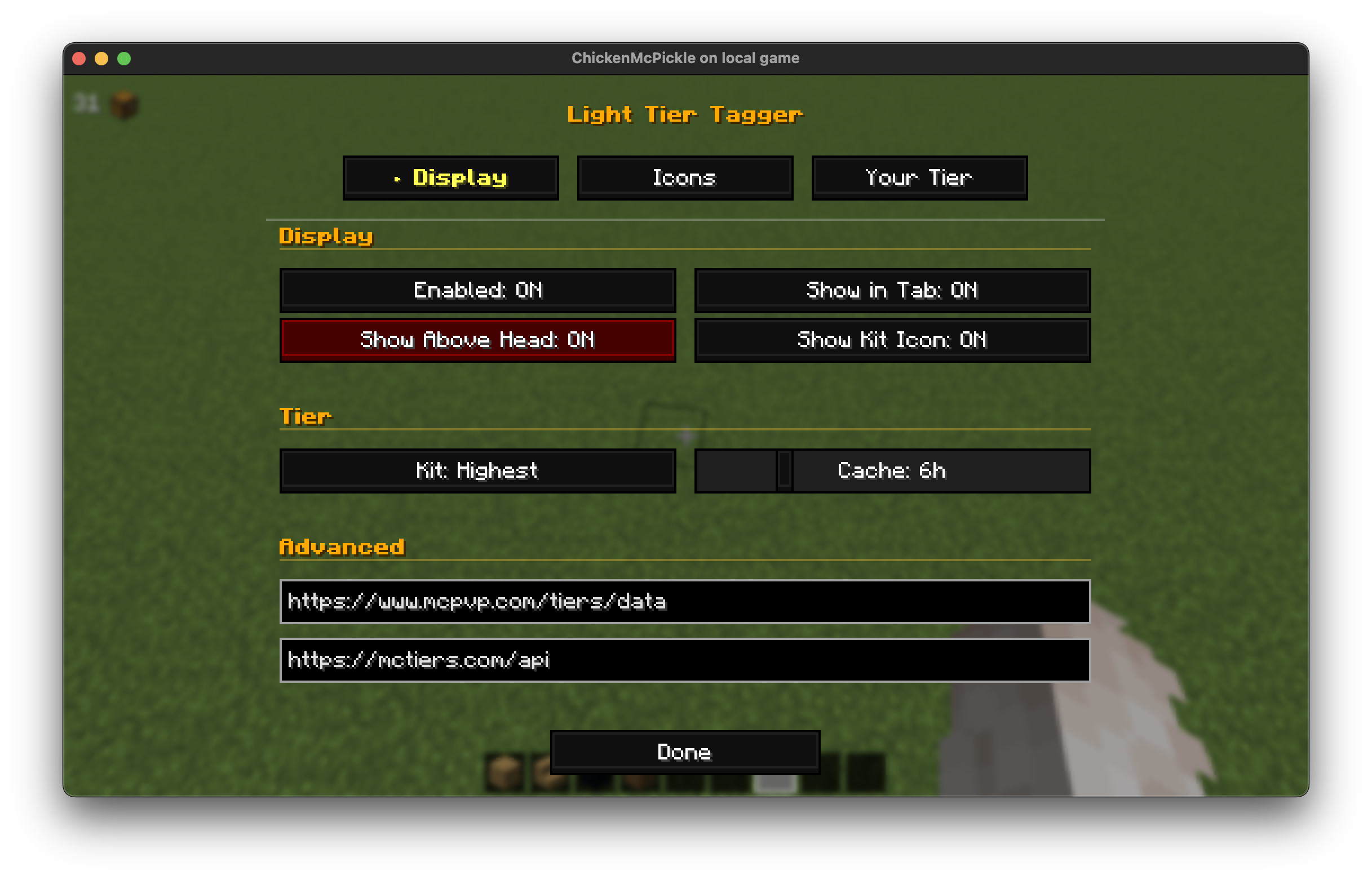 Main Settings Page
 -
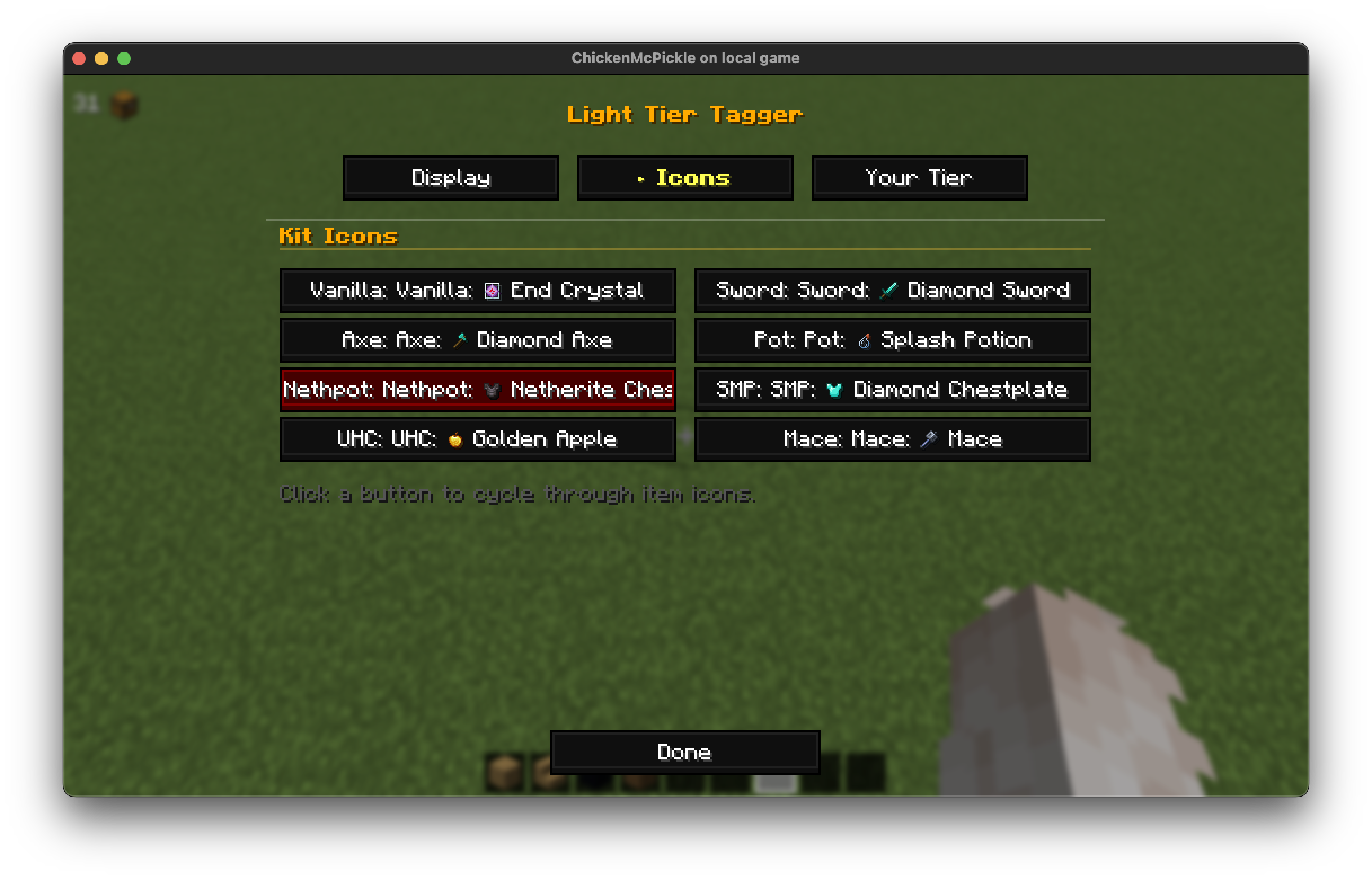 Icons Config
 -
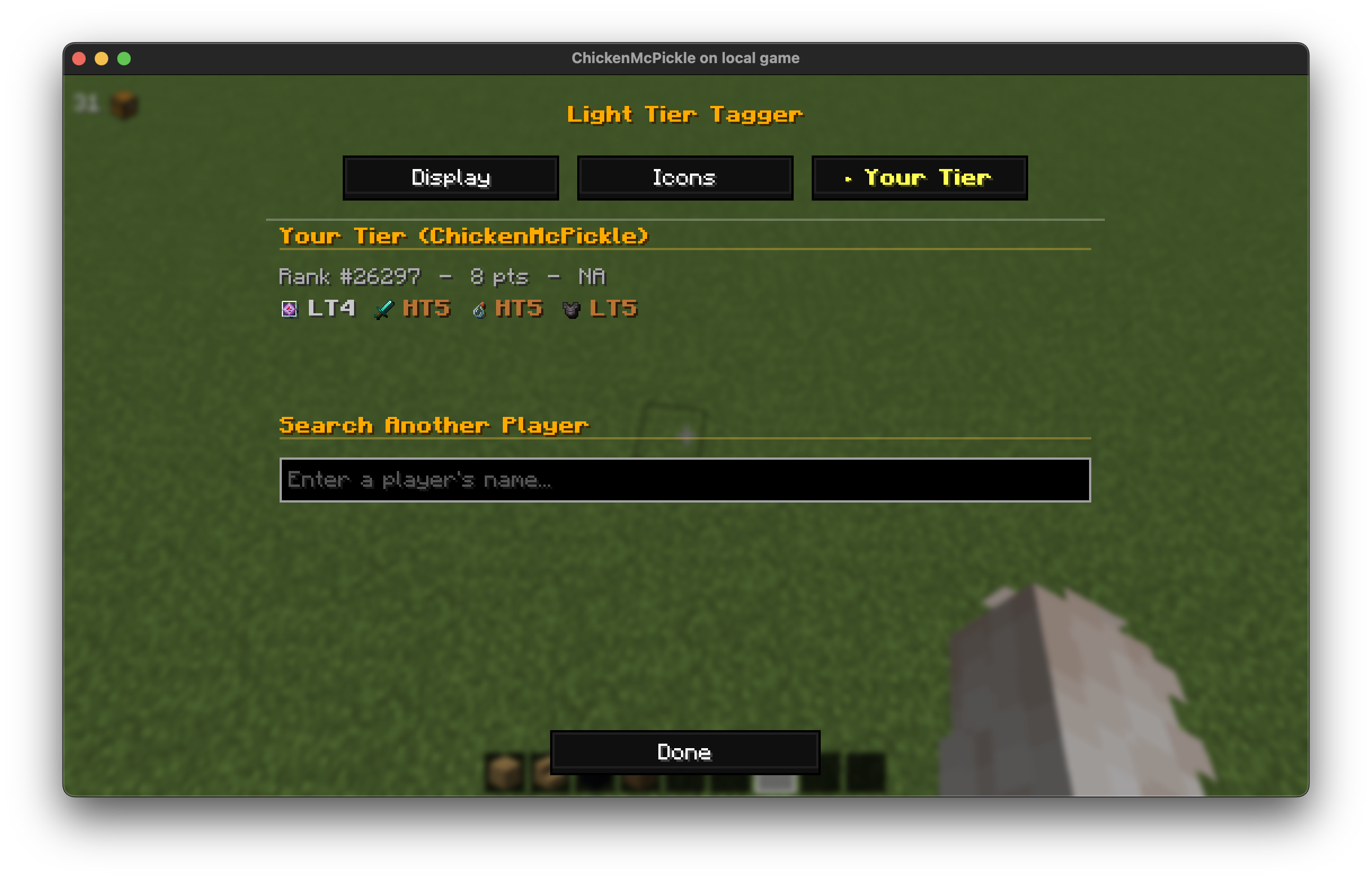 Player Search
Versions
Files
Relations
Project Relations
More like this
Similar Mods
Suggestions use data such as tags, dependencies, dependents, descriptions, titles, and more to rank how much they overlap with this mod.
On ModDex
Community snapshot
By the numbers
Statistics


Get it on
Available Platforms
On ModDex
Community snapshot
By the numbers
Statistics
Resources