Community listing page, reviews here may not be monitored by the author.
MCRGB - A Colour Picker for Blocks


No reviews yet
Search for blocks based on the dominant colours in their textures.
Includes quality of life improvements and small tweaks to enhance and customize gameplay.
Fabric is a mod loader for versions 1.14+ of Minecraft, particularly popular for client side and optimization mods.
Community voices
Reviews
Filters
Click once to include, again to exclude, again to clear
No reviews yet. Be the first to review this project!
Get it on
Available Platforms
Compatibility
Supported Environments
Runs entirely on the client. Works on vanilla servers.
About
Project Details
For authors
Embed Badge
If you're the author of this project, you can embed a live badge anywhere that supports HTML or Markdown. It updates automatically whenever ratings change.
Use HTML for any page that supports it, or Markdown for README files and Markdown-based descriptions.
Identifiers
Platform IDs
About
Description
MCRGB Mod for Minecraft Fabric 1.20.1+
-Trailer:
Requirements:
- Minecraft 1.20.1+
- Fabric
- Fabric API
Reccomended:
- Cloth Config
Features:
A Colour Picker for Minecraft Blocks!
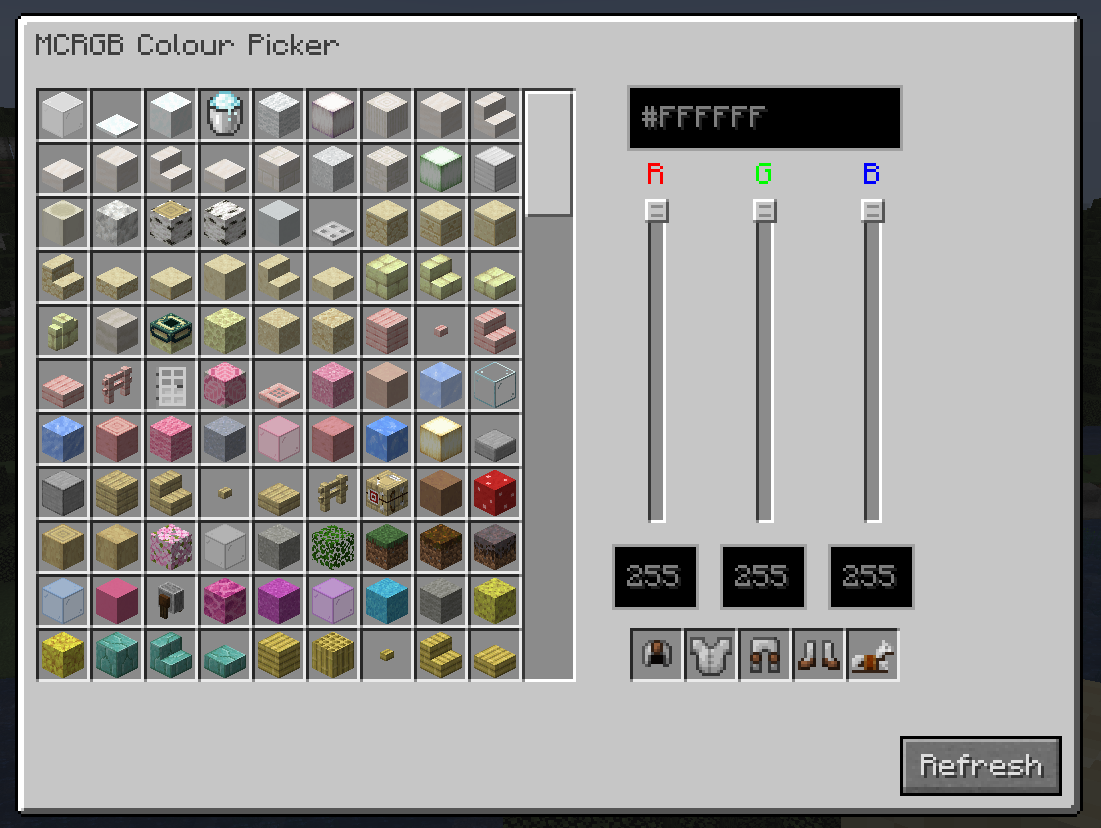
MCRGB is a client-side Minecraft Mod designed to assist building. It allows you to search for blocks based on the dominant colours in their textures.
Press the colour picker key (I by default) to open the colour picker GUI.
HSV, HSL, RGB and Hex Support!
Input your colours using your favourite colour space, and the mod will suggest blocks that closely match that colour. If you are in Creative Mode and have Operator Level Permissions, you can click blocks to give them to yourself.
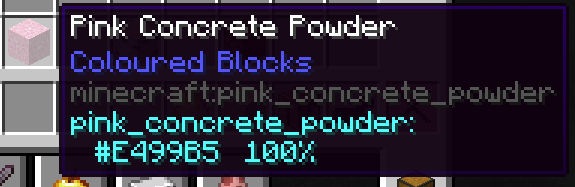
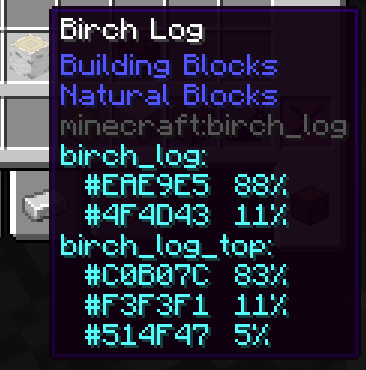
You can also see the breakdown of a block's colour info by hovering over it. This tells you the percentage each colour takes up in each texture, and which blockstates it corresponds to. Optional: You can also view this info in regular inventories by changing the config.
Build using Colour Theory
Easily /give Yourself Dyed Leather Armour
How it works:
On first launch, MCRGB will generate a file, located in .minecraft/mcrgb_colours/file.json
MCRGB attempts to scan every block texture in the game and calculates the dominant colours by grouping together similar pixels based on their euclidean distance in sRGB space, and calculating the mean average of each group. The results are saved in this file. If you ever need to regenerate the file (if you've changed resource packs or added new mods which add more blocks), click the "Refresh" button in the colour picker UI.
When you input a colour to the colour picker, the list of blocks is sorted by the euclidean distance to each of the dominant colours in each texture. Each texture is weighted according to how much of that colour takes up in the texture.
Credits:
Mod created by bacco
Logo created by Whirdle
MCRGB Mod for Minecraft Fabric 1.20.1+
-
Trailer:
Requirements:
- Minecraft 1.20.1+
- Fabric
- Fabric API
Reccomended:
- Cloth Config
Features:
A Colour Picker for Minecraft Blocks!
MCRGB is a client-side Minecraft Mod designed to assist building. It allows you to search for blocks based on the dominant colours in their textures.
Press the colour picker key (I by default) to open the colour picker GUI.
HSV, HSL, RGB and Hex Support!
Input your colours using your favourite colour space, and the mod will suggest blocks that closely match that colour. If you are in Creative Mode and have Operator Level Permissions, you can click blocks to give them to yourself.
You can also see the breakdown of a block's colour info by hovering over it. This tells you the percentage each colour takes up in each texture, and which blockstates it corresponds to. Optional: You can also view this info in regular inventories by changing the config.
Build using Colour Theory
Easily /give Yourself Dyed Leather Armour
How it works:
On first launch, MCRGB will generate a file, located in .minecraft/mcrgb_colours/file.json
MCRGB attempts to scan every block texture in the game and calculates the dominant colours by grouping together similar pixels based on their euclidean distance in sRGB space, and calculating the mean average of each group. The results are saved in this file. If you ever need to regenerate the file (if you've changed resource packs or added new mods which add more blocks), click the "Refresh" button in the colour picker UI.
When you input a colour to the colour picker, the list of blocks is sorted by the euclidean distance to each of the dominant colours in each texture. Each texture is weighted according to how much of that colour takes up in the texture.
Credits:
Mod created by bacco
Logo created by Whirdle
Screenshots
Gallery
Versions
Files
Relations
Project Relations
More like this
Similar Mods
Suggestions use data such as tags, dependencies, dependents, descriptions, titles, and more to rank how much they overlap with this mod.
On ModDex
Community snapshot
By the numbers
Statistics
Want to reach Minecraft players?
We're looking for a server hosting partner to feature here and other parts of the site. Interested? Send us a message!
Get in touchGet it on
Available Platforms
On ModDex
Community snapshot
By the numbers