
Mikasa Mob Health Bar
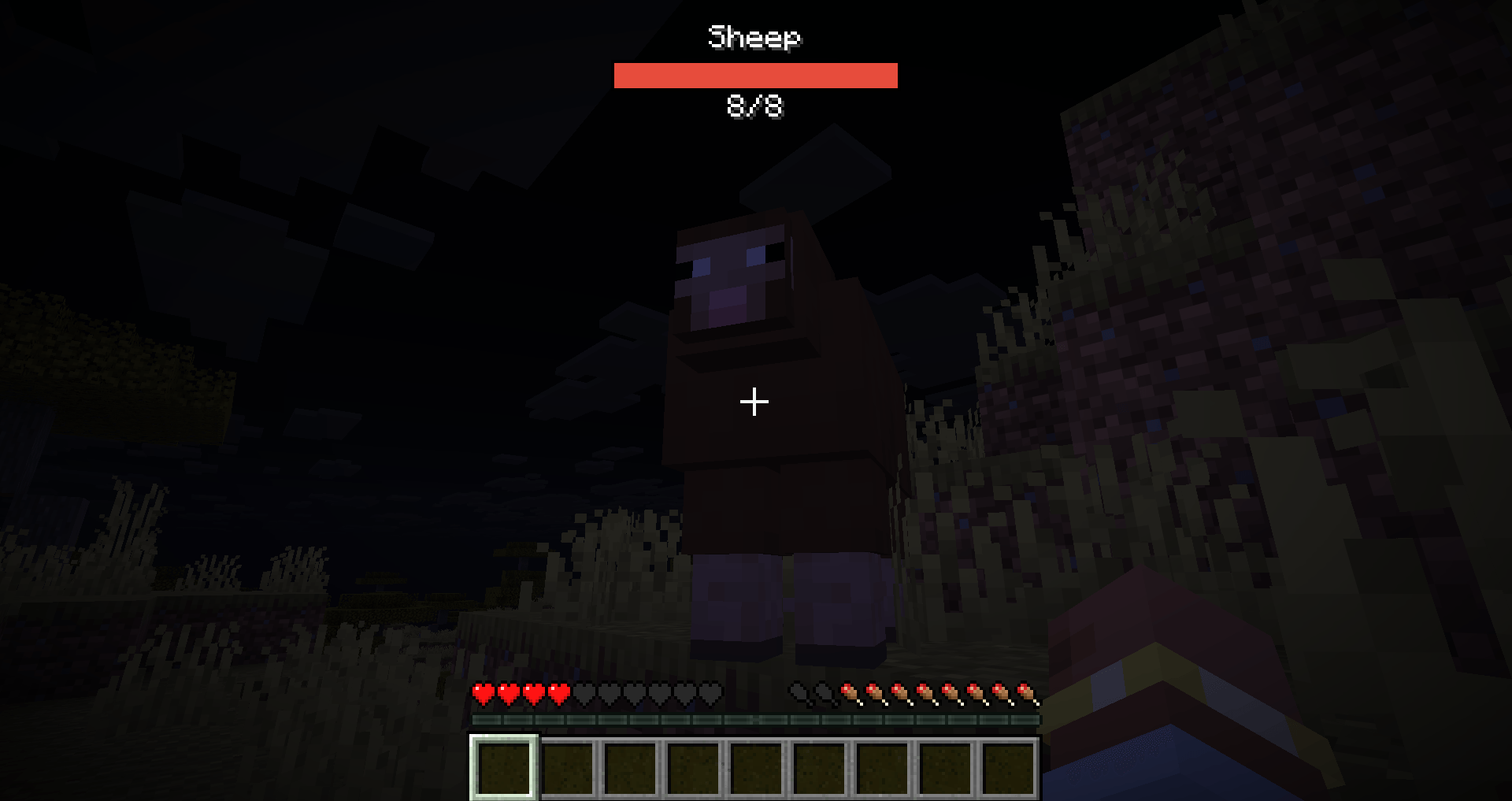
A minimalist client-side HUD that displays the target's name, a red health bar, and exact Current/Max HP at the top center of your screen when looking at any mob.
No ratings yet
Be the first to rate it.
Community listing page
Community listing page, reviews may not be monitored by the author.

Community voices
Reviews
No reviews yet. Be the first to review this project!
Get it on
Available Platforms
About
Project Details
For authors
Embed Badge
If you're the author of this project, you can embed a live badge anywhere that supports HTML or Markdown. It updates automatically whenever ratings change.
Use HTML for any page that supports it, or Markdown for README files and Markdown-based descriptions.
Identifiers
Platform IDs
About
Description
📊 Mikasa-bars — Minimalist Top-Center Target HUD
Mikasa-bars is a sleek, high-performance client-side HUD utility for Fabric. It provides a clean, static overlay at the top center of your screen whenever you look at a living entity, giving you vital combat information without cluttering your world view.
Unlike traditional nameplate mods that float awkwardly above mobs, Mikasa-bars stays fixed at the top of your screen and only appears when you actually need it.
✨ Key Features
- Target-Only Display: The HUD only activates when you place a living entity (player, mob, NPC, or monster) in your crosshair. Looking away immediately hides it.
- Static Top-Center HUD: Keeps your world clean. The health bar stays fixed at the top center of the screen, not floating in the 3D world.
- Comprehensive Info: Displays the entity's name, a clean red health bar, and exact numeric values (
CurrentHP/MaxHP). - Extended Range: The targeting detection range is 2× further than the vanilla entity interaction range.
- Localization Support: Fully respects your client's language settings for translated mob and NPC names.
- Immersive Friendly: Automatically hides when you toggle off the vanilla GUI using the F1 key.
🛠 Feature Overview
| Element | Purpose |
|---|---|
| Entity Name | Shows the localized display name of the targeted living entity. |
| Health Bar | A vibrant red progress bar that scales dynamically based on current vs max health. |
| CurrentHP/MaxHP | Precise numeric health readout positioned cleanly underneath the bar. |
| Targeting System | Activates instantly when looking at a living entity within the extended range. |
Note: This mod has no commands and works completely automatically.
📦 Compatibility & Dependencies
Required:
- Minecraft: 26.3
- Fabric Loader:
0.19.5or later (IMPORTANT: older loader versions like 0.19.3 are NOT supported!). - Fabric API: Required for Minecraft 26.3.
- Java: Version 25+.
⚙️ Configuration
Mikasa-bars has no config files. It is designed to work perfectly out of the box with zero setup. No files are generated on launch, and no manual editing is required!
🚀 Installation Guide
- Install Fabric Loader (
0.19.5+) for Minecraft 26.3 on your client. - Drop this mod jar and the official Fabric API into your client's
modsfolder. - Launch your game, find any mob, and look at it to see the new HUD in action!
Note: This is a client-side HUD mod. Players must install it on their own clients. It is completely optional (not required) on dedicated servers.
📄 License & Credits
- License: MIT
- Author: Mikasa
📄 Source
Screenshots
Gallery
-
 bar.png bar.png
Versions
Files
Relations
Project Relations
More like this
Similar Mods
Suggestions use data such as tags, dependencies, dependents, descriptions, titles, and more to rank how much they overlap with this mod.
Stats
- Downloads
- <1,000
- Used in
- 0 modpacks
- Followers
- 0
- In stacks
- 0
- Created
- Last synced
-
Nov 16, 2026 2:01 PM UTC
New file updates sync automatically.
When ModDex last fully re-synced this project from CurseForge or Modrinth. A new file release triggers a resync usually within minutes, and every project is also re-synced on a schedule. Edits that don't ship a file, such as a new description or screenshots, are checked every few hours and can appear before this date changes.
How syncing works
External Links

Stats
- Downloads
- <1,000
- Used in
- 0 modpacks
- Followers
- 0
- In stacks
- 0
- Created
- Last synced
-
Nov 16, 2026 2:01 PM UTC
New file updates sync automatically.
When ModDex last fully re-synced this project from CurseForge or Modrinth. A new file release triggers a resync usually within minutes, and every project is also re-synced on a schedule. Edits that don't ship a file, such as a new description or screenshots, are checked every few hours and can appear before this date changes.
How syncing works