
Community listing page, reviews here may not be monitored by the author.
Mine Mine no Mi: Devil Fruit Circulation Bot


No reviews yet
Mine Mine no Mi Addon to synchronize devil fruit availability to Discord in a pretty embed
Community voices
Reviews
No reviews yet. Be the first to review this project!
Get it on
Available Platforms
Compatibility
Supported Environments
Runs entirely on the server. Also works in singleplayer.
About
Project Details
For authors
Embed Badge
If you're the author of this project, you can embed a live badge anywhere that supports HTML or Markdown. It updates automatically whenever ratings change.
Use HTML for any page that supports it, or Markdown for README files and Markdown-based descriptions.
Identifiers
Platform IDs
About
Description
Devil Fruit Circulation Bot
Devil Fruit Circulation Bot is an Add-on for the popular Mine Mine no Mi mod
It allows you to synchronize the current fruit circulation to Discord in a beautiful embed.
Warning: This mod depends on the latest 1.16.5 version of Discord Integration, so this must be set up beforehand
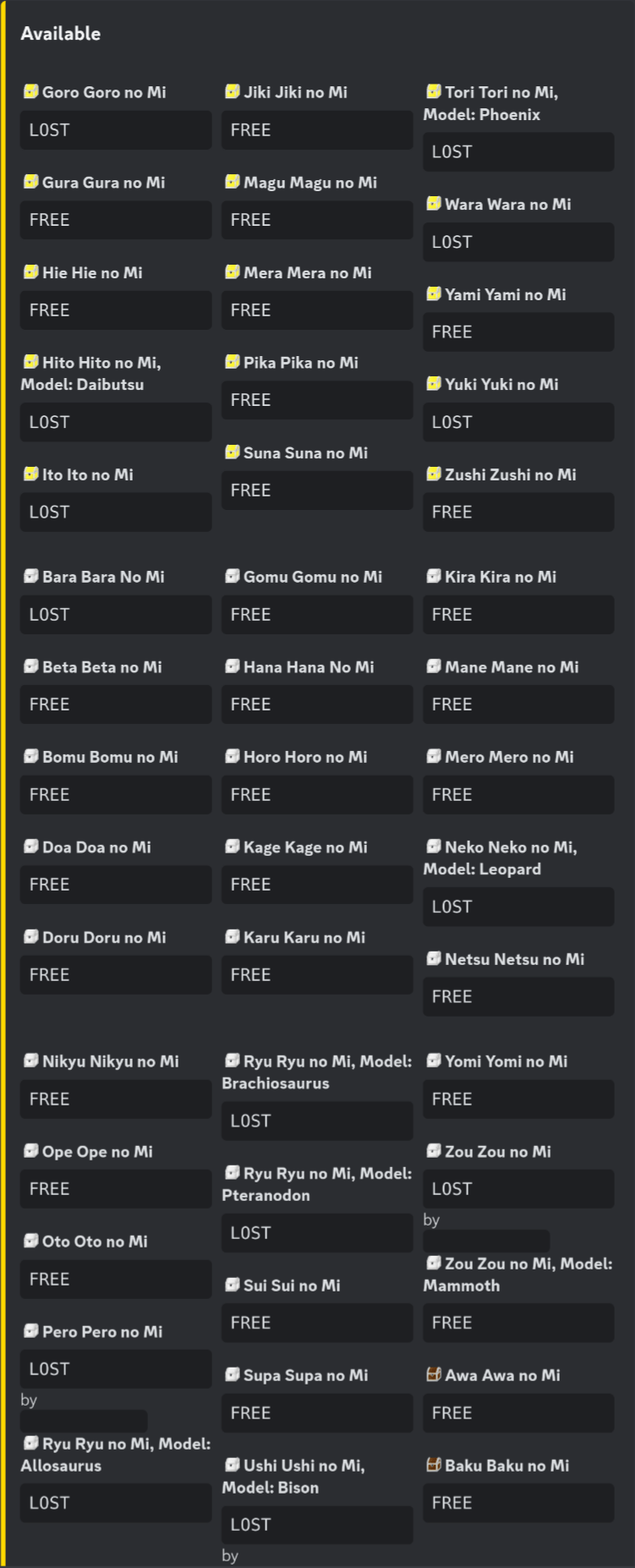
Devil Fruit Circulation Bot
Devil Fruit Circulation Bot is a Minecraft Addon for the popular Mine Mine no Mi Mod mod.
Installation
git clone https://github.com/rathmerdominik/devilfruit-circulation-bot.git
cd devilfruit-circulation-bot
./gradlew build
From there you can take the jar out of the build/libs folder
Dependencies
This mod depends on the latest 1.16.5 version of Discord Integration therefore you must get and configure this addon as well!
Configuration Options
[EmbedDesign]
	#Color for the generated Embed in Hexadecimal
	"Color Hex" = "0xFFD700"
	#Sort Devil Fruits by Alphabet
	"Sort by Alphabet" = false
	#Sort Devil Fruits by their Tier
	"Sort By Tier" = true
	#The title of the Embed
	"Embed Title" = "Current Devilfruit Circulation"
	#The footer of the Embed
	"Embed Footer" = "Made by DerHammerclock | Last updated"
	#Show a date next to the footer when the embed has been updated
	"Show Last Updated" = true

[General]
	#Show the current Status of the Fruit as well if it has one
	"Show Fruit Status" = false
	#In which mode the Bot is supposed to work.
	#Allowed Values: ONLY_SHOW_AVAILABLE, SHOW_AVAILABLE_AND_UNAVAILABLE, ONLY_SHOW_UNAVAILABLE
	"Circulation Bot Mode" = "ONLY_SHOW_AVAILABLE"
	#Channel ID to where the Circulation Messages will be send. Please make sure the bot has write access!
	#Range: 0 ~ 9223372036854775807
	"Channel ID" = 0
	#DO NOT TOUCH. WILL BE GENERATED
	#Range: 0 ~ 9223372036854775807
	"Message ID" = 0
	#Show the player name if the fruit status is INVENTORY or IN_USE. Requires Show Fruit Status to be true
	"Show Player Name as Status" = false

[Emojis]
	#Discord Emoji ID to represent a Gold Box.
	#Range: 0 ~ 9223372036854775807
	"Gold Box Emoji ID" = 0
	#Discord Emoji ID to represent a Wooden Box.
	#Range: 0 ~ 9223372036854775807
	"Wooden Box Emoji ID" = 0
	#Use emojis to show the rarity of a fruit
	"Use Emojis" = false
	#Discord Emoji ID to represent an Iron Box.
	#Range: 0 ~ 9223372036854775807
	"Iron Box Emoji ID" = 0
Screenshots
Gallery
-
 Devil Fruit Circulation Bot Logo
 -
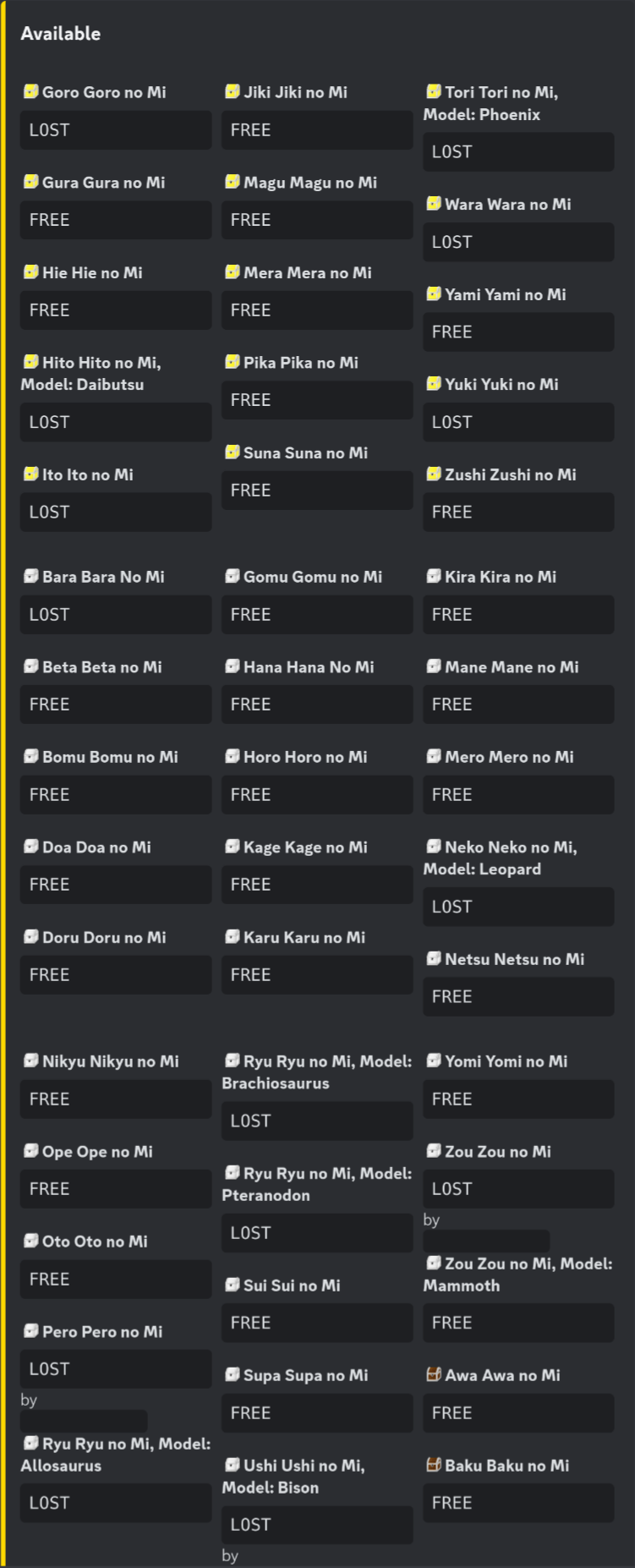 Available Embed With "Show Fruit Status" enabled and tier emojis applied
 -
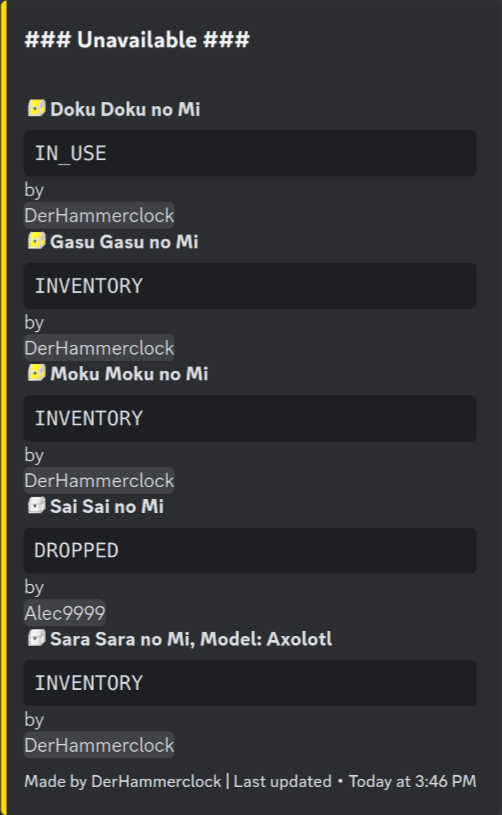 Unavailable Embed With "Show Status" and "Show Player Name as Status" enabled and tier emojis applied
Versions
Files
Relations
Project Relations
More like this
Similar Mods
Suggestions use data such as tags, dependencies, dependents, descriptions, titles, and more to rank how much they overlap with this mod.
- Sol's MMNM Addon: AbilityProtection Rework (QoL, Improvements)
- Fishy Business
- Darkroots
- Mine Mine No Mi: Rank Rank No Mi Discontinued
- Mine Mine No Mi Extra Slots
- Mine Mine no Mi: Player Revive Compat
- Mine Mine No Mi: Devil Hordes
- Sui battle royal
- Mine Mine no Mi : Awaken Path
- Mine Mine no Mi : All Fruits All Boxes
- Awaken Awaken no Mi
- Devil Fruit Progression
On ModDex
Community snapshot
By the numbers
Statistics
Want to reach Minecraft players?
We're looking for a server hosting partner to feature here and other parts of the site. Interested? Send us a message!
Get in touchGet it on
Available Platforms
On ModDex
Community snapshot
By the numbers