
Community listing page, reviews here may not be monitored by the author.
Minecord (for Discord)


No reviews yet
Bring your Minecraft world into your Discord guild
Community voices
Reviews
No reviews yet. Be the first to review this project!
Get it on
Available Platforms
Compatibility
Supported Environments
Runs on a dedicated server only; does not work in singleplayer.
About
Project Details
For authors
Embed Badge
If you're the author of this project, you can embed a live badge anywhere that supports HTML or Markdown. It updates automatically whenever ratings change.
Use HTML for any page that supports it, or Markdown for README files and Markdown-based descriptions.
Identifiers
Platform IDs
About
Description

Minecord
Bring your Minecraft world into your Discord guild




Minecord is a Minecraft mod that brings your Minecraft world into your Discord guild.
It is a server-side only mod, uses JDA to interface with Discord, is built on the Fabric mod loader, and is available for modern versions of Minecraft Java Edition.
💡 You only need to add the one mod jar to your server, e.g.
minecord-2.0.3+1.20.6.jar.
Integrations
- TextPlaceholderAPI by Patbox — for text placeholders
- TydiumCraft Skin API by Tydium — for embed avatars
Features
💬 Chat
Chat is responsible for bridging chat-related events between Minecraft and Discord.
- Multi-channel support
- Filter events to Minecraft dimensions
- Translate unicode emojis, e.g. 😃 ->
:smiley: - Show player avatars in embeds where appropriate
- Discord events relayed to Minecraft
- A user sent a message
- A user sent a message in reply to another
- A user edited their recently sent message
- A user reacted to a recent message
- A user removed their reaction from a recent message
- A user sent a message that contained stickers
- A user sent a message that contained attachments
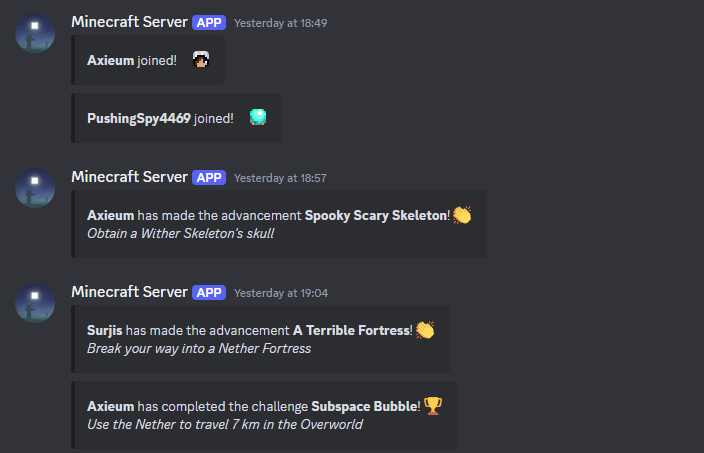
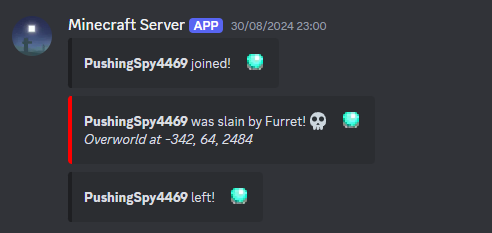
- Minecraft events relayed to Discord
- A player sent an in-game chat message
- A player sent an in-game message via the
/mecommand - An admin broadcast an in-game message via the
/saycommand - An admin broadcast an in-game message to all players via the
/tellraw @acommand - A player had died
- A named animal/monster (with name tag) had died
- A player unlocked an advancement task
- A player reached an advancement goal
- A player completed an advancement challenge
- A player teleported to another dimension
- A player joined the game
- A player left the game
- The server began to start
- The server started and is accepting connections
- The server began to stop
- The server stopped and is offline
- The server stopped unexpectedly and is inaccessible
- Optionally attach the crash report if available
🪄 Commands
Commands is responsible for providing various commands to interact with your Minecraft server from Discord.
- Built-in commands ready to use
/uptime— shows for how long the server has been online/tps— displays the Minecraft server's current ticks-per-second
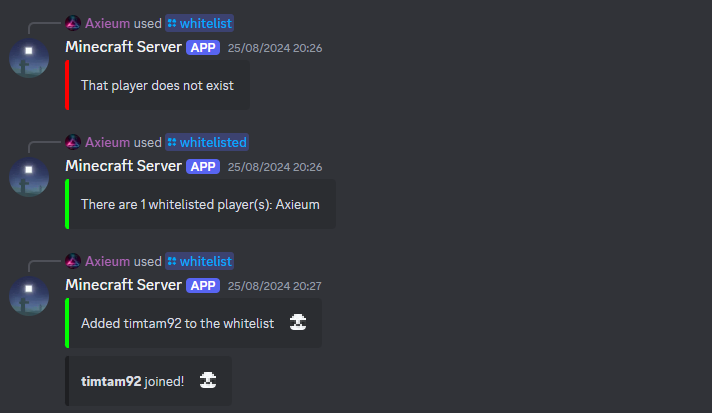
- Configure your own slash commands to run Minecraft commands
- For example, you could manage your server's whitelist via
/whitelist
- For example, you could manage your server's whitelist via
- Ability to apply cooldowns to commands
- This can be configured on a per user, channel or guild basis
- Detects players in commands and places their avatar in the response
- Mod developers can register their own slash commands
😇 Presence
Presence is responsible for updating the bot presence in Discord to show more detailed statuses.
- Built-in presence categories ready to use
starting— used when the Minecraft server is startingrunning— used when the Minecraft server is runningstopping— used when the Minecraft server is stopping
- Configure your own presences
- Type of activity, i.e. competing, listening, playing, streaming, or watching
- Name of activity (supports placeholder values)
- Mod developers can register and trigger their own presence categories
📦 API
API is a gateway into the Minecord mod. It equips developers with the tools necessary to integrate their mods with Discord.
Sponsors
We would like to extend our thanks to the following sponsors for supporting Minecord development.

Contributing
Thank you for considering contributing to Minecord! Please see the Contribution Guidelines.
Security Vulnerabilities
Please review the Security Policy on how to report security vulnerabilities.
Licence
Minecord is open-sourced software licenced under the MIT licence.

Minecord
Bring your Minecraft world into your Discord guild


Minecord is a Minecraft mod that brings your Minecraft world into your Discord guild.
It is a server-side only mod, uses JDA to interface with Discord, is built on the Fabric mod loader, and is available for modern versions of Minecraft Java Edition.
💡 You only need to add the one mod jar to your server, e.g.
minecord-2.0.3+1.20.6.jar.
Integrations
- TextPlaceholderAPI by Patbox — for text placeholders
- TydiumCraft Skin API by Tydium — for embed avatars
Features
💬 Chat
Chat is responsible for bridging chat-related events between Minecraft and Discord.
- Multi-channel support
- Filter events to Minecraft dimensions
- Translate unicode emojis, e.g. 😃 ->
:smiley: - Show player avatars in embeds where appropriate
- Discord events relayed to Minecraft
- A user sent a message
- A user sent a message in reply to another
- A user edited their recently sent message
- A user reacted to a recent message
- A user removed their reaction from a recent message
- A user sent a message that contained stickers
- A user sent a message that contained attachments
- Minecraft events relayed to Discord
- A player sent an in-game chat message
- A player sent an in-game message via the
/mecommand - An admin broadcast an in-game message via the
/saycommand - An admin broadcast an in-game message to all players via the
/tellraw @acommand - A player had died
- A named animal/monster (with name tag) had died
- A player unlocked an advancement task
- A player reached an advancement goal
- A player completed an advancement challenge
- A player teleported to another dimension
- A player joined the game
- A player left the game
- The server began to start
- The server started and is accepting connections
- The server began to stop
- The server stopped and is offline
- The server stopped unexpectedly and is inaccessible
- Optionally attach the crash report if available
🪄 Commands
Commands is responsible for providing various commands to interact with your Minecraft server from Discord.
- Built-in commands ready to use
/uptime— shows for how long the server has been online/tps— displays the Minecraft server's current ticks-per-second
- Configure your own slash commands to run Minecraft commands
- For example, you could manage your server's whitelist via
/whitelist
- For example, you could manage your server's whitelist via
- Ability to apply cooldowns to commands
- This can be configured on a per user, channel or guild basis
- Detects players in commands and places their avatar in the response
- Mod developers can register their own slash commands
😇 Presence
Presence is responsible for updating the bot presence in Discord to show more detailed statuses.
- Built-in presence categories ready to use
starting— used when the Minecraft server is startingrunning— used when the Minecraft server is runningstopping— used when the Minecraft server is stopping
- Configure your own presences
- Type of activity, i.e. competing, listening, playing, streaming, or watching
- Name of activity (supports placeholder values)
- Mod developers can register and trigger their own presence categories
📦 API
API is a gateway into the Minecord mod. It equips developers with the tools necessary to integrate their mods with Discord.
Sponsors
We would like to extend our thanks to the following sponsors for supporting Minecord development.

Contributing
Thank you for considering contributing to Minecord! Please see the Contribution Guidelines.
Security Vulnerabilities
Please review the Security Policy on how to report security vulnerabilities.
Licence
Minecord is open-sourced software licenced under the MIT licence.
Screenshots
Gallery
Versions
Files
Relations
Project Relations
More like this
Similar Mods
Suggestions use data such as tags, dependencies, dependents, descriptions, titles, and more to rank how much they overlap with this mod.
On ModDex
Community snapshot
By the numbers
Statistics
Want to reach Minecraft players?
We're looking for a server hosting partner to feature here and other parts of the site. Interested? Send us a message!
Get in touchGet it on
Available Platforms
On ModDex
Community snapshot
By the numbers