Community listing page, reviews here may not be monitored by the author.
Mod Tabs (Forked)

No reviews yet
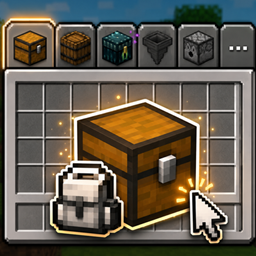
A clean, configurable inventory tab bar that lets you jump between nearby containers and return home with one click.
Community voices
Reviews
No reviews yet. Be the first to review this project!
Get it on
Available Platforms
About
Project Details
For authors
Embed Badge
If you're the author of this project, you can embed a live badge anywhere that supports HTML or Markdown. It updates automatically whenever ratings change.
Use HTML for any page that supports it, or Markdown for README files and Markdown-based descriptions.
Identifiers
Platform IDs
About
Description
Mod Tabs
Stop closing your inventory just to open a chest. Mod Tabs adds a clean, configurable tab bar to your inventory and container screens — click a tab to jump straight to another screen, then hit your inventory key to snap right back.
This is the fresh Minecraft 26.1.2 / NeoForge release (0.1.0): a ground-up rewrite of the classic Legendary Tabs / Mod Tabs concept, rebuilt on a lean, flexible core.
This is a fork. Mod Tabs (Forked) is a fork of Mod Tabs by Vodmordia (source), which itself descends from Legendary Tabs by Legendary_Workshop. It is distributed under the LGPL 2.1 License (see How this fork differs and Credits below). Fork source: https://github.com/otectus/mod-tabs
✨ What it does
🎒 Nearby containers, one click away
Enable Nearby Container Tabs and Mod Tabs quietly scans the blocks around you and adds a tab for every openable one — chests, barrels, shulker boxes, hoppers, dispensers, and modded containers alike. No hardcoded list: if a block opens a menu when you right-click it, it gets a tab.
- Double chests show as a single tab — no clutter.
- Blocked chests (something on top) are skipped, just like vanilla.
- The bar updates live if a chest is placed or broken while you're browsing.
- Optional line-of-sight filter, and an adjustable scan radius (1–16 blocks).
🏠 Always-home inventory tab
A dedicated inventory tab sits on your inventory screen and on vanilla container screens, so getting back home is always one click — and it closes any open container properly so your items never desync.
🎛️ Make the bar yours
A built-in per-screen layout editor lets you dial in exactly how the bar looks:
- Move, scale, rotate and re-space the tabs.
- Reposition and rotate the paging button.
- Tuck the bar out of the way and have it slide back in on hover — in any direction.
- Pin sticky tabs to the leading edge so they never scroll off the page.
- Anchor the bar to the GUI or to a fixed screen position.
- Set a tabs-per-page limit and page through the rest with a chevron.
Every layout is saved per screen, so each menu can look exactly how you want.
📦 Modpack-friendly
Pack authors can flip a single "Allow Layout Editing" switch to lock the layout, ship a curated arrangement, and keep it consistent for every player.
🎮 Controls
- Shift + Tab — cycle to the next tab (rebindable)
- Your inventory key (E) — return to the inventory from a tab-opened screen
- Shift + Z or long-press the inventory tab — open the layout editor
- Left-click a tab — open its screen
📋 Requirements
- Minecraft 26.1.2
- NeoForge (
26.1.2.76or compatible) - Java 25
- MidnightLib — required (powers the config screen)
Client-side friendly — you can install it on the client alone.
⚙️ Configuration
All options live in the in-game MidnightLib config screen. Toggle nearby-container tabs, set the scan radius and line-of-sight, lock layout editing for modpacks, and more. Fine-grained per-tab tweaks (visibility, order, sticky, custom icons) are handled right in the layout editor.
🔀 How this fork differs from the original
Mod Tabs (Forked) is a ground-up port to Minecraft 26.1.2 / NeoForge, deliberately reduced to a lean core rather than a feature-for-feature copy of the upstream 1.21.1 line:
- Ships only the tab-bar framework, the inventory / home tab, and the nearby-container tabs.
- Not included (yet): the ~45 third-party per-mod integration tabs, the integration network packets, and the standalone global-settings panel from the older Mod Tabs / Legendary Tabs builds.
- Config migrated entirely to the in-game MidnightLib config screen.
- Container detection is now menu-provider-driven (no hardcoded block list), so vanilla and modded containers are picked up automatically.
More per-mod integrations are planned on top of this base.
🙏 Credits
- Original Legendary Tabs concept and implementation by Legendary_Workshop (source).
- Mod Tabs rewrite and NeoForge port by Vodmordia (source) — the direct parent of this fork.
- 26.1.2 core port (this fork) by otectus (source).
- The nearby-container feature is a clean-room implementation inspired by the design of InventoryTabs by dhyces / Kavin Phan. No source code was copied — the shared ideas are credited in full in the project's
CREDITS.txt.
Note:
0.1.0is the core foundation for 26.1.2 — the tab framework, the inventory tab and nearby-container tabs. More per-mod integrations are on the way. Feedback and bug reports are very welcome!
Screenshots
Gallery
Versions
Files
Relations
Project Relations
More like this
Similar Mods
Suggestions use data such as tags, dependencies, dependents, descriptions, titles, and more to rank how much they overlap with this mod.
On ModDex
Community snapshot
By the numbers
Statistics
Want to reach Minecraft players?
We're looking for a server hosting partner to feature here and other parts of the site. Interested? Send us a message!
Get in touchGet it on
Available Platforms
On ModDex
Community snapshot
By the numbers