
Community listing page, reviews may not be monitored by the author.
Modern Advancements

No reviews yet
Client-side UI and quality-of-life overhaul for advancements: fullscreen tree with zoom, interactive criteria inspector, HUD tracking, and progress bars.

Community voices
Reviews
No reviews yet. Be the first to review this project!
Get it on
Available Platforms
About
Project Details
For authors
Embed Badge
If you're the author of this project, you can embed a live badge anywhere that supports HTML or Markdown. It updates automatically whenever ratings change.
Use HTML for any page that supports it, or Markdown for README files and Markdown-based descriptions.
Identifiers
Platform IDs
Resources
External Links
About
Description
Modern Advancements
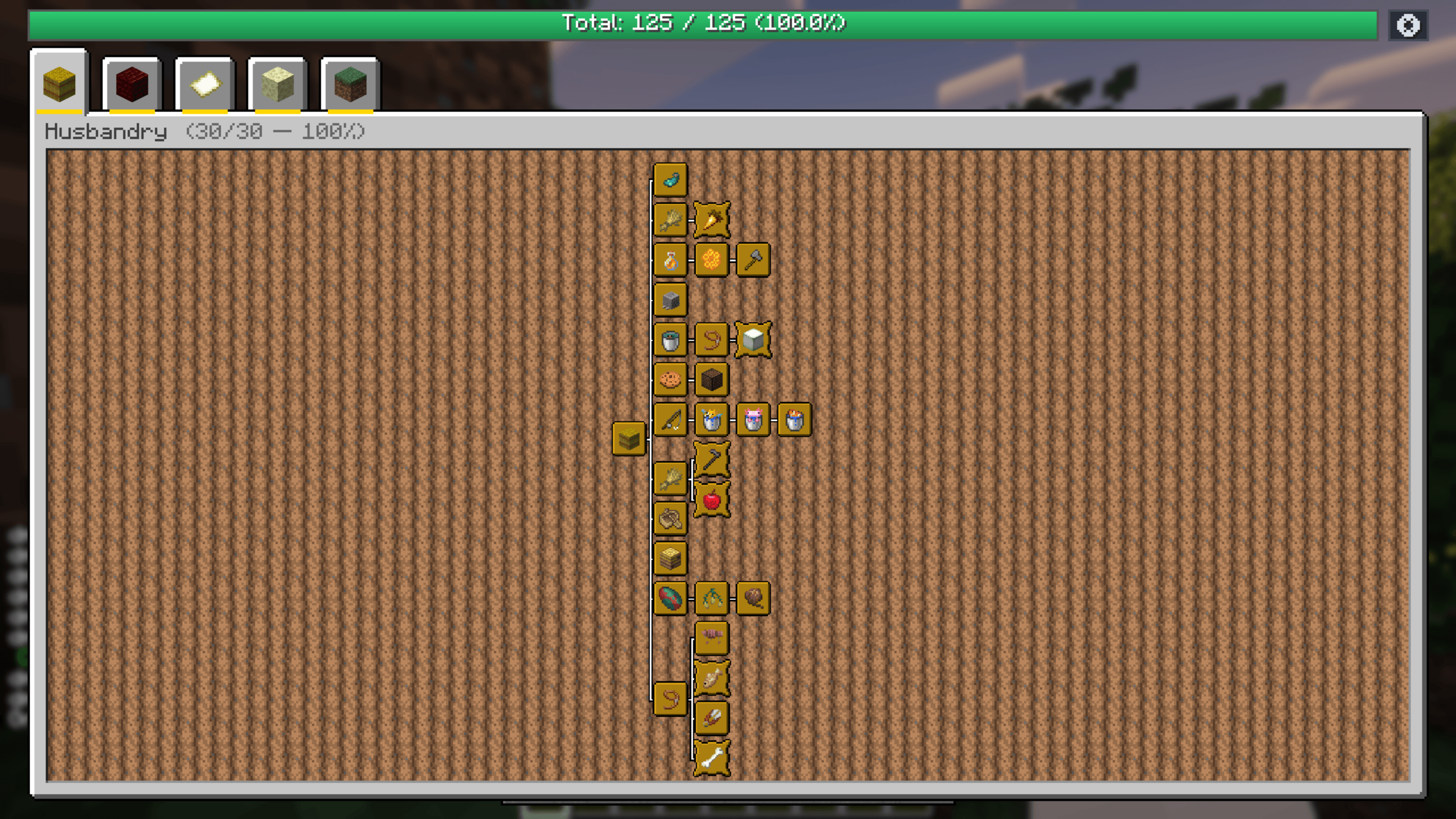
Modern Advancements is a client-side UI and quality-of-life mod that modernizes Minecraft's advancement screen. It replaces the cramped vanilla window with a clean fullscreen canvas, reveals missing criteria for complex tasks, uncovers secret advancements, and lets you pin goals directly onto your HUD while playing.
- Client-Side Only: Works everywhere — Singleplayer, Realms, and multiplayer servers (Vanilla, Paper, Fabric, NeoForge). No server-side installation needed.
- Modern Alternative to Better Advancements: Built from scratch for modern Minecraft versions with smooth controls and zero bloat.
- No More Alt-Tabbing: Check missing requirements for multi-part achievements and secret goals directly in-game without checking external wikis.
Features
- Responsive Fullscreen Canvas: Replaces the tiny vanilla window with an adaptive fullscreen view, smooth panning, a customizable zoom factor (default
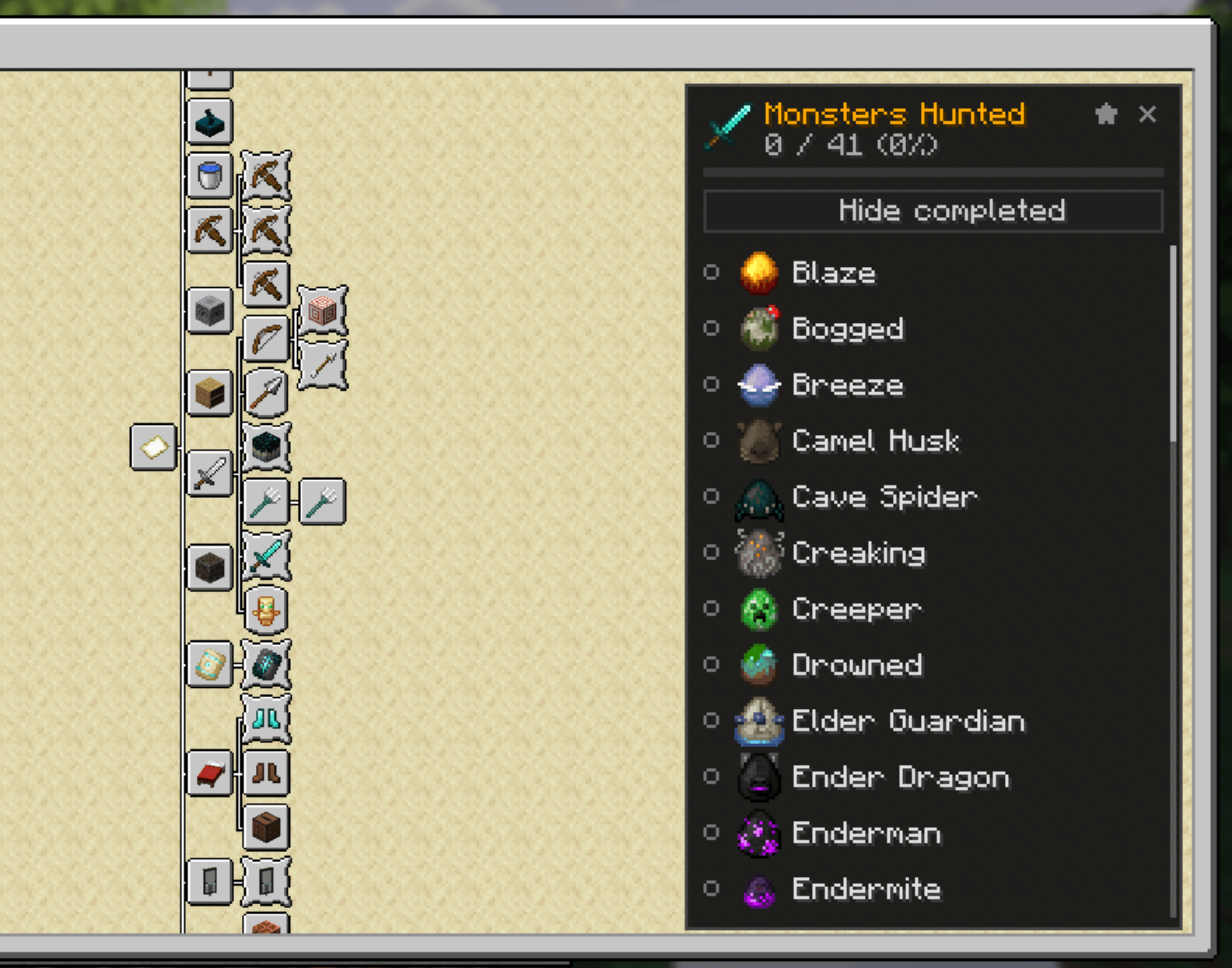
0.65x), and overall progress bars. - Criteria Checklist & Inspector: Left-click composite achievements (A Balanced Diet, Monsters Hunted, Adventuring Time, Two by Two) to open a side panel showing remaining mobs, items, or biomes with icons, translated names, and a "Hide completed" toggle.
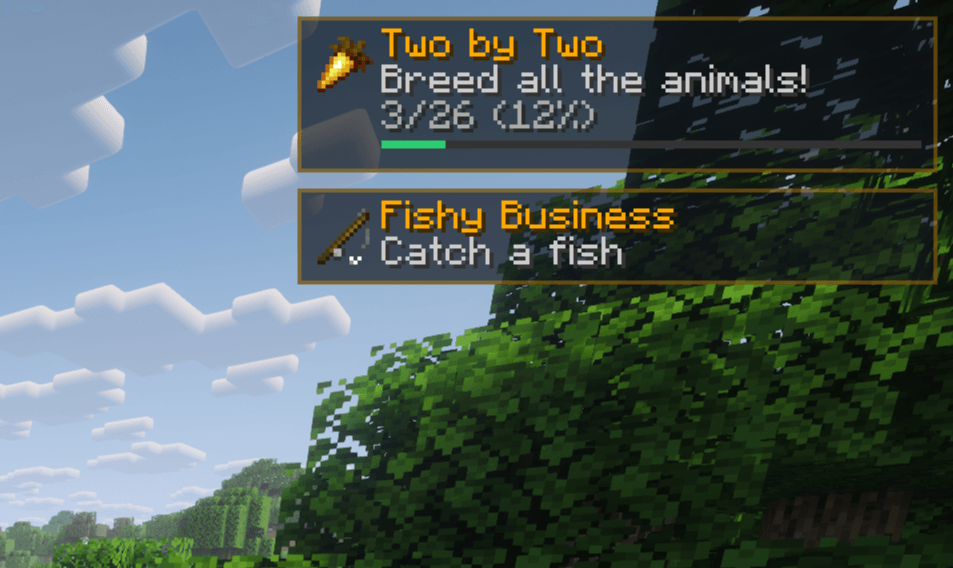
- In-Game HUD Tracking: Right-click or middle-click any advancement to pin up to 5 active goals directly onto your HUD with live counters, progress bars, and descriptions. Pins persist across worlds and servers.
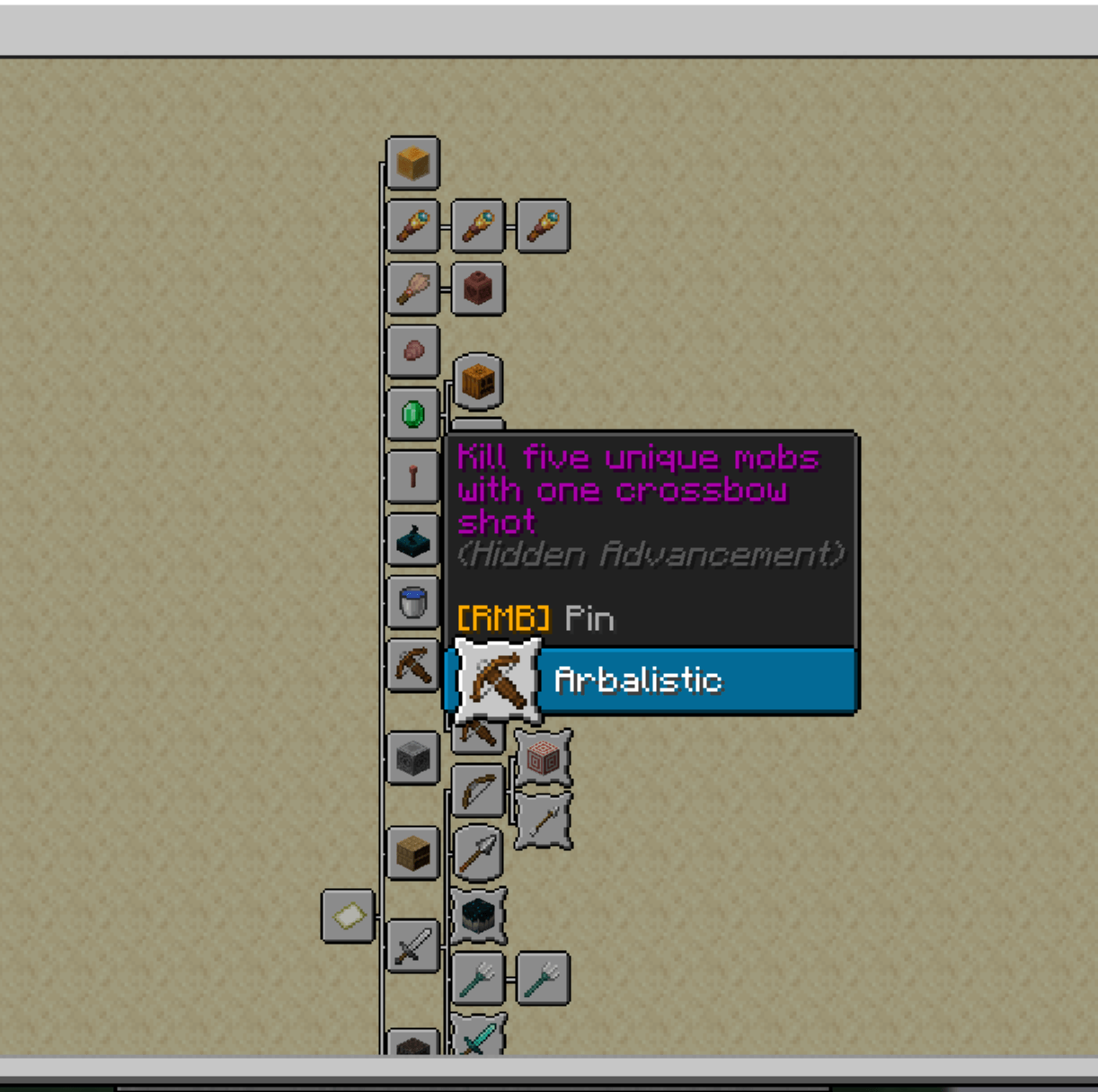
- Reveal Secret Goals: Unearned hidden advancements remain visible and inspectable in the tree so you always know what challenges are available.
- Progress Tracking: View your overall completion at the top (
Total: X / Y (Z%)) alongside mini progress indicators on individual category tabs. - Native Integration: Keybind hints (
[LMB] Inspect • [RMB] Pin) blend directly into vanilla tooltips without obstructing descriptions. - In-Game Settings: Configure HUD positions, zoom levels, and pin limits via the gear icon
⚙or Mod Menu.
Controls
| Action | Input | Result |
|---|---|---|
| Inspect Criteria | Left-Click on composite node |
Opens side panel with missing requirements |
| Toggle HUD Pin | Right-Click or Middle-Click |
Pins or unpins the goal to your HUD |
| Pan Canvas | Left-Click Drag on background |
Glides smoothly across advancement trees |
| Jump to Tab | Left-Click on top header chip |
Switches directly to that advancement's tab |
| Settings | Gear button ⚙ or Mod Menu |
Opens customization screen |
Configuration
Accessible through the gear icon ⚙ in the advancement screen or via Mod Menu:
- HUD Position: Top-Right, Top-Left, Bottom-Right, or Bottom-Left.
- Pin Limit: Choose between 1 and 5 simultaneous trackers.
- Tree Zoom: Adjust canvas scale from
0.5x(compact) to1.0x(standard). - Auto-Unpin: Automatically clears completed advancements from your HUD.
Frequently Asked Questions
Do I need to install this on the server?
No. The mod is strictly client-side. You can use it on any vanilla, Paper, Purpur, Fabric, or NeoForge server without issues or special permissions.
Is this compatible with Better Advancements?
No, and you don't need both. Modern Advancements is designed as a direct modern replacement with built-in fullscreen scaling, criteria tracking, and HUD pinning.
Does this work with custom advancements from datapacks or other mods?
Yes. Any advancement that uses standard criteria will automatically appear in the tree, support criteria inspection, and allow HUD pinning.
Does HUD tracking or criteria caching affect FPS?
No. HUD rendering and criteria checks are lightweight and optimized to run smoothly alongside performance mods like Sodium and Lithium.
Screenshots
Gallery
-
 Minecraft Screenshot 2026.09.13 - 17.46.35.95.png Minecraft Screenshot 2026.09.13 - 17.46.35.95.png
 -
 Minecraft Screenshot 2026.09.13 - 18.01.21.18.png Minecraft Screenshot 2026.09.13 - 18.01.21.18.png
 -
 Minecraft Screenshot 2026.09.13 - 17.53.58.14.png Minecraft Screenshot 2026.09.13 - 17.53.58.14.png
 -
 Minecraft Screenshot 2026.09.13 - 18.13.59.74.png Minecraft Screenshot 2026.09.13 - 18.13.59.74.png
Versions
Files
Relations
Project Relations
More like this
Similar Mods
Suggestions use data such as tags, dependencies, dependents, descriptions, titles, and more to rank how much they overlap with this mod.
On ModDex
Community snapshot
By the numbers
Statistics

Get it on
Available Platforms
On ModDex
Community snapshot
By the numbers
Statistics
Resources