![MoreRecipes [Cobblemon]](https://cdn.modrinth.com/data/P32n013L/dcaa3cf5b1a67a16668f3df5f0dcf6d0bb967801.png)
Community listing page, reviews here may not be monitored by the author.
MoreRecipes [Cobblemon]

No reviews yet
MoreRecipes aims to add some useful recipes to the popular modpack Cobblemon. This datapack is here to bring you all the crafting recipes you ever wanted, adding more possibilities to your Cobblemon adventures.
Community voices
Reviews
No reviews yet. Be the first to review this project!
Get it on
Available Platforms
About
Project Details
For authors
Embed Badge
If you're the author of this project, you can embed a live badge anywhere that supports HTML or Markdown. It updates automatically whenever ratings change.
Use HTML for any page that supports it, or Markdown for README files and Markdown-based descriptions.
Identifiers
Platform IDs
Resources
External Links
About
Description


🟣 MoreRecipes ⚪
MoreRecipes in the Cobblemon mod. This datapack adds useful recipes that make playing your favourite Pokémon modpack easier. It's pretty simple, just place the datapack inside your world and you're good to go!📋 Candy Recipe List 🍬
Exp. Candy XS: Exp. Candy S:
 Exp. Candy M:
 Exp. Candy L:
 Exp. Candy XL:
 Rare Candy:

📋 Apricorn Recipe List 🌱
Apricorn Sprout:
📝 Change Recipes 📝
Important Note: Modifying datapacks can be challenging for beginners. Proceed with caution! ⚠️To customize the recipes, you'll need to have the datapack folder unzipped and placed in your datapacks directory. Once unzipped, navigate to the following location:
MoreRecipesDatapack\data\morerecipes\recipeIn this folder, you'll find JSON files for each recipe, such as exp_candy_xs, exp_candy_s, exp_candy_m, exp_candy_l, and exp_candy_xl for example. These files contain the recipe of each item.
To change the recipe of an item, open the .json file of the item you'd like to change:
{
    "type": "minecraft:crafting_shaped",
    "category": "misc",
    "pattern": [
      " h ",
      "sgs",
      " b "
    ],
    "key": {
      "s": {
        "item": "minecraft:sugar"
      },
      "g": {
        "item": "minecraft:lapis_lazuli"
      },
      "h": {
        "item": "minecraft:honey_bottle"
      },
      "b": {
        "item": "minecraft:sweet_berries"
      }
    },
    "result": {
      "id": "cobblemon:exp_candy_xs"
    }
  }
In this example we are looking at the exp_candy_xs.json crafting recipe. If you want to change one item in the crafting recipe just change the item name in the "item": "minecraft:sugar". You have to change the item that corresponds for each key, for example, on this crafting recipe the "key" "s" corresponds to sugar and the "key" "g" corresponds to lapis lazuli, so if I wanted to change the item sugar to an apple on the recipe I would change the "s" "key"'s item.
You can find the namespaces for minecraft and cobblemon items by pressing F3+H in-game and hovering your mouse over an item.
To add more items into the recipe you can just add another key on the crafting pattern as well as the "key list":
{
    "type": "minecraft:crafting_shaped",
    "category": "misc",
    "pattern": [
      "aha",
      "sgs",
      "aba"
    ],
    "key": {
      "s": {
        "item": "minecraft:sugar"
      },
      "g": {
        "item": "minecraft:lapis_lazuli"
      },
      "h": {
        "item": "minecraft:honey_bottle"
      },
      "b": {
        "item": "minecraft:sweet_berries"
      },
      "a": {
        "item": "minecraft:apple"
      }
    },
    "result": {
      "id": "cobblemon:exp_candy_xs"
    }
  }
Here I have added the letter "a" into the pattern, corresponding the letter after in the "key list" to the item apple.
If you've modified any of these .json files and the recipes stop working, you might have misspelled an item in the namespace or used an item that doesn't exist in Minecraft's namespace. Additionally, double-check that your .json file is properly formatted by using an online JSON formatter.
Have some issues? You can join the Official Cobblemon discord server, search for 'MoreRecipes' and ask your questions there, or alternatively, you can DM me on discord.


Screenshots
Gallery
-
 Apricorn Sprout
 -
 Exp. Candy XS
 -
 Exp. Candy S
 -
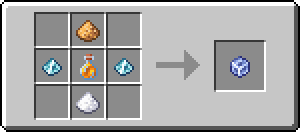 Exp. Candy M
 -
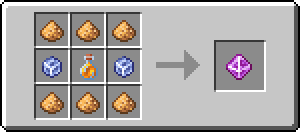 Exp. Candy L
 -
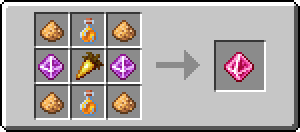 Exp. Candy XL
 -
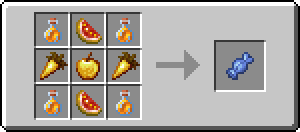 Rare Candy
Versions
Files
Relations
Project Relations
More like this
Similar Mods
Suggestions use data such as tags, dependencies, dependents, descriptions, titles, and more to rank how much they overlap with this mod.
On ModDex
Community snapshot
By the numbers
Statistics

Want to reach Minecraft players?
We're looking for a server hosting partner to feature here and other parts of the site. Interested? Send us a message!
Get in touchGet it on
Available Platforms
On ModDex
Community snapshot
By the numbers
Statistics
Resources