Community listing page, reviews here may not be monitored by the author.
Motionblur Plus


No reviews yet
A Fabric Motionblur mod with configurable frame blending
Community voices
Reviews
No reviews yet. Be the first to review this project!
Get it on
Available Platforms
Compatibility
Supported Environments
Runs entirely on the client. Works on vanilla servers.
About
Project Details
For authors
Embed Badge
If you're the author of this project, you can embed a live badge anywhere that supports HTML or Markdown. It updates automatically whenever ratings change.
Use HTML for any page that supports it, or Markdown for README files and Markdown-based descriptions.
Identifiers
Platform IDs
Resources
External Links
About
Description
MotionBlur Plus
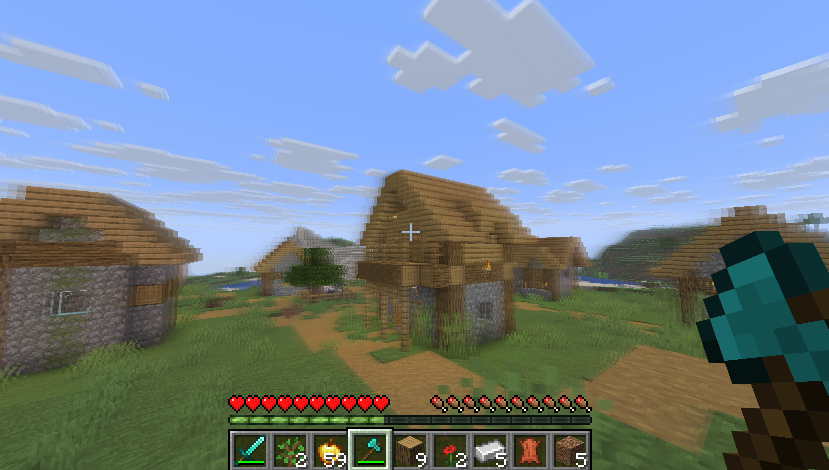
Want a smooth Minecraft experience without losing FPS? MotionBlur Plus is a lightweight Minecraft mod that adds a clean motion blur effect while keeping your game fast and responsive. Unlike heavy shader packs, this mod focuses only on motion blur, making it perfect for PvP, Survival, Bedwars, and regular gameplay.
✨ Features
- Works with the latest Minecraft versions (supported releases available for modern versions).
- Lightweight and highly optimized.
- Almost no FPS loss compared to traditional shaders.
- Smooth camera movement.
- Fully configurable settings. (Open Settings UI, Default Keybind M)
- Toggle Motion Blur ON/OFF anytime.
- Increase or decrease blur intensity.
- Great for PvP, Bedwars, Survival, and content creation.
🎛️ Fully Customizable
MotionBlur Plus lets you customize the effect according to your preference.
You can easily:
- Enable or disable Motion Blur.
- Adjust blur strength from low to high.
- Fine-tune the visual effect for smooth gameplay.
- Find the perfect balance between visuals and performance.
🕹️ Commands
/motionblurplus percentage <0-100>
Sets the Motion Blur intensity from 0% to 100%.
/motionblurplus toggle Enable
Enables Motion Blur.
/motionblurplus toggle Disable
Disables Motion Blur.
🚀 Optimized for Performance
One of the biggest advantages of MotionBlur Plus is its optimization.
Unlike many shader packs that reduce FPS significantly, MotionBlur Plus is designed to use very little GPU power while still giving a premium-looking motion blur effect. It is suitable even for mid-range and low-end PCs.
📥 Installation
- Download MotionBlur Plus.
- Install the required mod loader (Fabric).
- Place the mod inside the
modsfolder. - Launch Minecraft.
- Open the configuration screen (Keybind M) and customize the blur strength.
MotionBlur Plus
MotionBlur Plus is a lightweight Minecraft mod that adds a clean motion blur effect while keeping your game fast and responsive. Unlike heavy shader packs, this mod focuses only on motion blur, making it perfect for PvP, Survival, Bedwars, and regular gameplay.
Feature Overview
- Works with the latest Minecraft versions (supported releases available for modern versions).
- Lightweight and highly optimized.
- Almost no FPS loss compared to traditional shaders.
- Smooth camera movement.
- Fully configurable settings. (Open Settings UI, Default Keybind M)
- Toggle Motion Blur ON/OFF anytime.
- Increase or decrease blur intensity.
- Great for PvP, Bedwars, Survival, and content creation.
Fully Customizable
- Enable or disable Motion Blur.
- Adjust blur strength from low to high.
- Fine-tune the visual effect for smooth gameplay.
- Find the perfect balance between visuals and performance.
Commands
/motionblurplus percentage <0-100>
Sets the Motion Blur intensity from 0% to 100%.
/motionblurplus toggle Enable
Enables Motion Blur.
/motionblurplus toggle Disable
Disables Motion Blur.
Optimized for Performance
One of the biggest advantages of MotionBlur Plus is its optimization.
Unlike many shader packs that reduce FPS significantly, MotionBlur Plus is designed to use very little GPU power while still giving a premium-looking motion blur effect. It is suitable even for mid-range and low-end PCs.
Installation
- Download MotionBlur Plus Mod.
- Install the required mod loader (Fabric).
- Place the mod inside the
modsfolder. - Launch Minecraft.
- Open the configuration screen (Keybind M) and customize the blur strength.
Screenshots
Gallery
Versions
Files
Relations
Project Relations
More like this
Similar Mods
Suggestions use data such as tags, dependencies, dependents, descriptions, titles, and more to rank how much they overlap with this mod.
On ModDex
Community snapshot
By the numbers
Statistics
Want to reach Minecraft players?
We're looking for a server hosting partner to feature here and other parts of the site. Interested? Send us a message!
Get in touchGet it on
Available Platforms
On ModDex
Community snapshot
By the numbers
Statistics
Resources