
Community listing page, reviews here may not be monitored by the author.
Mouse&mouse

No reviews yet
Mouse-mouse is a client-side input-splitting mod for Minecraft 1.21.1 NeoForge. It is designed for local multi-instance play, multiple keyboard/mouse setups, local co-op experiments, and input testing.
Community voices
Reviews
No reviews yet. Be the first to review this project!
Get it on
Available Platforms
Compatibility
Supported Environments
Runs entirely on the client. Works on vanilla servers.
About
Project Details
For authors
Embed Badge
If you're the author of this project, you can embed a live badge anywhere that supports HTML or Markdown. It updates automatically whenever ratings change.
Use HTML for any page that supports it, or Markdown for README files and Markdown-based descriptions.
Identifiers
Platform IDs
Resources
External Links
About
Description
Mouse-mouse
Multi-instance mouse & keyboard input splitter for Minecraft
Let two players share one PC, each controlling their own Minecraft window with their own devices





What does this mod do?
Mouse-mouse solves one specific problem: two people playing Minecraft simultaneously on the same PC.
When two Minecraft windows are open on the same machine, they compete for the same mouse and keyboard — only the focused window receives input normally. This mod captures raw input at the system level via Windows Raw Input and routes each device's events to its assigned Minecraft instance, so both windows run independently without interfering with each other.
Features
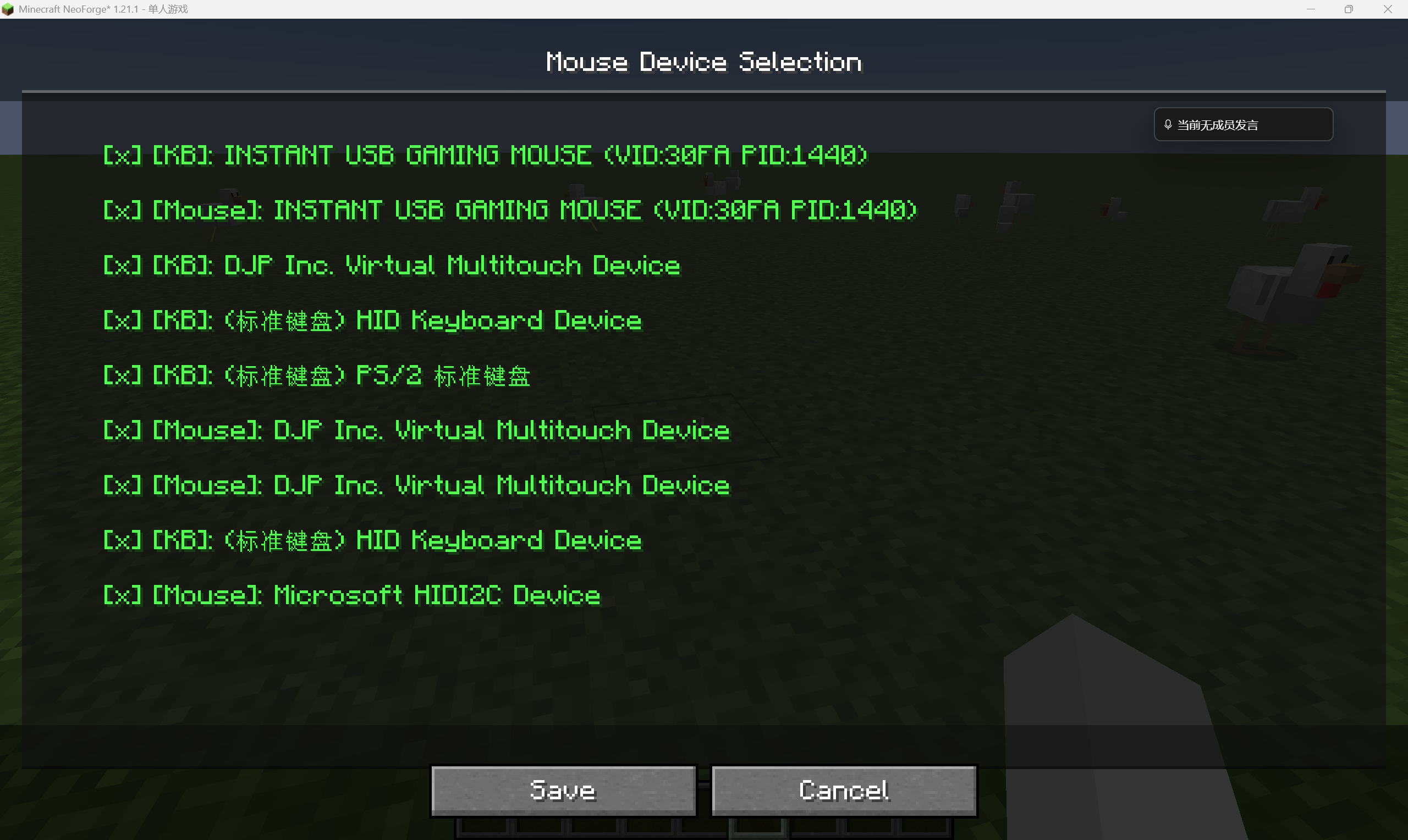
- Per-instance device selection — each window picks its own mouse and keyboard, no conflicts
- Virtual cursor — menus use a software cursor for clicks, drags, and scrolling, isolated from the physical mouse
- Input isolation — events from unassigned devices are blocked so they don't affect the game
- Safety chord
Alt + F8— opens the device selection screen at any time and temporarily releases mouse capture - No config files — device selection is stored only in memory; nothing is written to disk
- Multi-instance cooperation — both instances share one splitter process; duplicate launches are detected and skipped automatically
Installation
Windows only. This mod relies on the Windows Raw Input API and does not work on Linux or macOS.
Step 1 — Download splitter.exe
Download splitter.exe from GitHub Releases and place it in your Minecraft instance's mods/ folder:
.minecraft/mods/
├── Mouse-mouse-NeoForge-x.x.x+mc1.21.1.jar   ← mod jar
└── splitter.exe                                 ← required, download separately
splitter.exeis the Raw Input capture process. The mod launches it automatically on startup. If it is missing frommods/, the mod will not function.
Step 2 — Install the mod
- Install NeoForge or Fabric for your Minecraft version
- Drop the mod
.jarinto yourmods/folder - (Fabric only) Also install Fabric API
- Confirm
splitter.exeis present inmods/ - Launch the game, then press
Alt + F8in-game or on a screen to open the device selection UI
Usage
Two players, one PC
- Start the first Minecraft instance
- Start the second Minecraft instance
- In the first window, press
Alt + F8, select the first set of devices, click Save - In the second window, press
Alt + F8, select the second set of devices, click Save - Both windows now respond independently to their assigned devices
Safety chord Alt + F8
| Situation | Effect |
|---|---|
| Want to change devices | Opens the device selection screen |
| Mouse is captured and can't leave the window | Temporarily releases mouse capture |
| Wrong device selected | Re-enter the screen to reassign or deselect |
Compatibility
| Requirement | |
|---|---|
| Minecraft | 1.21.1 |
| NeoForge | 21.1.x |
| Fabric Loader | 0.16.x or later |
| Fabric API | Required |
| Java | 21 |
| OS | Windows only |
| Local port | 127.0.0.1:19091 (localhost, not exposed externally) |
Known Limitations
- Windows clients only — Linux and macOS are not supported
- Device selection is not persisted; you must re-select after every launch
- If port
19091is already in use by another process, the mod will fail to start - Some virtual HID devices or touchpads may appear in the device list
- This is a client-side mod; the server does not need it installed
How It Works
Physical devices A / B
        │
        ▼
  splitter.exe  (Windows Raw Input)
        │ IPC: 127.0.0.1:19091
        ▼
  Minecraft instance A ←── input from device A
  Minecraft instance B ←── input from device B
On startup, the mod launches splitter.exe, which enumerates physical input devices via Windows Raw Input and opens an IPC channel. Each Minecraft instance claims the devices it wants; the Java side then receives raw events from those devices and injects them into Minecraft's input pipeline via Mixin. Menu interaction is handled through a per-instance virtual cursor, so the physical mouse position does not directly affect GUI state.
License
GPL-3.0-only
Screenshots
Gallery
Versions
Files
Relations
Project Relations
More like this
Similar Mods
Suggestions use data such as tags, dependencies, dependents, descriptions, titles, and more to rank how much they overlap with this mod.
On ModDex
Community snapshot
By the numbers
Statistics

Want to reach Minecraft players?
We're looking for a server hosting partner to feature here and other parts of the site. Interested? Send us a message!
Get in touchGet it on
Available Platforms
On ModDex
Community snapshot
By the numbers
Statistics
Resources