

Telegram Bridge
Simple spigot plugin to make communication with groups on Telegram. You can reply, mention, see online players, see current game time, etc.
No ratings yet
Be the first to rate it.
Community listing page
Community listing page, reviews may not be monitored by the author.

Community voices
Reviews
No reviews yet. Be the first to review this project!
Get it on
Available Platforms
About
Project Details
For authors
Embed Badge
If you're the author of this project, you can embed a live badge anywhere that supports HTML or Markdown. It updates automatically whenever ratings change.
Use HTML for any page that supports it, or Markdown for README files and Markdown-based descriptions.
Identifiers
Platform IDs
About
Description
This plugin adds a bridge between telegram and your minecraft sever making possible to send and receive messages from telegram to minecraft and vice versa.
Usage
- Install the plugin and restart your server this will create a config file for you to proceed
- Create a bot with @BotFather on telegram and disable “Group Privacy” on bot settings
- Get your chat id from your group with the @ScanIDBot
- Now you can change the configuration file
plugins/TelegramBridge/config.ymlto put your chat id and bot token - Restart your server
Permissions
| key | Description | Default |
|---|---|---|
| telegrambridge.receive | If player should receive message from telegram | true |
| telegrambridge.send | If message of the player should be sent to telegram | true |
| telegrambridge.commands.reply | Ability to reply to messages from telegram on minecraft | true |
| telegrambridge.commands.mention | Command that make auto complete on users from telegram to mention them | true |
| telegrambridge.commands.reload | Allows the user to reload the TelegramBridge configuration | op |
Config
To all the configuration options check CONFIG.md
Translation
To all the translation options check TRANSLATION.md
Telegram Commands
/setthread- When using threads, this command will set witch thread the events will be sent to/unsetthread- Unset the thread that was set by/setthread/setpin- Send a message to the chat and pin it which will show dynamically the online players (bot needs to have pin permission)/unsetpin- Unpin the message that was pinned by/setpin(bot needs to have pin permission)/online- Show the online players on the chat/time- Show the server time and date
Minecraft Commands
/tbreload- Reload the TelegramBridge configuration file/tbmention <user> <message>alias/tbm- Auto complete on users from telegram to mention them
Screenshots
Gallery
-
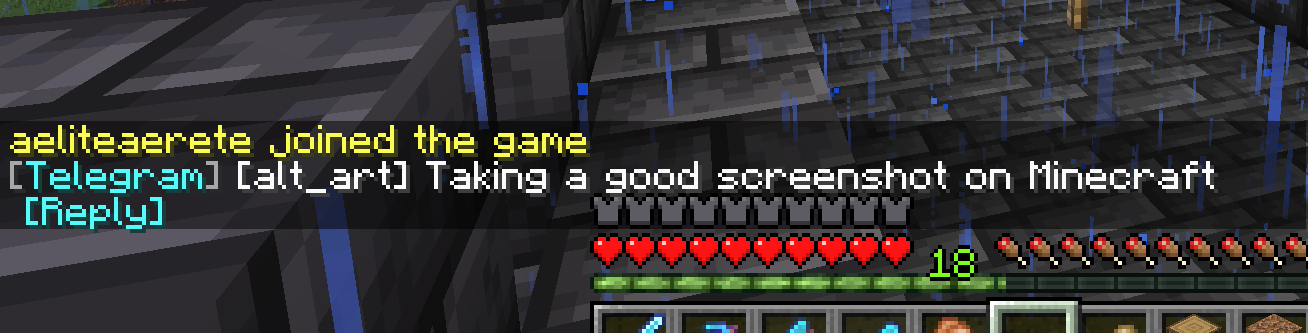 Telegram message displayed on Minecraft
-
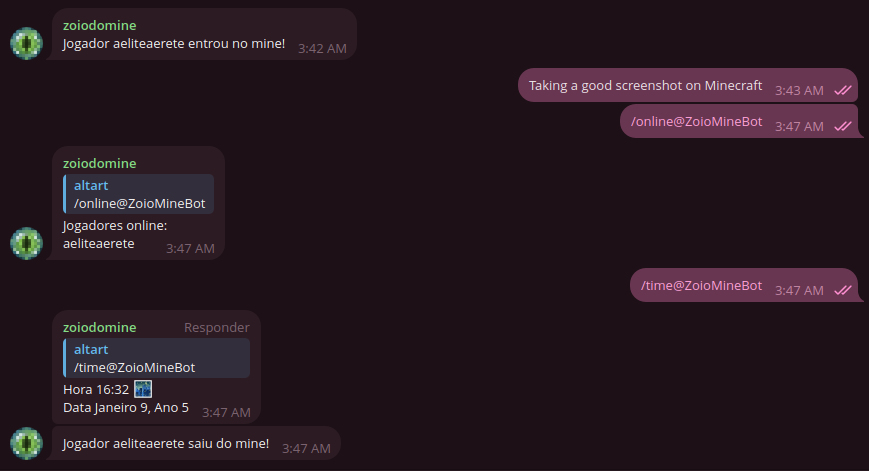 Telegram chat using the bot commands (messages changed to pt-BR)
Versions
Files
Relations
Project Relations
More like this
Similar Mods
Suggestions use data such as tags, dependencies, dependents, descriptions, titles, and more to rank how much they overlap with this mod.
Stats
- Downloads
- 1k
- Used in
- 0 modpacks
- Followers
- 0
- In stacks
- 0
- Created
- Last synced
-
Jul 7, 2026 5:34 PM UTC
New file updates sync automatically.
When ModDex last fully re-synced this project from CurseForge or Modrinth. A new file release triggers a resync usually within minutes, and every project is also re-synced on a schedule. Edits that don't ship a file, such as a new description or screenshots, are checked every few hours and can appear before this date changes.
How syncing works
External Links

Stats
- Downloads
- 1k
- Used in
- 0 modpacks
- Followers
- 0
- In stacks
- 0
- Created
- Last synced
-
Jul 7, 2026 5:34 PM UTC
New file updates sync automatically.
When ModDex last fully re-synced this project from CurseForge or Modrinth. A new file release triggers a resync usually within minutes, and every project is also re-synced on a schedule. Edits that don't ship a file, such as a new description or screenshots, are checked every few hours and can appear before this date changes.
How syncing works