Community listing page, reviews here may not be monitored by the author.
MrDeadPools Filter Hopper


No reviews yet
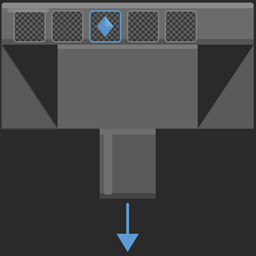
A hopper with configurable item filter. Set up to 5 filter templates in the ghost slots — only matching items get transferred. No filter = everything blocked.
Community voices
Reviews
No reviews yet. Be the first to review this project!
Get it on
Available Platforms
Compatibility
Supported Environments
Must be installed on both the client and the server.
About
Project Details
For authors
Embed Badge
If you're the author of this project, you can embed a live badge anywhere that supports HTML or Markdown. It updates automatically whenever ratings change.
Use HTML for any page that supports it, or Markdown for README files and Markdown-based descriptions.
Identifiers
Platform IDs
Resources
External Links
About
Description
[ENG]
Filter Hopper
Filter Hopper is a lightweight NeoForge mod for Minecraft 1.21.1 that adds a new block: a hopper with a configurable item filter — perfect for automated sorting systems.
What is the Filter Hopper?
Vanilla hoppers transfer every item without distinction. The Filter Hopper gives you control: you decide which items are allowed to pass through and which are not. Everything else gets blocked.
How it works
Right-click the Filter Hopper to open it. You'll see a familiar interface — the vanilla hopper GUI — with one special detail: 5 ghost slots above the inventory, recognizable by their semi-transparent checkerboard grid overlay.
Drag an item into a ghost slot to set it as a filter template. The item stays in your hand — it is not consumed. Right-clicking a filled ghost slot removes the template again.
The Filter Hopper then only pulls items matching one of your templates from the inventory above and pushes them into the inventory it is facing — just like a regular hopper, but filtered.
Features
5 Ghost Slots — configure up to 5 different item templates simultaneously
Directional — faces all directions like a vanilla hopper (down, north, south, east, west)
Blocks everything without a filter — if no template is set, no items are transferred
Inactive without connection — if no inventory is present above or in the facing direction, nothing happens
Persistent — filter templates are saved and restored on world reload
Multiplayer compatible — all players see the same filter templates in real time
No dependencies — works without any additional mods
Usage
[Chest/Inventory]
↓
[Filter Hopper] → [Target Inventory]
Place the Filter Hopper and orient it towards the target inventory
Right-click → fill the ghost slots with your desired item templates
Place an inventory above the hopper
Done — the hopper will only transfer the filtered items
Compatibility
Minecraft: 1.21.1
ModLoader: NeoForge
Dependencies: none
Side: both (Client + Server)
[GER]
Filter Hopper
Der Filter Hopper ist eine leichtgewichtige NeoForge Mod für Minecraft 1.21.1, die einen neuen Block hinzufügt: einen Hopper mit konfigurierbarem Itemfilter — perfekt für automatisierte Sortiersysteme.
Was ist der Filter Hopper?
Vanilla Hopper transportieren alle Items ohne Unterschied. Der Filter Hopper gibt dir die Kontrolle: Du bestimmst welche Items transportiert werden dürfen und welche nicht. Alles andere wird blockiert.
Funktionsweise
Öffne den Filter Hopper mit einem Rechtsklick. Du siehst eine vertraute Oberfläche — die Vanilla Hopper GUI — mit einem besonderen Detail: 5 Ghost-Slots über dem Inventar, erkennbar an dem halbtransparenten Schachbrett-Gitter.
Ziehe ein Item in einen Ghost-Slot um es als Filter-Template zu setzen. Das Item bleibt dabei in deiner Hand — es wird nicht verbraucht. Rechtsklick auf einen belegten Ghost-Slot entfernt das Template wieder.
Der Filter Hopper zieht dann nur Items die einem deiner Templates entsprechen aus dem Inventar über ihm und schiebt sie in das Inventar in die Richtung in die er zeigt — genau wie ein normaler Hopper, nur gefiltert.
Features
5 Ghost-Slots — bis zu 5 verschiedene Item-Templates gleichzeitig konfigurierbar
Richtungsabhängig — zeigt in alle Richtungen wie ein Vanilla Hopper (unten, norden, süden, osten, westen)
Alles blockiert ohne Filter — ist kein Template gesetzt wird kein Item transportiert
Kein Inventar ohne Verbindung — ist kein Inventar oben oder in Blickrichtung vorhanden passiert nichts
Persistent — Filter-Templates bleiben nach dem Speichern und Neuladen erhalten
Multiplayer-kompatibel — alle Spieler sehen die gleichen Filter-Templates in Echtzeit
Keine Abhängigkeiten — funktioniert ohne weitere Mods
Verwendung
[Kiste/Inventar]
↓
[Filter Hopper] → [Ziel-Inventar]
Filter Hopper platzieren und in Richtung des Ziel-Inventars ausrichten
Rechtsklick → Ghost-Slots mit gewünschten Item-Templates befüllen
Inventar über dem Hopper platzieren
Fertig — der Hopper transportiert nur die gefilterten Items
Kompatibilität
Minecraft: 1.21.1
ModLoader: NeoForge
Abhängigkeiten: keine
Seite: beide (Client + Server)

[ENG] Filter Hopper Filter Hopper is a lightweight NeoForge mod for Minecraft 1.21.1 that adds a new block: a hopper with a configurable item filter — perfect for automated sorting systems. What is the Filter Hopper? Vanilla hoppers transfer every item without distinction. The Filter Hopper gives you control: you decide which items are allowed to pass through and which are not. Everything else gets blocked. How it works Right-click the Filter Hopper to open it. You'll see a familiar interface — the vanilla hopper GUI — with one special detail: 5 ghost slots above the inventory, recognizable by their semi-transparent checkerboard grid overlay. Drag an item into a ghost slot to set it as a filter template. The item stays in your hand — it is not consumed. Right-clicking a filled ghost slot removes the template again. The Filter Hopper then only pulls items matching one of your templates from the inventory above and pushes them into the inventory it is facing — just like a regular hopper, but filtered. Features
5 Ghost Slots — configure up to 5 different item templates simultaneously Directional — faces all directions like a vanilla hopper (down, north, south, east, west) Blocks everything without a filter — if no template is set, no items are transferred Inactive without connection — if no inventory is present above or in the facing direction, nothing happens Persistent — filter templates are saved and restored on world reload Multiplayer compatible — all players see the same filter templates in real time No dependencies — works without any additional mods
Usage [Chest/Inventory] ↓ [Filter Hopper] → [Target Inventory]
Place the Filter Hopper and orient it towards the target inventory Right-click → fill the ghost slots with your desired item templates Place an inventory above the hopper Done — the hopper will only transfer the filtered items
Compatibility
Minecraft: 1.21.1 ModLoader: NeoForge Dependencies: none Side: both (Client + Server)
[GER] Filter Hopper Der Filter Hopper ist eine leichtgewichtige NeoForge Mod für Minecraft 1.21.1, die einen neuen Block hinzufügt: einen Hopper mit konfigurierbarem Itemfilter — perfekt für automatisierte Sortiersysteme. Was ist der Filter Hopper? Vanilla Hopper transportieren alle Items ohne Unterschied. Der Filter Hopper gibt dir die Kontrolle: Du bestimmst welche Items transportiert werden dürfen und welche nicht. Alles andere wird blockiert. Funktionsweise Öffne den Filter Hopper mit einem Rechtsklick. Du siehst eine vertraute Oberfläche — die Vanilla Hopper GUI — mit einem besonderen Detail: 5 Ghost-Slots über dem Inventar, erkennbar an dem halbtransparenten Schachbrett-Gitter. Ziehe ein Item in einen Ghost-Slot um es als Filter-Template zu setzen. Das Item bleibt dabei in deiner Hand — es wird nicht verbraucht. Rechtsklick auf einen belegten Ghost-Slot entfernt das Template wieder. Der Filter Hopper zieht dann nur Items die einem deiner Templates entsprechen aus dem Inventar über ihm und schiebt sie in das Inventar in die Richtung in die er zeigt — genau wie ein normaler Hopper, nur gefiltert. Features
5 Ghost-Slots — bis zu 5 verschiedene Item-Templates gleichzeitig konfigurierbar Richtungsabhängig — zeigt in alle Richtungen wie ein Vanilla Hopper (unten, norden, süden, osten, westen) Alles blockiert ohne Filter — ist kein Template gesetzt wird kein Item transportiert Kein Inventar ohne Verbindung — ist kein Inventar oben oder in Blickrichtung vorhanden passiert nichts Persistent — Filter-Templates bleiben nach dem Speichern und Neuladen erhalten Multiplayer-kompatibel — alle Spieler sehen die gleichen Filter-Templates in Echtzeit Keine Abhängigkeiten — funktioniert ohne weitere Mods
Verwendung [Kiste/Inventar] ↓ [Filter Hopper] → [Ziel-Inventar]
Filter Hopper platzieren und in Richtung des Ziel-Inventars ausrichten Rechtsklick → Ghost-Slots mit gewünschten Item-Templates befüllen Inventar über dem Hopper platzieren Fertig — der Hopper transportiert nur die gefilterten Items
Kompatibilität
Minecraft: 1.21.1 ModLoader: NeoForge Abhängigkeiten: keine Seite: beide (Client + Server)
Screenshots
Gallery
Versions
Files
Relations
Project Relations
More like this
Similar Mods
Suggestions use data such as tags, dependencies, dependents, descriptions, titles, and more to rank how much they overlap with this mod.
On ModDex
Community snapshot
By the numbers
Statistics
Want to reach Minecraft players?
We're looking for a server hosting partner to feature here and other parts of the site. Interested? Send us a message!
Get in touchGet it on
Available Platforms
On ModDex
Community snapshot
By the numbers
Statistics
Resources