
Community listing page, reviews may not be monitored by the author.
MultiAFK Manager

No reviews yet
Keep several offline-mode accounts AFK from one Minecraft window. Parked accounts stay connected with no rendering; switch between them instantly.

Community voices
Reviews
No reviews yet. Be the first to review this project!
Get it on
Available Platforms
About
Project Details
For authors
Embed Badge
If you're the author of this project, you can embed a live badge anywhere that supports HTML or Markdown. It updates automatically whenever ratings change.
Use HTML for any page that supports it, or Markdown for README files and Markdown-based descriptions.
Identifiers
Platform IDs
Resources
External Links
About
Description
MultiAFK Manager
Keep several offline-mode accounts AFK from one Minecraft window — and switch between them instantly.
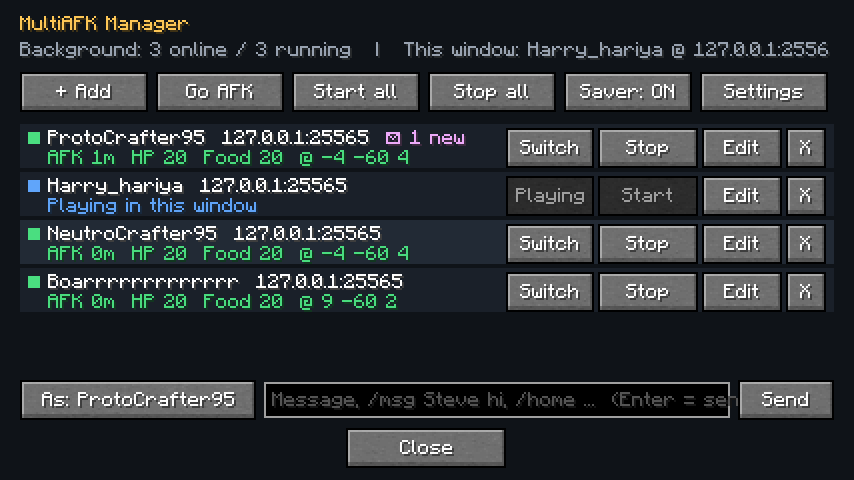
Normally, keeping three accounts on a server means three Minecraft windows, three times the RAM, CPU and GPU. MultiAFK lets one window do it: the account you are not playing is parked — it stays connected and keeps receiving the world, but nothing is rendered or ticked for it. When you want it back, one click and you are playing it again, without reconnecting.
⚠️ Offline-mode servers only. MultiAFK creates offline (non-Microsoft) sessions by player name. It does not log into Microsoft/premium accounts and cannot join online-mode servers with extra accounts. Many servers do not allow alt accounts or AFK players — read your server's rules first.
How it works
- Join a server normally and walk to your AFK spot.
- Press I (or Esc → Go AFK). The account stays on the server, parked in the background.
- Press O to open the manager → + Add → type a name → Play in this window.
- Set that account up, press I again. Repeat.
- Click Switch on any parked account to play it again — instantly, same connection.
Features
- Instant switching — parked accounts keep their world, inventory and position in memory; switching back does not reconnect, so you do not land in a lobby or have to log in again.
- Almost zero cost while parked — no rendering, no entity ticking, small view distance; the menu drops to a low FPS while only parked accounts are running (Power saver).
- Background accounts — start saved accounts without ever opening them (
Start/Start all), spaced out to avoid "connection throttled". - Auto-reconnect after kicks or server restarts, and optional join commands per account (for example
/login <password>; /server survivalon servers that use an auth plugin). - Auto-respawn for parked/background accounts.
- Private messages reach you — when a parked account gets a
/msg, you see it in your chat as[AFK name] …with a sound (or a toast while in menus). Public chat of parked accounts is not shown to you. - Send as any account —
/afk <name> <message or /command>,/afk all <message>, and/afkr <message>to reply to the last private message. There is also a chat bar in the manager. - Unread counters per account; full message history in each account's Edit screen.
- Works with proxy networks (Velocity/BungeeCord server switches) and survives keep-alive timeouts.
Keys and commands
| Key / command | What it does |
|---|---|
O |
Open the MultiAFK manager |
I |
Go AFK — park the account you are playing |
/afk <name\|all> <text> |
Send chat or a command as an account |
/afkr <text> |
Reply to the last private message an AFK account got |
Keys can be changed in Options → Controls → MultiAFK.
Settings
Power saver · resume AFK accounts on game start · auto-respawn · auto-accept server code of conduct ·
optional arm-swing anti-AFK (off by default — only use it where the server allows it) ·
background view distance · gap between joins.
Saved in config/multiafk.json (join commands are stored there in plain text).
Requirements
- Minecraft 1.21.11, Fabric Loader 0.18+, Fabric API, Java 21
- Client-side only. Nothing to install on the server.
Notes
- Private messages sent by server plugins (Essentials and similar) are recognised by their format, such as
(Name -> me). If your server uses an unusual format, add part of it towhisperPatternsin the config. - Each parked account keeps its world in memory, so very many parked accounts use more RAM than background-only ones.
Screenshots
Gallery
-
 1-manager.png 1-manager.png
Versions
Files
Relations
Project Relations
More like this
Similar Mods
Suggestions use data such as tags, dependencies, dependents, descriptions, titles, and more to rank how much they overlap with this mod.
On ModDex
Community snapshot
By the numbers
Statistics

Get it on
Available Platforms
On ModDex
Community snapshot
By the numbers
Statistics
Resources