
Community listing page, reviews here may not be monitored by the author.
MultiScoreboard


No reviews yet
Allows viewing multiple scoreboards and nbt data at the same time
Community voices
Reviews
No reviews yet. Be the first to review this project!
Get it on
Available Platforms
Compatibility
Supported Environments
Must be installed on both the client and the server.
About
Project Details
For authors
Embed Badge
If you're the author of this project, you can embed a live badge anywhere that supports HTML or Markdown. It updates automatically whenever ratings change.
Use HTML for any page that supports it, or Markdown for README files and Markdown-based descriptions.
Identifiers
Platform IDs
Resources
External Links
About
Description
MultiScoreboard Minecraft Mod

This Minecraft Fabric mod allows you to view multiple scoreboards and nbt data on the sidebar at the same time!
Usage
For the mod to work, it must be installed on both the client and the server.
Otherwise, scoreboards act like in vanilla.
Scoreboards
To view multiple objectives at once, simply call /scoreboard objectives setdisplay sidebar <objective> multiple times with different objectives. Calling the command with the same scoreboard again will remove the objective from the sidebar again.
/scoreboard objectives setdisplay sidebar still clears the sidebar.
It is also possible to display individual scores to the
sidebar using /scoreboard objectives setdisplay indivSidebar [<objective>] [<target>]:
If both objective and target are specified, the individual score is toggled for the sidebar.
If only objective is specified, all individual scores of that objective are removed from the sidebar.
If neither objective nor target is specified, all individual scores are removed from the sidebar.
Nbt Sidebar
To view nbt data in the sidebar, use the command /data multiscoreboard toggle (block <targetPos>|entity <target>|storage <target>) [<path>] [<name>] to toggle whether the specified nbt data is displayed in the sidebar. If <path> is not specified, the root compound is displayed. If <name>is not specified, a default name is build based on the data object and nbt path.
The command /data multiscoreboard remove <name> removes the nbt sidebar with the specified name.
The command /data multiscoreboard removeAll (block <targetPos>|entity <target>|storage <target>) removes all nbt sidebars for the specified data object.
Scrolling
Use the Up or Down arrow keys to scroll through the sidebar. If Ctrl is pressed, the next sidebar entry of the particular direction will be brought into view.
MultiScoreboard Minecraft Mod
This Minecraft Fabric mod allows you to view multiple scoreboards and nbt data on the sidebar at the same time!
Usage
For the mod to work, it must be installed on both the client and the server. Otherwise, scoreboards act like in vanilla.
Scoreboards
To view multiple objectives at once, simply call
/scoreboard objectives setdisplay sidebar <objective> multiple
times with different objectives. Calling the command with the same
scoreboard again will remove the objective from the sidebar again.
/scoreboard objectives setdisplay sidebar still clears the sidebar.
It is also possible to display individual scores to the
sidebar using /scoreboard objectives setdisplay indivSidebar [<objective>] [<target>]:
If both objective and target are specified, the individual score is toggled for the sidebar.
If only objective is specified, all individual scores of that objective are removed from the sidebar.
If neither objective nor target is specified, all individual scores are removed from the sidebar.
Nbt Sidebar
To view nbt data in the sidebar, use the command /data multiscoreboard toggle (block <targetPos>|entity <target>|storage <target>) [<path>] [<name>]
to toggle whether the specified nbt data is displayed in the sidebar.
If <path> is not specified, the root compound is displayed.
If <name> is not specified, a default name is build based on the data object and nbt path.
The command /data multiscoreboard remove <name> removes the nbt sidebar with the specified name.
The command /data multiscoreboard removeAll (block <targetPos>|entity <target>|storage <target>)
removes all nbt sidebars for the specified data object.
Scrolling
Use the Up or Down arrow keys to scroll through the sidebar.
If Ctrl is pressed, the next sidebar entry of the particular direction
will be brought into view.
Screenshots
Gallery
-
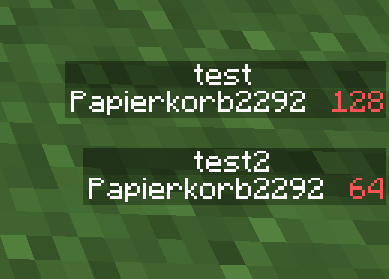 Scoreboard display This image shows multiple scoreboards being displayed at the same time using the MultiScoreboard mod
 -
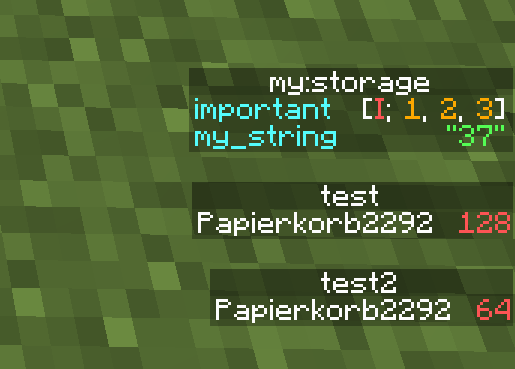 Sidebar Display This image shows multiple scoreboards and a NBT storage being displayed at the same time using the MultiScoreboard mod
-
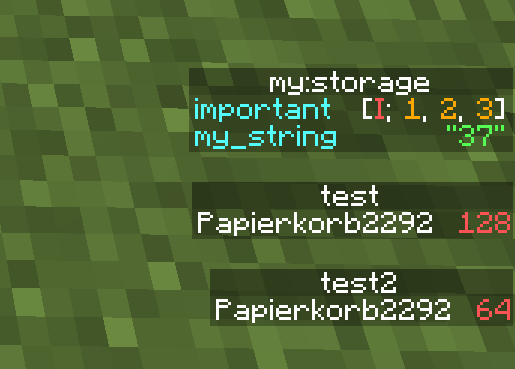 Sidebar display This image shows multiple scoreboards and a NBT storage being displayed at the same time using the MultiScoreboard mod
 -
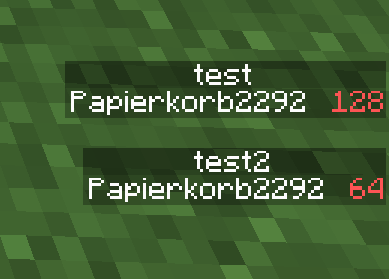 Scoreboard display This image shows multiple scoreboards being displayed at the same time using the MultiScoreboard mod
Versions
Files
Relations
Project Relations
More like this
Similar Mods
Suggestions use data such as tags, dependencies, dependents, descriptions, titles, and more to rank how much they overlap with this mod.
On ModDex
Community snapshot
By the numbers
Statistics
Want to reach Minecraft players?
We're looking for a server hosting partner to feature here and other parts of the site. Interested? Send us a message!
Get in touchGet it on
Available Platforms
On ModDex
Community snapshot
By the numbers
Statistics
Resources