
Community listing page, reviews here may not be monitored by the author.
MultiWorld

No reviews yet
World Mangement for Minecraft
Community voices
Reviews
No reviews yet. Be the first to review this project!
Get it on
Available Platforms
About
Project Details
For authors
Embed Badge
If you're the author of this project, you can embed a live badge anywhere that supports HTML or Markdown. It updates automatically whenever ratings change.
Use HTML for any page that supports it, or Markdown for README files and Markdown-based descriptions.
Identifiers
Platform IDs
About
Description














-
Custom Generator Support
- Multiworld supports custom world generators, allowing server administrators to create worlds with unique landscapes, structures, or biome configurations beyond the default Minecraft generation.
-
Flags
- AUTO_LOAD: Automatically loads the world on server startup.
- AUTO_UNLOAD: Automatically unloads the world when no players are present.
- DIFFICULTY: Sets the difficulty level for the world (e.g., peaceful, easy, normal, hard).
- END_PORTAL_ACCESSIBLE: Controls whether the End portal is accessible in the world.
- GAME_MODE: Sets the default game mode for players entering the world (e.g., survival, creative).
- HUNGER_ENABLED: Determines whether hunger mechanics are enabled in the world.
- KEEP_SPAWN_IN_MEMORY: Keeps the spawn chunks loaded in memory for faster access.
- NETHER_PORTAL_ACCESSIBLE: Controls whether Nether portals are accessible in the world.
- PVP_ENABLED: Toggles whether Player vs. Player (PvP) combat is enabled.
- RECEIVE_ACHIEVEMENTS: Allows or disallows players to receive achievements in the world.
- REDSTONE_ENABLED: Controls whether redstone mechanisms function in the world.
- SPAWN_ANIMALS: Controls whether passive animals spawn naturally in the world.
- SPAWN_ENTITIES: Controls the spawning of all entities, including custom entities.
- SPAWN_MONSTERS: Controls whether hostile monsters spawn naturally in the world.
- WEATHER_ENABLED: Toggles weather effects, such as rain or snow, in the world.
-
Link Worlds Together
- Multiworld allows multiple worlds to be connected, enabling seamless travel between them. This can be configured to create a network of interconnected worlds, enhancing the multiplayer experience.
-
Per World PVP
- Multiworld allows PvP (Player vs. Player) combat to be enabled or disabled on a per-world basis, giving more control over the gameplay experience in each world.
-
Portal Control
- Provides control over how portals function, including the ability to define where portals lead. This can include linking portals to different worlds or specific locations within a world.
-
World Whitelist
- This feature restricts access to specific worlds by maintaining a whitelist of players who are allowed to enter. This is useful for creating private or VIP worlds.

» All permissions follow the same schema <multiworld.command.world.COMMAND>
/world back
/world backup <Name>
/world clone <World> <Name>
/world create <Name> <Environment> <-g, -s, -t> <Generator | Seed | Type>
/world delete <World>
/world flag <World> <Property> <Value>
/world gamerule <World> <Gamerule> <Value>
/world help
/world import <Name> <Environment> <-g, -t> <Generator | WorldType>
/world info <World>
/world link <World> <End | Nether> <World>
/world list
/world load <World>
/world reload
/world teleport <Player> <World>
/world unload <World>
/world version
/world whitelist <World> <Enable | Disable | Add | Remove | List> <Name>


-
Download the Latest Jar File
Go to the Modrinth Page to download the needed version of the MultiWorld plugin and any other required plugins. -
Put Both Plugins in Your "Plugins" Folder
Ensure both the MultiWorld and FacilisCommon plugins are placed in your server'spluginsfolder. -
Restart the Server
Restart your Minecraft server to load the plugins and apply the changes. -
Enjoy!
You're all set to use MultiWorld! Enjoy managing multiple worlds on your server.




Screenshots
Gallery
-
 Preview World Info Command When using the World Info Command, you will receive the following output.
 -
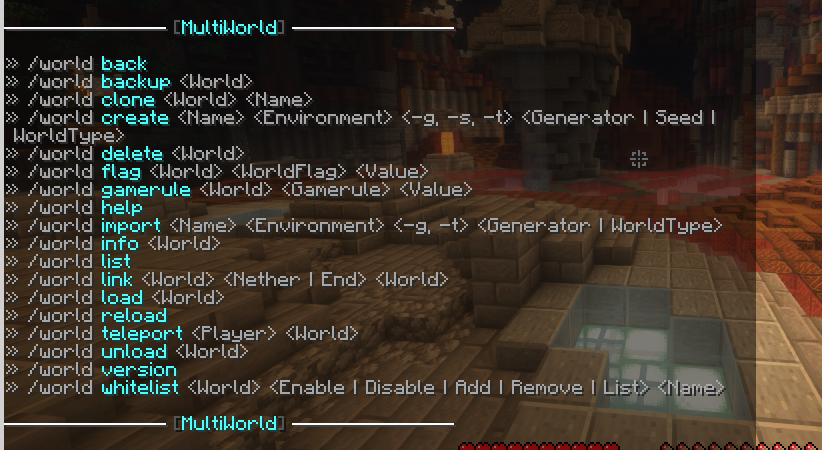 Preview World Command A list of all commands
Versions
Files
Relations
Project Relations
More like this
Similar Mods
Suggestions use data such as tags, dependencies, dependents, descriptions, titles, and more to rank how much they overlap with this mod.
On ModDex
Community snapshot
By the numbers
Statistics

Want to reach Minecraft players?
We're looking for a server hosting partner to feature here and other parts of the site. Interested? Send us a message!
Get in touchGet it on
Available Platforms
On ModDex
Community snapshot
By the numbers