
Community listing page, reviews here may not be monitored by the author.
Music and Melody


No reviews yet
An advanced music player, fitting soundtrack expansion, powerful playback system and various vanilla fixes as one comprehensive music solution

Community voices
Reviews
No reviews yet. Be the first to review this project!
Get it on
Available Platforms
Compatibility
Supported Environments
Required on the client. Installing it on the server adds functionality.
About
Project Details
For authors
Embed Badge
If you're the author of this project, you can embed a live badge anywhere that supports HTML or Markdown. It updates automatically whenever ratings change.
Use HTML for any page that supports it, or Markdown for README files and Markdown-based descriptions.
Identifiers
Platform IDs
About
Description
Summary
Music and Melody is an easy-to-use, incredibly powerful & customisable music overhaul
- Music Player. Browse, install and play any vanilla, modded or custom music with a fully-fledged music player. Queue, Shuffle, Loop and save any music, any time
- Control. Easily disable tracks or albums you don't want to hear, and create Events for those that you do
- Events. Control how your music plays. Make entire custom music systems that replace vanilla, listen to structure-specific music, revert music to the old days - really, anything you can think of! And you can do it all right in-game, even if you're not a developer! There are a plethora built-in Events can be enabled or disabled at your will
- Soundtrack Expansion. This includes a large, custom Music & Melody Album, featuring dozens of new songs tailored for each location they're added to - whether it be biome-specific, structure-specific, for caves or even somewhere else, all created by community composers
- Fix Vanilla Shortcomings. Recent updates have destroyed the weighting and balance of music, both new and old, and this is only getting worse in new updates. Music and Melody not only reweights every music pool, but adds additional fixes for vanilla bugs (such as creative music not playing when it should), and additional quality of life features (including Jukeboxes no longer overlapping with background music)
- bring your own music. Importing music is handled in-game and is incredibly easy, with support for .ogg, .mp3, .flac & .wav formats across all Music & Melody features
- extensible resource-driven features. Resource Pack, Mod and Modpack developers alike can make entire custom music projects with detailed music playback conditions and high configurability, all through Music and Melody's resource-driven features as documented on the wiki
Check out the Gallery for images, and check out the Wiki for comprehensive documentation on Albums, Playlists, Events & Themes, alongside a full player Guide!
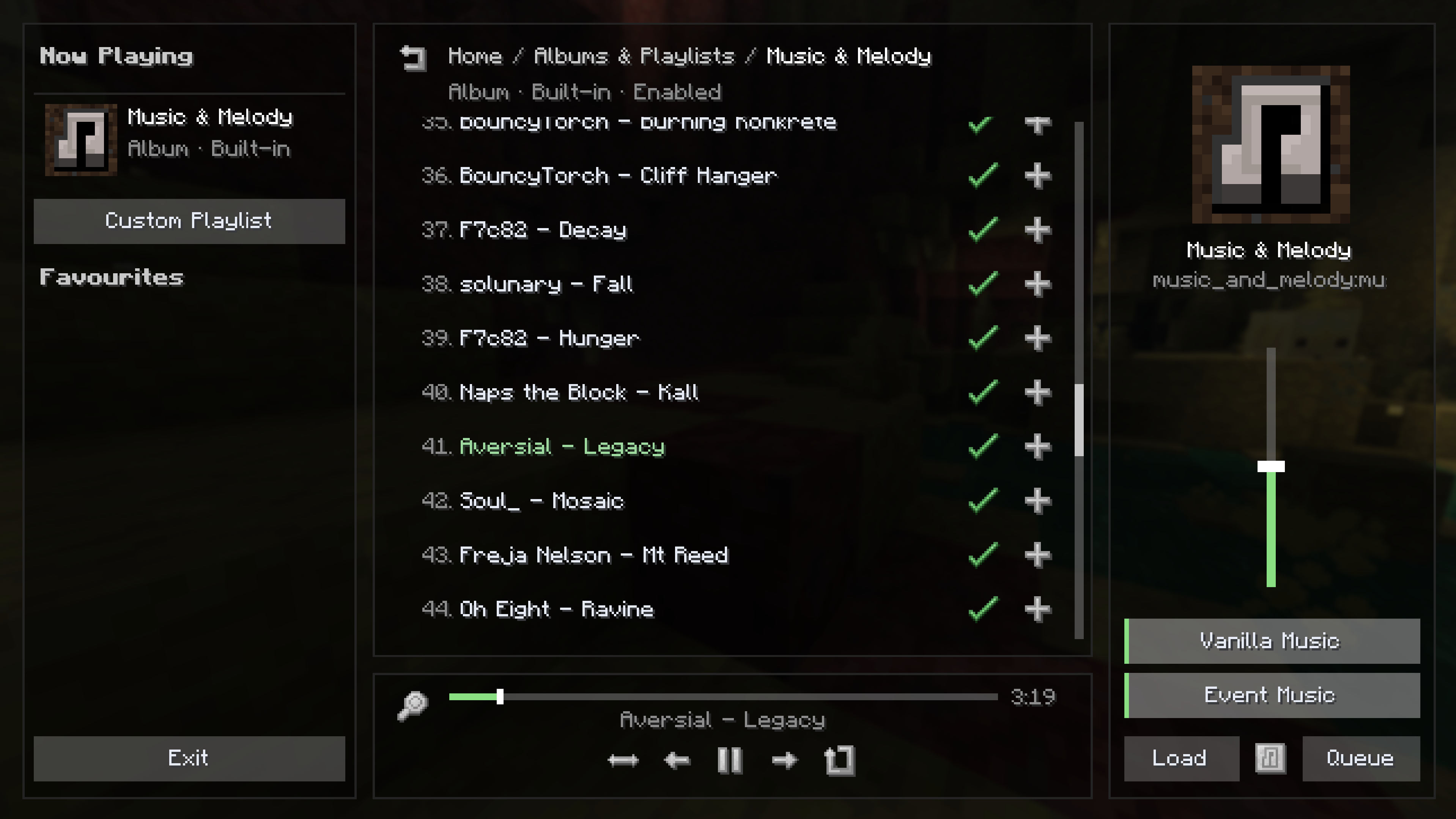
*Yep, that's right - Music & Melody *both* overhauls and extends control of music playback systems and gives you an entirely self-contained music player alongside it!*
Albums
Music and Melody introduces Albums, and lets you view and edit all available Albums in a new menu accessed from the sounds or mod config screen.
Here, you can view all unique albums, whether they're from vanilla (every vanilla album is included, alongside Music & Melody's own new one!), Music and Melody or a supported resource pack / mod. You are able to enable and disable entire albums, or even individual tracks at your leisure. Whilst browsing an album, you can play any song to drag that Album right into your Now Playing, or add it to your custom queue. Further, if you're a player, you can easily drag any .ogg file you want into config/music_and_melody/album to have it appear in-game.
Albums are entirely resource-driven, so check out Album documentation on the wiki!
Custom Playlists & The Music Player
Playlists and Albums go hand-in-hand. You can queue any song into the game, control your Custom Playlist and even save and share it with friends!
The Music Player screen allows you to shuffle, loop, skip re-order and everything else you'd expect from a fully-fledged music app. To bring up your current playlist, simply press the bound keybind (default: H) or access it from the pause or title screen. Playlists can even be dynamically loaded through your own events!
Playlists are entirely resource-driven, so whether you're a player or developer you should check out the Playlist documentation.
Events
Events are a unique, built-in-editable way of controlling dynamic music playback. The event system is so comprehensive that it makes both vanilla and modded ways of playing custom music in-world (eg for biomes, structures, etc) entirely redundant. You can check for various conditions like the time of day, weather, dimension, etc.
Events can be edited in-game from the Events menu, accessed from the Playlist or config screen. A guide on doing so can be found with the Event documentation.
Built-in event presets, made entirely within the client-side event system, which can be enabled or disabled in-game, include:
- Stronghold music
- Ancient City music
- Wither music
- Snowy music
- Dark Forest music
- Savanna music
- Sky Music
- Cave Music
- Ocean Monument Music
- Woodland Mansion Music
- Nether Fortress Music
- Trial Chambers Music
- Classic C418-only preset (defaults to disabled)
Themes
If you don't like how the menu looks, you can fix that easily by changing to another theme, or making your own. See the Theme documentation.
Config
Location:
- all config files (and folders) are located in config/music_and_melody
- client config is config/music_and_melody/client.json5
- data config (stores internal data, should not be touched by users) is config/music_and_melody/data.json5
- server config (optional features when installed on the server) is config/music_and_melody/server.json5
- custom albums / imported music is stored in config/music_and_melody/albums/[album_name]
- custom playlists should be stored, and are generated (if saved in-game) in config/music_and_melody/playlists
- custom events should be stored, and are generated (if saved in-game) in config/music_and_melody/events
Client Config Features:
- Music Rebalance. The reweighting of every vanilla music pool with an emphasis on restoring variety and reducing repetition added by poor decision-making in recent updates (see this explanation and MC-308155 for context). This does include re-adding C418 music to biomes Mojang removed certain tracks from, making common tracks slightly rarer, and rarer tracks more common, and a ton more smaller changes
- Jukebox Fading. When you're listening to a music disc, background music temporarily fades away
- Fade Speed. The speed at which music fades in and out between using Jukeboxes or switching Events
- Creative Fix. A fix for MC-299683, restoring the ability for Creative music to play in all Overworld biomes. You can also tag a biome in #music_and_melody:has_creative_music if you want a non-Overworld biome to have this fix
- Under Water Fix. Based on the Creative Fix, this fixes MC-306710 and enforces the under-water-exclusive music being able to play in all rivers and oceans. You can also tag a biome in #music_and_melody:has_under_water_music if you want a non-river or non-ocean biome to have this fix
- Event Weight Fix. This fixes a flaw (not necessarily a bug) in vanilla code that makes sounds.json files ignore the weight specified for "type": "event". The fix is only applied to entries that specify an explicit weight, ensuring safe compatability with vanilla & modded sound pools, whilst allowing Music and Melody to utilise this fix in its own pools. This also allows the further fixing of Creative music frequency, seeing as Creative music references the music.game sound event
- Menu Buttons. Whether the Music Player icon-button should be added to the Title and Pause screens
- Automatic Discs. Whether Album-less mod discs should populate a fallback Mod Discs album
- Allow Events. Whether the Event system should function
- Online Functionality. Whether internet-dependant features should function
Features that require Music and Melody to also be installed on the server:
- Count Disc Uses. Whether putting a disc in a Jukebox should count as using the disc. Used for determining whether a music disc is unlocked for survival-mode playback
- Sync Structures. Whether structure information should be tracked and sent to the client. Used for Events with structure-specific conditions
- Improved PvE Detection. Whether the server should provide clients with more reliable PvE tracking detection for the pve_score event
Once again, for further documentation, you should check out the Wiki!
If you have any feedback, issues or contributions, you're welcome to open an issue or pull request on the GitHub page
Music and Melody has full integration with Simple Music Control, which offers additional features such as fancier music popups and customisable music frequency, down to the second! Further, Simple Music Control provides now-playing popups and no-loading-interruptions playback for 1.21.1
If you're a composer, or you just think you've found some fitting music you'd like to see added, open an issue or reach out to me on Discord as @rebel459
If you'd like some new music discs, also check out Legacies and Legends!
Music Credits
F7c82 - https://www.youtube.com/@F7c82
Shauny Jang - https://www.shaunyjangaudio.com
Jorclai - https://www.youtube.com/@Jorclai
Soul_ - https://www.youtube.com/@soulwynmc
bhuv_ - https://www.youtube.com/@bhuv_
Firel - https://www.youtube.com/@FirelMusic
Technotech - https://www.youtube.com/@technotechmusic
Johan Johnson - https://minecraft.wiki/w/Johan_Johnson
Antimo & Welles - https://www.youtube.com/antimowelles
Freja Nelson - https://www.youtube.com/@frejanelson
Firch - https://www.youtube.com/@Firchex
qwaston - https://www.youtube.com/@qwaston
BouncyTorch - https://aurigrave.org/
Oh Eight - https://www.youtube.com/@oheight
Louie Zong - https://louiezong.bandcamp.com
solunary
Naps the Block - https://www.youtube.com/@napstheblock
Talon Trueblood - https://www.youtube.com/@TalonTrueblood
RedWolf - https://www.youtube.com/@redwolfninja
ARKTNDR - https://www.youtube.com/@ARKTNDR
Aversial - https://www.youtube.com/@Aversial731
Joabi - https://www.youtube.com/@Joabi_
Soft Serve Salad - https://www.youtube.com/@SoftServeSalad
Summary
Music and Melody is an easy-to-use, incredibly powerful & customisable music overhaul
- Music Player. Browse, install and play any vanilla, modded or custom music with a fully-fledged music player. Queue, Shuffle, Loop and save any music, any time
- Control. Easily disable tracks or albums you don't want to hear, and create Events for those that you do
- Events. Control how your music plays. Make entire custom music systems that replace vanilla, listen to structure-specific music, revert music to the old days - really, anything you can think of! And you can do it all right in-game, even if you're not a developer! There are a plethora built-in Events can be enabled or disabled at your will
- Soundtrack Expansion. This includes a large, custom Music & Melody Album, featuring dozens of new songs tailored for each location they're added to - whether it be biome-specific, structure-specific, for caves or even somewhere else, all created by community composers
- Fix Vanilla Shortcomings. Recent updates have destroyed the weighting and balance of music, both new and old, and this is only getting worse in new updates. Music and Melody not only reweights every music pool, but adds additional fixes for vanilla bugs (such as creative music not playing when it should), and additional quality of life features (including Jukeboxes no longer overlapping with background music)
- bring your own music. Importing music is handled in-game and is incredibly easy, with support for .ogg, .mp3, .flac & .wav formats across all Music & Melody features
- extensible resource-driven features. Resource Pack, Mod and Modpack developers alike can make entire custom music projects with detailed music playback conditions and high configurability, all through Music and Melody's resource-driven features as documented on the wiki
Check out the Gallery for images, and check out the Wiki for comprehensive documentation on Albums, Playlists, Events & Themes, alongside a full player Guide!
Yep, that's right - Music & Melody both overhauls and extends control of music playback systems and gives you an entirely self-contained music player alongside it!
Albums
Music and Melody introduces Albums, and lets you view and edit all available Albums in a new menu accessed from the sounds or mod config screen.
Here, you can view all unique albums, whether they're from vanilla (every vanilla album is included, alongside Music & Melody's own new one!), Music and Melody or a supported resource pack / mod. You are able to enable and disable entire albums, or even individual tracks at your leisure. Whilst browsing an album, you can play any song to drag that Album right into your Now Playing, or add it to your custom queue. Further, if you're a player, you can easily drag any .ogg file you want into config/music_and_melody/album to have it appear in-game.
Albums are entirely resource-driven, so check out Album documentation on the wiki!
Custom Playlists & The Music Player
Playlists and Albums go hand-in-hand. You can queue any song into the game, control your Custom Playlist and even save and share it with friends!
The Music Player screen allows you to shuffle, loop, skip re-order and everything else you'd expect from a fully-fledged music app. To bring up your current playlist, simply press the bound keybind (default: H) or access it from the pause or title screen. Playlists can even be dynamically loaded through your own events!
Playlists are entirely resource-driven, so whether you're a player or developer you should check out the Playlist documentation.
Events
Events are a unique, built-in-editable way of controlling dynamic music playback. The event system is so comprehensive that it makes both vanilla and modded ways of playing custom music in-world (eg for biomes, structures, etc) entirely redundant. You can check for various conditions like the time of day, weather, dimension, etc.
Events can be edited in-game from the Events menu, accessed from the Playlist or config screen. A guide on doing so can be found with the Event documentation.
Built-in event presets, made entirely within the client-side event system, which can be enabled or disabled in-game, include:
- Stronghold music
- Ancient City music
- Wither music
- Snowy music
- Dark Forest music
- Savanna music
- Sky Music
- Cave Music
- Ocean Monument Music
- Woodland Mansion Music
- Nether Fortress Music
- Trial Chambers Music
- Classic C418-only preset (defaults to disabled)
Themes
If you don't like how the menu looks, you can fix that easily by changing to another theme, or making your own. See the Theme documentation.
Config
Location:
- all config files (and folders) are located in config/music_and_melody
- client config is config/music_and_melody/client.json5
- data config (stores internal data, should not be touched by users) is config/music_and_melody/data.json5
- server config (optional features when installed on the server) is config/music_and_melody/server.json5
- custom albums / imported music is stored in config/music_and_melody/albums/[album_name]
- custom playlists should be stored, and are generated (if saved in-game) in config/music_and_melody/playlists
- custom events should be stored, and are generated (if saved in-game) in config/music_and_melody/events
Client Config Features:
- Music Rebalance. The reweighting of every vanilla music pool with an emphasis on restoring variety and reducing repetition added by poor decision-making in recent updates (see this explanation and MC-308155 for context). This does include re-adding C418 music to biomes Mojang removed certain tracks from, making common tracks slightly rarer, and rarer tracks more common, and a ton more smaller changes
- Jukebox Fading. When you're listening to a music disc, background music temporarily fades away
- Fade Speed. The speed at which music fades in and out between using Jukeboxes or switching Events
- Creative Fix. A fix for MC-299683, restoring the ability for Creative music to play in all Overworld biomes. You can also tag a biome in #music_and_melody:has_creative_music if you want a non-Overworld biome to have this fix
- Under Water Fix. Based on the Creative Fix, this fixes MC-306710 and enforces the under-water-exclusive music being able to play in all rivers and oceans. You can also tag a biome in #music_and_melody:has_under_water_music if you want a non-river or non-ocean biome to have this fix
- Event Weight Fix. This fixes a flaw (not necessarily a bug) in vanilla code that makes sounds.json files ignore the weight specified for "type": "event". The fix is only applied to entries that specify an explicit weight, ensuring safe compatability with vanilla & modded sound pools, whilst allowing Music and Melody to utilise this fix in its own pools. This also allows the further fixing of Creative music frequency, seeing as Creative music references the music.game sound event
- Menu Buttons. Whether the Music Player icon-button should be added to the Title and Pause screens
- Automatic Discs. Whether Album-less mod discs should populate a fallback Mod Discs album
- Allow Events. Whether the Event system should function
- Online Functionality. Whether internet-dependant features should function
Features that require Music and Melody to also be installed on the server:
- Count Disc Uses. Whether putting a disc in a Jukebox should count as using the disc. Used for determining whether a music disc is unlocked for survival-mode playback
- Sync Structures. Whether structure information should be tracked and sent to the client. Used for Events with structure-specific conditions
- Improved PvE Detection. Whether the server should provide clients with more reliable PvE tracking detection for the pve_score event
Once again, for further documentation, you should check out the Wiki!
If you have any feedback, issues or contributions, you're welcome to open an issue or pull request on the GitHub page
Music and Melody has full integration with Simple Music Control, which offers additional features such as fancier music popups and customisable music frequency, down to the second! Further, Simple Music Control provides now-playing popups and no-loading-interruptions playback for 1.21.1
If you're a composer, or you just think you've found some fitting music you'd like to see added, open an issue or reach out to me on Discord as @rebel459
If you'd like some new music discs, also check out Legacies and Legends!
Music Credits
F7c82 - https://www.youtube.com/@F7c82
Shauny Jang - https://www.shaunyjangaudio.com
Jorclai - https://www.youtube.com/@Jorclai
Soul_ - https://www.youtube.com/@soulwynmc
bhuv_ - https://www.youtube.com/@bhuv_
Firel - https://www.youtube.com/@FirelMusic
Technotech - https://www.youtube.com/@technotechmusic
Johan Johnson - https://minecraft.wiki/w/Johan_Johnson
Antimo & Welles - https://www.youtube.com/antimowelles
Freja Nelson - https://www.youtube.com/@frejanelson
Firch - https://www.youtube.com/@Firchex
qwaston - https://www.youtube.com/@qwaston
BouncyTorch - https://aurigrave.org/
Oh Eight - https://www.youtube.com/@oheight
Louie Zong - https://louiezong.bandcamp.com
solunary
Naps the Block - https://www.youtube.com/@napstheblock
Talon Trueblood - https://www.youtube.com/@TalonTrueblood
RedWolf - https://www.youtube.com/@redwolfninja
ARKTNDR - https://www.youtube.com/@ARKTNDR
Aversial - https://www.youtube.com/@Aversial731
Joabi - https://www.youtube.com/@Joabi_
Soft Serve Salad - https://www.youtube.com/@SoftServeSalad
Screenshots
Gallery
-
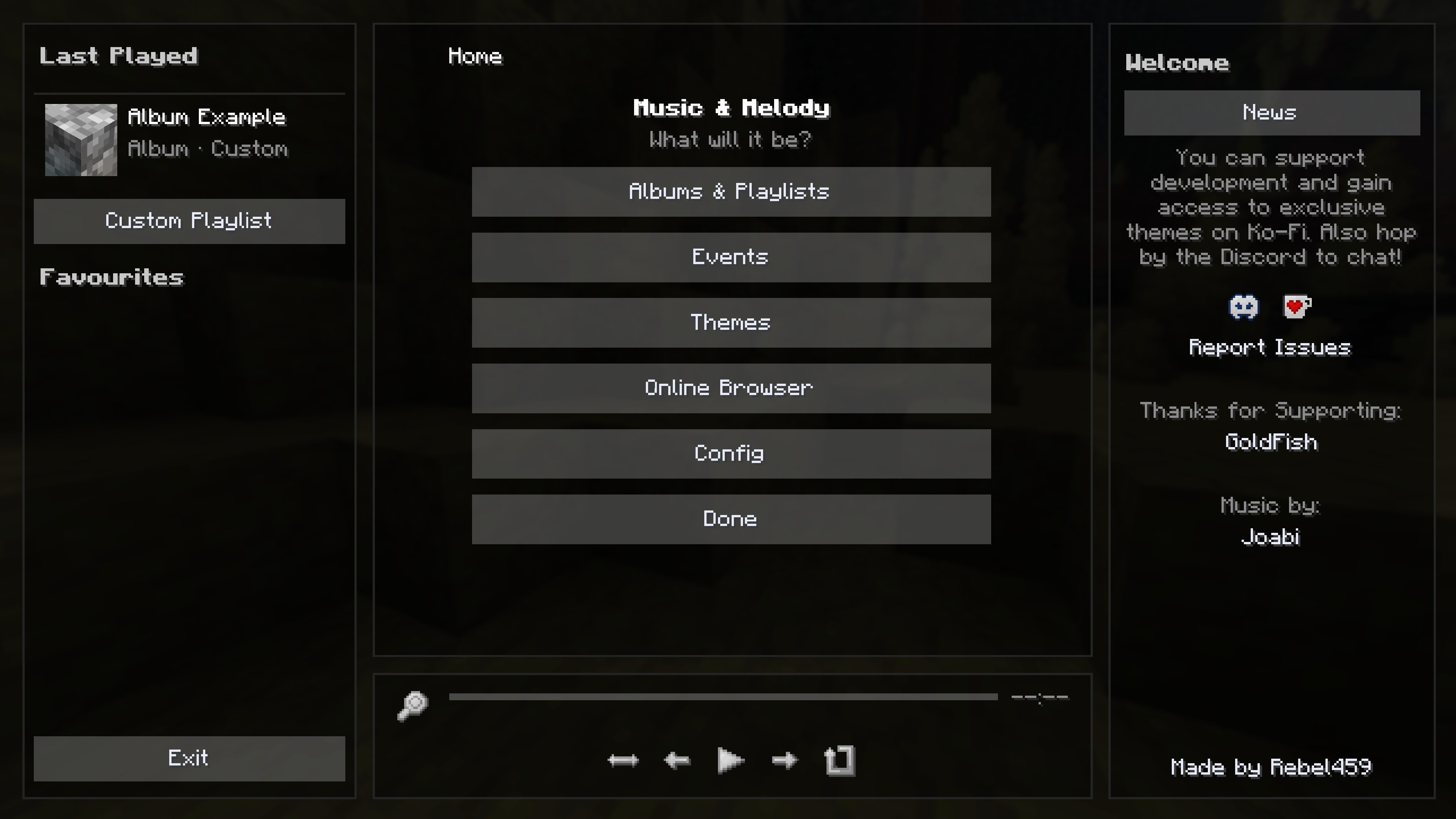 Home The first page opened when you boot up the music player. Here, you can check out news, a randomly featured composer, jump straight to your favourites or do anything else you'd like!
 -
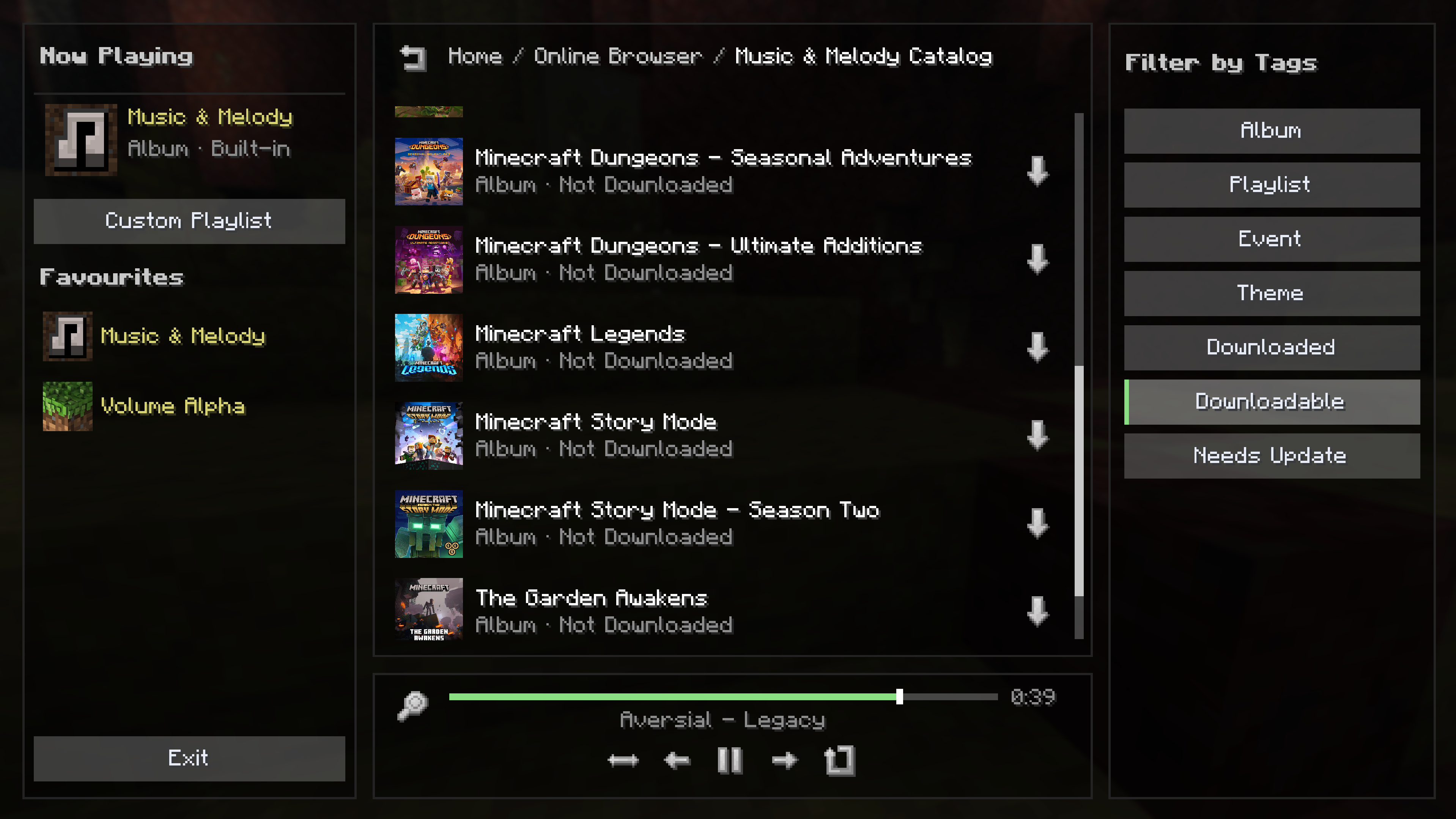 Online Browser Choose from a series of official, community or your self-added online catalogs and browse additional Albums, Events, Playlists and Themes to install!
 -
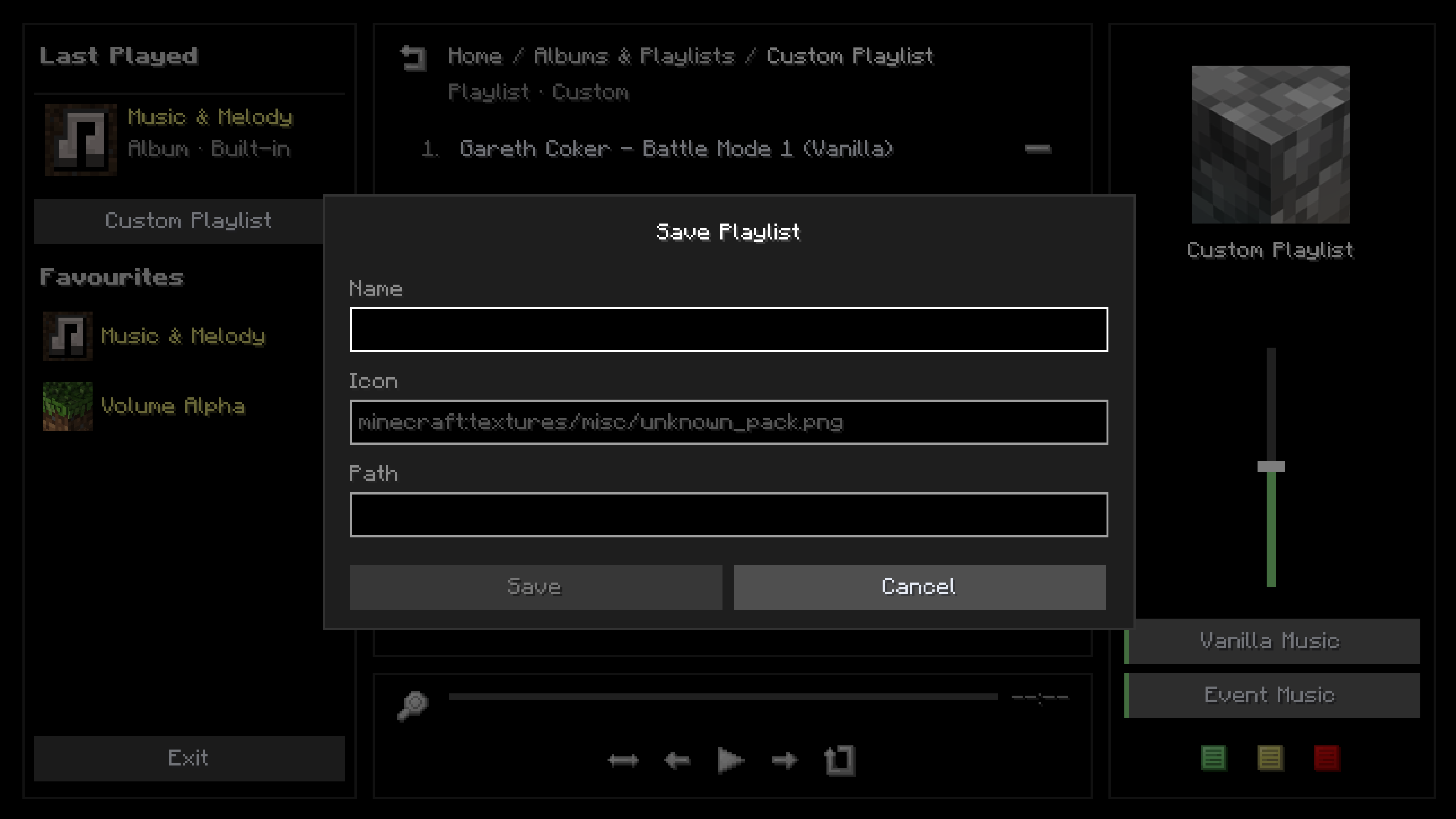 Custom Playlist You can create your own Custom Playlist, drag around track orders and then either save it as a new Playlist, or update an existing one
 -
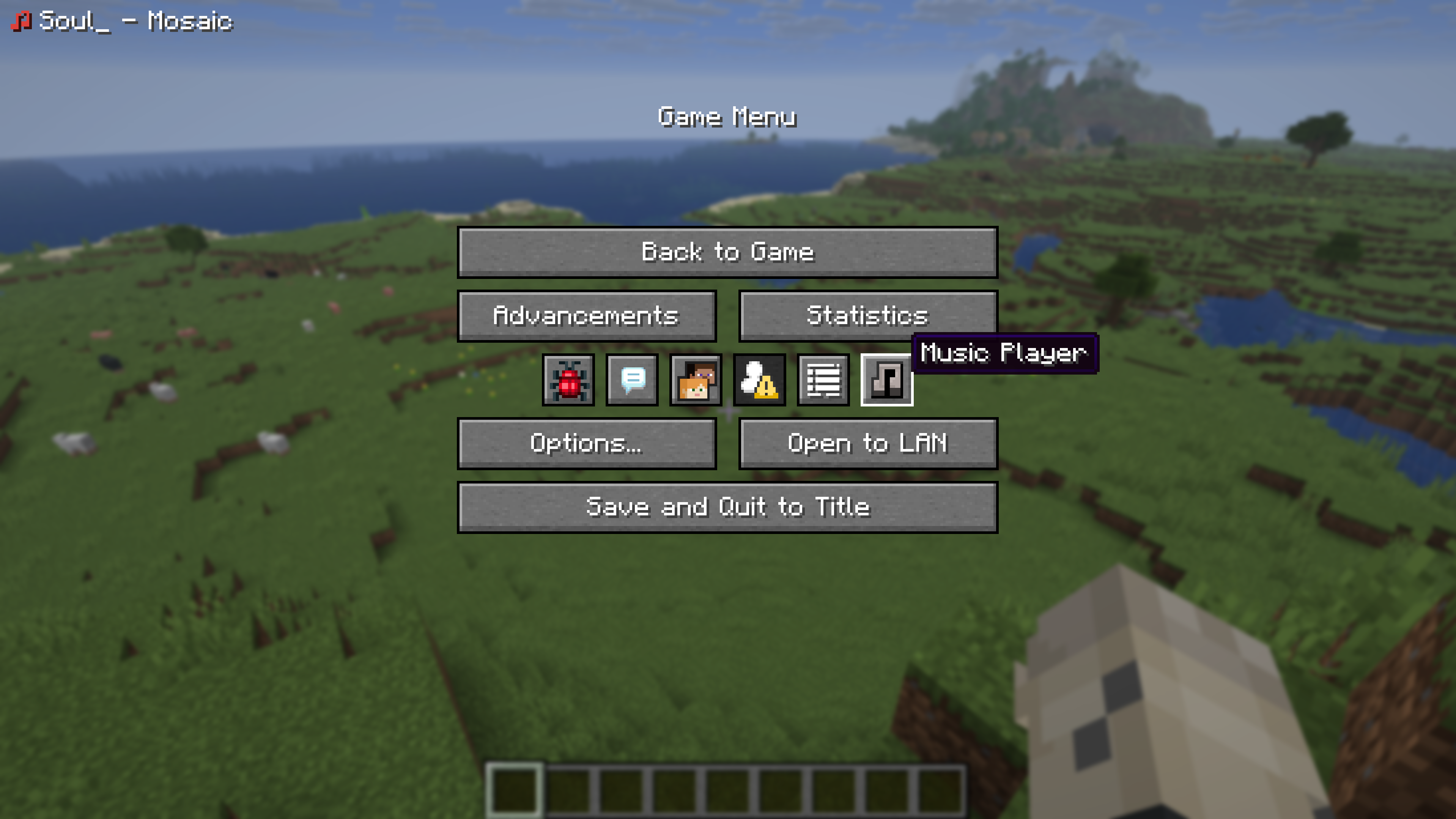 Pause Screen By default, the Music Player icon-button is added to the Pause Screen
 -
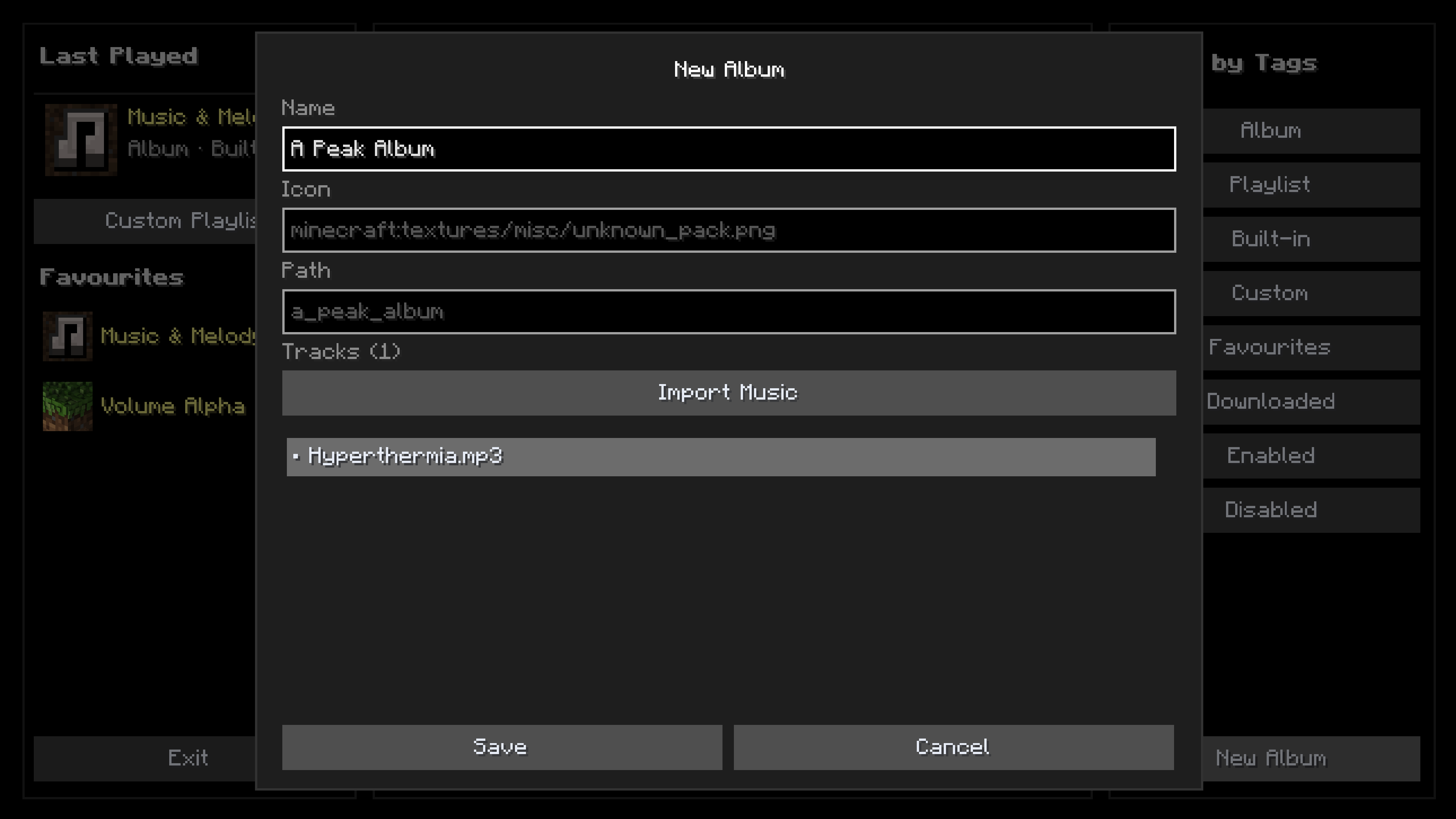 Import Your Own Music You can create your own albums, with the option to easily import your music by selecting it in your file manager - .ogg, .mp3, .flac and .wav are all supported
 -
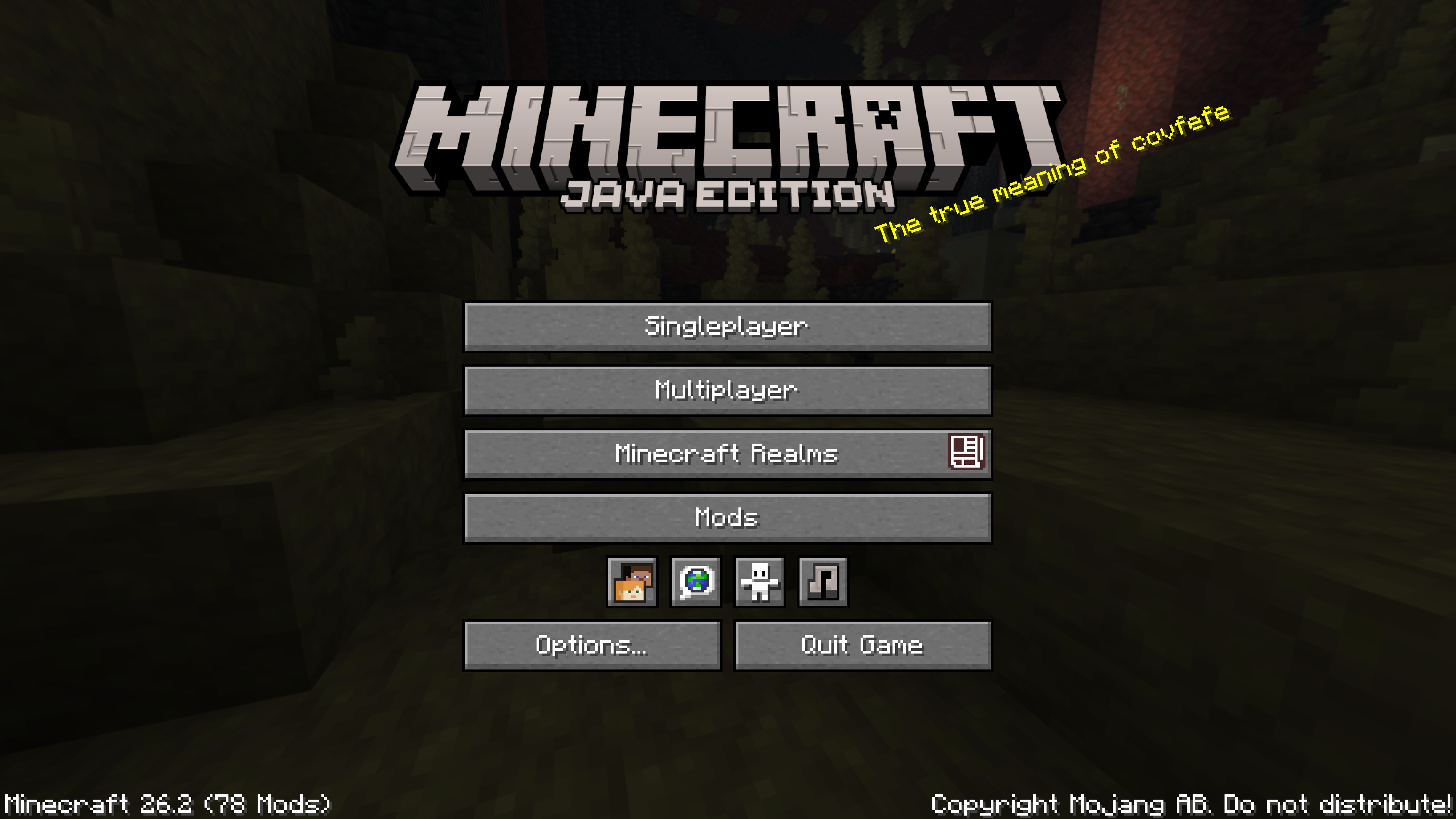 Title Screen By default, the Music Player icon-button is added to the Title Screen
 -
![[1.21.x] Album / Playlist Viewer](https://cdn.modrinth.com/data/dpNZjlVi/images/1a9f3ce26908128f037312b0f55e5ce6ad39e48f.png) [1.21.x] Album / Playlist Viewer 1.21.x Album / Playlist UI
[1.21.x] Album / Playlist Viewer 1.21.x Album / Playlist UI -
![[1.21.x] Albums & Playlists](https://cdn.modrinth.com/data/dpNZjlVi/images/774621e9579ee1c12dcf61cdc94406d010b2e706.png) [1.21.x] Albums & Playlists 1.21.x Content Browser UI
[1.21.x] Albums & Playlists 1.21.x Content Browser UI -
![[1.21.x] Playlist](https://cdn.modrinth.com/data/dpNZjlVi/images/8f04c30240bb2498891b2da475076b2a9a981882.png) [1.21.x] Playlist 1.21.x Playlist UI
[1.21.x] Playlist 1.21.x Playlist UI -
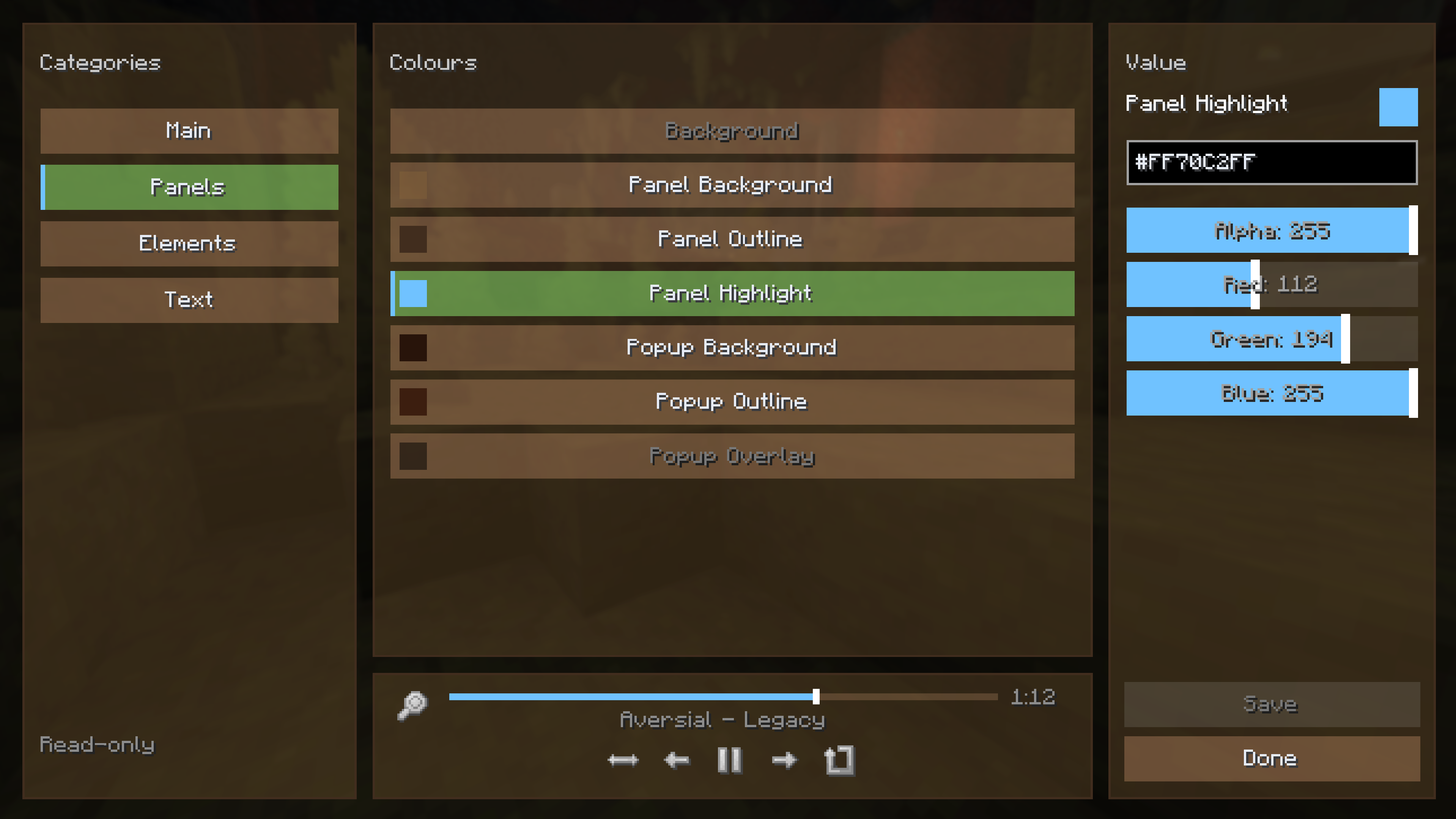 Theme Editor You can create your own custom themes, or take a peak at the insides of existing ones in a read-only state
 -
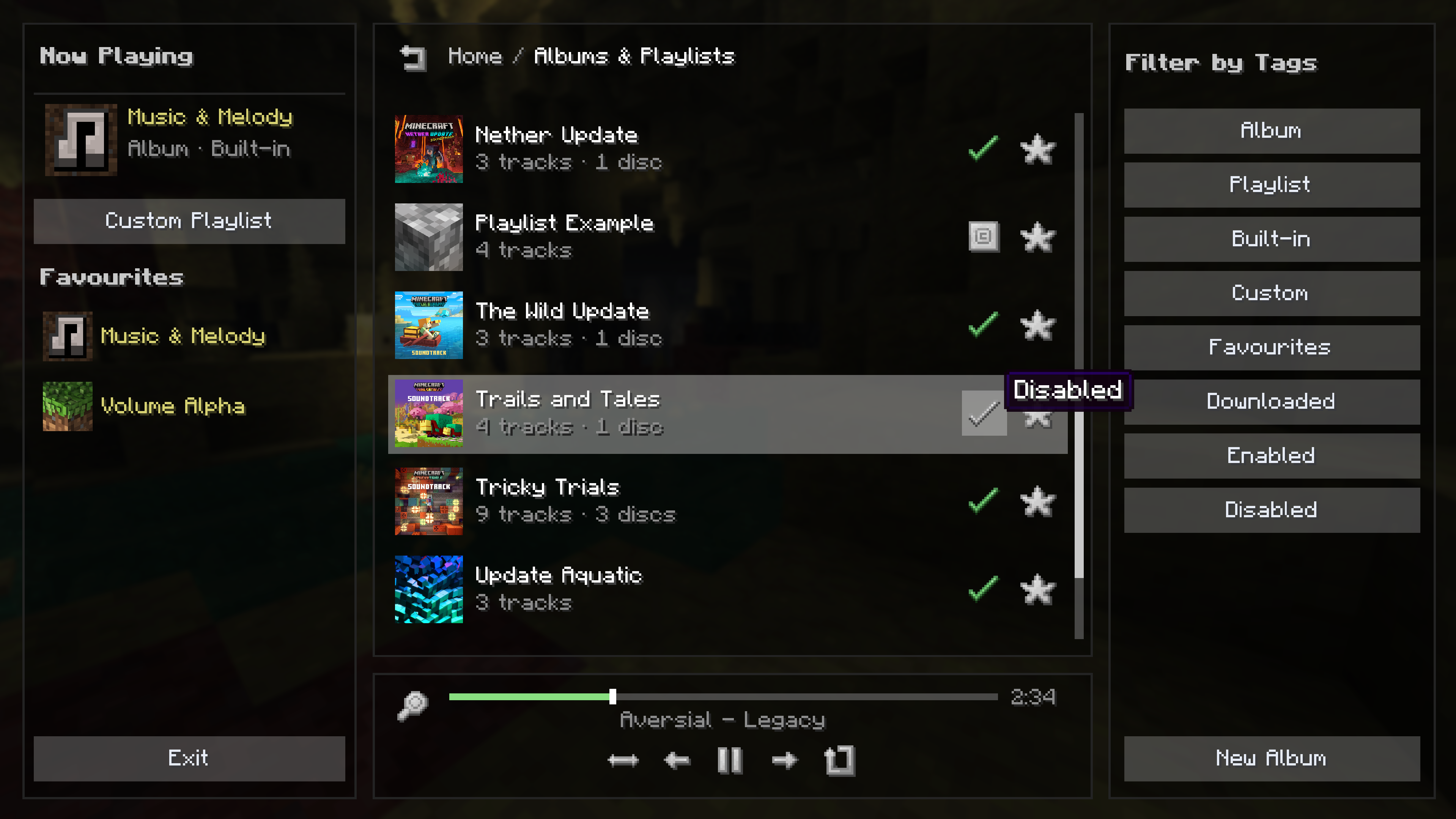 Albums & Playlists This is the browser for your installed or custom Albums & Playlists. There are a ton of search filters
 -
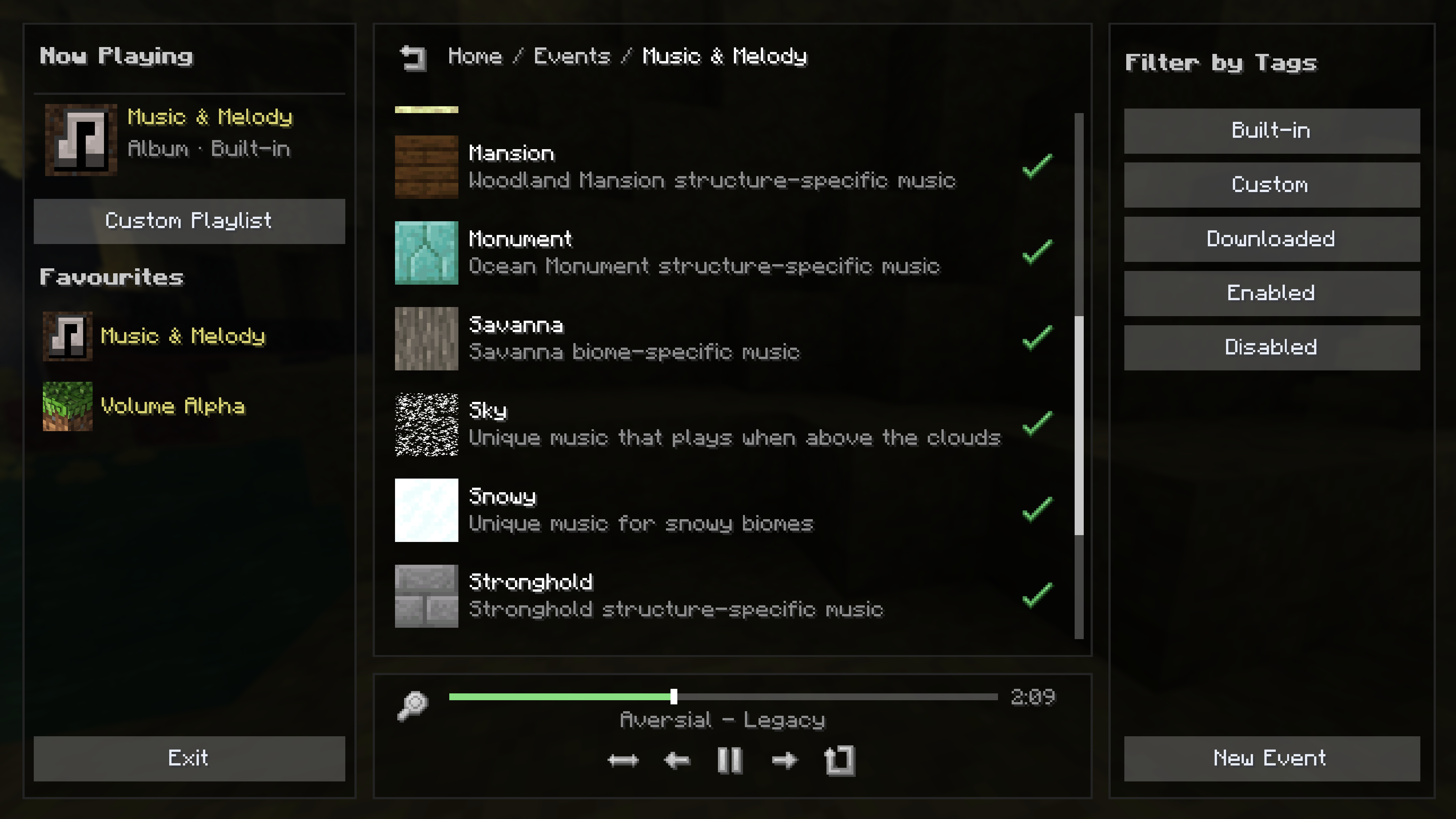 Event Browser Here, you can view, enable, disable and create music Events
 -
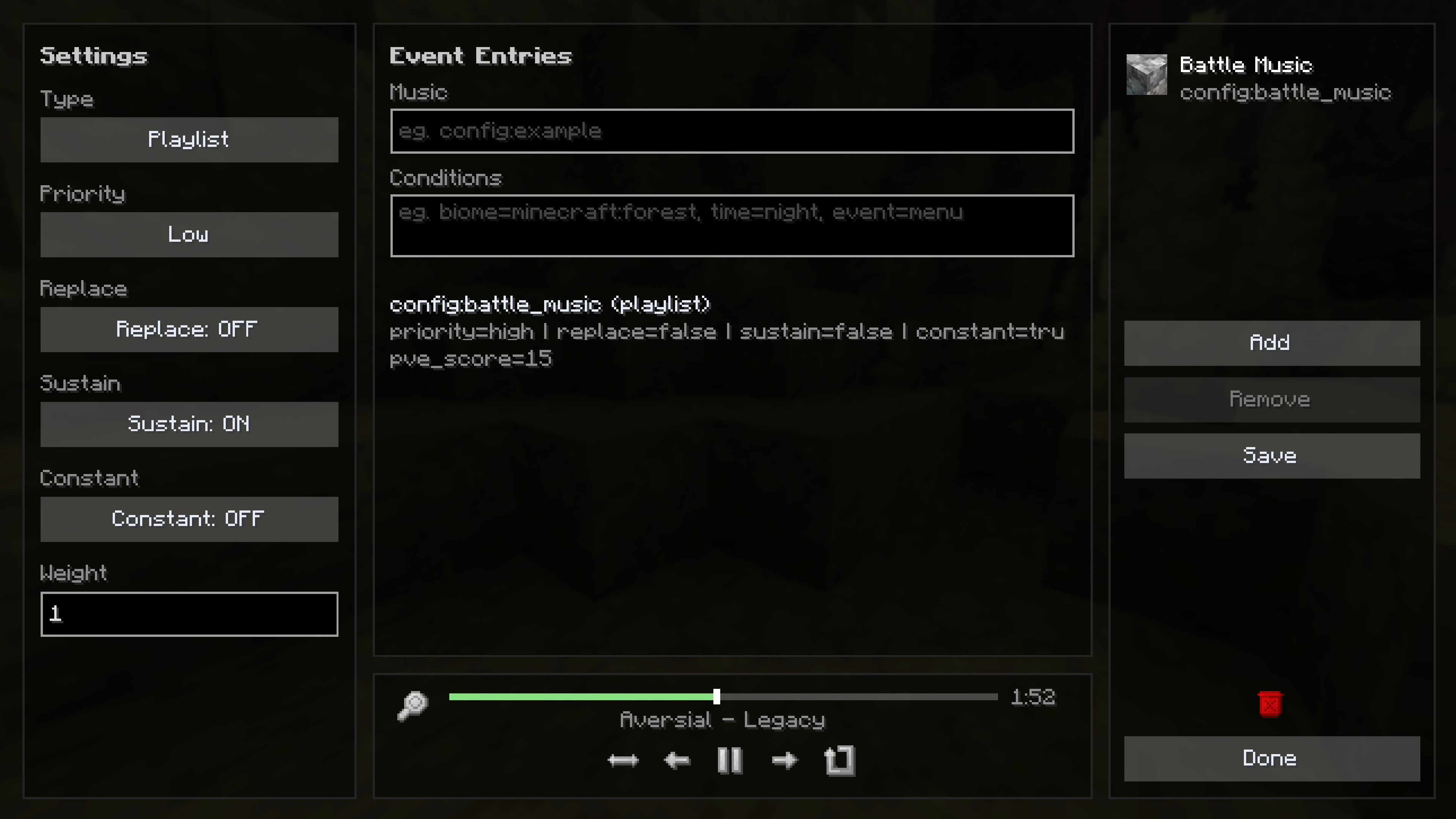 Event Editor In this image, you can see I've used the custom Event editor to have battle music play whilst in combat
 -
Music Player You can open any Album or Playlist and easily play music directly, or add it to your Custom Playlist queue!
-
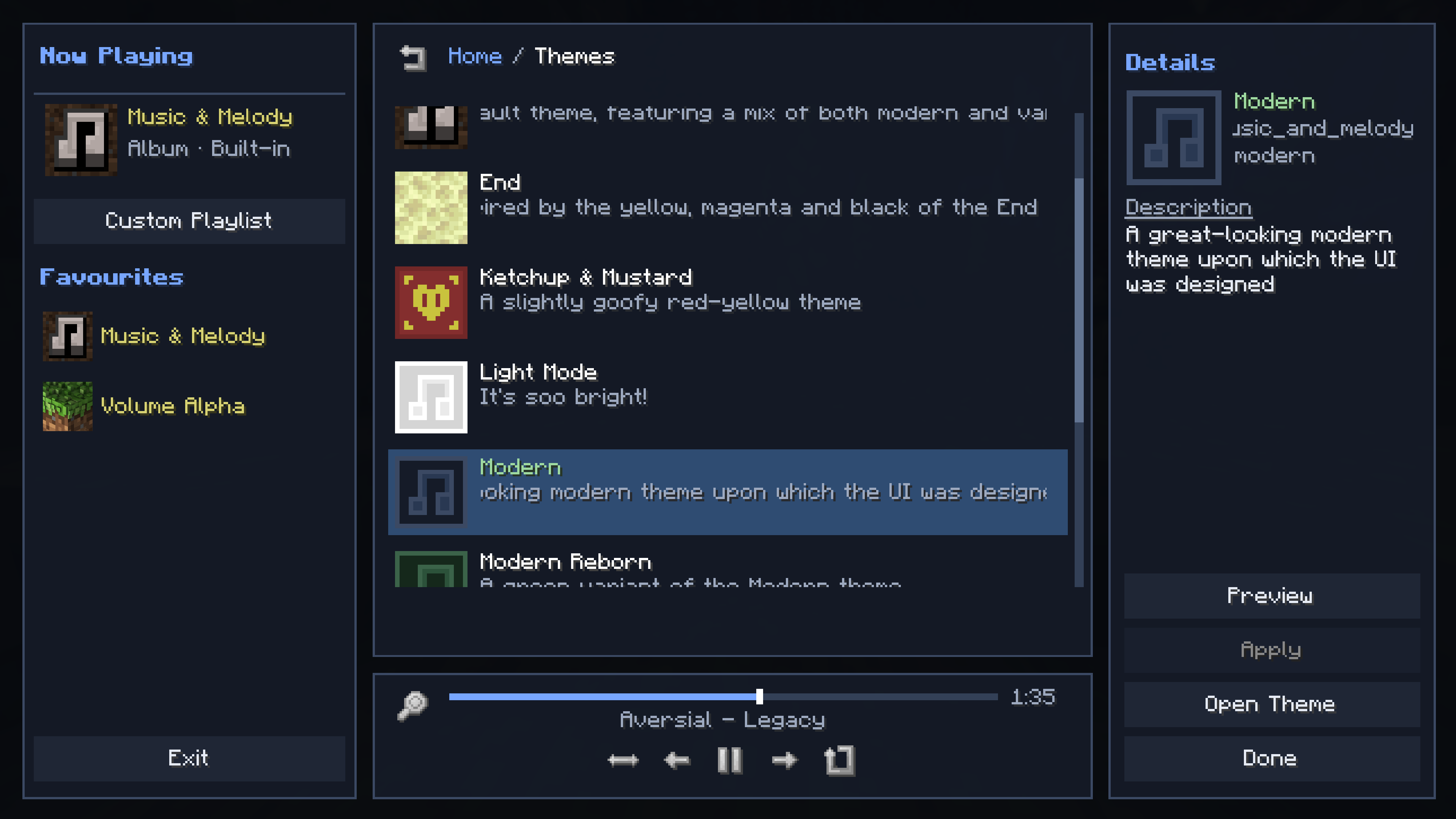 Themes Music & Melody comes with several built-in themes that completely change the way the music player looks, the one you see here being one of them
Versions
Files
Relations
Project Relations
More like this
Similar Mods
Suggestions use data such as tags, dependencies, dependents, descriptions, titles, and more to rank how much they overlap with this mod.
On ModDex
Community snapshot
By the numbers
Statistics
 (opens in a new tab)
Get it on
Available Platforms
On ModDex
Community snapshot
By the numbers