
Community listing page, reviews may not be monitored by the author.
Music Maker


No reviews yet
Create music, play it with a variety of instruments, form a band with friends or integrate music into redstone contraptions

Community voices
Reviews
No reviews yet. Be the first to review this project!
Get it on
Available Platforms
Compatibility
Supported Environments
Must be installed on both the client and the server.
About
Project Details
For authors
Embed Badge
If you're the author of this project, you can embed a live badge anywhere that supports HTML or Markdown. It updates automatically whenever ratings change.
Use HTML for any page that supports it, or Markdown for README files and Markdown-based descriptions.
Identifiers
Platform IDs
About
Description
Music Maker adds music sheets, instruments and other devices to the game for creating and playing music. Check the video below to see how it works.
Music Maker is designed to work efficiently and properly in multiplayer. You can play music with friends without worrying about server lag ruining the rhythm like with note block creations.
Bring your favourite music to Minecraft or create your own masterpiece. Set free your heart and become the musician you aspire to be!
If you are interested in making paintings as well, check Joy of Painting, or check my other mods:
Note about Forge/Neoforge after 1.21:
Starting with Minecraft 1.21, every major version will have Fabric support, and only certain versions will have Neoforge support. For other versions, you can try the Fabric file using Neoforge with Sinytra connector and Forgified fabric api. The other Forge won't be supported.
Glissando Update (1.21.1-1.1.0+ & 1.20.1-1.2.0+)
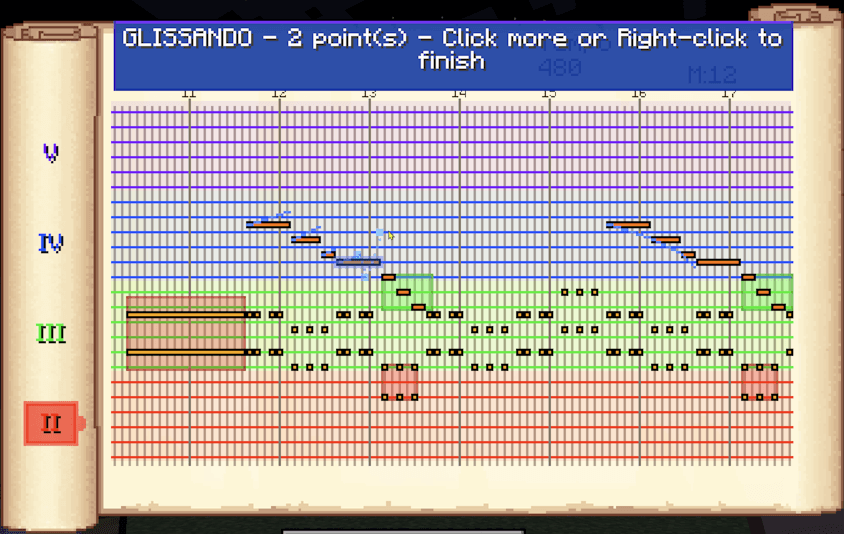
New features added in this update are:
- Glissando lets you add gradual pitch change curves to notes (activate glissando mode by clicking G in the sheet GUI)
- Crescendo/Decrescendo lets you add gradual volume change to note regions (shift-drag on the sheet GUI)
- Three new instruments
- Some QoL changes, such as better help UI
Thanks to contributions by Miguel Ventura.
The Huge Update (1.16.5-2.0+)

This update improves basically everything about the mod! Here is a quick look through the changes:
- Overhauled the music sheet GUI. Now it is a horizontal, scrolling sheet.
- You can now create MUCH longer music sheets. The upper limit is long enough to fit basically any music in a single sheet.
- Note length is customizable! You can drag the mouse to set the length of each note.
- Multiple notes can be put at the same beat, and notes of different lengths can overlap in any way possible!
- TWICE the number of octaves. So, we are up from 4 to 8 octaves. Note that not every instrument is suitable for every octave.
- Music sheets have a volume setting now.
- Each individual note also has a volume that can be set.
- Much more granular Tempo options, with an upper limit of 3000 BPM!
- 4 new instruments: Redstone Guitar, Bass Guitar, Oboe and French Horn
- Advanced instrument playing GUI: You can now press multiple notes together, and releasing a key stops the note.
- Support for MIDI device input in the instrument GUI! Just connect your device and right click an instrument as normal.
- With 1.17.1-2.2, you can also use your MIDI device in the music sheet GUI as well! You can even record with it!
- The new record button in 1.17.1-2.2 allows you to record music in real time with your keyboard or a MIDI device.
- Middle clicking a note in the sheet GUI lets you view its real life notation name and edit it.
- Customizable measure lines in the music sheet GUI, for visual aid.
- CTRL+Z to undo in the sheet GUI.
- A help button in the sheet GUI that explains the controls and keyboard shortcuts.
- Storage and network for the music sheets are handled more smartly now, consuming less resources than before, regardless of the length of a music.
- Loading an old world will automatically update all old music sheets to the new format on load. This is irreversible, so backup your world if you might want to play in an older version of the mod.
- Old copied musics can still be pasted in the new version (but not vice versa).
- Old exported sheet files can be imported in the new version (but not vice versa).
Note: If updating from an older version, I suggest you backup your world (or at least just the music sheets) before updating, in case there is a problem with the update process.
Features (before the huge update)
- Music sheets that let you create music
- Sounds follow the chromatic scale with 12 notes per octave and 4 octaves for a total of 48 notes
- 11 different tempo settings from 60 BPM to 1200 BPM
- Writing music with the mouse or the keyboard, whichever you find comfortable
- Convenient keyboard functionality such as space, delete, backspace
- Selecting, copying and pasting notes. CTRL + A, CTRL + C, CTRL + V shortcuts work.
- Copying between different sheets and even outside Minecraft. You can copy them to a text file to back up or paste in another world/server.
- Putting up to 5 sheets in the hotbar to see and preview multiple layers of music at the same time when editing. Neighboring sheets can easily be disabled with a button that appears.
- Previewing sheets with an instrument in the off hand. You can also lock the instrument per sheet to only preview with that instrument even when your off hand item changes. This can be used to mark which instrument a sheet is supposed to be played with and is also useful with neighboring sheets previews.
- 13 craftable instruments and 1 instrument that can be found in certain treasures.
- Using an instrument by itself plays a random note.
- Using an instrument while holding a sheet with your offhand plays the sheet to the world.
- Music boxes take in a sheet and an instrument. They start (or stop if playing already) playing when they take in a redstone signal that goes from off to on.
- Music boxes also send a one second redstone pulse to their right face when they finish playing. This can be used to chain songs or activate piece of a contraption.
- Metronomes supply a steady ticking when the redstone signal is on. The ticking rate can be set with a right click or using a music sheet on the metronome.
- After four tickings of a metronome, all nearby players that hold a music sheet with the correct tempo and an instrument will start playing synchronously. Use this to play songs together with your band.
- Keyboard usage is as shown:

Converting MIDI Files into Music Sheets
If you have MIDI files you want to play in game, you can convert them with this online tool: https://ercanserteli.com/midi-to-sheet/
Credits
Credits to LuchadorMickey for most of the graphics.
Credits to inuyasha01 for the Chinese translation.
Credits to Greyberet for the Spanish translation.
Credits to Ste B for the Italian translation.
Credits to whiteevilbro for the Russian translation.
Credits to Szpieg2000 for the Polish translation.
Credits to SamKMadden for the Japanese, Swedish and Icelandic translations.
Credits to FoxMcloud5655 for back-porting changes to 1.16.
Credits to Miguel Ventura for the PR that includes Glissando, Crescendo, three new instruments and some QoL changes.
Community
There is a Discord server now, where you can share your creations with the world!
Music Maker adds music sheets, instruments and other devices to the game for creating and playing music. Check the video below to see how it works.
Music Maker is designed to work efficiently and properly in multiplayer. You can play music with friends without worrying about server lag ruining the rhythm like with note block creations.
Bring your favourite music to Minecraft or create your own masterpiece. Set free your heart and become the musician you aspire to be!
If you are interested in making paintings as well, check Joy of Painting, or check my other mods:
Note about Forge/Neoforge after 1.21:
Starting with Minecraft 1.21, every major version will have Fabric support, and only certain versions will have Neoforge support. For other versions, you can try the Fabric file using Neoforge with Sinytra connector and Forgified fabric api. The other Forge won't be supported.
Glissando Update (1.21.1-1.1.0+ & 1.20.1-1.2.0+)
New features added in this update are:
- Glissando lets you add gradual pitch change curves to notes (activate glissando mode by clicking G in the sheet GUI)
- Crescendo/Decrescendo lets you add gradual volume change to note regions (shift-drag on the sheet GUI)
- Three new instruments
- Some QoL changes, such as better help UI
Thanks to contributions by Miguel Ventura.
The Huge Update (1.16.5-2.0+)

This update improves basically everything about the mod! Here is a quick look through the changes:
- Overhauled the music sheet GUI. Now it is a horizontal, scrolling sheet.
- You can now create MUCH longer music sheets. The upper limit is long enough to fit basically any music in a single sheet.
- Note length is customizable! You can drag the mouse to set the length of each note.
- Multiple notes can be put at the same beat, and notes of different lengths can overlap in any way possible!
- TWICE the number of octaves. So, we are up from 4 to 8 octaves. Note that not every instrument is suitable for every octave.
- Music sheets have a volume setting now.
- Each individual note also has a volume that can be set.
- Much more granular Tempo options, with an upper limit of 3000 BPM!
- 4 new instruments: Redstone Guitar, Bass Guitar, Oboe and French Horn
- Advanced instrument playing GUI: You can now press multiple notes together, and releasing a key stops the note.
- Support for MIDI device input in the instrument GUI! Just connect your device and right click an instrument as normal.
- With 1.17.1-2.2, you can also use your MIDI device in the music sheet GUI as well! You can even record with it!
- The new record button in 1.17.1-2.2 allows you to record music in real time with your keyboard or a MIDI device.
- Middle clicking a note in the sheet GUI lets you view its real life notation name and edit it.
- Customizable measure lines in the music sheet GUI, for visual aid.
- CTRL+Z to undo in the sheet GUI.
- A help button in the sheet GUI that explains the controls and keyboard shortcuts.
- Storage and network for the music sheets are handled more smartly now, consuming less resources than before, regardless of the length of a music.
- Loading an old world will automatically update all old music sheets to the new format on load. This is irreversible, so backup your world if you might want to play in an older version of the mod.
- Old copied musics can still be pasted in the new version (but not vice versa).
- Old exported sheet files can be imported in the new version (but not vice versa).
Note: If updating from an older version, I suggest you backup your world (or at least just the music sheets) before updating, in case there is a problem with the update process.
Features (before the huge update)
- Music sheets that let you create music
- Sounds follow the chromatic scale with 12 notes per octave and 4 octaves for a total of 48 notes
- 11 different tempo settings from 60 BPM to 1200 BPM
- Writing music with the mouse or the keyboard, whichever you find comfortable
- Convenient keyboard functionality such as space, delete, backspace
- Selecting, copying and pasting notes. CTRL + A, CTRL + C, CTRL + V shortcuts work.
- Copying between different sheets and even outside Minecraft. You can copy them to a text file to back up or paste in another world/server.
- Putting up to 5 sheets in the hotbar to see and preview multiple layers of music at the same time when editing. Neighboring sheets can easily be disabled with a button that appears.
- Previewing sheets with an instrument in the off hand. You can also lock the instrument per sheet to only preview with that instrument even when your off hand item changes. This can be used to mark which instrument a sheet is supposed to be played with and is also useful with neighboring sheets previews.
- 13 craftable instruments and 1 instrument that can be found in certain treasures.
- Using an instrument by itself plays a random note.
- Using an instrument while holding a sheet with your offhand plays the sheet to the world.
- Music boxes take in a sheet and an instrument. They start (or stop if playing already) playing when they take in a redstone signal that goes from off to on.
- Music boxes also send a one second redstone pulse to their right face when they finish playing. This can be used to chain songs or activate piece of a contraption.
- Metronomes supply a steady ticking when the redstone signal is on. The ticking rate can be set with a right click or using a music sheet on the metronome.
- After four tickings of a metronome, all nearby players that hold a music sheet with the correct tempo and an instrument will start playing synchronously. Use this to play songs together with your band.
- Keyboard usage is as shown:

Converting MIDI Files into Music Sheets
If you have MIDI files you want to play in game, you can convert them with this online tool: https://ercanserteli.com/midi-to-sheet/
Credits
Credits to LuchadorMickey for most of the graphics.
Credits to inuyasha01 for the Chinese translation.
Credits to Greyberet for the Spanish translation.
Credits to Ste B for the Italian translation.
Credits to whiteevilbro for the Russian translation.
Credits to Szpieg2000 for the Polish translation.
Credits to SamKMadden for the Japanese, Swedish and Icelandic translations.
Credits to FoxMcloud5655 for back-porting changes to 1.16.
Credits to Miguel Ventura for the PR that includes Glissando, Crescendo, three new instruments and some QoL changes.
Community
There is a Discord server now, where you can share your creations with the world!
Screenshots
Gallery
-
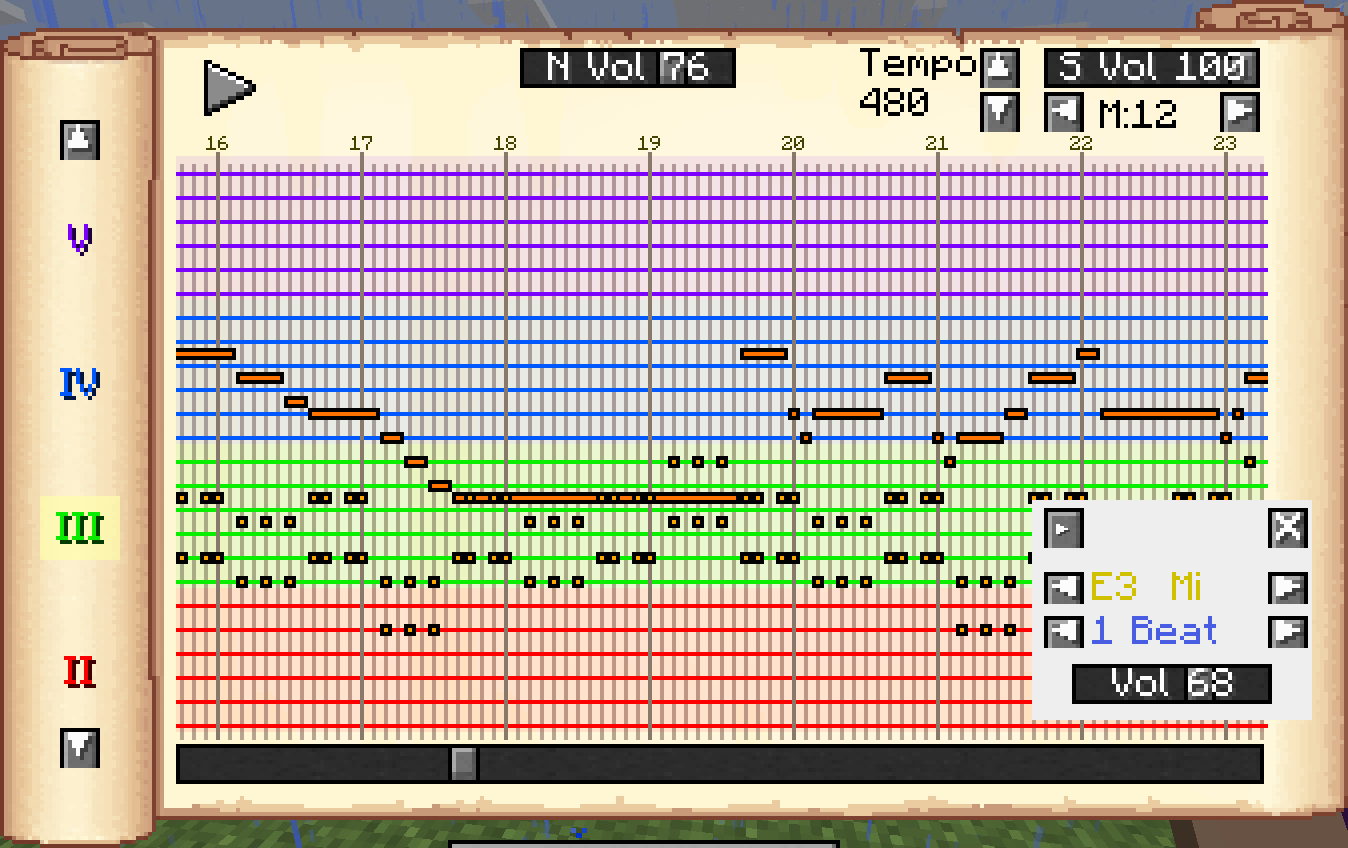 The Music Sheet GUI
 -
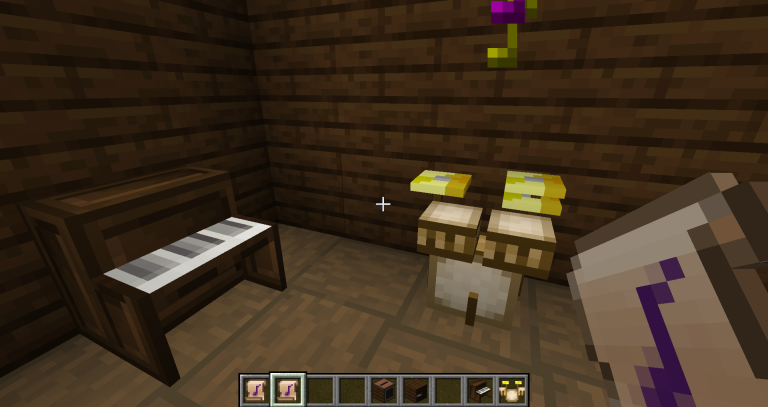 Piano and Drum Kit as blocks
 -
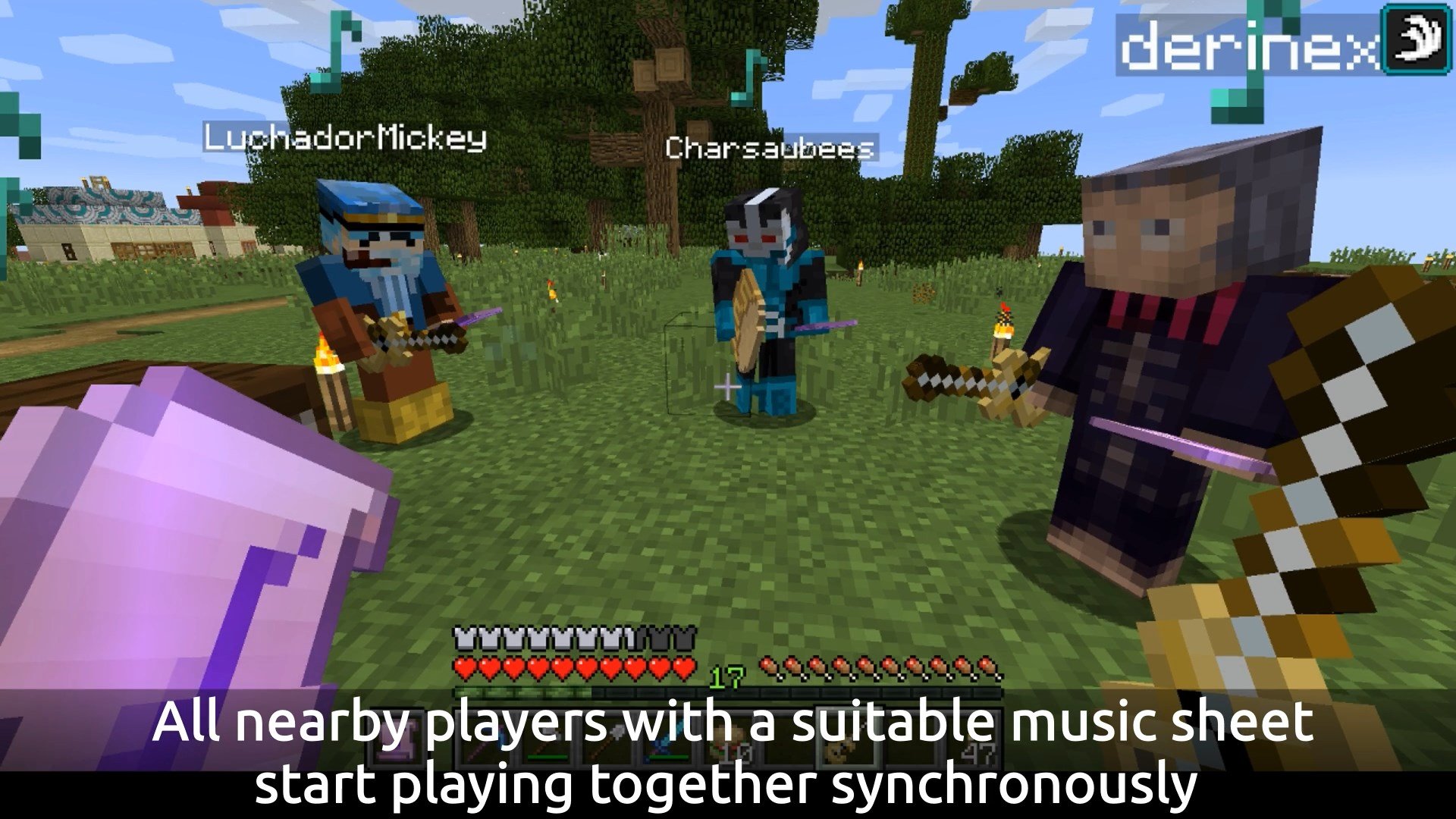 Playing together with friends You can play in synchronization with friends using a Metronome
Versions
Files
Relations
Project Relations
More like this
Similar Mods
Suggestions use data such as tags, dependencies, dependents, descriptions, titles, and more to rank how much they overlap with this mod.
On ModDex
Community snapshot
By the numbers
Statistics

Get it on
Available Platforms
On ModDex
Community snapshot
By the numbers