Community listing page, reviews here may not be monitored by the author.
MusicBox Radio

No reviews yet
Stream real internet radio in Minecraft. Place a music box, pick a station, and everyone nearby hears the same thing, or pair headphones and take it anywhere.

Community voices
Reviews
No reviews yet. Be the first to review this project!
Get it on
Available Platforms
About
Project Details
For authors
Embed Badge
If you're the author of this project, you can embed a live badge anywhere that supports HTML or Markdown. It updates automatically whenever ratings change.
Use HTML for any page that supports it, or Markdown for README files and Markdown-based descriptions.
Identifiers
Platform IDs
Resources
External Links
About
Description
MusicBox Radio
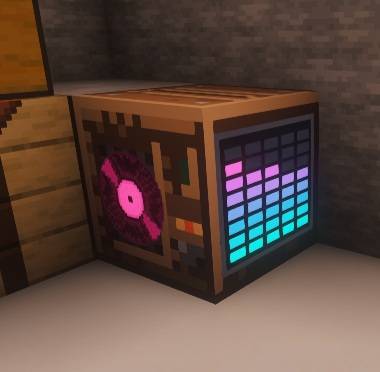
Stream real internet radio in Minecraft. Place a music box, pick a station, and everyone nearby hears the same thing. Pair headphones to keep listening in full stereo anywhere you go.
MusicBox Radio plays live MP3 radio streams from the actual internet, not bundled music discs. The station list is fully configurable, so you can point it at whatever you like.
Features
- Live internet radio. Plays direct MP3 streams, including Shoutcast and Icecast servers. Links to
.m3uand.plsplaylists are followed automatically. - Server authoritative. The selected station, play state, and volume live on the block itself. When one player changes the station, everyone listening changes with them, in sync.
- Proximity audio by default. Music fades with distance like any other block sound, with a configurable range.
- Headphones for listening anywhere. Wear a pair and the audio follows you in full stereo, across any distance and even between dimensions.
- Pair headphones to a specific box. Running more than one music box is fine. Pair your headphones to the one you want and everyone paired to it stays on the same station together.
- Fully configurable stations. A simple JSON file of label and URL pairs. Supports up to 100 stations.
- Client side mute switch. Any player can disable streaming entirely on their own machine, which is useful while recording or streaming.
- Forge and Fabric. Both loaders are supported on Minecraft 1.19.2.
How it works
The Music Box
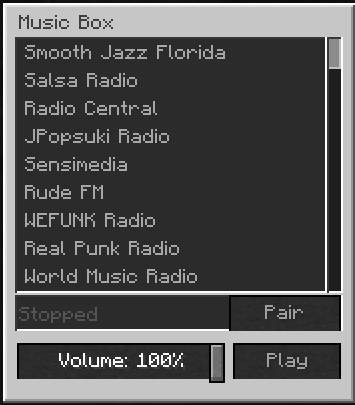
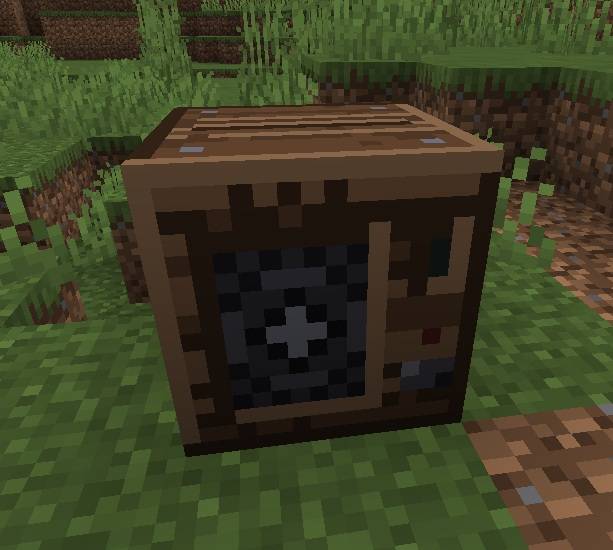
Place the block and right click it to open the interface. You will see your configured station list, a play and stop toggle, and a volume slider. Pick a station and it starts streaming for everyone in range.
Headphones
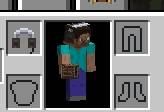
Headphones go in the helmet slot. If you have Curios installed on Forge, or Trinkets on Fabric, they will use a bauble slot instead so your helmet stays free. Neither mod is required.
While wearing headphones, audio no longer fades with distance. You get clean stereo playback wherever you are, including in another dimension or far outside render distance.
Pairing
Unpaired headphones simply follow the nearest playing music box. To lock onto a specific one, do either of the following:
- Sneak and right click the music box while wearing or holding the headphones.
- Open the music box and press the Pair button.
Repeat the action to unpair. Because pairing is resolved on the server, every player paired to the same box hears the same station at the same time.
Configuring stations
Stations are defined in config/musicboxradio/stations.json. The file is created with a set of working defaults the first time the mod runs. On a multiplayer server, this file is controlled by the server and applies to everyone.
{
  "proximityRange": 24.0,
  "maxConcurrentStreams": 3,
  "stations": {
    "SomaFM Groove Salad": "https://ice1.somafm.com/groovesalad-128-mp3",
    "Vaporwave Radio": "https://radio.plaza.one/mp3",
    "My Favourite Station": "https://example.com/stream.mp3"
  }
}| Option | Default | Description |
|---|---|---|
proximityRange |
24.0 | How far the sound carries, in blocks, for players without headphones. |
maxConcurrentStreams |
3 | How many streams one client will play at once. Accepts 1 to 8. |
stations |
see file | Your station list, written as "Label": "url" pairs. Entries keep the order you write them in. |
Direct MP3 streams give the best results. AAC only streams are not supported.
Client settings
Personal playback settings live in config/musicboxradio/client.json. Set streamingEnabled to false to mute all internet radio on your own client without affecting anyone else, and use masterVolume to scale overall loudness.
Crafting
- Music Box: 7 planks of any type, 1 note block, and 1 redstone dust.
- Headphones: 1 iron ingot, 2 leather, and 2 wool of any colour.
Requirements and notes
- Minecraft 1.19.2 on Forge or Fabric. The Fabric version requires Fabric API.
- Curios and Trinkets are optional. Headphones work in the helmet slot without them.
- Each client connects to the radio station directly, so every listener needs working internet access. The server never relays audio.
- No music is bundled with the mod. All audio comes from third party radio stations, and those stations are responsible for their own content and licensing.
- Streaming uses bandwidth on each listening client, typically around 128 kbps per active stream.
Screenshots
Gallery
-
 1.jpg 1.jpg
 -
 2.jpg 2.jpg
 -
 3.jpg 3.jpg
 -
 3.jpg 3.jpg
Versions
Files
Relations
Project Relations
More like this
Similar Mods
Suggestions use data such as tags, dependencies, dependents, descriptions, titles, and more to rank how much they overlap with this mod.
On ModDex
Community snapshot
By the numbers
Statistics
 (opens in a new tab)
Get it on
Available Platforms
On ModDex
Community snapshot
By the numbers
Statistics
Resources