
Community listing page, reviews may not be monitored by the author.
My Bossfight Music

No reviews yet
A modification to add custom music when fighting mobs.

Community voices
Reviews
No reviews yet. Be the first to review this project!
Get it on
Available Platforms
About
Project Details
For authors
Embed Badge
If you're the author of this project, you can embed a live badge anywhere that supports HTML or Markdown. It updates automatically whenever ratings change.
Use HTML for any page that supports it, or Markdown for README files and Markdown-based descriptions.
Identifiers
Platform IDs
Resources
External Links
About
Description
My Bossfight Music
MyBossMusic is a lightweight client-side mod that allows you to replace Minecraft's default boss music with your own custom OGG tracks.
Simply place your music files in the mod's music folder and configure which boss should play each track. The mod automatically detects bosses, starts your custom music when a battle begins, and stops it when the fight ends.
Features
-
🎵 Play custom OGG music during boss fights.
-
📁 Easy file-based configuration.
-
🎮 Client-side only.
-
🔧 Supports custom boss music for compatible mods through the configuration.
Perfect for creating a more cinematic and immersive boss battle experience.
How to use this mod?
Configuration
When you launch the game with this mod installed, a folder named mybossmusic will be created in your Minecraft game directory. Inside it, you will find:
-
configuration.cfg -
musicfolder
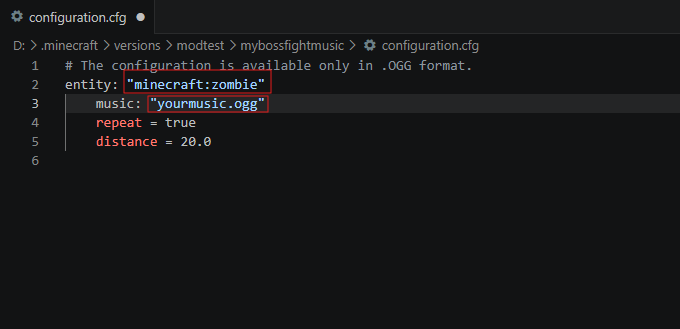
To assign custom music to a mob, place your .ogg music file into the music folder. Then open configuration.cfg and enter the exact name of the music file for the desired mob, as shown in the screenshot.
Mod Compatibility
This mod is compatible with entities from other mods, such as Ice and Fire.
To assign custom music to a modded entity, enter its full entity ID (for example, iceandfire:fire_dragon) in the entity field of configuration.cfg.
Notes
-
Only OGG audio files are supported.
-
Your Minecraft instance (modpack) path must not contain Cyrillic (non-Latin) characters. Use English characters only for the folder names in the game path; otherwise, the mod may not work correctly.
Screenshots
Gallery
Versions
Files
Relations
Project Relations
More like this
Similar Mods
Suggestions use data such as tags, dependencies, dependents, descriptions, titles, and more to rank how much they overlap with this mod.
On ModDex
Community snapshot
By the numbers
Statistics

Get it on
Available Platforms
On ModDex
Community snapshot
By the numbers
Statistics
Resources