Community listing page, reviews may not be monitored by the author.
MyMusic - Custom Music Discs

No reviews yet
Adds 40 custom music disc slots to Minecraft allowing players to easily add their own .ogg audio files.

Community voices
Reviews
No reviews yet. Be the first to review this project!
Get it on
Available Platforms
About
Project Details
For authors
Embed Badge
If you're the author of this project, you can embed a live badge anywhere that supports HTML or Markdown. It updates automatically whenever ratings change.
Use HTML for any page that supports it, or Markdown for README files and Markdown-based descriptions.
Identifiers
Platform IDs
Resources
External Links
About
Description
⚠️ IMPORTANT DISCLAIMER: NO MUSIC TRACKS INCLUDED! ⚠️
READ THIS BEFORE DOWNLOADING: This mod DOES NOT come with any music files included! You must manually add your own tracks named Disc1 through Disc40 directly into your mods folder.
Please read the full instructions below before asking where the music is!
🎵 MyMusic – Custom Music Discs
Minecraft 1.20.1 | Forge 47.4.2
📌 IMPORTANT INFORMATION & TRACKLIST PRESET
🎵 Original Reference Playlist:
🔗 https://youtube.com/playlist?list=PLFef8xYNIor8&si=JvY8zg4_P7Cf3J4-⚠️ Copyright Notice:
Please respect all copyright laws! You are fully responsible for ensuring you have the appropriate rights for any music you add to your game.🔄 Live Updates & Version Notes:
This list is subject to updates, and new songs will be added periodically. Please note that if a song is no longer available, it will be replaced. Because of these track adjustments, the first two versions of this mod will likely be archived.Thank you for your understanding, everyone—have fun with the mod!
ℹ️ This description is available in both English and German. Please make sure to read it carefully before downloading.
[EN] ENGLISH DESCRIPTION
MyMusic adds 40 custom music disc slots to your Minecraft world – completely empty and ready for your own custom audio tracks!
🔑 Key Features
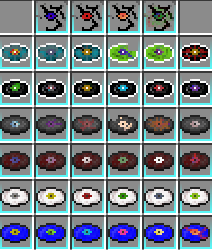
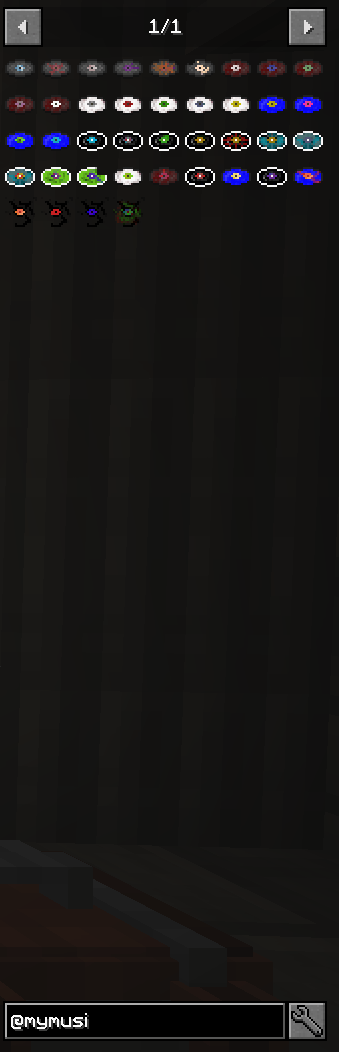
- 💿 40 Custom Music Discs: Fully registered items, each with its own name, texture, and item slot.
- 📻 Vanilla Compatible: Works flawlessly with standard Jukeboxes (including Redstone Comparator output).
- 🌲 Ambient Music Integration: Selected discs can naturally play as background music in the Overworld (configurable).
- 🗝️ Loot & Drops: Discs can also be found in select loot chests (dungeons, mineshafts, strongholds, and more) or occasionally dropped by hostile mobs—both fully configurable (chance, enabled/disabled, affected loot tables).
- 📦 No Resource Packs Needed: Direct auto-loading from a dedicated config folder—no manual pack activation required!
📖 Setup Guide
- Install: Add the mod to your
modsfolder and start the game once. - Find Directory: The folder
.minecraft/config/MyMusic/Musics/will automatically be generated. - Add Music: Drop your custom audio files in Mono OGG format (
disc1.oggthroughdisc40.ogg) into this folder. - Enjoy: Restart your game and start playing your music in-game!
⚠️ Copyright Disclaimer
This mod does not contain any audio files or copyrighted music. It only provides the technical infrastructure. Users are solely responsible for ensuring they possess the legal rights to play any added audio files (original compositions, royalty-free audio, or explicitly permitted content).
[DE] DEUTSCHE BESCHREIBUNG
MyMusic fügt deinem Spiel 40 zusätzliche Music-Disc-Slots hinzu – komplett leer und bereit dafür, dass du deine eigene Musik einbindest!
🔑 Features & Funktionen
- 💿 40 neue Music Discs: Vorbereitete Items, jede mit eigenem Namen, eigener Textur und Item-Slot.
- 📻 Vanilla-Kompatibel: Voll funktionstüchtig mit der normalen Jukebox (inkl. Redstone-Komparator-Signal).
- 🌲 Umgebungsmusik: Ein Teil der Discs kann zusätzlich als Hintergrundmusik in der Overworld auftauchen (konfigurierbar).
- 🗝️ Loot & Beute: Discs können in ausgewählten Beutekisten gefunden werden (Dungeons, Minenschächte, Festungen etc.) oder selten von feindlichen Kreaturen gelassen werden – beides ist vollständig konfigurierbar (Wahrscheinlichkeit, an/aus, betroffene Loot-Tabellen).
- 📦 Keine Resource-Packs nötig: Die Mod liest deine Audiodateien direkt aus einem eigenen Konfigurationsordner.
📖 Anleitung zur Einbindung
- Installieren: Mod installieren und das Spiel einmal starten.
- Ordner öffnen: Der Ordner
.minecraft/config/MyMusic/Musics/wird automatisch angelegt. - Musik einfügen: Lege deine Tracks als Mono-OGG-Dateien (
disc1.oggbisdisc40.ogg) direkt in diesen Ordner. - Genießen: Spiel neu starten – fertig!
⚠️ Wichtiger Hinweis zum Urheberrecht
Diese Mod enthält selbst keinerlei Audiodateien oder urheberrechtlich geschützte Inhalte. Sie stellt ausschließlich die technische Struktur bereit. Es liegt in der Verantwortung der Nutzer, nur Musik einzubinden, für die sie die entsprechenden Rechte besitzen.
💬 CONTACT & SUPPORT / KONTAKT & SUPPORT
- [EN] English: If you have any questions or feedback regarding my mod, please contact Victoriamangles on TeamSpeak.
- [DE] Deutsch: Bei Rückfragen oder Fragen zu meiner Mod wendet euch bitte auf dem TeamSpeak an Victoriamangles.
📍 TeamSpeak Server: ts.DSoM-MG.com
Screenshots
Gallery
-
 2026-08-20_20.51.46.png 2026-08-20_20.51.46.png
 -
 2026-08-20_20.52.44.png 2026-08-20_20.52.44.png
Versions
Files
Relations
Project Relations
More like this
Similar Mods
Suggestions use data such as tags, dependencies, dependents, descriptions, titles, and more to rank how much they overlap with this mod.
On ModDex
Community snapshot
By the numbers
Statistics

Get it on
Available Platforms
On ModDex
Community snapshot
By the numbers
Statistics
Resources