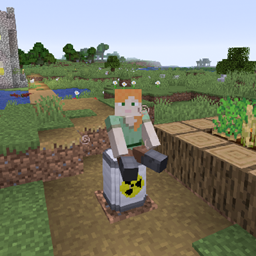
Community listing page, reviews may not be monitored by the author.
nz chair

No reviews yet
Sit down, or add your own chair, or define other blocks as chairs

Community voices
Reviews
No reviews yet. Be the first to review this project!
Get it on
Available Platforms
About
Project Details
For authors
Embed Badge
If you're the author of this project, you can embed a live badge anywhere that supports HTML or Markdown. It updates automatically whenever ratings change.
Use HTML for any page that supports it, or Markdown for README files and Markdown-based descriptions.
Identifiers
Platform IDs
Resources
External Links
About
Description
Attention: The mod is distributed under the MIT license.
Resource code: GitHUB Repository
A new capability "sit down" is added to Minecraft by the mod.
.
.
.
Language files
- zh_cn.json
- en_us.json
Features
- Configurable "sit down" hotkey Under Settings-Movement category, bound to "Z" by default. Players can also resume standing using the hotkey when they are sitting or riding.
- Unusable chests A chest with an entity sat on it will be unusable.
- Log pieces beside the campfire: Log pieces obtained by stonecutting the corresponding logs are added, whose material follows vanilla textures and also depends on your texture pack.
Highly customizable for everyone
- Regular players Sit anywhere you can!
- Server owners & decoration mod players & players want to customize Define any blocks from vanilla or other mods as places to sit. Import your favorite chairs or models via model files and localization files (no java knowledge required)
- Modders: The mod's open-source package provides an API for the "sit down" capability, which can be used to enhance your mod's playfulness. . .
.
Development and Customization
If you want to define any block from vanilla or other mods as a chair, please read these.
You can get the demo package here:GitHUB
Attention:
If you are playing in multi-player mode, modified mod jar should be synchronized to your players’ or partners’ clients (otherwise you would not be able to play because a mismatched mod or an issue of Unrecognized local resources would appear).
Define other blocks as chairs
Requirements: Basic JSON knowledge or sufficient comprehension ability.
Find and extract chair_blocks.json right in the mod.jar ’s root directory.
Original content:
```json { "chairs_id" : {
} } ```
Explanation:
- chairsid should contain a key-value pair, the key is a block’s id and the value is another key-value pair with a key named ”sitpos”.
Example:
json
{
  "chairs_id" : {
    "minecraft:oak_plank" : {
      "sit_pos" : [0.75,0.5,0.5]
    }
  }
}
Explanation:
- sit_pos
The key should be given a value of an array with length 3 to define your relative coordinates to the chair. The format is [x,y,z].
There’s no limit for the values, but values between 0 and 1 are recommended.
Here’s a reference BlockBench for the block’s coordinate axis. If you have no idea what values are for “x” and “z”, just assign “0.5” to them.
0~1 indicates the location you are in the block, can also be interpreted 0% ~ 100%. If you are more familiar with “Pixel Indication” (which divides a block’s length into 16 parts), just make the value be “pixel length” divided by 16.
After doing these, you should be able to sit on the block you’ve set to chair by right clicking.
See the BlockBench editor for the axis, north facing the -x axis.
.
.
Add your own models as chairs
Requirements: Basic datapack and resourcepack knowledge or sufficient comprehension ability.
Find and extract chair_packs.json right in the mod.jar ‘s root directory and modify it. Original content
json
{
  "packlist": [
  ]
}
- packlist the value should be an array holds string(s), exactly your datapack’s id. The id only allows lowercase letters, underscores and numbers.
For example:
json
{
  "packlist": [
    "demo",
    "my_chairs_pack"
  ]
}
Next, copy your datapack to the assets folder in the mod’s jar.
But wait, you should know your pack’s namespace first!
To avoid most conflicts, the mod specified a prefix for any packs:
> nzchairspack*
For example, your pack’s id was defined as “example”.
Then your pack’s namespace would be nzchairspackexample.
The resources directory would be assets/nzchairspackexample.
A file pack.json should also be in your resources directory( assets/nzchairspackexample/pack.json ).
The file is used to register your blocks and define the blocks’ properties.
Example:
json
{
  "blocks" : {
    "nuclear_waste_cask" : {
      "sit_pos" : [0.3125,1,0.5] ,
      "ass_cancer" : true ,
      "no_occlusion" : false ,
      "shape_box" : [
        [ 4, 0, 2, 12, 16, 14 ] ,
        [ 2, 0, 4, 14, 16, 12 ] ,
        [ 3, 0, 3, 13, 16, 13 ]
      ]
    }
  }
}
Explanations
-
blocks
Should contain a key-value pair, your block’s id as the key and the value should define these:
- sit_pos Should be given a value of an array with length 3 to define your relative coordinates to the chair. The format is [x,y,z]. There’s no limit for the values, but values between 0 and 1 are recommended. If you have no idea what values are for “x” and “z”, just assign “0.5” to them. 0~1 indicates the location you are in the block, can also be interpreted 0% ~ 100%. If you are more familiar with “Pixel Indication” (which divides a block’s length into 16 parts), just make the value be “pixel length” divided by 16.
- ass_cancer Should be given a Boolean (true or false) value. Would be false if undefined. When true, the player sits on the chair suffers from “Ass Cancer”.
- noocclusion Should be given a Boolean value. Would be false if undefined. Minecraft assumes your model fills the entire space(like the grass block, etc.), so the contact surface between your model and its surrounding faces will not be rendered, causing a see-through effect if your model is actually not “full 1x1x1”. Define “noocclusion” as true to avoid the issue.
- shape_box Should be given an array without length limitation. The element(s) inside should be 6-length array(s). These arrays are used to define the collision box. The format of a single array is[x1,y1,z1,x2,y2,z2]. x1, y1, z1 define the starting coordinates of the “box element”*; x2, y2, z2 define the ending coordinates of the “box element”. *: The final collision box is a combination of the box elements. The values go differently than the “sit_pos” values above, in the terms of the values’ sizes. Like “Pixel Indication”, a block’s length is divided into 16 parts. So, for example, if you want to define the vanilla grass block as a chair, its shape box should be [0,0,0,16,16,16]. If you have no idea what values to assign, just leave it blank.
Completed these, your chairs should be imported into the game. The recipes for the chairs should be added on your own. Check Data pack – Minecraft Wiki. The datapack’s namespace is same.
Screenshots
Gallery
-
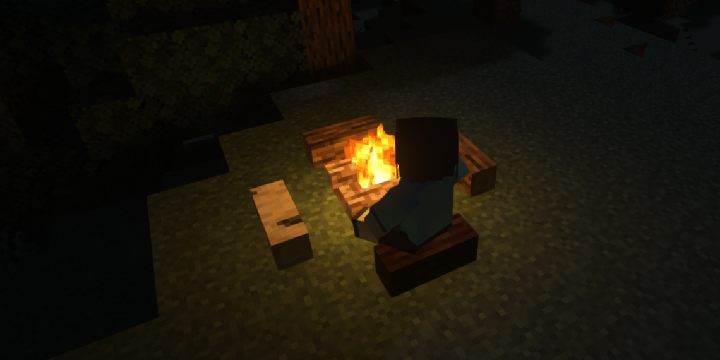 Small wood block
Versions
Files
Relations
Project Relations
More like this
Similar Mods
Suggestions use data such as tags, dependencies, dependents, descriptions, titles, and more to rank how much they overlap with this mod.
- Painted Glowstone
- Every Compat (Wood Good)
- Gravestone Easy
- Quilted Fabric API (QFAPI) / Quilt Standard Libraries (QSL)
- BCLib: New Dawn
- ItsUniqueGamer's MrCrayfish's Posture Unofficial Player Port
- Sky Aesthetics
- WorldWeaver: New Dawn
- CTM Refabricated
- Flare (Spark for 1.12.2)
- Config API
- Scrollable Tooltips
On ModDex
Community snapshot
By the numbers
Statistics
 (opens in a new tab)
Get it on
Available Platforms
On ModDex
Community snapshot
By the numbers
Statistics
Resources