Community listing page, reviews here may not be monitored by the author.
Nc: Fade Command

No reviews yet
Adds a /fade command for smooth screen transitions.
Community voices
Reviews
No reviews yet. Be the first to review this project!
Get it on
Available Platforms
About
Project Details
For authors
Embed Badge
If you're the author of this project, you can embed a live badge anywhere that supports HTML or Markdown. It updates automatically whenever ratings change.
Use HTML for any page that supports it, or Markdown for README files and Markdown-based descriptions.
Identifiers
Platform IDs
Resources
External Links
About
Description
🌒 Narrative Core – Fade Command:
Narrative Core - Fade Command
Bring cinematic flair to your Minecraft storytelling.
This mod adds a powerful new /fade command that enables smooth fade-in and fade-out screen transitions, ideal for roleplay, cutscenes, server events, and immersive storytelling.
📜 Features
/fade in <player/@a/@p> <colorCode or preset>
Fades the target player's screen in using the specified color.
Supports:
- Hex color codes (e.g.,
#000000,#ff0000) - Color presets (if defined)
/fade out <player/@a/@p>
Fades the target player's screen out, returning their view to normal.
🚫 Player Exclusion System
You can exclude certain players from receiving fade effects, useful for admins or camera operators.
[.../config/fade_command_config.json]
/fade config add <player>— Prevents the player from receiving fades./fade config remove <player>— Re-enables fades for the player.
🎨 Color Customization
You can use any color by grabbing its hex code from Encycolorpedia or similar tools.
This allows infinite flexibility when creating ambiance, transitions, or emotional tone shifts.
Test Video
🔧 Currently available only for Minecraft 1.20.1.
📦 May be included in modpacks with proper credit.
🚫 Redistribution, modification, or resale is not allowed.
Part of a series of mods by the NarrativeCore development team.
Screenshots
Gallery
-
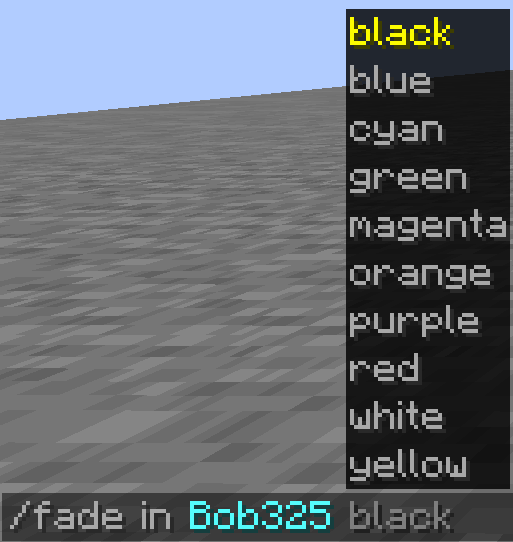 FadeCommandColorList Default Colors List.
 -
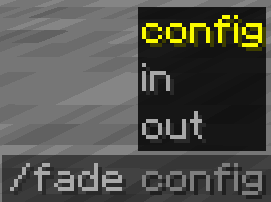 FadeCommand.png ➤ Screen fade-in with custom color. ➤ Clears the fade effect. ➤ Manage fade-exempt players.
Versions
Files
Relations
Project Relations
More like this
Similar Mods
Suggestions use data such as tags, dependencies, dependents, descriptions, titles, and more to rank how much they overlap with this mod.
On ModDex
Community snapshot
By the numbers
Statistics
Want to reach Minecraft players?
We're looking for a server hosting partner to feature here and other parts of the site. Interested? Send us a message!
Get in touchGet it on
Available Platforms
On ModDex
Community snapshot
By the numbers
Statistics
Resources