Community listing page, reviews here may not be monitored by the author.
Near World Spawn


No reviews yet
Customize the way your world spawn is set
Community voices
Reviews
No reviews yet. Be the first to review this project!
Get it on
Available Platforms
Compatibility
Supported Environments
Runs entirely on the server. Also works in singleplayer.
About
Project Details
For authors
Embed Badge
If you're the author of this project, you can embed a live badge anywhere that supports HTML or Markdown. It updates automatically whenever ratings change.
Use HTML for any page that supports it, or Markdown for README files and Markdown-based descriptions.
Identifiers
Platform IDs
About
Description



NO PORT TO FORGE PLANNED! (but feel free to port it by yourself and link it)
Description
This mod allows you to change the way the worldspawn is set! Whether a player is joining an old server for the first time or a player died with no spawn point set, this player will roll the dice to set a new world spawn location. The random location is chosen in an area around the online players that you can customize.
For a better experience with the mod, its configuration can be changed directly in-game through new commands!
This is a short description, full description below.
FAQ
Do I need it on my server? Yes. This mod is server side, so you don't need it on your client
Can I include it in my modpack? Yes, you are free to include this mod into your modpack
For any other things: Feel free to share your experience, problems, enhancement ideas in the Discord server, or directly creating issues on the GitHub
Full description
If the changing area is enabled (the main purpose of the mod), when a player joins a server for the first time or dies without a spawn point set, a new worldspawn is randomly set around alive and online players from the Overworld.
Note that if no other player is found, last worldspawn will be used.
Area Shape
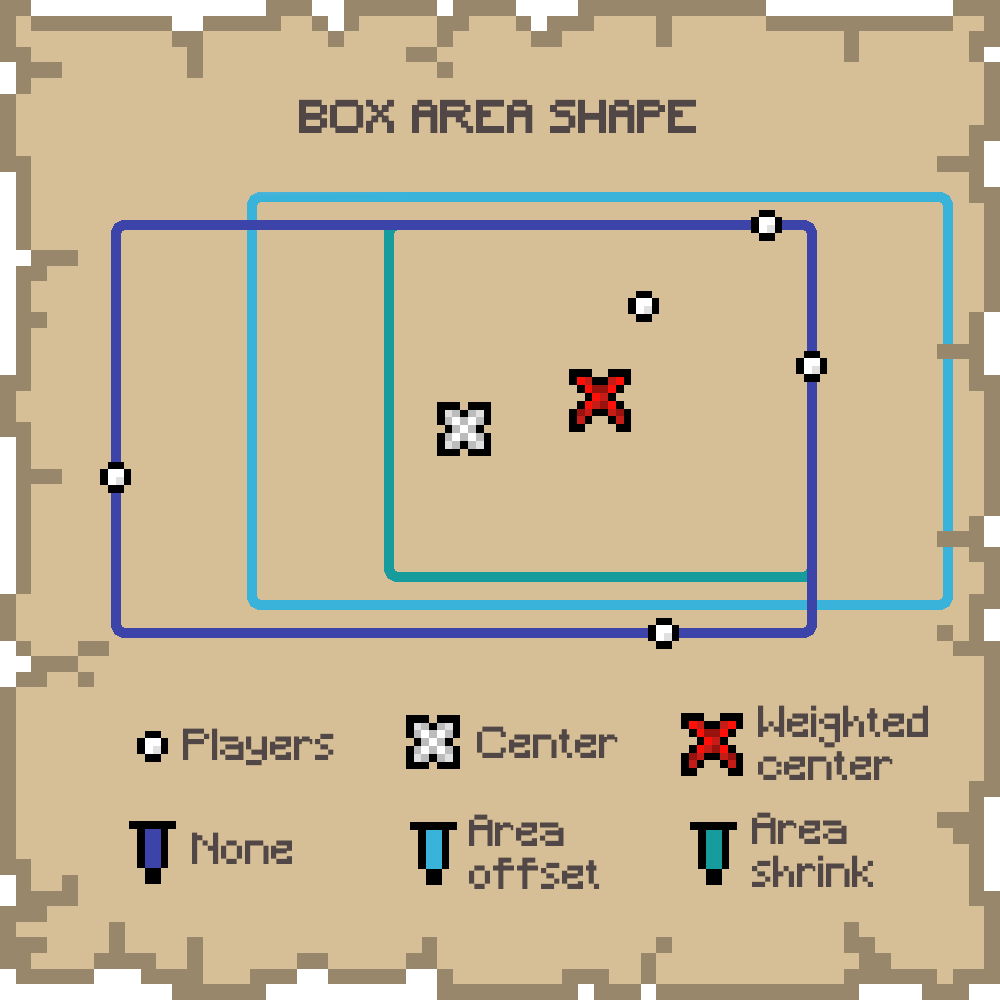
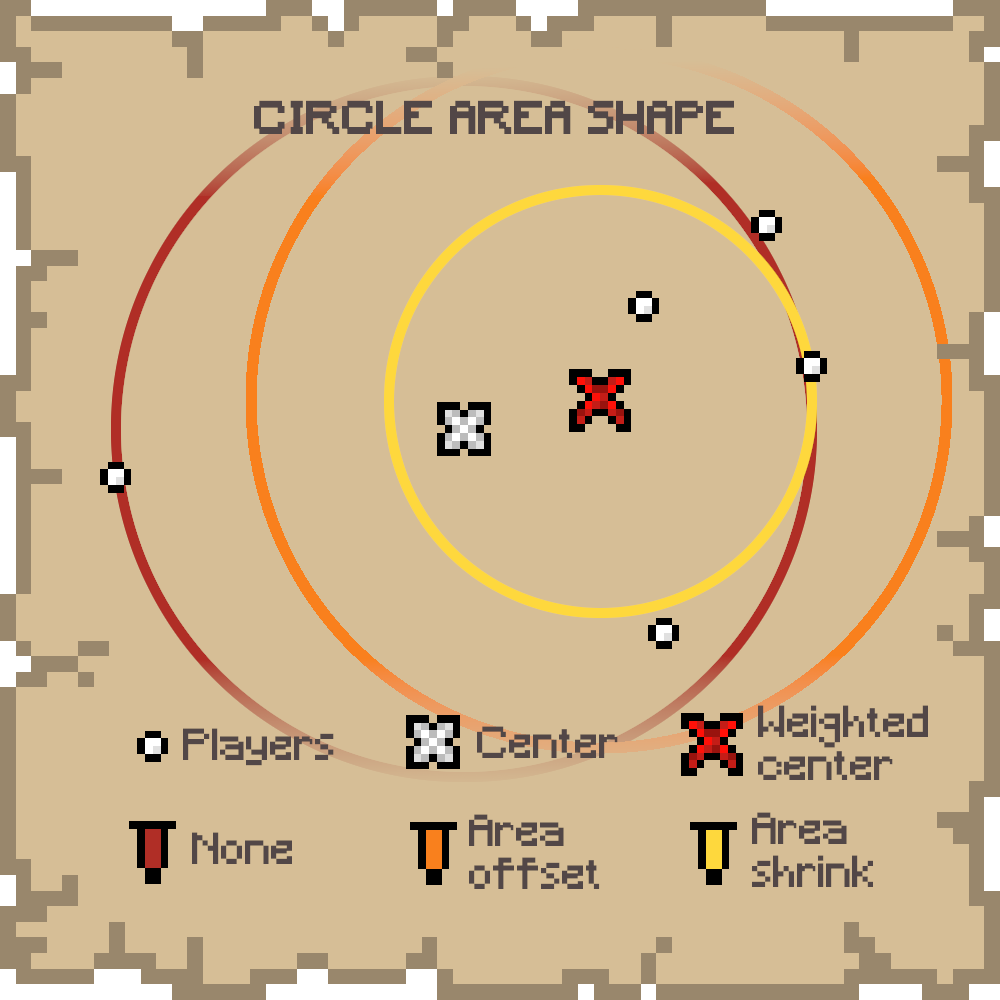
The shape of the area from which a random position is chosen may not necessarily contains every player. This is only the case for the BOX shape. If the player influence is different from NONE, even the BOX may not contain every player.
If only only one other player is found, the shape is necessarily a point. So, unless an expand is set, the worldspawn will be set to the other player's position.
- BOX: A box containing every player
- CIRCLE: A circle centered on the box, with a radius equals to the longest side of the box. If players are far from each other in one direction, this shape will contain a lot more of "empty space". Note than this is not yet the smallest bounding circle.
Player Influence
To avoid the area being too big (with too much "empty space") or too far from players, a player influence can be set. This means if there are more players in one side of the shape, the world spawn will be more likely on this side.
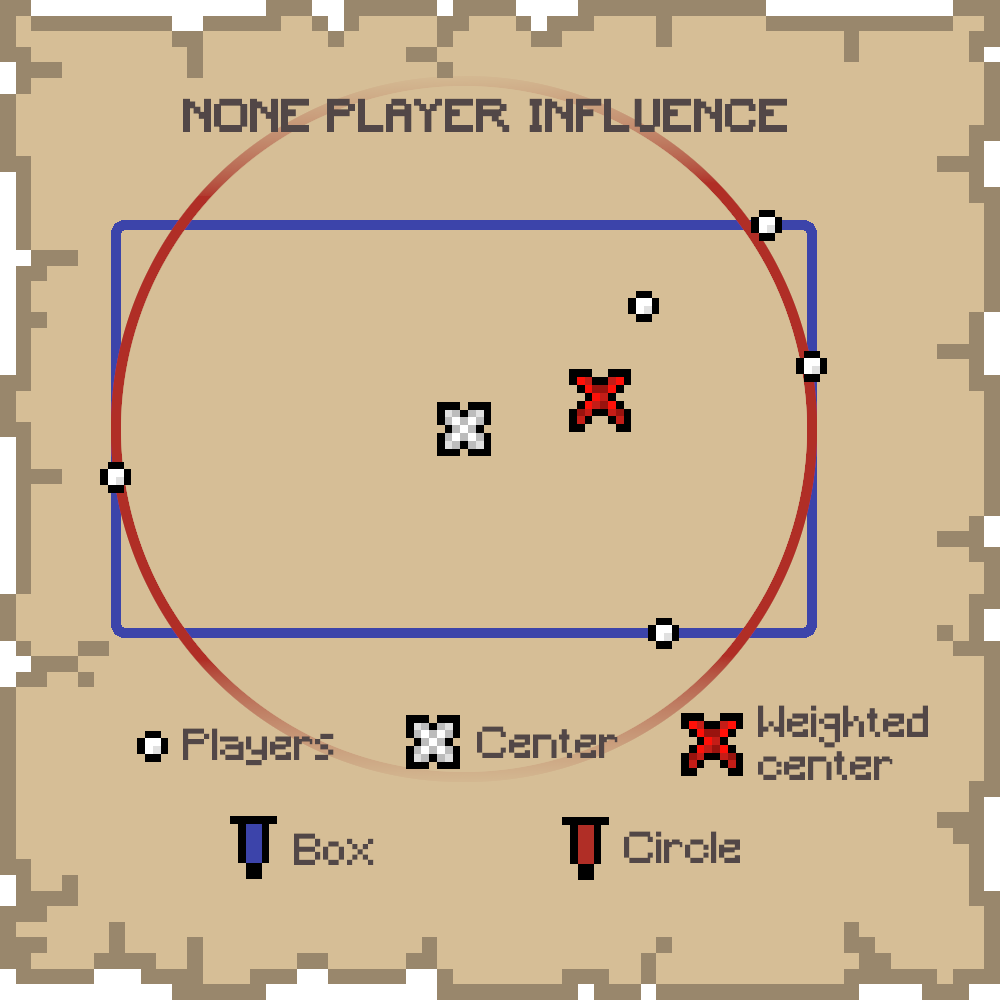
- NONE: No player influence on the shape
- AREA OFFSET: A weighted center is computed and the shape is moved toward this new center
- AREA SHRINK: A weighted center is computed and the shape is shrink in a way that makes the shape's center match the computed one
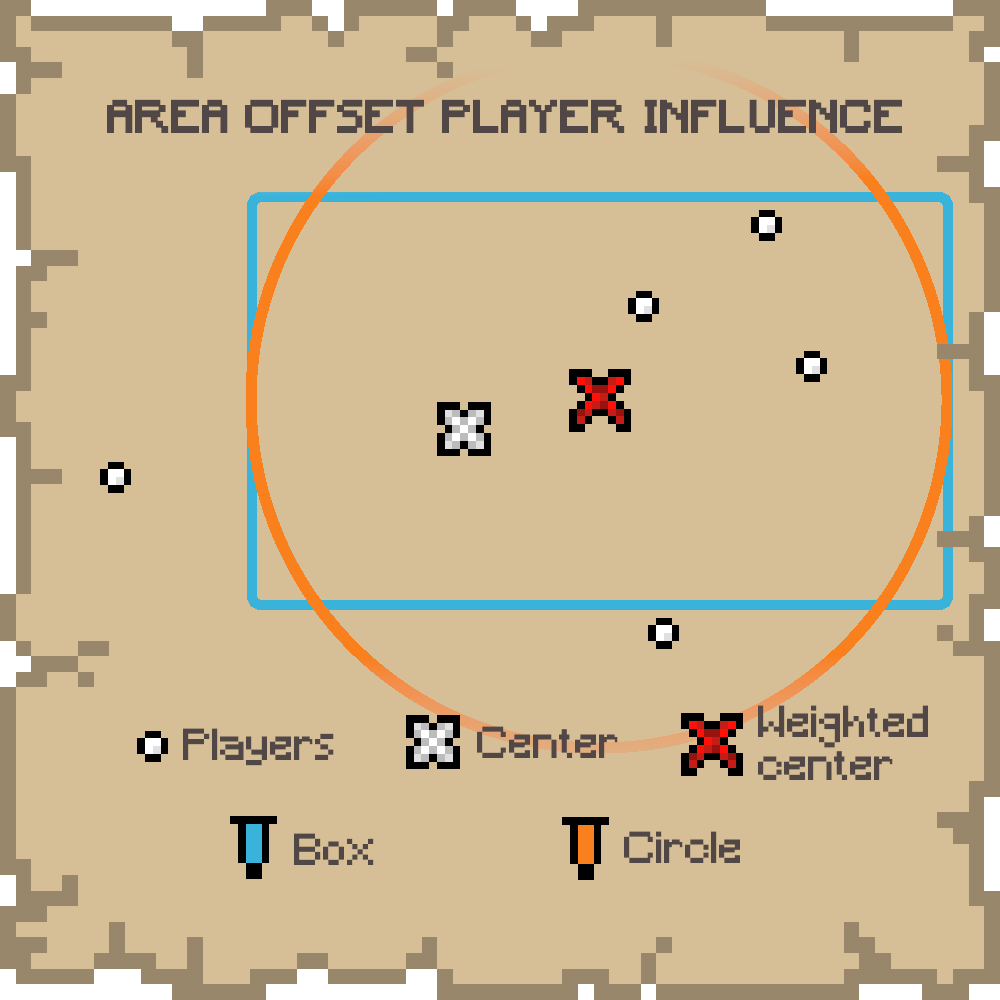
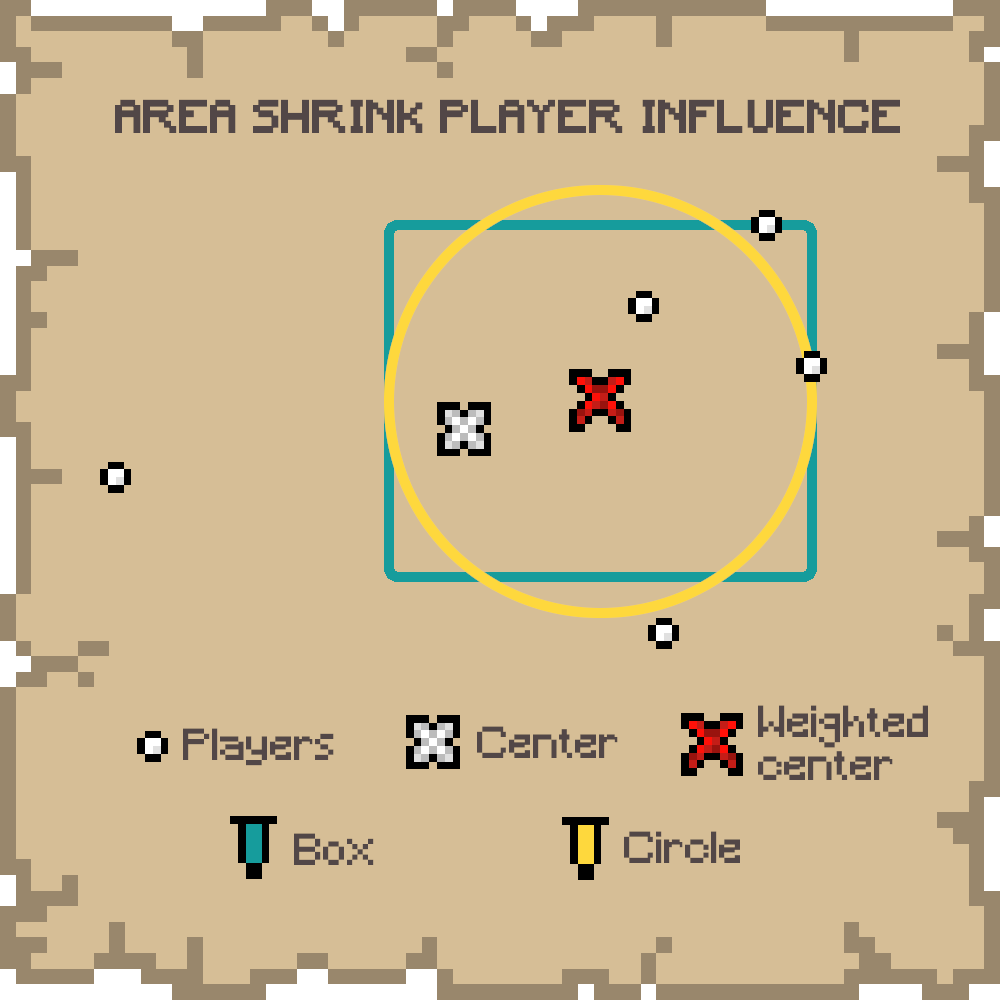
Expand
The area, no matter the shape or the player influence, may be too small if you want to encourage a bit of running, even though this mod aims to avoid loooong runs. So, you can set an expand value that will expand the shape of this number of blocks in every direction.
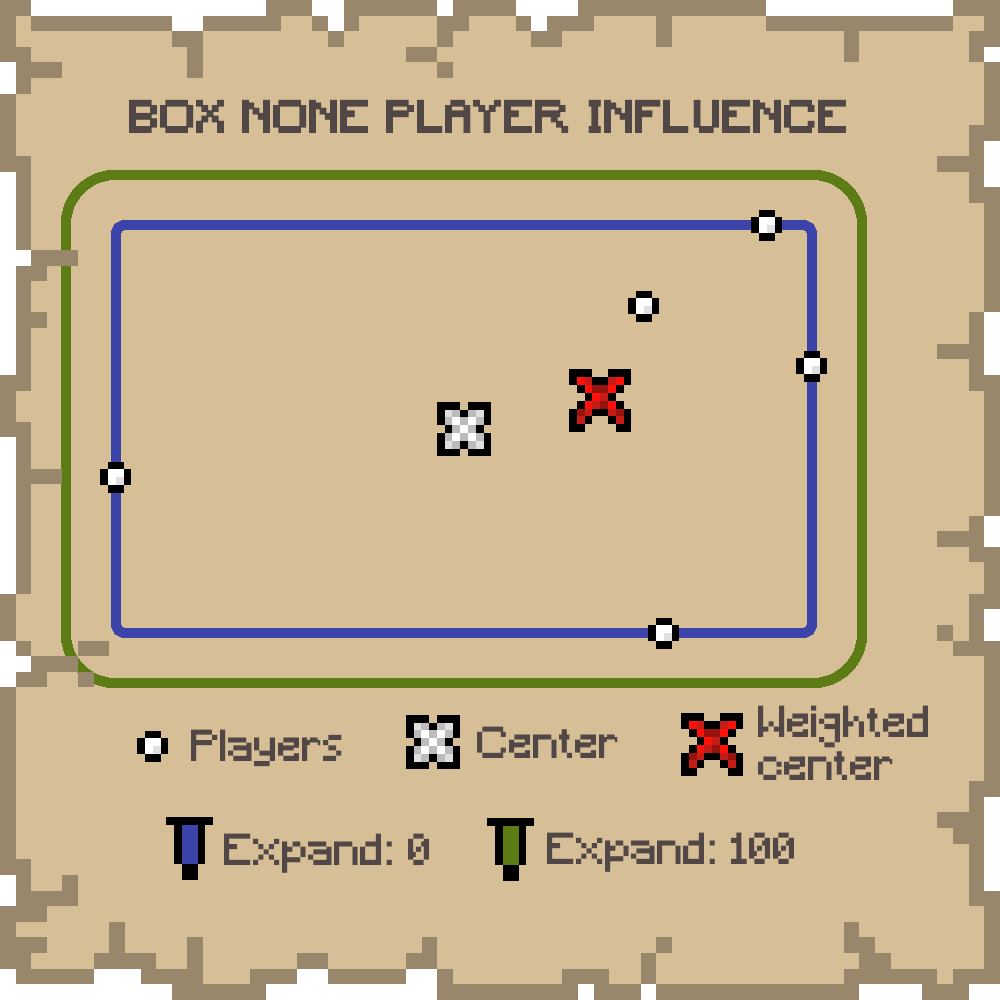
Spawn Chunks
In Minecraft, worldspawn chunks are always loaded. Having a worldspawn that can change might be annoying if you plan to setup always loaded machines. Also, it could possibly create lags if your server is not very efficient and your worldspawn chunk radius (future gamerule) is too big.
To avoid this, you can set the (0,0,0) to be the position used for the worldspawn chunks with an option of the mod. You can always update this behavior with the command, but note that the change will be effective only after someone joins or dies.
Commands
Commands require level 2 of permission.
/worldspawn-modded
Print whether the worldspawn changing area is enabled/worldspawn-modded <enabled>
Enable/Disable the worldspawn changing area/worldspawn
Print every custom worldspawn parameters/worldspawn (box|circle) <expand> (none|area_offset|area_shrink)
Set every custom worldspawn parameters/worldspawn-areashape
Print worldspawn area shape/worldspawn-areashape (box|circle)
Set worldspawn area shape/worldspawn-playerinfluence
Print worldspawn player influence/worldspawn-playerinfluence (none|area_offset|area_shrink)
Set worldspawn player influence/worldspawn-expand
Print worldspawn expand value/worldspawn-expand <expand>
Set worldspawn expand value/spawnchunksPrint whether the worldspawn chunks use the (0,0,0) or the last worlspawn position/spawnchunks (fixed|worldspawn)Set whether we want the worldspawn chunks to use the (0,0,0) or the last worlspawn position
<enabled> is a boolean value, and <expand> is a positive integer.

NO PORT TO FORGE PLANNED! (but feel free to port it by yourself and link it)
Description
This mod allows you to change the way the worldspawn is set! Whether a player is joining an old server for the first time or a player died with no spawn point set, this player will roll the dice to set a new world spawn location. The random location is chosen in an area around the online players that you can customize.
For a better experience with the mod, its configuration can be changed directly in-game through new commands!
This is a short description, full description below.
FAQ
-
Do I need it on my server? Yes. This mod is server side, so you don't need it on your client
-
Can I include it in my modpack? Yes, you are free to include this mod into your modpack
-
For any other things: Feel free to share your experience, problems, enhancement ideas in the Discord server, or directly creating issues on the GitHub
Full description
If the changing area is enabled (the main purpose of the mod), when a player joins a server for the first time or dies without a spawn point set, a new worldspawn is randomly set around alive and online players from the Overworld.
Note that if no other player is found, last worldspawn will be used.
Area Shape
The shape of the area from which a random position is chosen may not necessarily contains every player. This is only the case for the BOX shape. If the player influence is different from NONE, even the BOX may not contain every player.
If only only one other player is found, the shape is necessarily a point. So, unless an expand is set, the worldspawn will be set to the other player's position.
- BOX: A box containing every player
- CIRCLE: A circle centered on the box, with a radius equals to the longest side of the box. If players are far from each other in one direction, this shape will contain a lot more of "empty space". Note than this is not yet the smallest bounding circle.
Player Influence
To avoid the area being too big (with too much "empty space") or too far from players, a player influence can be set. This means if there are more players in one side of the shape, the world spawn will be more likely on this side.
- NONE: No player influence on the shape
- AREA OFFSET: A weighted center is computed and the shape is moved toward this new center
- AREA SHRINK: A weighted center is computed and the shape is shrink in a way that makes the shape's center match the computed one
Expand
The area, no matter the shape or the player influence, may be too small if you want to encourage a bit of running, even though this mod aims to avoid loooong runs. So, you can set an expand value that will expand the shape of this number of blocks in every direction.
Spawn Chunks
In Minecraft, worldspawn chunks are always loaded. Having a worldspawn that can change might be annoying if you plan to setup always loaded machines. Also, it could possibly create lags if your server is not very efficient and your worldspawn chunk radius (future gamerule) is too big.
To avoid this, you can set the (0,0,0) to be the position used for the worldspawn chunks with an option of the mod. You can always update this behavior with the command, but note that the change will be effective only after someone joins or dies.
Commands
Commands require level 2 of permission.
/worldspawn-modded
Print whether the worldspawn changing area is enabled/worldspawn-modded <enabled>
Enable/Disable the worldspawn changing area/worldspawn
Print every custom worldspawn parameters/worldspawn (box|circle) <expand> (none|area_offset|area_shrink)
Set every custom worldspawn parameters/worldspawn-areashape
Print worldspawn area shape/worldspawn-areashape (box|circle)
Set worldspawn area shape/worldspawn-playerinfluence
Print worldspawn player influence/worldspawn-playerinfluence (none|area_offset|area_shrink)
Set worldspawn player influence/worldspawn-expand
Print worldspawn expand value/worldspawn-expand <expand>
Set worldspawn expand value/spawnchunksPrint whether the worldspawn chunks use the (0,0,0) or the last worlspawn position/spawnchunks (fixed|worldspawn)Set whether we want the worldspawn chunks to use the (0,0,0) or the last worlspawn position
<enabled> is a boolean value, and <expand> is a positive integer.

Screenshots
Gallery
-
Box - Area Shape Show different player influences for the box shape
-
Circle - Area Shape Show different player influences for the circle shape
-
None - Player Influence Show different shapes for none player influence
-
Area Offset - Player Influence Show different shapes for area offset player influence
-
Area Shrink - Player Influence Show different shapes for area shrink player influence
-
Expand Show different expand values
Versions
Files
Relations
Project Relations
More like this
Similar Mods
Suggestions use data such as tags, dependencies, dependents, descriptions, titles, and more to rank how much they overlap with this mod.
On ModDex
Community snapshot
By the numbers
Statistics
Want to reach Minecraft players?
We're looking for a server hosting partner to feature here and other parts of the site. Interested? Send us a message!
Get in touchGet it on
Available Platforms
On ModDex
Community snapshot
By the numbers