Community listing page, reviews may not be monitored by the author.


Community voices
Reviews
No reviews yet. Be the first to review this project!
Get it on
Available Platforms
About
Project Details
For authors
Embed Badge
If you're the author of this project, you can embed a live badge anywhere that supports HTML or Markdown. It updates automatically whenever ratings change.
Use HTML for any page that supports it, or Markdown for README files and Markdown-based descriptions.
Identifiers
Platform IDs
Resources
External Links
About
Description
NEI Features for JEI
Brings the best parts of GTNH's NotEnoughItems to Just Enough Items
Highlights
- Bookmark panel on the left, with groups, todo-list view, multiple lists and drag and drop. Fills from JEI's own bookmark button too.
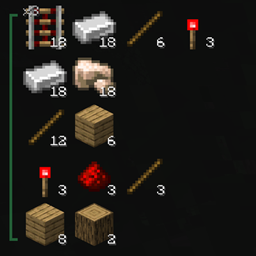
- Crafting chains: turn a bookmark group into a chain and it works out every sub-recipe and how often it runs, counts your inventory and shows what is missing in red. GregTech tools are counted by durability.
- Favorite recipes and recipe trees: a heart on every recipe; save a whole tree of favorites as one group in a key press.
- Crafting tree window: the whole chain as a zoomable tree with stats, and save it as an image.
- Autocrafting (Shift + C): crafts a whole chain at a crafting table, batch by batch, and works with other crafting tables JEI can fill, such as Tinkers' Crafting Station.
- Cheat mode: give items from JEI's list and bookmarks in the amount you set, delete held items, and give a chain's missing ingredients in one key press. The server still decides whether you may cheat.
- Subsets (filter JEI by mod or creative tab), collapsible item groups, ingredient directory for tag slots, a recipe search in the recipe screen, item zoom, highlight tips, storage counts for AE2 and Refined Storage, pulling items from chests, chat links for items, recipes and groups, data dumps and more.
Hold Alt over any item or bookmark group in game to see what you can do with it.
Full feature guide
Every key below is the default and can be changed under Controls > NEI Features for JEI. Hold Alt over any item or bookmark group to see the keys that work on it right there.
Settings
- Open them with the N button in JEI's bottom-left button row, or the mod's Config button in the mod list.
- Ctrl + click on N cycles between Recipe Mode, Utility Mode and Cheat Mode (see Cheat mode below).
- The settings are laid out like NEI's options screen: Inventory holds most options and the sub-pages (Bookmarks Panel, Recipes GUI, History Panel, Craftables Panel, Item Zoom Panel, Favorites); World holds Highlight Tooltips; Tools holds Data Dumps. JEI Options opens JEI's own settings and Report Issues opens the issue tracker.
- Settings are saved in
config/neiaddon-client.toml.
Bookmark panel
A grid of bookmarked items on the left of inventory screens and JEI's recipe screen.
Adding and removing - A over any item (JEI's list, a recipe, your inventory, the panel) adds it, or removes it if it is already there. Ctrl + A adds it with a count (the Stack Controls amount, or the stack size). - A over an item inside a recipe saves that recipe with it (setting: Bookmark Items With Recipe); its tooltip then shows the recipe. The same item from two different recipes is two bookmarks. - A over a recipe's output bookmarks the recipe instead, when JEI's own "Bookmark Output as Recipe" option is on: the output item with the recipe type's icon in its corner, the recipe shown while Shift is held. - Drag items from JEI's list onto the panel. - JEI's own bookmark button and key fill this panel too (setting: JEI's Bookmark Button Fills This Panel). - Fluids can be bookmarked (one bucket; Ctrl keeps the slot's amount). - B shows or hides the panel; so does JEI's bookmark button.
Using bookmarks - Left click / R: recipes for the item. On a bookmarked recipe, JEI opens on that recipe first. - Right click / U: what the item is used in. - Shift + drag: move a bookmark (a recipe moves as a whole). - Ctrl + scroll: change the amount. Ctrl + Alt + scroll: change it in steps of the Item Quantity (one stack by default). - Shift + scroll on an ingredient that accepts several items (a tag) switches the item.
Groups - the thin strip left of the slots: - Drag with left click over rows to make a group or extend one; drag with right click to take rows out. - Left click the strip: toggle todo-list view (one recipe per row). Right click: toggle crafting chain (green bracket, see Crafting chains below). Alt + left click: collapse or expand the group. - Shift + drag the strip moves the whole group. Ctrl + scroll scales every amount in it. - Shift + A over the strip removes the group. - The page label at the top is the handle of the ungrouped bookmarks and takes the same clicks.
Pages - The arrows at the top flip grid pages; the arrows at the bottom switch bookmark lists. A new empty list always follows the last one, so you can keep separate lists per project. - Bookmarks are saved in config/neiaddon/bookmarks.txt (setting World Specific: one list per world or server).
Look - Bookmark Scale (50-100 %) makes the slots smaller so more fits on a page. - Show Recipe Marker: mark recipe results with an R, the recipe type's icon (Show Handler Icon, size with Handler Icon Scale) or a tinted background. - Panel Margin Top / Left move the panel if it overlaps something another mod draws. The panel already moves out of the way of other mods' buttons by itself.
Favorite recipes and recipe trees
- Every recipe in JEI's recipe screen gets a heart button. Click it to make that recipe the item's favorite (red heart). Scroll over the heart to pick which result it is for, or press Shift + F over a result.
- Shift + A over a heart saves the whole recipe tree (the recipe, the favorite recipe of each ingredient, and so on, up to the Depth setting) as a new bookmark group with the crafting chain on. Shift + T does the same and opens the crafting tree. Shift + A over a recipe saves just that recipe.
- Over an item in JEI's list: Shift + A bookmarks its favorite recipe, Shift + F saves its favorite recipe tree.
- Generate Single-Recipe Favorites makes an item with only one recipe use it as its favorite.
- Show Recipe Tooltips in Right Panel / Recipe Gui: an item's favorite recipe as a picture beside its tooltip.
Crafting chains
Turn a group into a crafting chain with a right click on its strip. The mod then works out how often every recipe in the group has to run so the end result gets everything it needs, using what you already have first.
- The first result of each recipe shows xN: how often it runs.
- Hover the strip for the chain's tooltip: results, required crafts and ingredients. Hold Shift to count your inventory: missing ingredients turn red. Shift + Ctrl only counts what is still missing.
- Crafting tools (GregTech hammers, files...) are listed by the durability the chain needs, in blue, and turn red when all the tools of that kind in your inventory together don't have enough. A worn tool counts as the same tool.
- Alt + click a recipe in a chain to collapse it into one block.
Crafting tree
T over a crafting chain's strip opens it as a tree (or Shift + T over a heart). - Scroll to zoom (setting: Tree Zoom without Ctrl), drag to pan, click a node to collapse or expand it. - The toolbar can use an inventory snapshot, fit the tree to the view, collapse finished items, collapse or expand all, send the group to chat, and save the whole tree as an image in the screenshots folder. - The stats panel lists handlers, ingredients and results; click a handler to highlight its recipes. - The search box finds items in the tree.
Autocrafting
Open a crafting table (or your inventory for 2x2 recipes) and press Shift + C: - over a crafting chain's strip: crafts the whole chain; - over a recipe's result in the panel: crafts that recipe; - over an item with a favorite recipe: crafts it once.
Ctrl + Shift + C only crafts what your inventory is missing. Plain Shift + C crafts the full amount again.
- It moves the ingredients with JEI's recipe transfer and crafts as many sets at once as fit. JEI must be installed on the server in multiplayer.
- It works at any crafting table JEI can fill, such as Tinkers' Crafting Station.
- Recipes with a tool are filled up around the tool and crafted in one go; a broken tool is replaced from your inventory.
- When it stops, or finishes without making something, chat says why.
- Settings: Faster Autocrafting (crafts the exact amount from a full grid), Restore Inventory Layout (puts your items back in their old slots afterwards).
- Recipes JEI can't move into a crafting grid (furnaces, machines) are skipped.
Cheat mode
Turn it on in Settings > Inventory (Cheat Mode), with Ctrl + click on the N button, or use JEI's own cheat mode. Giving goes through JEI on the server, so the server still decides whether you may cheat.
- Left click an item in JEI's list: gives the Stack Controls amount (0 = one stack). Right click: gives one. Shift + click still shows recipes.
- Left click a bookmark: gives its own amount (or the Stack Controls amount). Right click: gives one. Fluid bookmarks give filled buckets.
- With an item on the cursor over JEI's list or the bookmark panel: left click deletes it, right click removes one.
- G over a crafting chain's strip gives everything the chain is missing (the red ingredients of its Shift tooltip), including enough tools to cover the durability it needs. Also works in creative mode.
- Utility buttons above the panel: time of day, rain, heal and feed, game mode. Utility Mode shows the ones you pick under Utilities; Cheat Mode shows all. The same actions can be bound to keys (unbound by default).
Stack Controls
The number box with + / - above JEI's search box. It sets the amount for Ctrl + A, cheat-mode clicks and the Ctrl + Alt + scroll step. Type a number, click + / -, or scroll over it (Shift: 10, Ctrl: 64).
JEI's item list
- Subsets: the S button next to N lists every mod (with item counts) and every creative tab. Picking one filters JEI's list; it combines with whatever you type.
- Collapsible item groups (off by default, Settings > Inventory): families of items like wool, concrete, dyes, spawn eggs and potions show as one entry with a green +. Alt + click opens or closes a group; groups open while you search. Edit or add groups in
config/neiaddon/collapsibleitems.cfgwith item tags (#minecraft:wool), mods (@ae2) or item ids with*(*:*_spawn_egg). - Item Untranslator: when the game is not in English, JEI's search also finds items by their English name.
- Ctrl + C / Ctrl + D / Ctrl + X over an item copy its name, tags or id.
- Ctrl + L sends the item to chat as a link others can click to bookmark it; Ctrl + Shift + L sends a recipe, and over a group strip the whole group. Needs the mod on the server.
JEI's recipe screen
- Middle click a slot that cycles through several items (like "any planks") to see all of them in a grid. Left click or R shows an item's recipes, right click or U its uses.
- S over a recipe moves its ingredients into the open crafting grid (Shift + S: as many as fit).
- Recipe Search Field (Recipes GUI): a search box under the recipe screen that filters the recipes shown.
<ironhas iron as an ingredient,>railmakes a rail,^crafting station,|or,-not,@mod,#tooltip,$tag,&id. - Highlight Present Item: tints the ingredients you already have.
Storage and chests
- Storage counts: with an AE2 terminal or a Refined Storage grid open, bookmarks show how many the network holds (cyan, top left) and item tooltips get an "In storage" line.
- T over an item while an AE2 terminal is open types its name into the terminal's search.
- Pull items (chest open): V over a group's strip pulls its items (a crafting chain pulls the raw materials it needs), over a bookmark pulls it at its amount, over any other item pulls the Stack Controls amount. Shift + V only pulls what you are missing. The P button next to the bookmark page arrows pulls all ungrouped bookmarks.
Other panels and tools
- Item zoom: the hovered item drawn large beside the inventory. Shift + Z toggles it; zoom in, zoom out and hold-to-show keys can be bound. Options in Settings > Item Zoom Panel.
- Craftables panel (off by default): what the open container can craft from your inventory, above the Stack Controls. Shift + C over an entry crafts it.
- Highlight tips: the block under your crosshair, shown NEI style. Numpad 0 toggles it; bind "Move Highlight Tooltips" to drag it into place.
- Item info pages: write extra info pages for items in
config/neiaddon/informationpages.cfg(filter = text; filters are item ids with*,$tagor@mod). They show up in JEI on the item's recipe page. - Data dumps (Settings > Tools): items, blocks, potion effects, potions, entities, enchantments, biomes and JEI's item list as CSV files in
neiaddon/dumps.
Compatibility notes
- The bookmark panel moves around buttons and panels other mods put on the inventory screen (FTB mods, Curios, Apothic Attributes and more). If something still overlaps, use Panel Margin Top / Left.
- On older JEI versions (ATM9, ATM10, Monifactory) the heart and recipe tree buttons sit to the right of each recipe, and features that need newer JEI turn themselves off.
- NTM - Continuum fluids show once in JEI's list.
- JEI++ changes the same things this mod does; a chat message warns when it is installed.
Requirements
JEI (15.20 or newer on 1.20.1). Works client side; chat links need the mod on the server too, and autocrafting and cheat mode need JEI on the server.
Reporting issues
Use Settings > Report Issues in game, or the issue tracker.
Credits and license
LGPL-3.0-or-later. Large parts are ports of GTNH NotEnoughItems by Chicken-Bones, GTNewHorizons and the NotEnoughItems contributors. Not affiliated with them or with JEI.
AI was used when making this project
Screenshots
Gallery
-
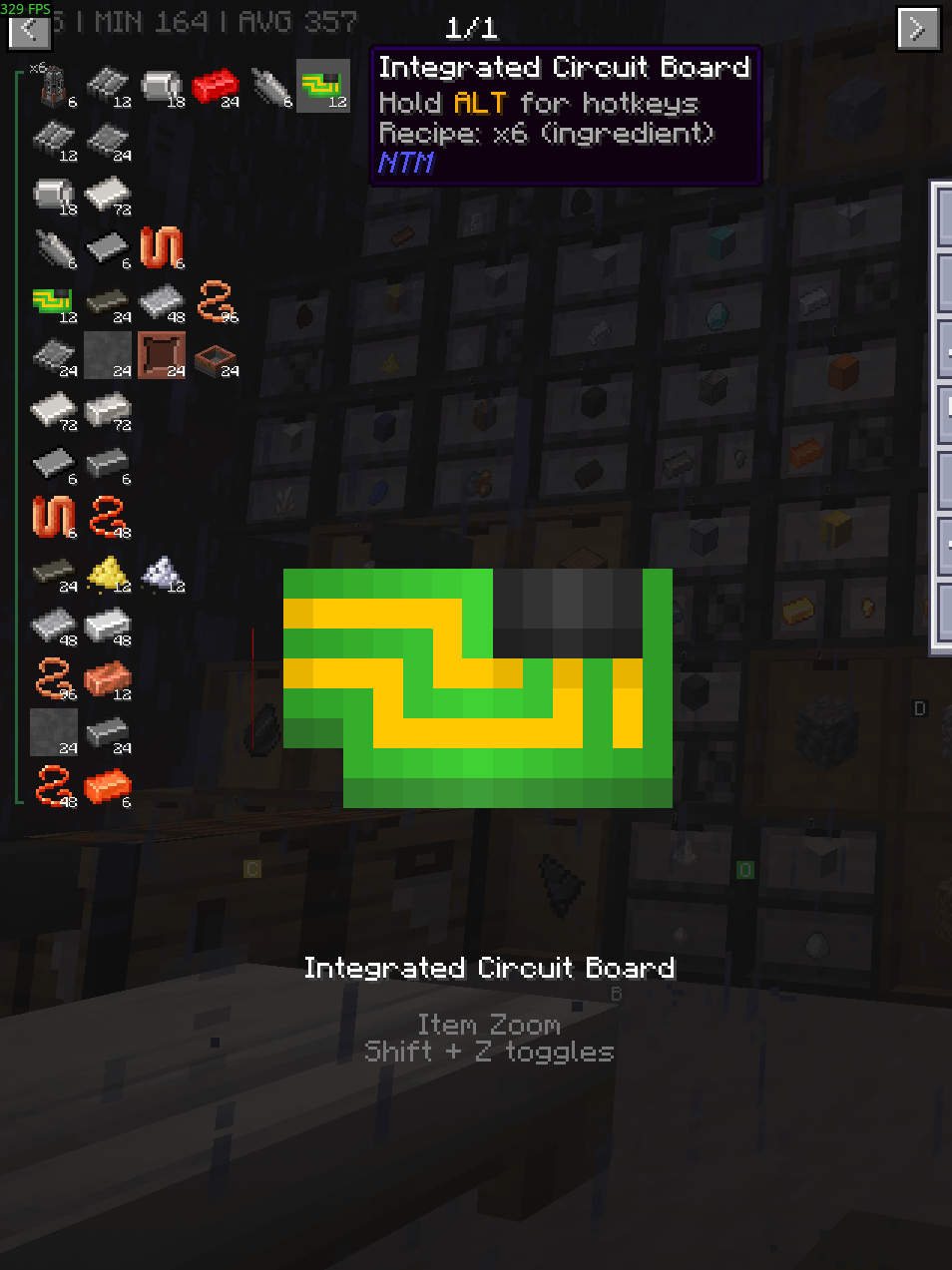 itemzoombookmarkgroup.png Features items from https://www.curseforge.com/minecraft/mc-mods/ntm-next
-
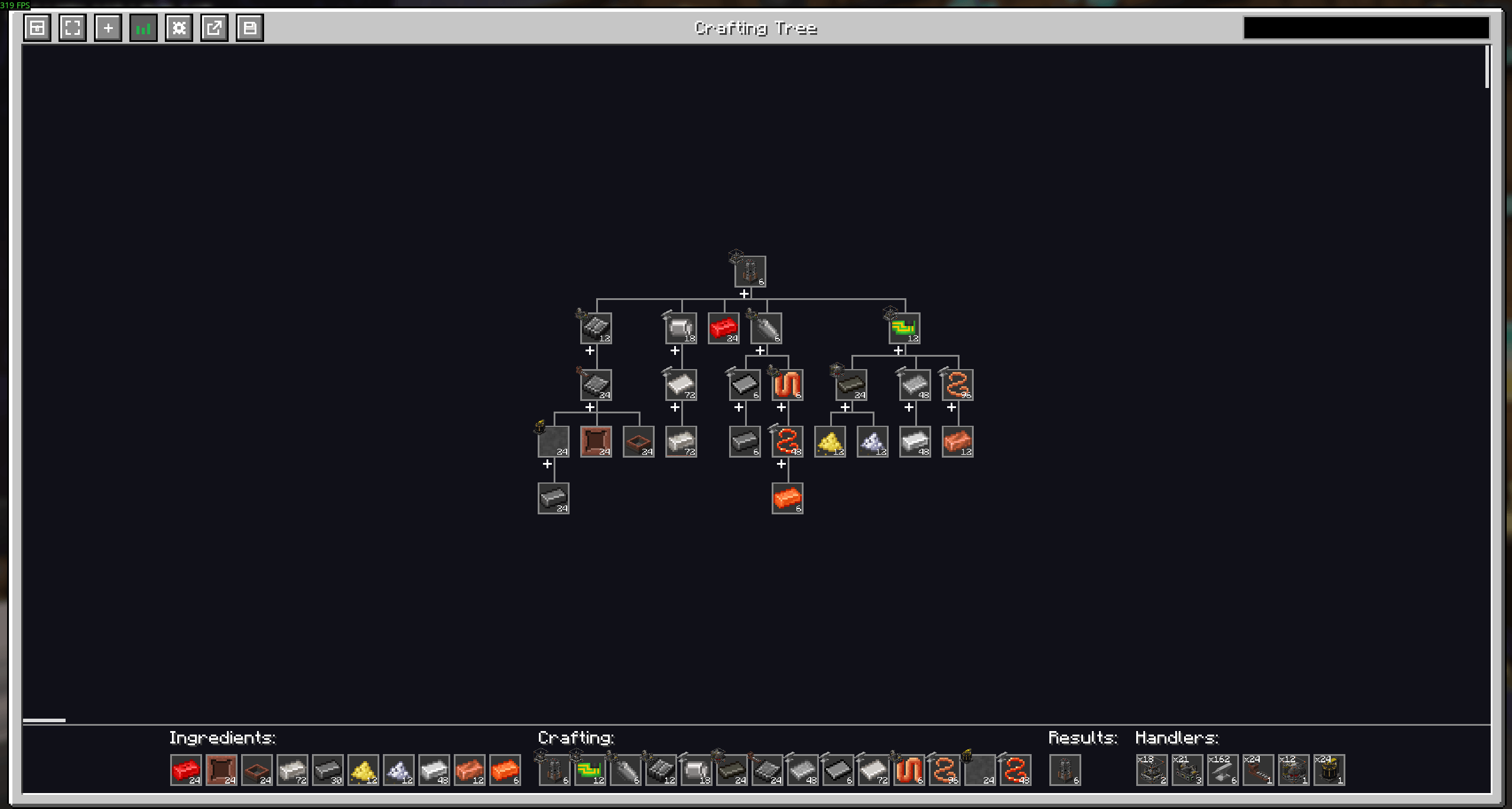 CraftingTree.png Features items from https://www.curseforge.com/minecraft/mc-mods/ntm-next
-
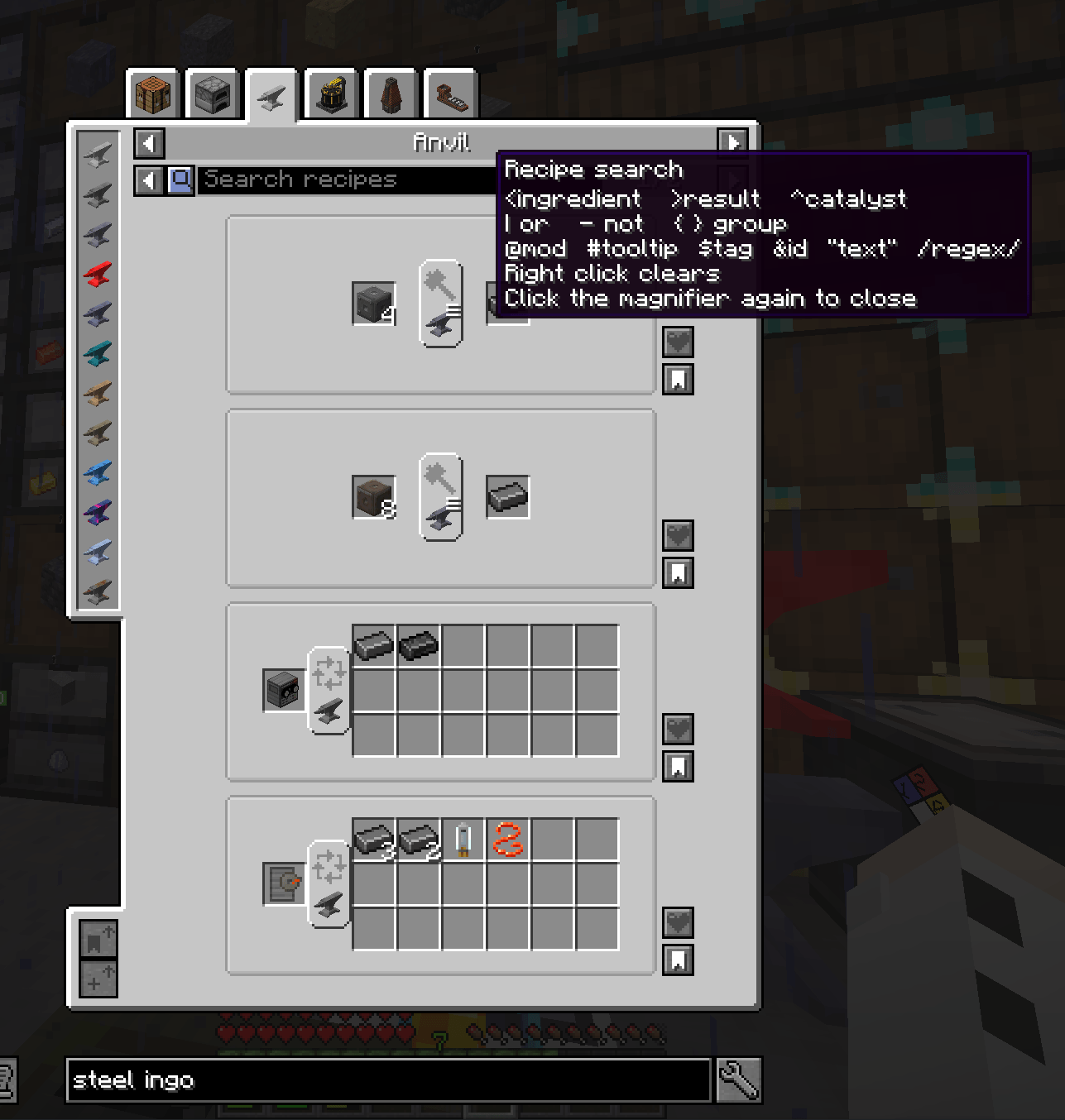 SearchInRecipe.png Features items from https://www.curseforge.com/minecraft/mc-mods/ntm-next
Versions
Files
Relations
Project Relations
More like this
Similar Mods
Suggestions use data such as tags, dependencies, dependents, descriptions, titles, and more to rank how much they overlap with this mod.
On ModDex
Community snapshot
By the numbers
Statistics

Get it on
Available Platforms
On ModDex
Community snapshot
By the numbers
Statistics
Resources